
In short
SEO is the work of getting your pages into Google's and Bing's free results for the searches your customers make. For a small business it comes down to four jobs: pick the searches worth winning, give each one a page that answers it better than the current top results, remove anything that stops Google reading your site, and earn mentions on other sites. Search Console and Bing Webmaster Tools are free and cover most of the measuring. Expect the first movement within weeks and competitive rankings in six to twelve months.
Contents (19)
- 1Does SEO Still Matter Now That People Ask AI?
- 2What Is SEO?
- 3How Does Google Decide What to Show?
- 4Step 1: Find the Searches Your Customers Actually Make
- 5Step 2: Give Every Important Search One Page
- 6Step 3: Optimize Each Page for Its Search
- 7Step 4: Fix What Stops Google Reading Your Site
- 8Step 5: Write Content People Would Miss If It Disappeared
- 9Can You Use AI to Write SEO Content?
- 10Step 6: Earn Links and Mentions From Other Sites
- 11Step 7: Show Up in Local Search and Google Maps
- 12Step 8: Measure Clicks and Leads, Not Rankings
- 13What Should You Do When Google Releases a Spam Update?
- 14Which SEO Tools Does a Small Business Actually Need?
- 15What Is Black Hat SEO, and Why Should You Avoid It?
- 16Can You Really Do SEO Yourself?
- 17Your First 90 Days of SEO
- 18If You Only Do Three Things
- 19Frequently Asked Questions
This guide is the process I'd follow if I were starting SEO for a small business today: the steps, the tool that makes each step manageable, and where people waste money.
It's written for owners and solo marketers doing the work themselves. You don't need an agency for SEO. You need a clear process, a few hours a week, and the right tool for each job. Most of those tools are free when you start.
11+ years in digital marketing, including years as a digital marketing agency co-owner.
SEO tools I've used hands-on: Semrush, Ahrefs, SE Ranking, Seobility, Mangools, Moz, Screaming Frog and KeySearch.
This site's own Search Console data, used as real examples throughout.
Google's own documentation for every rule about how Search works, linked where it's used.
Tool prices checked on each vendor's pricing page in October 2026.
Does SEO Still Matter Now That People Ask AI?
Yes, and the numbers are less dramatic than the headlines. More people ask AI tools, and you should plan for it. But Google is still where most buying research starts, and Google has become an AI search engine itself.
1.2 billion
weekly ChatGPT users
OpenAI, September 2026
2.5 billion
monthly users of Google AI Overviews
Google I/O, May 2026
95%
of ChatGPT users also use Google
Similarweb, May 2026
<1%
of website traffic still comes from ChatGPT
SE Ranking, May 2026
Sources: Google's I/O keynote (Google AI Mode also has 1 billion monthly users), Similarweb via Search Engine Journal and SE Ranking, whose data also shows ChatGPT's share of referral traffic growing fast from that small base.
So most people use both, AI sends a small but fast-growing share of visits, and Google still sends the bulk. The AI tools also pull a lot of their answers from pages that already rank. Good SEO is the base, and AI visibility is a layer on top of it. That layer has its own rules, which I cover in my guide to ranking in AI search.
What Is SEO?
Search engine optimization (SEO) is the work of getting your website into the unpaid results on Google and Bing for the searches your customers make when they look for what you sell.
The difference from ads is simple: you don't pay per click. Visibility builds more slowly, but it doesn't disappear the day your ad budget runs out.
SEO has three parts, and none of them works alone:
Technical
Google can find, read and index your pages, and the site works fast on a phone.
Content
Every important search has a page that answers it better than the competing pages.
Links and reputation
Other sites mention and link to you, which tells Google your site can be trusted.
A technically perfect site with thin pages won't rank. Great pages Google can't read won't rank either. That's why I treat it as one job, not three projects.
How Does Google Decide What to Show?
Before a page can show up for any search, Google has to find it and store it. That happens in four steps: discover, index, rank and show.
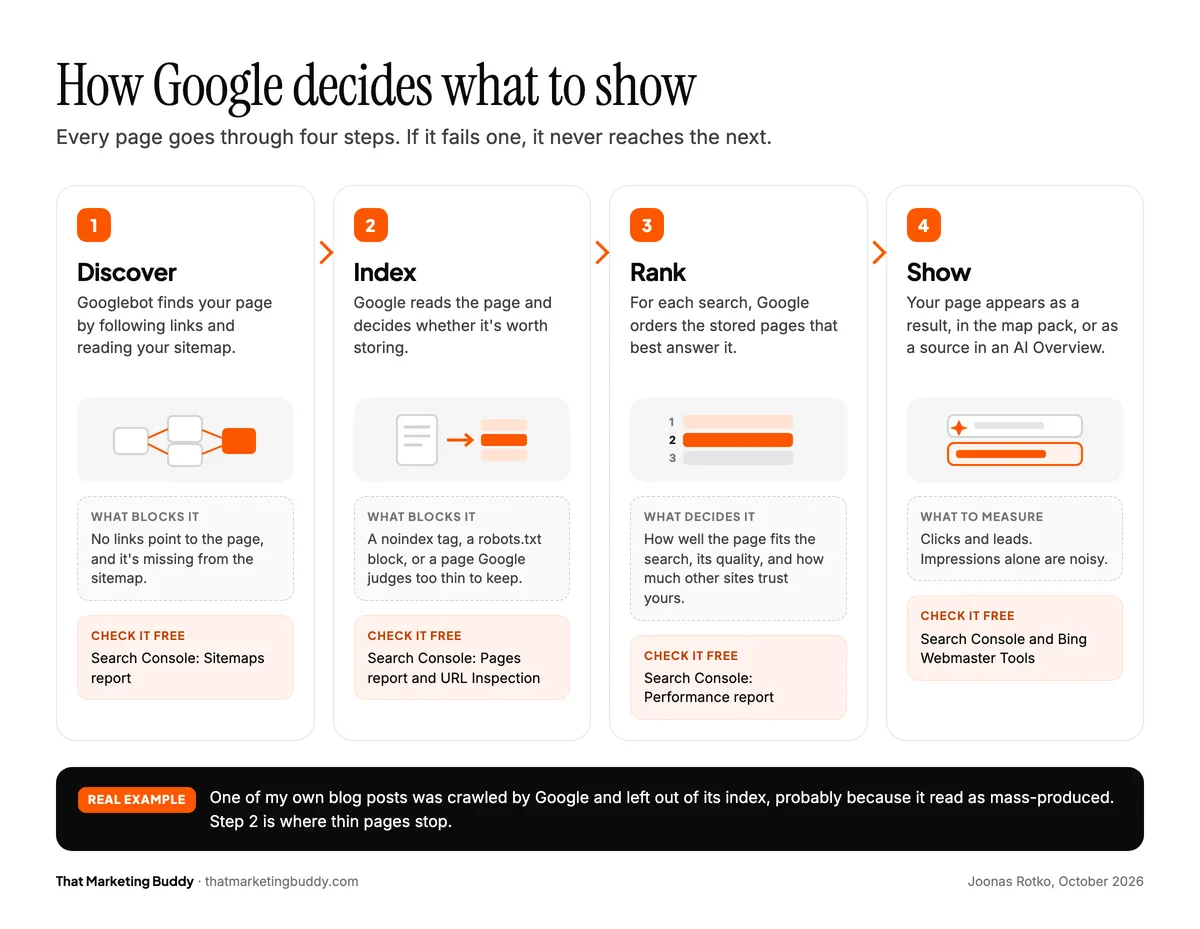
If a page isn't indexed, it can't rank for anything. That's why the first thing I check on any site is which pages Google has indexed and which it left out. You can see which of your pages are indexed in the Pages report in Google Search Console.
Google says it uses hundreds of signals. You don't need the list. Each step below removes one reason for Google to skip your page: the wrong searches, a weak answer, a technical block, or no outside trust.
Step 1: Find the Searches Your Customers Actually Make
Keyword research means finding out which words and questions your customers type when they look for what you sell, how many people search them, and what they actually want when they do.
Start from how customers describe their problem, not how you describe your service. A bookkeeping firm might sell "outsourced financial administration," while its customers type "bookkeeper for small business" or "catch up on bookkeeping." Your reviews, your sales emails and the questions people ask on calls are the best source for those words.
Here are the searches I wrote this guide for:
seo for small business
- Searches a month (US)
- 2,900
- What the searcher wants
- A practical guide for their own business
how to do seo
- Searches a month (US)
- 1,300
- What the searcher wants
- Step-by-step instructions
how does seo work
- Searches a month (US)
- 880
- What the searcher wants
- An explanation first
seo basics
- Searches a month (US)
- 880
- What the searcher wants
- The fundamentals
seo guide
- Searches a month (US)
- 880
- What the searcher wants
- One complete guide
seo for beginners
- Searches a month (US)
- 590
- What the searcher wants
- A starting point with no jargon
diy seo
- Searches a month (US)
- 390
- What the searcher wants
- Doing it without an agency
| Search | Searches a month (US) | What the searcher wants |
|---|---|---|
| seo for small business | 2,900 | A practical guide for their own business |
| how to do seo | 1,300 | Step-by-step instructions |
| how does seo work | 880 | An explanation first |
| seo basics | 880 | The fundamentals |
| seo guide | 880 | One complete guide |
| seo for beginners | 590 | A starting point with no jargon |
| diy seo | 390 | Doing it without an agency |
Google search volume, US monthly average, DataForSEO, October 2026.
The biggest number isn't automatically the target. I skipped "what is seo" (22,200 a month) on purpose: it's a definition search, and Google answers it on the results page before anyone clicks. "seo for small business" is smaller, but the person typing it wants exactly this guide. Pick searches by fit first and volume second. One good page usually ranks for many phrasings of the same need anyway.
Keyword tools estimate volume from past searches, so they lag behind anything new. If customers keep asking you about something, write the page even when a tool shows zero, and let Search Console tell you a few weeks later how many people found it.
What Is Search Intent, and Why Does It Decide Which Page Ranks?
Search intent is what the person searching actually wants. Google shows the type of page that best fits that intent, so your page type has to match it.
"how to do bookkeeping for a small business"
They want to understand it, maybe do it themselves. Guides and checklists rank.
"quickbooks vs xero"
They're choosing between options. Comparisons and reviews rank.
"bookkeeping services cost"
They're close to hiring. A service page with real prices ranks.
"bookkeeper denver"
They want someone local. Service pages and Google Business Profiles rank.
Don't guess the intent. Search the phrase and look at what Google already shows. When I searched "seo for small business" in October 2026, the top results were guides from small agencies, and most of them were dated between 2019 and 2022. That told me two things: a guide is the right format, and the current results are stale enough to beat. If the top ten are all guides, a service page will struggle to break in, however well you optimize it.
Which Keyword Research Tools Do You Need?
The most valuable free tool is Google Search Console, because it shows the searches you already appear for, based on Google's own data. For search volumes, Google's Keyword Planner is free inside a Google Ads account. Paid tools such as Mangools and KeySearch add volumes and keyword difficulty, and Semrush and Ahrefs show which keywords your competitors rank for. My keyword research tools roundup compares them, and my step-by-step keyword research guide goes deeper on the method.
The cheapest wins are already in Search Console: searches where one of your pages is close to the top but not there yet. In its Performance report, impressions means how many times your page appeared in the results, and average position is where it typically ranked. Filter for an average position between 5 and 15, sort by impressions, and you have a to-do list. Here's mine:
semrush pricing
- My page
- Semrush pricing
- Avg. position
- 11.3
- Click-through rate
- 0.04%
ai visibility tool
- My page
- Best AI visibility tools
- Avg. position
- 14.2
- Click-through rate
- 0%
software seo
- My page
- Best SEO software
- Avg. position
- 15.0
- Click-through rate
- 0.17%
se ranking price
- My page
- SE Ranking pricing
- Avg. position
- 14.2
- Click-through rate
- 0.06%
semrush api pricing
- My page
- Semrush API pricing
- Avg. position
- 5.3
- Click-through rate
- 0.93%
| Search | My page | Avg. position | Click-through rate |
|---|---|---|---|
| semrush pricing | Semrush pricing | 11.3 | 0.04% |
| ai visibility tool | Best AI visibility tools | 14.2 | 0% |
| software seo | Best SEO software | 15.0 | 0.17% |
| se ranking price | SE Ranking pricing | 14.2 | 0.06% |
| semrush api pricing | Semrush API pricing | 5.3 | 0.93% |
thatmarketingbuddy.com, Google Search Console, 28 days to October 20, 2026.
The one row on page one, at position 5.3, gets clicked about 17 times as often as the four rows on page two combined (0.93% against 0.05%). That's why these rows are the first thing I fix: the demand is proven, Google already sees the page as relevant, and moving from page two to page one is where the clicks start.
Step 2: Give Every Important Search One Page
Once you've chosen the searches, you assign them to pages. Each important group of searches gets its own page, and each page has one main job. Here's how that looks for a small bookkeeping firm in Denver, with each page's main search next to it:
- Home pagethe firm and all services
- Bookkeeping servicesbookkeeping services denver
- Monthly bookkeepingmonthly bookkeeping for small business
- Catch-up bookkeepingcatch up bookkeeping
- Payrollpayroll services denver
- Guideslearning searches
- What bookkeeping costsbookkeeping services cost
- Bookkeeping checklistsmall business bookkeeping checklist
Made-up example. Orange = the page's main search. The guides link to the service pages they support.
Keep your important pages close to the home page. If it takes four or five clicks to reach a service page, Google tends to treat it as minor too, and visits it less often.
How Should You Link Your Own Pages Together?
Internal links tell Google which pages matter most and how your topics connect. When your guide on what bookkeeping costs mentions your monthly service, link to that page with words like "monthly bookkeeping for small businesses." "Click here" tells Google nothing.
What Happens When Two Pages Target the Same Search?
Two of your pages chasing the same search split Google's attention, and often neither ranks well. That's keyword cannibalization. Search Console shows it: open the search in the Performance report and check the Pages tab. If two of your URLs keep trading places, merge them into one stronger page and 301-redirect the weaker one to it.
What Makes a Good URL?
Short and readable: /monthly-bookkeeping beats /services/?id=482. And if a redesign changes your URLs, redirect every old address to its new one. A rebuild without redirects can wipe out years of rankings within weeks, so it's the first thing I'd check after any relaunch.
Tools for this step: a crawler (see Step 4) shows how deep each page sits, and Search Console's free Links report lists the internal links pointing to each page.
Step 3: Optimize Each Page for Its Search
Once a page has its main search, you tune its text and its technical fields for it. The most important field is the title tag, because it's the big clickable line in the search result and it tells Google what the page is about.
Here's the same page in a search result before and after, for a made-up bookkeeping firm:
Before
Ledger & Co
https://ledgerandco.example
Home | Ledger & Co
Welcome! We are a dedicated team of professionals committed to excellence. Learn more about our story and the services we offer...
After
Ledger & Co
https://ledgerandco.example › monthly-bookkeeping
Monthly Bookkeeping for Small Businesses in Denver | Ledger & Co
Bookkeeping from $300 a month for Denver small businesses, with your books closed by the 10th of every month. Book a free 20-minute call.
Made-up example of the same page in a search result before and after optimizing the title and description.
The second version answers three questions before anyone clicks: what is it, is it for me, and what does it cost? The rules behind it:
Title
- Rule of thumb
- Main search near the start, 50 to 60 characters, unique on every page
- Why it matters
- It's the clickable line in the results, and it tells Google the topic
Meta description
- Rule of thumb
- 150 to 160 characters on what the page offers
- Why it matters
- It doesn't change rankings but changes who clicks. Google may rewrite it
H1 and subheadings
- Rule of thumb
- One H1 for the topic, H2 and H3 for the sections
- Why it matters
- Readers and Google see the structure at a glance
Image alt text
- Rule of thumb
- Describe what's in the image
- Why it matters
- It's written for screen-reader users first
URL
- Rule of thumb
- Short, with the main search in it
- Why it matters
- Easier to read, share and trust
| Field | Rule of thumb | Why it matters |
|---|---|---|
| Title | Main search near the start, 50 to 60 characters, unique on every page | It's the clickable line in the results, and it tells Google the topic |
| Meta description | 150 to 160 characters on what the page offers | It doesn't change rankings but changes who clicks. Google may rewrite it |
| H1 and subheadings | One H1 for the topic, H2 and H3 for the sections | Readers and Google see the structure at a glance |
| Image alt text | Describe what's in the image | It's written for screen-reader users first |
| URL | Short, with the main search in it | Easier to read, share and trust |
What Should the Page Actually Say?
Open the top three results for your search next to your own page and list what they cover that you don't: prices, examples, photos, comparisons, answers to the follow-up questions. Then add what only you have: your prices, your process, your examples. The goal isn't a longer page. It's the most useful one.
On a service page, the SEO work and the sales work are the same work. Say what's included, who it's for, what it costs and what happens after someone gets in touch. A page that answers those four tends to rank better and convert better.
Does a WordPress SEO Plugin Do This for You?
Yoast SEO and Rank Math make titles and descriptions easy to edit on WordPress. Their green score checks that fields are filled in and the keyword appears. It can't tell whether your page is the best answer, so treat it like a spell checker, not an editor.
Tools for this step: Search Console's Performance report shows which searches each page already appears for, so you know what to write the title for. A crawler or the free Seobility Basic plan lists missing, duplicate and too-long titles across the whole site in one go.
Step 4: Fix What Stops Google Reading Your Site
Technical SEO makes sure Google can find, read and index your site, and that the site works well for visitors. It doesn't need to be perfect, but technical blocks have to go before content work pays off fully. Run through these once when you start, and again after any redesign:
Nothing blocks your important pages
No robots.txt block and no accidental noindex tag. The Search Console Pages report shows what's indexed.
Google has your page list
An XML sitemap lists the pages you want indexed and is submitted in Search Console.
Secure everywhere
The whole site runs on https, and http addresses redirect to it.
Works on a phone
Google indexes the mobile version, so the content has to be the same there and work well.
One main address per page
A canonical tag tells Google which version is the main one, for example with or without www.
Google understands the page
Schema.org markup such as Organization, LocalBusiness, Product and Article, matching what's visible on the page.
No dead ends
Internal links don't lead to 404 pages or chains of redirects.
Google sees your content
If content only appears after JavaScript runs, check it with URL Inspection in Search Console.
Do Page Speed and Core Web Vitals Affect Rankings?
Google measures page experience with three Core Web Vitals, based on data from real Chrome users:
LCP (Largest Contentful Paint)
- What it measures
- How fast the biggest element, usually the main image or headline, loads
- Good
- 2.5 seconds or less
INP (Interaction to Next Paint)
- What it measures
- How fast the page responds to a click or tap
- Good
- 200 ms or less
CLS (Cumulative Layout Shift)
- What it measures
- How much the layout jumps while loading
- Good
- 0.1 or less
| Metric | What it measures | Good |
|---|---|---|
| LCP (Largest Contentful Paint) | How fast the biggest element, usually the main image or headline, loads | 2.5 seconds or less |
| INP (Interaction to Next Paint) | How fast the page responds to a click or tap | 200 ms or less |
| CLS (Cumulative Layout Shift) | How much the layout jumps while loading | 0.1 or less |
Thresholds from Google's Core Web Vitals documentation.
Check them for free in PageSpeed Insights and in Search Console's Core Web Vitals report. Treat speed as a tiebreaker, not a strategy: it rarely lifts a weak page, but a slow page loses visitors before they read a word. Fix the obvious causes (huge images, a heavy theme, plugins and tracking scripts you don't use) and move on.
Which Tools Find Technical Problems?
Screaming Frog crawls your site like Googlebot and lists broken links, missing titles and redirects. It's free up to 500 URLs per crawl, and a licence costs $279 a year. On a Mac, Crawly is a free crawler with no URL cap. Seobility has a free Basic plan that audits 100 pages per crawl for one site. My technical SEO audit tools roundup compares the options, and my SEO audit walkthrough shows the process.
One thing most small sites can skip: crawl budget only matters once you have many thousands of pages.
Step 5: Write Content People Would Miss If It Disappeared
Google's helpful content guidance asks one thing in many forms: do people leave your page satisfied, or do they go back and keep searching? Write for the first outcome.
What Is E-E-A-T?
E-E-A-T comes from Google's search quality rater guidelines. It isn't a single ranking factor, but it describes well what kind of content Google's systems try to reward:
Experience
Has the writer done the thing they're writing about?
Expertise
Does the writer know the subject?
Authoritativeness
Is the site or writer known in the field, and do others refer to it?
Trustworthiness
Is the information correct, and is it clear who's behind the page? Google calls this the most important of the four.
On a small business site, E-E-A-T is practical: real names and photos on the About page, examples of real work, reviews people can check, and contact details that are easy to find. The author box at the end of this guide and the "What this guide is based on" box at the top are my version of it.
How Often Should You Update Your Pages?
Put a reminder in your calendar to review your ten most important pages twice a year. Prices, plan names, screenshots and dates go stale first. On this site prices go stale fastest, so I recheck them against the vendors' own pricing pages before anything else: a wrong price loses a reader faster than anything.
Tools for this step: comparing your page with the top results by hand works, and it's free. Once you publish regularly, a content tool does that comparison for you: Surfer scores a draft against what ranks and suggests what's missing, from $59/month ($49/month billed annually). My AI content SEO tools roundup covers the alternatives.
Can You Use AI to Write SEO Content?
Yes, and Google says so. Google doesn't penalize content for being made with AI. What it judges is whether the page is helpful. What its spam policies do ban is scaled content abuse: mass-producing pages mainly to rank, whether a person or a machine writes them. A hundred near-identical AI pages for every city you serve is exactly that.
I use AI every day for research, outlines and first drafts. The risk with AI content isn't a Google penalty on day one. It's that the page stops sounding like someone who knows the subject, and that's the part readers, and Google's quality guidelines, care about most.
I learned this the hard way. One of my own blog posts, written mostly through automation, was crawled by Google and left out of its index. Google doesn't give a reason, but the post was generic, and it most likely read as mass-produced. Content I put real effort into has always beaten what I automated. The best results come from combining the two: automation for the groundwork, your own experience and judgment for everything the reader actually values.
What an AI draft gets wrong
In October 2026 I tested an AI article generator on the same topic as my AI search guide. The draft was well structured and quick to produce. It also:
- wrote a personal story in my name about something that happened "during my agency years" that never happened,
- left an empty quote box signed with my first name,
- wrote "we" throughout, on a site run by one person,
- built most of its claims on statistics from other software vendors' blogs, with none of my own data.
None of that would trip a spam filter. All of it would cost trust with a reader who notices, and an invented first-hand story is the worst kind of mistake on a site whose value is real experience.
Five rules for AI-assisted content
These are adapted from Clay's AI writing policy, which the company wrote for its own team's documents. They fit web content just as well:
- Stand behind every sentence. If you can't explain why a line is there, cut it. "The AI wrote that" isn't an answer a reader will accept.
- Do the thinking yourself. Decide the point of the page, what to emphasize and what to leave out. Let AI help with the wording, not the judgment.
- Spend your time, not the reader's. A page that took two minutes to generate and ten minutes to read makes the reader pay the difference. Edit until it's worth their time.
- Shorter beats longer. AI pads. Cut every sentence that doesn't add a fact, an example or a decision.
- Add what AI can't have. Your experience, your numbers, your photos, your prices, your opinion. That's the part that makes a page worth ranking.
Research
- Let AI help
- Summarize sources, suggest questions to cover
- Do it yourself
- Open and check every source it cites
Outline
- Let AI help
- Suggest a structure
- Do it yourself
- Decide the angle and the order
First draft
- Let AI help
- Write the explanatory parts
- Do it yourself
- Add experience, examples and opinions
Facts and prices
- Let AI help
- Nothing
- Do it yourself
- Verify every number on the original source
Editing
- Let AI help
- Shorten, fix typos, flag unclear sentences
- Do it yourself
- Read it aloud and cut what you can't stand behind
Titles and descriptions
- Let AI help
- Suggest five options
- Do it yourself
- Pick the one that matches the search
| Task | Let AI help | Do it yourself |
|---|---|---|
| Research | Summarize sources, suggest questions to cover | Open and check every source it cites |
| Outline | Suggest a structure | Decide the angle and the order |
| First draft | Write the explanatory parts | Add experience, examples and opinions |
| Facts and prices | Nothing | Verify every number on the original source |
| Editing | Shorten, fix typos, flag unclear sentences | Read it aloud and cut what you can't stand behind |
| Titles and descriptions | Suggest five options | Pick the one that matches the search |
If you use an AI writing tool, budget the editing time: these tools save the typing, not the thinking. My AI content SEO tools roundup compares the options.
Step 6: Earn Links and Mentions From Other Sites
Other sites linking to you is still one of the strongest signals Google uses to decide whom to trust. What counts is who links, not how many: a mention from your trade association or a local newspaper does more than dozens of links from directories no one visits.
Good links come from
- Associations and chambers you're already a member of
- Suppliers, partners and the software you use, many of which list customers
- Local news, trade newsletters and podcasts in your field
- Data, a checklist or a calculator only you have
- Sites that already mention you without a link: ask them to add one
Avoid
- Links sold by the hundred
- Networks of sites built only to link to each other
- Comment and forum spam
- Swaps arranged only for the link
Paying for links breaks Google's spam policies. The downside is a ranking drop that can take months to recover from. The upside is small next to the links you can earn.
Where Should You Start Building Links?
Start with the people who already know you: suppliers, partners, the associations you belong to, the software you use. Ask each one for one specific link to one specific page. It costs nothing, and these are the most relevant links you'll ever get.
After that, you need data on who links to you and to your competitors. There are three ways to get it, depending on how hands-on you want to be:
An SEO suite
SE Ranking, Semrush, Ahrefs, Seobility, Moz and Mangools all include backlink data. Use it to see who links to you, which sites link to several competitors but not to you, and which of your pages attract links.
An SEO autopilot platform
Some all-in-one platforms, such as RankYak, Rankpilot, AutoSEO and BabyLoveGrowth, add links automatically, usually through an exchange between their own customers' sites.
An API
DataForSEO's Backlinks API returns raw link data you can query yourself, and a SERP API such as SearchApi lets you script searches that find link prospects. You pay per request instead of a subscription.
Google's spam policies list "excessive link exchanges" and "using automated programs or services to create links to your site" as link spam. A customer-to-customer link network can fall under both. Before you switch it on, check where the links actually come from: are the sites related to yours, and would you link to them yourself? If the answer is no, the downside (a ranking drop or a manual action) can outweigh what the links add.
Compare the options: best SEO software for the suites, SEO autopilot platforms for the automated route, and SEO APIs and SERP APIs such as DataForSEO and SearchApi for the technical one.
Step 7: Show Up in Local Search and Google Maps
For a business that serves one area, the Google Business Profile often brings in more calls than the website. It's what appears in Google Maps and in the map block (the "local pack") above the normal results for searches like "bookkeeper near me."
- Pick the most specific main category that fits, then add every service you offer.
- Set your service area and hours, and upload real photos instead of stock images.
- Use the same business name, address and phone number everywhere online.
- Ask for a review right after a job goes well, and answer every review, the critical ones too.
Google says local ranking depends on relevance, distance and prominence. Review count alone doesn't decide it: in a test I ran on accounting firms in one city, the third business in the map pack had just two reviews.
One page per city works only if each page has something that city alone gets: local clients, an address, local prices. Copies with the city name swapped are what Google's spam policies call doorway pages.
Tools for this step: the Google Business Profile itself is free, and its Performance view shows how many people found you on Maps and in search, and how many called or asked for directions.
Step 8: Measure Clicks and Leads, Not Rankings
Free tools take you a long way:
- Google Search Console: impressions, clicks and average position by search and by page, plus indexed pages and technical errors.
- Bing Webmaster Tools: Bing's version of Search Console. Its AI Performance report shows how often your site is cited in Copilot and Bing's AI answers, which makes it one of the few free ways to measure AI visibility.
- Web analytics: Google Analytics 4, or a privacy-friendly option such as Umami or PostHog (I use both on this site). What matters is how many search visitors contact you or buy.
Track the result, not the activity. Rankings and visits only matter if they turn into calls, bookings or sales, so set up tracking for form submissions and phone-number clicks before anything else. Otherwise you'll never know which pages earn money. My guide to tracking SEO progress without expensive tools shows the setup.
Why Do SEO Tools Show Different Rankings Than Google?
Google has made it harder for SEO tools to collect search results. It removed the 100-results-per-page option in September 2025, and in September 2026 Nozzle measured Google serving altered results to rank trackers on 8% of pages, peaking at 27%. So a tool's visibility score can drop while your real positions don't. When a tool and Search Console disagree about your own site, believe Search Console, and use the tools for what it can't show you: competitors, backlinks and trends.
Search Console isn't perfect either, because impressions include some searches made by bots and AI agents. Between the 28 days to September 22 and the 28 days to October 20, 2026, my impressions fell 35% while my clicks fell 12%. That's why I read clicks first.
How Long Does SEO Take to Work?
Technical fixes can show within weeks, and rewritten pages usually move within one to three months. Competitive searches take six months to a year. Plan it as a monthly routine, not a project with an end date.
What Should You Do When Google Releases a Spam Update?
Google runs spam updates several times a year to push down sites that break its spam policies. The September 2026 update rolled out from September 24 to October 8, 2026, according to Google's Search Status Dashboard, and Google didn't say what it targeted. Here's that period in my own Search Console:
- Sep 1 to 7100%
- Sep 8 to 1490%
- Sep 15 to 2170%
- Sep 22 to 28update starts Sep 2435%
- Sep 29 to Oct 5update rolling out51%
- Oct 6 to 12update ends Oct 859%
- Oct 13 to 1982%
Google Search Console, thatmarketingbuddy.com. Over the same weeks, average daily clicks stayed within 20% of the first week's level.
Impressions fell to about a third and were most of the way back within a month, while clicks barely moved. The drop started a week before the update, and I retired pages in the same weeks, so the update isn't the only cause. The lesson: judge an update by clicks, not by an impressions chart.
If an update lands while you're doing SEO yourself, this is the order I'd work in:
- Wait until the rollout is finished. The Search Status Dashboard shows when it starts and ends. Rankings move around during the rollout, so judging halfway through means judging noise.
- Compare clicks, not impressions, for the two weeks before and the two weeks after, in Search Console.
- Check the Manual Actions report. A manual action is a person at Google penalizing your site, and it comes with a message explaining why. An update drop doesn't.
- If clicks stay down, read the spam policies against your own site. The usual suspects: bought links, mass-produced pages, city pages where only the name changes, hidden text, and AI pages published without editing.
- Fix the cause, then be patient. Google's spam update documentation says that after you fix a problem, it can take months for its systems to recognize the change.
If you never bought links or mass-produced pages, a spam update usually isn't about you. Don't rewrite your whole site because a chart dipped for two weeks.
Which SEO Tools Does a Small Business Actually Need?
Start free, one job at a time, and pay for an upgrade only when you hit the free tool's limit:
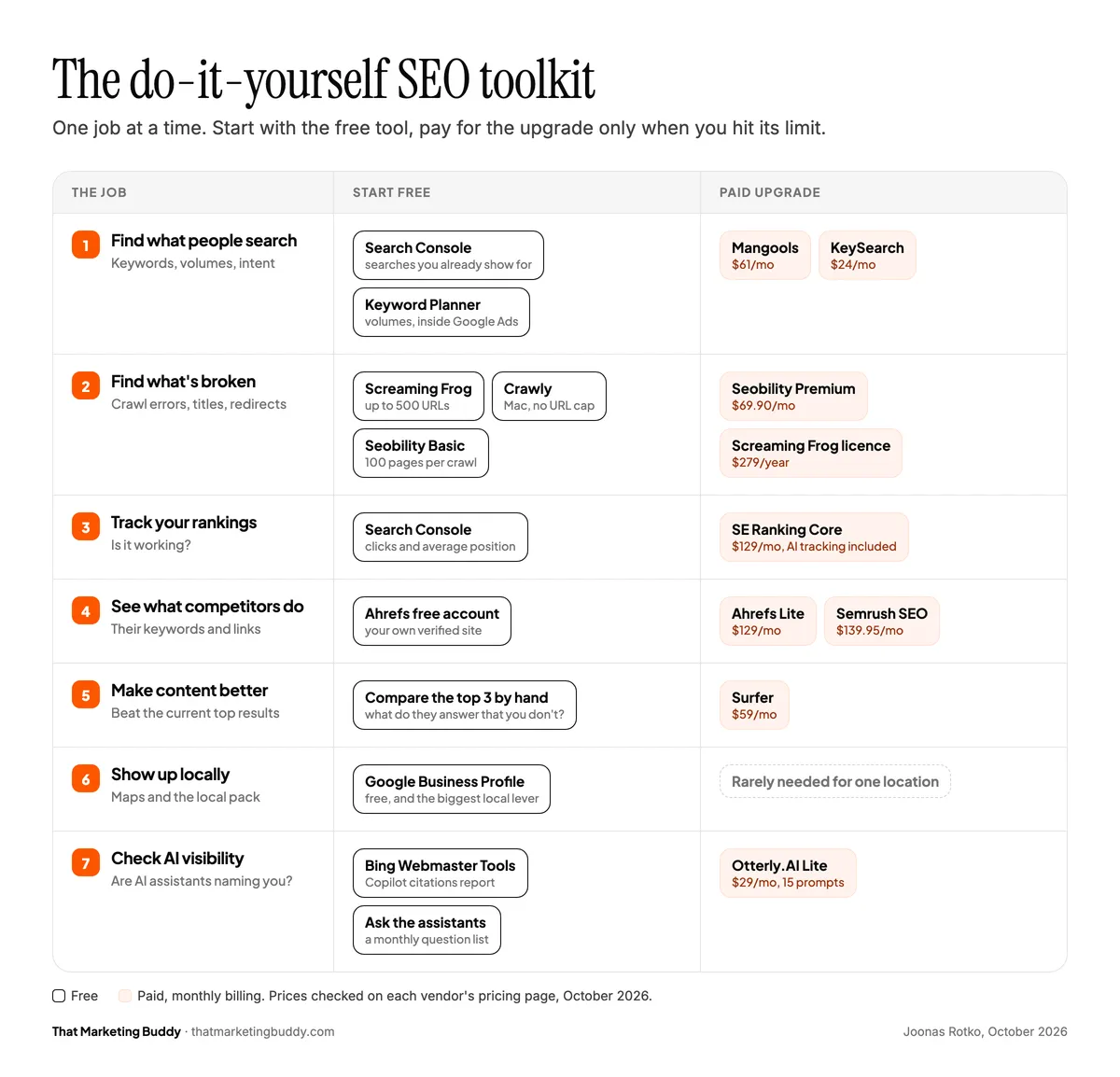
Pay for a tool when you compete for searches where you need to see what competitors do and where their links come from. These are the current entry prices, on monthly billing unless noted:
Mangools Basic
- Monthly billing
- $61/month
- Billed annually
- $37.70/month
- Best for
- The easiest keyword research
Seobility Premium
- Monthly billing
- $69.90/month (€59.90)
- Billed annually
- €47.92/month
- Best for
- Site audits, with a 14-day free trial
SE Ranking Core
- Monthly billing
- $129/month
- Billed annually
- $103.20/month
- Best for
- Rank tracking, audits and AI search tracking in one plan
Ahrefs Lite
- Monthly billing
- $129/month
- Billed annually
- $108/month
- Best for
- Backlink and competitor research, no free trial
Semrush SEO
- Monthly billing
- $139.95/month
- Billed annually
- $117.33/month
- Best for
- The biggest toolbox; AI prompt tracking from the $199/month Starter plan
| Tool and plan | Monthly billing | Billed annually | Best for |
|---|---|---|---|
| Mangools Basic | $61/month | $37.70/month | The easiest keyword research |
| Seobility Premium | $69.90/month (€59.90) | €47.92/month | Site audits, with a 14-day free trial |
| SE Ranking Core | $129/month | $103.20/month | Rank tracking, audits and AI search tracking in one plan |
| Ahrefs Lite | $129/month | $108/month | Backlink and competitor research, no free trial |
| Semrush SEO | $139.95/month | $117.33/month | The biggest toolbox; AI prompt tracking from the $199/month Starter plan |
Prices from each vendor's pricing page, checked October 15, 2026.
Full reviews: Mangools, Seobility, SE Ranking, Ahrefs and Semrush.
My take: for one business with one site, start free. When you outgrow it, SE Ranking or Mangools covers most of what you'll use for less than Semrush or Ahrefs. Pay for Semrush or Ahrefs when competitor and backlink research is the actual bottleneck, not because they're the famous names. My best SEO software roundup has the full comparison, and the free SEO tools roundup covers the free side.
What Is Black Hat SEO, and Why Should You Avoid It?
Black hat SEO means tactics that try to trick the search engine instead of serving the searcher. Some of them lift rankings for a while, but they break Google's spam policies. The result can be a ranking drop or a manual action, where your site or part of it disappears from the results. Recovery takes months.
Bought links and link networks
Link packages and site networks that exist only to sell links.
Keyword stuffing
Repeating a phrase until the text stops making sense.
Hidden text and links
Invisible keywords, and hidden instructions aimed at AI answers.
Mass-produced pages
Hundreds of pages made mainly to rank, such as unedited AI text or pages where only the city name changes.
Cloaking and sneaky redirects
Search engines see different content than visitors, or visitors land somewhere the result didn't promise.
Fake reviews
Reviews you wrote or bought for your Google Business Profile or star ratings.
Doing SEO yourself, you'll still run into these as offers: link packages, "guaranteed page one" gigs and tools that promise hundreds of AI-written pages a day. Skip them. If you bought something like that in the past, the Manual Actions report in Search Console shows whether Google has penalized your site.
Can You Really Do SEO Yourself?
Yes. Everything in this guide is work a business owner or a solo marketer can do. What it takes is a few hours a week, a process you stick to for months rather than weeks, and tools that do the parts that are slow or impossible by hand.
Where doing it yourself usually stalls is the slow, repetitive part: finding what's broken, tracking positions and seeing what competitors do. That's exactly the work the tools in the toolkit above take over. Start with the free ones and add a paid tool only when you hit the problem it solves. Buying a $140/month suite on day one is an easy way to waste money while you're still fixing the basics.
Your First 90 Days of SEO
If you're starting from zero, this is the order I'd work in, with the tool for each step:
Week 1
- What to do
- Set up Search Console and Bing Webmaster Tools, submit your sitemap, and check which pages are indexed.
- Tools
- Search Console, Bing Webmaster Tools (free)
Week 2
- What to do
- Crawl your site and fix broken links, missing titles and redirect chains.
- Tools
- Screaming Frog or Crawly, Seobility Basic (free)
Weeks 3 to 4
- What to do
- List your services in your customers' words, check volumes and intent, and give each search group one page.
- Tools
- Search Console, Keyword Planner (free); Mangools or KeySearch (paid)
Weeks 5 to 8
- What to do
- Rewrite your five most important pages: titles, descriptions, direct answers, prices. Create the pages that are missing.
- Tools
- Search Console Performance report; Surfer (paid, optional)
Weeks 9 to 10
- What to do
- Complete your Google Business Profile and ask partners, suppliers and associations for links.
- Tools
- Google Business Profile, your SEO suite's backlink report
Weeks 11 to 12
- What to do
- Compare clicks and leads with week 1, then pick the next pages from your position 5 to 15 rows.
- Tools
- Search Console, analytics; SE Ranking (paid) for rank tracking
| When | What to do | Tools |
|---|---|---|
| Week 1 | Set up Search Console and Bing Webmaster Tools, submit your sitemap, and check which pages are indexed. | Search Console, Bing Webmaster Tools (free) |
| Week 2 | Crawl your site and fix broken links, missing titles and redirect chains. | Screaming Frog or Crawly, Seobility Basic (free) |
| Weeks 3 to 4 | List your services in your customers' words, check volumes and intent, and give each search group one page. | Search Console, Keyword Planner (free); Mangools or KeySearch (paid) |
| Weeks 5 to 8 | Rewrite your five most important pages: titles, descriptions, direct answers, prices. Create the pages that are missing. | Search Console Performance report; Surfer (paid, optional) |
| Weeks 9 to 10 | Complete your Google Business Profile and ask partners, suppliers and associations for links. | Google Business Profile, your SEO suite's backlink report |
| Weeks 11 to 12 | Compare clicks and leads with week 1, then pick the next pages from your position 5 to 15 rows. | Search Console, analytics; SE Ranking (paid) for rank tracking |
If You Only Do Three Things
- Set up Search Console and fix anything that keeps your important pages out of Google's index.
- Give each important search one page that's the most useful answer to it, in your customers' words.
- Check clicks and leads once a month, and work from your position 5 to 15 searches first.
Everything else, including every paid tool in this guide, makes those three faster. Once they're in place, the next step is getting AI assistants to recommend you too, which I cover in how to rank in AI search.
Frequently Asked Questions
Can I do SEO myself?
Yes. Keyword research, writing pages for real searches, fixing technical problems and tracking results are all doable without an agency. Start with free tools such as Search Console, Bing Webmaster Tools and Seobility Basic, and add a paid tool like SE Ranking or Mangools when you need rank tracking or keyword data the free tools don't give you.
Does AI-written content hurt rankings?
Not by itself. Google judges content on quality and usefulness, not on how it was made. It does ban mass-producing pages mainly to manipulate rankings, whether a person or an AI writes them.
What's the difference between SEO and GEO?
SEO improves your rankings in Google's results. GEO (generative engine optimization) makes sure your business is named when someone asks ChatGPT, Gemini, Perplexity or Google's AI features. They share a base, but AI answers lean more on mentions in comparisons, directories, reviews and discussions.
How much do SEO tools cost?
A small business can start with free tools: Search Console, Bing Webmaster Tools, PageSpeed Insights, Seobility Basic and the Ahrefs free account. Paid all-in-one tools start at $129/month on monthly billing for SE Ranking Core or Ahrefs Lite and $139.95/month for Semrush, while Mangools costs $37.70/month billed annually.
Sources
- How Google Search works (Google Search Central)
- Creating helpful, reliable, people-first content (Google Search Central)
- Google Search's guidance on using generative AI content (Google Search Central)
- Spam policies for Google web search (Google Search Central)
- Core Web Vitals (Google Search Central)
- Tips to improve your local ranking (Google Business Profile Help)
- Google I/O 2026 keynote (Google)
- Google and ChatGPT audience overlap (Search Engine Journal, Similarweb data)
- ChatGPT referral traffic, May 2026 (SE Ranking)
- Impact of Google removing num=100 (Search Engine Land)
- Google feeds rank trackers swapped results (PPC Land, Nozzle data)
- AI writing policy (Clay)
- Google Search spam updates (Google Search Central)
- Google Search Status Dashboard (Google)
Tools in this guide


Read next

Joonas Rotko
SEO & GEO specialist, founder of That Marketing Buddy
I'm a Finnish SEO and GEO professional with 11+ years in digital marketing, including years as a co-owner of a digital marketing agency. On That Marketing Buddy I test and compare SEO and AI-visibility software for entrepreneurs, marketing professionals and agencies.