
I just moved That Marketing Buddy's own email over to Sequenzy, and I ran almost the entire setup through Claude Code instead of clicking around a dashboard. First a welcome automation, then a proper sending setup, then a custom HTML email theme built from my own website branding. This is the exact workflow, step by step, so you can copy it.
Quick context on the tool: Sequenzy is an email marketing platform with a real public API and an MCP server, which is the whole reason I picked it for an AI-driven workflow. If you want the numbers first, the Sequenzy pricing breakdown has the plan details.
Why Set Up Email Through Claude Code at All?
Fair question. Most people set up an email tool by logging in and clicking. That works. But two things are much faster and much better when an AI agent does them for you: writing the HTML for your emails, and wiring up the sending and automation through the API. Both are fiddly, both reward precision, and both are exactly what a coding assistant is good at.
The reason this works with Sequenzy specifically is that it exposes both an API and an MCP server. If you are fuzzy on what those are, I wrote a plain-English explainer on API vs MCP vs CLI. Short version: the MCP server lets Claude Code talk to Sequenzy directly, and the API lets it send emails and build automations with code.
Step 1: The Onboarding (Actually Good)
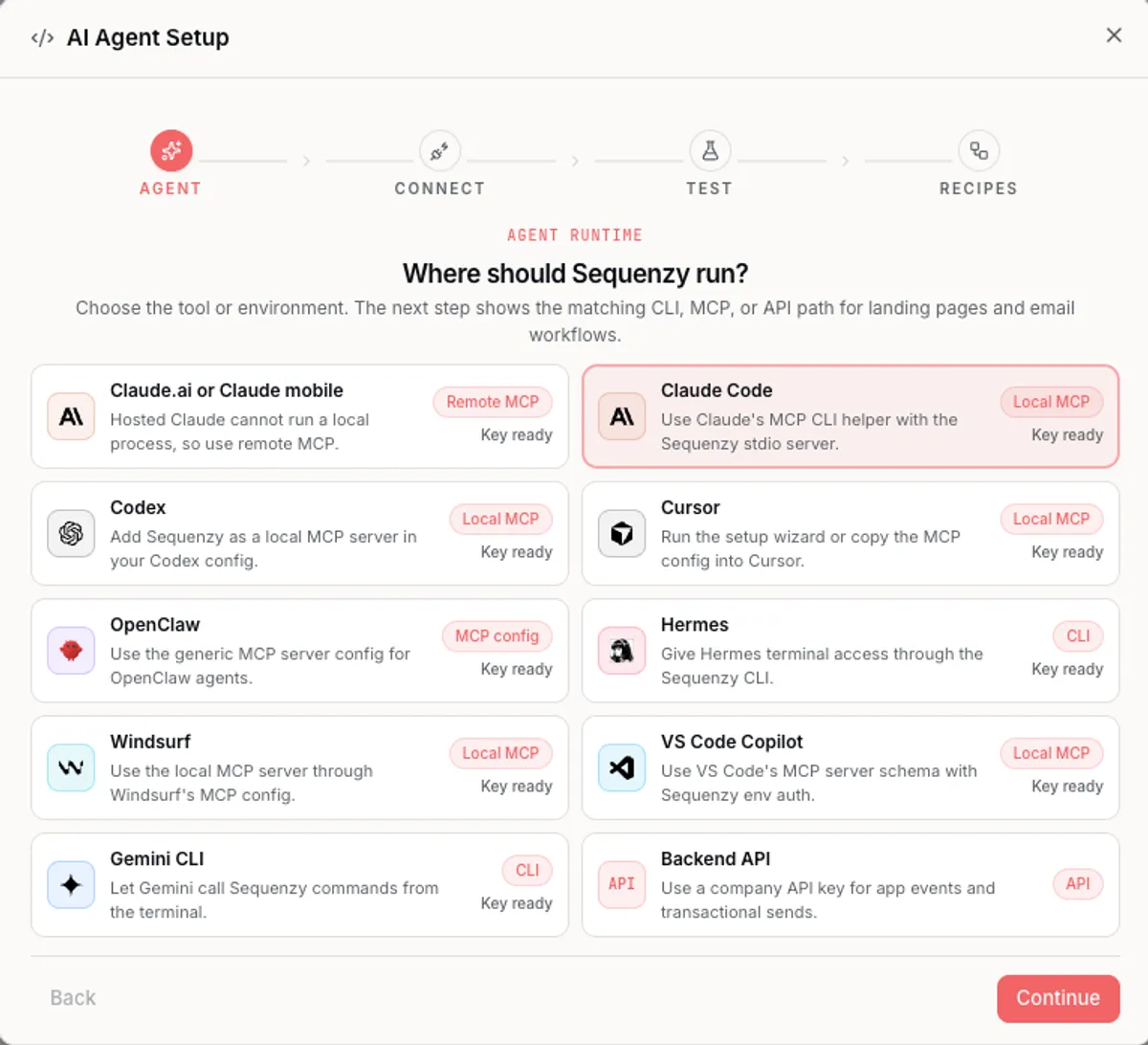
I will give Sequenzy credit here. The onboarding is one of the cleaner ones I have gone through. It walks you from account creation to a working sending setup without dumping you into an empty dashboard and wishing you luck. You create the account, name your company, and it immediately points you at the thing that actually matters for email: your sending domain.
Most tools bury domain authentication three menus deep and let you send from a shared address by default. Sequenzy puts it front and center, which saved me from the classic mistake of blasting a first campaign from an unauthenticated domain and landing everyone in spam.
Step 2: Set Up an Authenticated Sending Domain
This is the single most important step, and it is the one people skip. When you send from a shared domain (the default on most tools, something like yourname.theirmailservice.com), you inherit a reputation you do not control and you have no alignment with your real brand domain. Gmail treats that as a spoofing signal. My first test went to spam because of exactly this.
The fix is to send from your own authenticated subdomain. I used send.thatmarketingbuddy.com. In Sequenzy you add a custom sending domain, and it hands you a set of DNS records to prove you own it and to sign your mail. Sequenzy runs on Amazon SES underneath, so the records are the standard email-auth trio.
- DKIM: a TXT record that cryptographically signs every email so receivers can verify it really came from you.
- SPF: a TXT record listing who is allowed to send on your behalf (include:amazonses.com in this case).
- A return-path MX record: so bounces and complaints route back correctly.
- DMARC: a policy record that tells receivers what to do with mail that fails the checks. Start with p=none to monitor without blocking anything.
My DNS lives at Vercel, so I added the four records there. One detail worth flagging: Vercel wants the record name relative to your root domain, so if the tool shows a full host like sequenzy._domainkey.send.thatmarketingbuddy.com, you enter only the part before your root domain. Get that wrong and verification silently fails.
If you use Google Workspace or another provider for your normal inbox, leave your root MX record alone. The email-sending records all go on the send subdomain, not the root. Mixing them up can break your ability to receive mail.
Once the records propagate, you hit verify, and then you do the one step people forget: set the new domain as your default sending domain. Sequenzy sends from whatever is marked default, so if you leave the shared domain as default, all that DNS work does nothing. I also added a physical mailing address in the settings, which is a legal requirement under CAN-SPAM and another quiet spam signal when missing.
If you want the full theory on why any of this matters, I went deep on it in why your emails land in spam and how to fix it. The setup above is that article turned into a checklist.
Step 3: Let Claude Code Write Your Email Theme in Your Own Branding
Here is where a coding assistant earns its place. Most email tools give you a drag-and-drop builder with a handful of generic templates. They look like every other newsletter. If you want your emails to look like your actual website, with your fonts, your colors, your logo, and your spacing, you are usually stuck fighting a visual editor.
Instead, I pointed Claude Code at my own site and asked it to build an HTML email shell that matches the brand. It already had my site's design system in context: the exact hex colors, the font stack, the logo, the button styles. It produced a clean, table-based HTML email (the kind that actually renders across email clients) that looks like a real That Marketing Buddy page, not a template.
A few things Claude Code handled that a drag-and-drop builder would not:
- Table-based layout with inline styles, which is what email clients actually need. Modern CSS breaks in Outlook and Gmail. Claude Code knows the constraints and writes to them.
- A centered logo header, brand colors pulled straight from my website, and my real font stack with proper fallbacks.
- A dark-mode fix that took real work. Gmail's mobile app force-inverts light emails and ignores the standard color-scheme signals, which made my dark logo vanish on a dark background. The fix was baking a white plate into the logo image itself, because Gmail inverts CSS backgrounds but not image pixels. That is the kind of edge case you only solve with someone who understands rendering, and Claude Code solved it in one pass.
Tell Claude Code to read your live site or your design tokens, then ask for a table-based HTML email with inline styles that matches your brand, plus a light background and dark-text default with color-scheme light. Ask it to handle Gmail dark mode explicitly. You get a reusable shell you can drop any content into.
The result is a theme I now reuse for every send: the welcome email, the transactional confirmations, and future campaigns all share one branded shell. No builder, no templates, no monthly design fee.
Step 4: Build Your First Email and Automation
With sending sorted and a theme in hand, the actual first campaign is the easy part. My first build was a welcome automation: when someone subscribes, they get tagged, and that tag triggers a thank-you email sent from the branded shell.
Through Sequenzy's API, Claude Code created the sequence, set the trigger to fire when a subscriber gets the newsletter tag, attached the thank-you email, and enabled it. Then it fired a test send so I could see the real thing in my inbox rather than a preview that lies about how it renders.
If you would rather start from a pre-built flow than build one from scratch, the same logic applies to any starter automation. I covered the common ones in how to automate your email campaigns with pre-built templates.
Step 5: Test It Against a Real Inbox
Never trust the in-app preview. Send the real email to a real inbox, ideally Gmail on a phone in dark mode, because that is the harshest common environment. My first attempt hit spam (unauthenticated domain). After the domain fix, the same email landed in the inbox. After the logo fix, it looked right in dark mode too.
Check three things on the received email: it lands in the inbox and not spam or promotions, it comes from your authenticated domain, and the footer carries an unsubscribe link plus your physical address. If all three pass, you are done.
What Claude Code Did That the Dashboard Could Not
To be clear about where the AI actually helped versus where I still used the Sequenzy UI:
- Dashboard: account creation, adding the sending domain, hitting verify, setting the default domain, and adding the physical address. Fast and clean, no reason to automate one-time clicks.
- Claude Code: writing the branded HTML email theme, solving the Gmail dark-mode logo problem, creating the automation and the welcome email through the API, and running test sends. All the fiddly, repeatable, code-shaped work.
That split is the point. Use the dashboard for the one-time setup clicks. Use the AI for anything involving HTML, the API, or a problem that needs actual engineering. The tool being AI-ready in the first place is what makes the second half possible.
This is exactly why I score every tool on the site for AI-stack fit. A tool without an API or MCP cannot be driven like this at all. I wrote up where the whole market stands in the state of AI-agent readiness in marketing software, and you can see Sequenzy's own agent-readiness on its MCP page and API page.
I scored it 8 out of 10, which is top tier for an email tool. The MCP server exposes 120 tools over both a hosted HTTP endpoint and a local stdio server, every tool returns structured outputs, and webhooks are first-class. The only real gaps are a published OpenAPI spec and an official SDK, and the MCP already covers most of what those would give you.
The Bottom Line
Setting up your first email in Sequenzy with Claude Code comes down to five moves: get through the onboarding, authenticate your own sending domain, have Claude Code build a branded HTML theme, create the welcome automation through the API, and test against a real inbox. The parts that used to be tedious (HTML, DNS reasoning, API wiring) are the parts the AI now handles.
If you are still choosing a tool, I keep a full ranked list of the best email marketing software and a narrower list of AI-native email marketing tools that are built to work with agents like this one.
Mentioned in this post

Read next


Joonas Rotko
Author & founder of That Marketing Buddy
I score marketing software for AI-stack fit (MCP, API, agent-readiness), backed by 10+ years in digital marketing.