
TL;DR
Most email platforms offer pre-built automation templates (ActiveCampaign calls them "recipes") that let you skip the blank-canvas problem entirely. Instead of building every workflow from scratch, start with a proven template, customize it for your business, and launch in minutes. The biggest wins come from welcome sequences, abandoned cart recovery, lead nurturing drips, and re-engagement campaigns. Focus on setting up 3-4 core automations first before getting fancy.
Why Most Businesses Never Set Up Email Automation
Email automation is one of those things every marketer knows they should do but keeps putting off. The reason is almost always the same: staring at a blank automation builder with no idea where to start.
You know you need a welcome sequence. You know abandoned cart emails would recover revenue. You know a lead nurturing drip would warm up your prospects. But actually building those workflows from scratch? Mapping out the triggers, conditions, wait times, and email content? That is where most people get stuck and give up.
Here is the good news. You do not have to build any of this from scratch. Most modern email platforms offer pre-built automation templates that handle the logic for you. You just customize the content, adjust the timing, and activate.
ActiveCampaign takes this further than anyone else with their automation recipes library. Over 1,000 pre-built automation templates, organized by use case and industry, that you can import into your account with a single click. It is like having a marketing automation expert hand you their playbook.
New in 2026, you can run these same recipes from Claude instead of clicking through the builder. ActiveCampaign was the first marketing platform in Claude’s connector directory, and its official MCP lets you enroll contacts, tag segments, and read automation performance in plain language. I cover the ten-minute setup in How to Use ActiveCampaign with Claude.
What Are Automation Recipes?
Automation recipes are pre-built email workflows that handle common marketing, sales, and customer support scenarios. Think of them as blueprints. Each recipe includes the triggers (what starts the automation), the logic (conditions, wait steps, if/else branches), and the action steps (send email, update contact, notify your team).
You import a recipe into your account, swap in your own email content and branding, adjust the timing to fit your business, and activate it. The entire process takes minutes instead of the hours it would take to build from scratch.
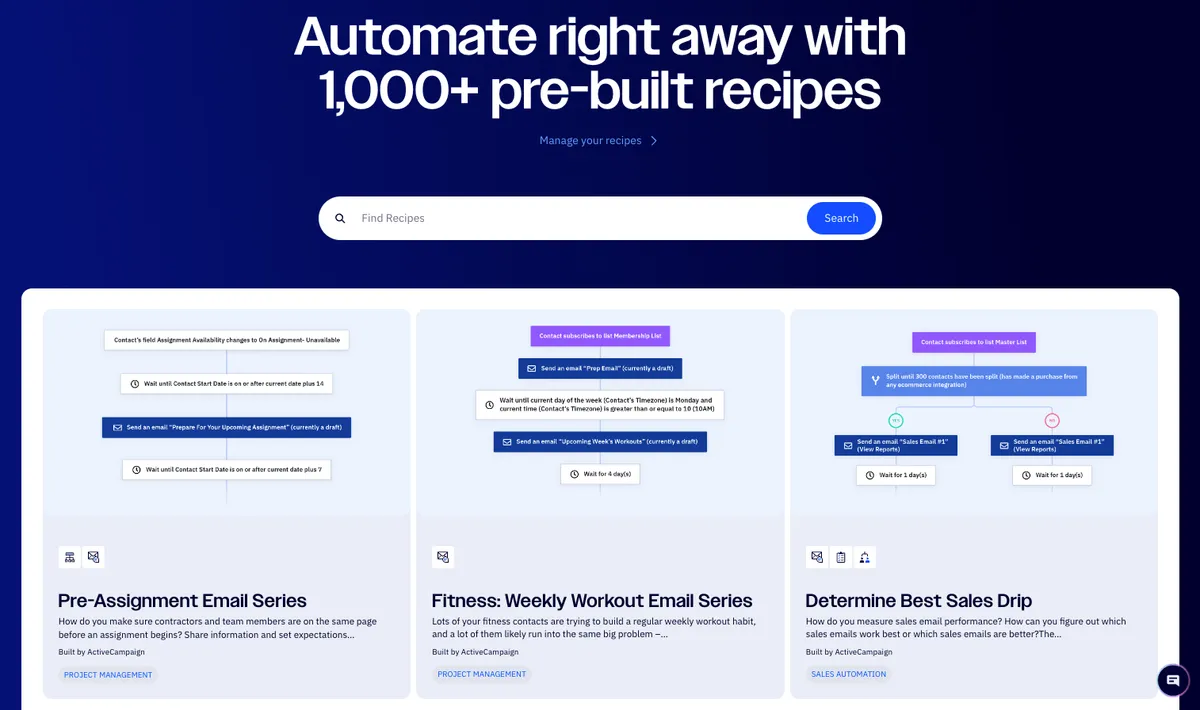
ActiveCampaign organizes their recipes into clear categories:
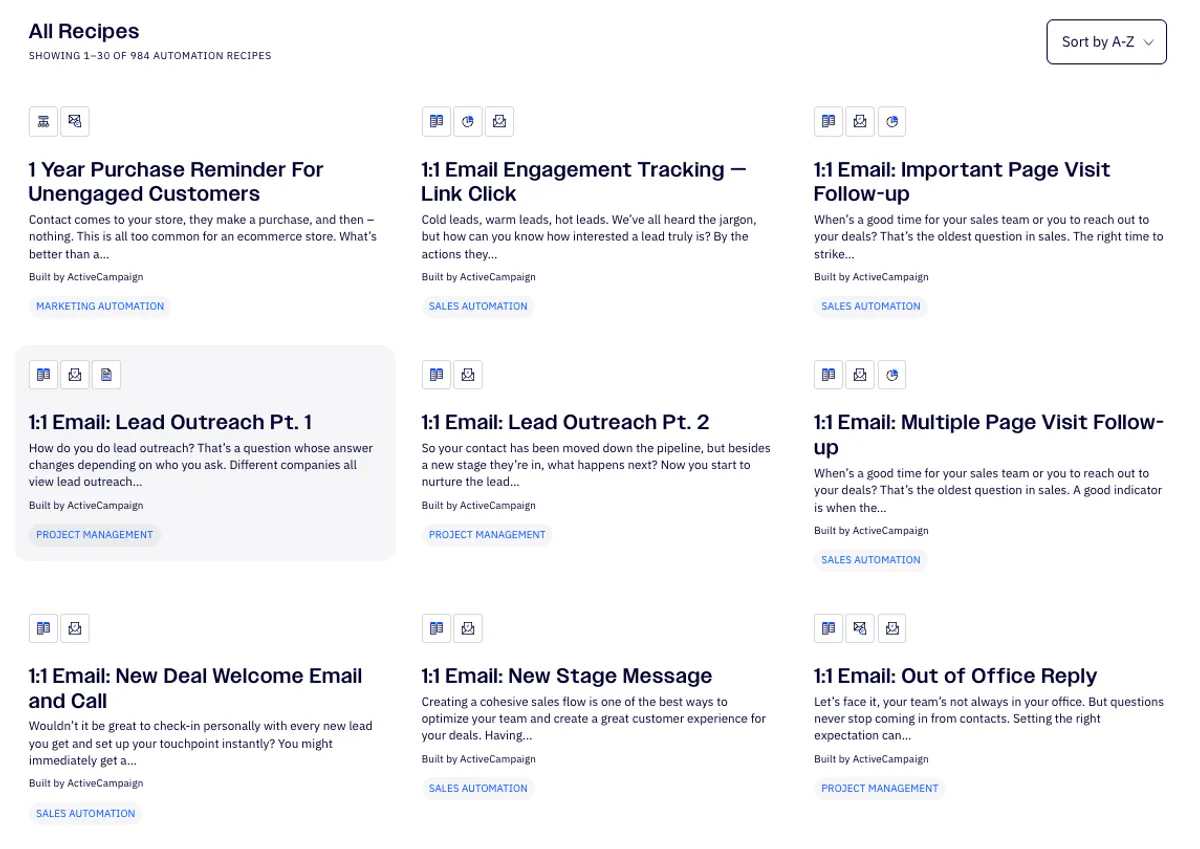
- Marketing Automation for email campaigns, lead nurturing, and engagement tracking
- Sales Automation for pipeline management, deal follow-ups, and lead scoring
- Customer Support for onboarding, feedback collection, and retention
- Project Management for internal notifications, task assignments, and team coordination
They also tag recipes by industry, so you can find templates specifically designed for ecommerce, SaaS, education, healthcare, agencies, and more.
5 High-Impact Email Automations to Start With
You do not need all 1,000 recipes. Start with these five. They cover the highest-impact automations that work for virtually any business, whether you are a personal trainer building a local client base or a B2B agency managing a sales pipeline.
1. Welcome Sequence
What it does: Sends a series of emails to new subscribers over their first 1-2 weeks. Introduces your brand, delivers immediate value, sets expectations, and makes a soft pitch.
Why it matters: New subscribers are most engaged in the first 48 hours. If you do not email them during that window, you have already lost momentum. A welcome sequence runs automatically, so every new subscriber gets the same great first impression.
B2C example: A personal trainer sends a welcome email with a free workout plan, followed by a nutrition tip on day 2, their personal story on day 4, and an invitation to book a session on day 7.
B2B example: A marketing agency sends a welcome email with a case study PDF, followed by their best blog post on day 2, their methodology overview on day 4, and an invitation to a free strategy call on day 7.
ActiveCampaign has multiple welcome sequence recipes, including a basic "7 Day Drip Series" and industry-specific versions. Import one, customize the emails, and you are done.
If you only set up one automation, make it your welcome sequence. It runs 24/7, nurtures every new subscriber without any manual effort, and directly impacts whether people stick around or forget about you.
2. Abandoned Cart Recovery
What it does: Triggers when someone adds items to their cart but does not complete the purchase. Sends a reminder email (sometimes a series of 2-3) to bring them back.
Why it matters: The average cart abandonment rate is around 75%. That means three out of four people who start buying from you walk away. Even recovering 10% of those abandoned carts can have a massive impact on revenue.
How it works in practice: The first email goes out 1 hour after abandonment (a gentle reminder). The second goes out 24 hours later (maybe with a testimonial or FAQ). The third goes out 48-72 hours later (with a small discount if you want to incentivize).
This one is primarily for ecommerce and course creators, but B2B SaaS companies can adapt it for abandoned signups or incomplete onboarding flows.
3. Lead Nurturing Drip
What it does: Sends a timed series of educational emails to contacts who have shown interest but are not ready to buy yet. Gradually moves them from awareness to consideration to decision.
Why it matters: Most people need 7-13 touchpoints before they make a purchase decision. A lead nurturing drip automates those touchpoints so you stay top of mind without manually following up with every prospect.
B2C example: A personal trainer has a lead who downloaded a free meal plan but has not booked a session. The drip sends them a success story on day 3, a common mistakes article on day 7, a "here is what working with me looks like" email on day 10, and a limited-time offer on day 14.
B2B example: A SaaS company has a lead who attended a webinar but has not started a trial. The drip sends them the webinar recording on day 1, a case study from a similar company on day 4, a product comparison guide on day 8, and a personal outreach from a sales rep on day 12.
ActiveCampaign recipes include drip sequences for different sales cycle lengths. Pick one that matches your typical buyer journey.
4. Re-Engagement Campaign
What it does: Identifies subscribers who have not opened or clicked your emails in 60-90 days and sends a targeted "win-back" sequence.
Why it matters: Inactive subscribers hurt your deliverability. Email providers like Gmail track your engagement rates. If too many people ignore your emails, more of your messages end up in spam, even for your engaged subscribers.
How it works: Send a "We miss you" email with your best content or offer. If they engage, great. Tag them as re-engaged. If they do not respond after 2-3 attempts, remove them from your list. A smaller, engaged list always outperforms a large, dead one.
This applies equally to B2C and B2B. The only difference is the tone. A personal trainer might say "Hey, ready to get back on track?" while a B2B agency might say "We have published some new research since we last connected. Here are the highlights."
5. Post-Purchase or Post-Onboarding Follow-Up
What it does: Triggers after someone makes a purchase or completes onboarding. Checks in with them, asks for feedback, offers additional resources, and encourages referrals or upsells.
Why it matters: The sale is not the end of the relationship. It is the beginning. A good post-purchase sequence reduces refund requests, increases lifetime value, and generates reviews and referrals on autopilot.
B2C example: After a personal training client buys a 10-session package, they receive a "what to expect" email on day 1, a check-in after their first session, a nutrition guide after week 2, and a referral offer after completing 5 sessions.
B2B example: After a client signs a contract with your agency, they receive a welcome-to-the-team email with next steps, a check-in after the first deliverable, a satisfaction survey after 30 days, and a case study request after 90 days.
How to Set Up an Automation Recipe in ActiveCampaign
The process is straightforward. Here is how it works step by step:
- Browse the recipe library. Go to activecampaign.com/recipes or access recipes directly from your ActiveCampaign dashboard. Filter by use case (marketing, sales, support) or search for something specific like "welcome sequence" or "abandoned cart."
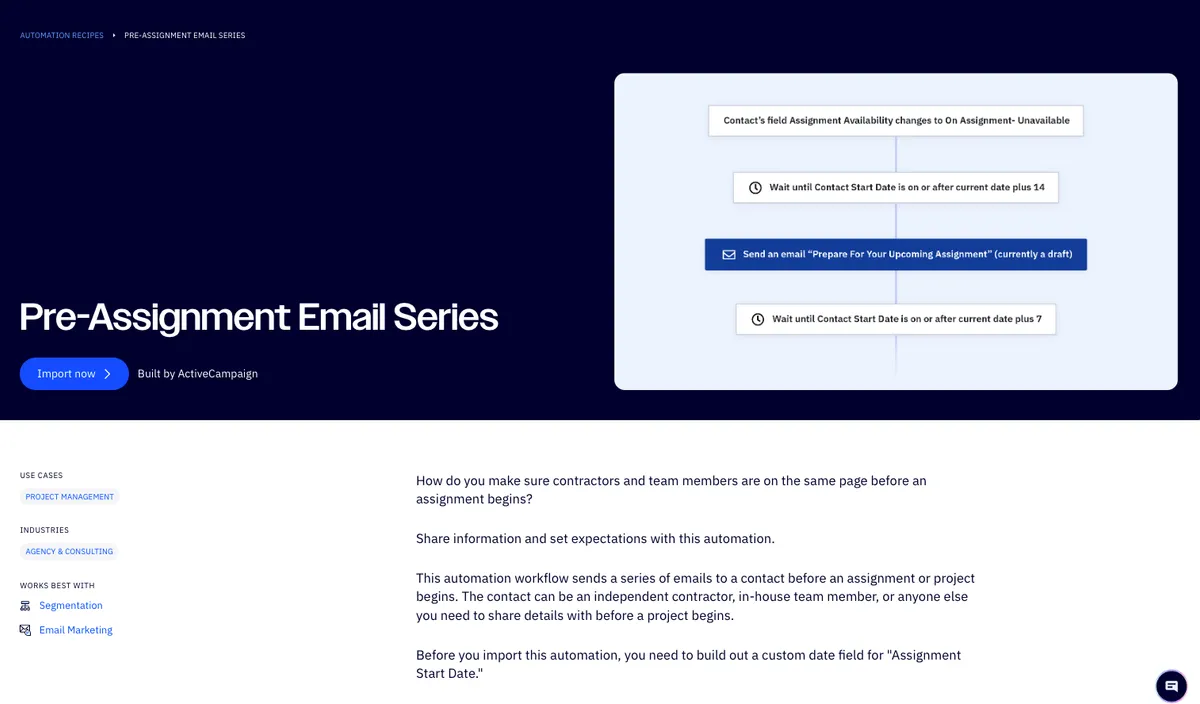
- Preview the recipe. Click on any recipe to see the full automation flow: what triggers it, what conditions it checks, what emails it sends, and what wait times it uses. This lets you evaluate whether the logic fits your business before importing.
- Import it to your account. Click the import button and the entire automation structure appears in your automation builder. All the triggers, conditions, wait steps, and action steps are pre-configured.
- Customize the content. The recipe gives you the structure, but you need to write (or rewrite) the actual email content. Replace placeholder text with your brand voice, add your links, and include your offers.
- Adjust the timing. The default wait times might not match your sales cycle. A B2C personal trainer might want 2-day gaps between emails, while a B2B agency with a longer sales cycle might want 4-5 day gaps.
- Test and activate. Send yourself test emails, verify all the links work, check the logic with a test contact, and then turn it on. Monitor the first week of results and adjust if needed.
ActiveCampaign has the most extensive recipe library, but other platforms offer automation templates too. MailerLite has pre-built automation workflows for common scenarios. GetResponse includes automation templates in its plans. Kit offers visual automation builders with template starting points. The concept is the same everywhere: start with a proven template instead of a blank canvas.
Recipes Worth Exploring by Business Type
Here are specific ActiveCampaign recipes that match common business scenarios:
If you run a service business (personal training, coaching, consulting):
- Pre-Assignment Email Series: Sends preparation info before a session or project kicks off
- Fitness: Weekly Workout Email Series: Delivers recurring content on a schedule (adapt for any recurring content)
- 7 Day Drip Series: Nurtures new leads with a week of automated emails
If you run an ecommerce or product business:
- Abandon Cart Follow Up: Recovers lost revenue from incomplete purchases
- Post-Purchase Follow Up: Builds loyalty and generates reviews after a sale
- Determine Best Sales Drip: A/B tests different sales email sequences to find what converts best
If you run a B2B company (agency, SaaS, consulting):
- 1:1 Email Engagement Tracking: Scores leads based on which links they click, so sales knows who is most interested
- Lead Scoring with CRM Integration: Automatically qualifies leads based on behavior and passes hot leads to your sales team
- Post-Onboarding Check-In: Follows up with new clients to ensure smooth onboarding
Browse the full library at activecampaign.com/recipes to find templates that match your specific workflow.
Common Automation Mistakes to Avoid
Pre-built templates solve the "where do I start" problem, but there are still ways to get it wrong.
Importing a recipe and never customizing it. The template gives you the logic, but generic placeholder content will not convert. Take the time to write emails that sound like you, not like a template.
Setting up too many automations at once. Start with 3-4 core workflows (welcome, nurture, re-engage, post-purchase). Get those working well before adding more complexity. Every automation you add is another thing to monitor and maintain.
Forgetting to test. Always send yourself through the automation before activating it. Check every email, every link, every conditional branch. One broken link in your welcome sequence creates a bad first impression for every new subscriber.
Using the same timing for B2C and B2B. Consumer purchase decisions happen faster. A personal trainer might send 4 emails in 7 days. A B2B agency selling a $10,000 retainer should probably spread that over 2-3 weeks. Match your automation timing to your buyer's decision speed.
Never reviewing performance. Set a monthly reminder to check your automation metrics: open rates, click rates, conversion rates, and unsubscribe rates. If an email in your sequence has a 5% open rate, something is wrong and it needs fixing.
Which Email Platform Is Best for Automation?
If automation is your priority, here is how the main platforms compare:
- ActiveCampaign is the clear leader for automation. 1,000+ recipes, visual automation builder, conditional logic, CRM integration, lead scoring, and split testing within automations. Best for businesses that take email marketing seriously, especially B2B.
- GetResponse offers strong automation features at a more accessible price point. Great webinar integration makes it a strong choice for B2B companies that use webinars for lead generation.
- MailerLite has automation workflows that cover the basics well. Perfect if you need simple automations (welcome sequences, drip campaigns) without the complexity of ActiveCampaign.
- Kit provides visual automations that are intuitive for creators. Great for bloggers, course creators, and coaches who want automation without a steep learning curve.
- Moosend punches above its weight on automation features for the price. If you want solid automations on a tight budget, Moosend is worth a look.
Sender also offers pre-built automation workflows on its free plan, including welcome sequences and abandoned cart recovery. If you need basic automations without any financial commitment, it is a practical starting point.
Campaign Monitor focuses on beautifully designed email campaigns with straightforward automation features. While it does not match ActiveCampaign in automation depth, its visual email builder and brand management tools make it a solid choice for agencies managing multiple client accounts.
Not sure which fits your needs? Compare all email marketing platforms or check specific matchups like MailerLite vs ActiveCampaign or Kit vs ActiveCampaign.
Getting Started Today
Here is the simplest path to your first automation:
- Pick your platform. If you do not have one yet, start with a free trial of ActiveCampaign or a free plan on MailerLite or Kit.
- Set up your welcome sequence first. This is the highest-impact, lowest-risk automation. Every new subscriber gets it, and it runs forever once activated.
- Use a recipe or template. Do not start from scratch. Import a pre-built template and customize the content.
- Write 3-4 emails. Your welcome sequence does not need to be 10 emails long. Start with 3-4 solid emails over 7-10 days.
- Activate and monitor. Turn it on, watch the first 50-100 subscribers go through it, and adjust based on what the data tells you.
Once your welcome sequence is running, add a second automation (lead nurturing or re-engagement). Build from there. Within a month, you can have 3-4 automations working around the clock, handling the repetitive email work so you can focus on the parts of your business that actually need a human touch.
My Take
I used to spend hours mapping out email automations on a whiteboard before building them. Then I discovered that ActiveCampaign has over 1,000 pre-built recipes you can import with one click. It felt like cheating. The truth is, most email automation workflows follow the same patterns regardless of your industry.
A welcome sequence for a personal training business looks structurally identical to one for a B2B consulting firm. The content changes, but the logic stays the same. Pre-built templates give you that logic for free. Customize the content, hit activate, and move on to growing your business.
Sources
Want to see how ActiveCampaign stacks up against other email platforms? Compare features, pricing, and automation capabilities side by side.
Read My ActiveCampaign Review →Mentioned in this post


Read next



Joonas Rotko
Author & founder of That Marketing Buddy
I test and score SEO and AI-visibility software for small business owners and agencies, backed by 10+ years in digital marketing.