
This page may contain affiliate links.
Some links on this page are affiliate links, meaning I may earn a commission if you sign up (at no extra cost to you). This never influences my ratings or recommendations.
The Verdict
Is SiteGPT right for you?
SiteGPT trains a chatbot on your website, docs, or files, then lets you (or an AI agent) run it through a dashboard, an API, an MCP server, or a CLI. Pricing starts at $39/month with no free tier, so this isn't an impulse buy.
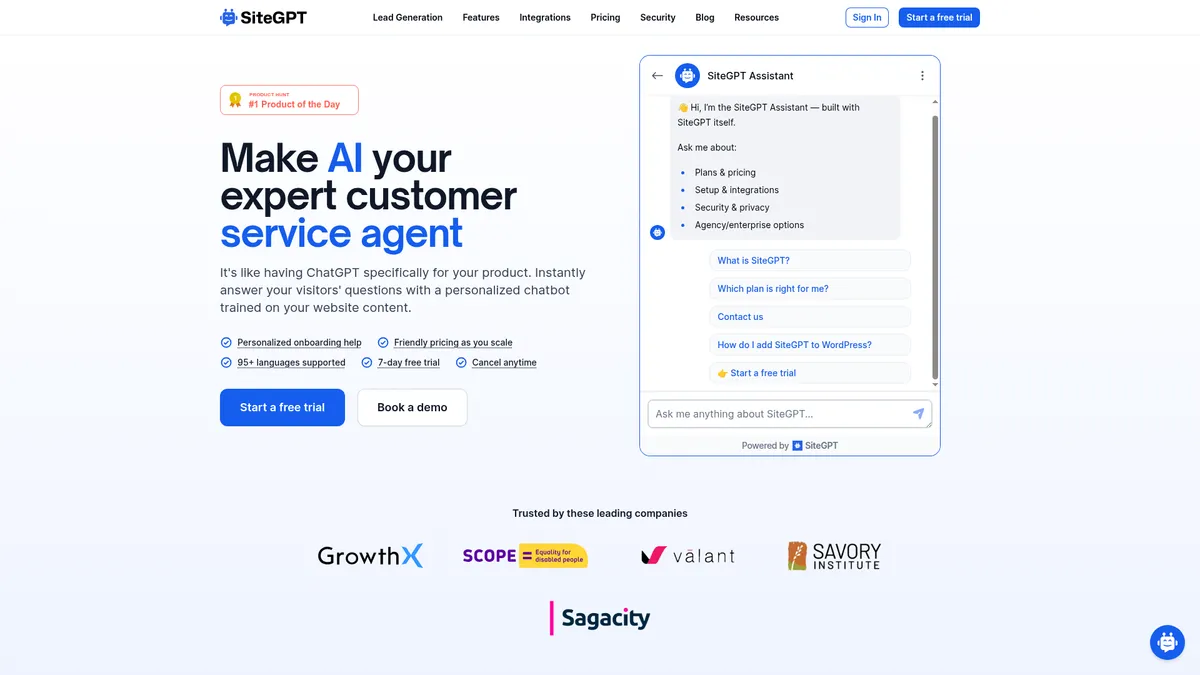
SiteGPT is a chatbot builder that crawls your site or docs and turns them into a trained support agent, with escalation to humans and lead capture built in. It's aimed at teams with real support volume and, notably, at AI agents themselves, since it ships a full API, MCP server, and CLI alongside the usual dashboard.
Whether it's worth $39 to $259 a month depends on how many tickets you're actually automating.
The agent-first setup (API, MCP, CLI) is unusual for a customer support chatbot at this price, but the pricing page's math on annual billing doesn't add up, and that's the kind of detail I'd want cleared up before paying for a year upfront.
Why I'm covering this
SiteGPT is built agent-first: a REST API, MCP server, and CLI let an AI agent spin up a working chatbot before a human opens the dashboard. That's rare in the customer support chatbot category.
Who It's For
Who SiteGPT is for (and who it isn't)
✓Best for
- +SaaS Companies With a Growing Help Center If you've got documentation, a help center, or a product generating repetitive 'how do I' questions, SiteGPT can crawl that content and cut down on ticket volume.
- +Teams Building AI-Agent Workflows The REST API, MCP server, and CLI mean an AI agent can create and manage a chatbot without touching the dashboard, useful if you're automating deployment across sites or client accounts.
- +Businesses Serving International Customers Support for 95+ languages makes this a reasonable pick if your visitors don't all speak English and you don't want to run separate bots per region.
- +Teams Wanting Human Handoff, Not Full Automation The escalate-to-human feature plus Zendesk, Slack, and Crisp integrations suit teams that want AI to filter tickets, not replace the support team entirely.
- +SaaS support teams drowning in repetitive tickets about docs or FAQs Trains directly on your help center or docs URL and can automate answering the bulk of tier-1 tickets, freeing staff for harder cases
- +Developers and AI agent builders who want to spin up chatbots programmatically The CLI, MCP server, and OpenAPI spec let an agent create, train, and test a chatbot from a single URL without a dashboard
- +Content-heavy sites like universities, healthcare orgs, or SaaS docs with tens of thousands of pages Scale and Enterprise tiers support up to 50,000 and 500,000 pages respectively, built for large knowledge bases rather than small marketing sites
- +Regulated businesses (healthcare, finance) needing compliance guarantees SOC 2 Type II, GDPR, and HIPAA assessments plus a Enterprise BAA option cover compliance needs many chatbot tools skip
- +Solo founders or small sites wanting a basic website Q&A bot Starter at $39/mo covers 1 chatbot, 1,000 pages, and 4k messages, enough for a small product site without enterprise complexity
✗Skip this if
- −Solo Sites With a Handful of FAQs Starting at $39/month with no free-forever tier, SiteGPT is a lot of tool (and cost) for a site that just needs three or four static answers.
- −Teams Wanting a Big Integration Marketplace Native integrations are limited to Crisp, Slack, and Zendesk. If your stack runs through a different help desk or CRM, you'll be leaning on the API to bridge the gap.
- −Budget-Conscious Teams Comparing Every Dollar Message limits split across GPT-4.1 and GPT-4.1-mini, which run roughly 10x apart in cost per message. Predicting your real monthly usage takes some homework before you commit.
- −Anyone Expecting a Permanent Free Plan There's a 7-day trial and a public demo bot, but no free-forever tier on any plan, including Enterprise.
- −Marketing teams needing multi-channel automation (email, SMS, behavioral drips) SiteGPT automates chatbot conversations, not marketing sequences across channels; it has no email/SMS workflow builderTry ActiveCampaign →
- −Teams wanting a simple live-chat widget without AI training setup SiteGPT's whole model is built around training a bot on your content, which is overhead if you just want a basic chat widget with canned responsesTry Tidio →
- −Budget-conscious startups needing high message volume without add-on costs Extra messages and branding removal are paid add-ons at $39/mo each, and real message counts vary 10x by model choice, making costs hard to predict at volumeTry ManyChat →
Features
What can SiteGPT do?
Training flexibility is the first thing worth flagging. SiteGPT pulls from website crawls, sitemaps, YouTube videos and playlists, uploaded files (CSV, TXT, PDF, DOCX, PPTX, MD), and connected sources including Notion, Google Drive, Dropbox, OneDrive, Box, and GitHub. That's a wider net than most chatbot builders cast, and it matters if your knowledge lives across scattered docs instead of one tidy website.
The part that separates SiteGPT from typical support-chatbot tools is agent access. It ships a full REST API (OpenAPI v2 spec), an official MCP server, and a command-line tool distributed as an npm package, with setup guides for Claude Code, Cursor, Codex, and other agent harnesses. An AI agent can create a chatbot from a single URL, no account required, then hand back a preview-and-claim link. Our breakdown of API vs MCP vs CLI for marketing tools covers why this distinction matters, and SiteGPT is one of the few support-chatbot vendors that's built all three from the start rather than bolting on an API as an afterthought.
On the day-to-day support side, Quick Prompts give visitors conversation starters instead of a blank chat box, Escalate to Human hands tricky conversations to a live agent, and Collect Leads captures visitor details for follow-up. Functions is the more interesting one: it turns natural-language chat commands into in-app actions, which pushes SiteGPT toward automation tool territory rather than a pure Q&A widget.
Integrations are the thinnest part of the feature set. Only Crisp, Slack, and Zendesk get native connections. If your support stack runs through a different help desk, you're relying on the API to bridge the gap, which is fine for a technical team but adds friction for anyone without developer resources.
Chatbot Training & Content Sources
Conversation & Support Tools
AI Agent & Developer Access
Security & Compliance
Integrations
UX & Support
Is SiteGPT easy to use?
Based on SiteGPT's own documentation, onboarding follows a three-step flow: sync your training data (URL, files, or raw text), install the embed code on your site, and refine the bot using real chat history and feedback. The FAQ notes that training a chatbot usually finishes within a few minutes regardless of content volume, though larger sites will take longer to crawl.
Support runs through direct email rather than a dedicated help desk or live chat, at least based on what's published. That's a workable model for smaller teams, but flag it if you expect instant support responses.
Third-party validation is thin. SiteGPT has G2 and Capterra listings, where reviewers praise the fast setup, intuitive interface and responsive support, while flagging limited chat-widget customisation and a lack of deeper integrations with tools like Zapier and HubSpot. Capterra carries just one review, so treat the sample accordingly. The one customer quote SiteGPT publishes comes from Brent Burrows II, VP of Retail & Sales at CBS Bahamas, who described a working setup escalating to Zendesk with no complaints after tuning the bot on GPT-4.
Pricing
How much does SiteGPT cost?
SiteGPT starts at $39/mo. No free plan, but there’s a 7-day free trial.
SiteGPT's four plans run Starter at $39/month, Growth at $79/month, Scale at $259/month, and a custom-priced Enterprise tier. Oddly, the annual totals shown on their pricing page ($468/year for Starter, $948/year for Growth, $3,108/year for Scale) work out to exactly 12x the monthly rate, even though SiteGPT advertises a 40% discount for annual billing. That's worth double-checking directly with SiteGPT before committing to a year upfront, since the public math doesn't show a discount.
Each tier scales chatbot count, message volume, and page limits together. Starter caps at 1 chatbot, 4,000 messages/month, and 1,000 pages. Growth jumps to 2 chatbots, 10,000 messages, 10,000 pages, plus API access and integrations. Scale adds webhook support, daily auto-scan, and room for 50,000 pages across 3 chatbots. Add-ons let you remove SiteGPT branding or buy an extra 5,000 messages, both for +$39/month.
The real pricing wrinkle is the message calculator. GPT-4.1-mini runs roughly 10x cheaper per message than GPT-4.1, so your actual usable message volume on any plan depends on which model you lean on. It's a flexible pricing mechanism, but it also means you can't compare SiteGPT's sticker price to a flat-rate competitor without running the numbers first.
| Plan | Monthly |
|---|---|
| Starter | $39/mo |
| Growth | $79/mo |
| Scale | $259/mo |
| Enterprise | Custom |
External Ratings
What reviewers say about SiteGPT
0"We've got the bot dialled in - we're using GPT-4, have an avenue for escalations to Zendesk, and so far I have no complaints."
Brent Burrows II, VP Retail & Sales at CBS Bahamas (SiteGPT customer testimonial)Downsides
What's wrong with SiteGPT
No Permanent Free Plan
You get a 7-day trial and a live demo bot, but every paid tier starts at $39/month. Budget teams testing a concept long-term will feel this.
Message Quotas Get Complicated Fast
Your real monthly message count depends on how you split usage between GPT-4.1 and the roughly 10x cheaper GPT-4.1-mini. The built-in calculator helps, but it adds a planning step most competitors don't require.
Limited Native Integrations
Only Crisp, Slack, and Zendesk are listed as direct integrations. Teams on other help desks or CRMs will need the API instead of a plug-and-play connection.
Team Seats Are Capped by Plan
Starter includes just 1 member, Growth caps at 4, and Scale at 10. Growing teams will need to upgrade tiers purely to add people, not for more chatbot capacity.
Annual Pricing Math Doesn't Match the Advertised Discount
The pricing page claims a 40% saving on annual billing, but the listed annual totals work out to exactly 12x the monthly rate. Confirm the actual discount before paying upfront.
No Independent Review-Site Ratings Found
SiteGPT is listed on both G2 and Capterra but with very little review volume behind it (Capterra shows a single review), so most of what is known still comes from SiteGPT's own site, docs and homepage testimonial.
Buddy's Take
None of this makes SiteGPT a bad product, but the pricing model, thin integration list, and unclear annual discount mean it fits certain teams more comfortably than others. If your support volume and budget match the Growth or Scale tier, most of these gaps matter less.
FAQ
Frequently asked questions about SiteGPT
No. SiteGPT offers a 7-day free trial and a public demo bot at sitegpt.ai/demo, but every plan, Starter through Enterprise, requires payment after the trial ends.
Yes. You can upload files (CSV, TXT, PDF, DOCX, PPTX, MD), paste in raw text, or connect sources like Notion, Google Drive, Dropbox, OneDrive, Box, and GitHub instead of pointing it at a live site.
Yes. SiteGPT publishes a REST API, an MCP server, and a CLI installable via npm, plus setup guides for Claude Code, Cursor, Codex, and other agent harnesses. An agent can build and train a chatbot from a URL without a human account.
It depends on your plan and which AI model you use. Starter includes up to 4,000 messages/month, Growth up to 10,000, and Scale up to 40,000, but GPT-4.1-mini is roughly 10x cheaper per message than GPT-4.1, so your real usable message count varies a lot depending on the model split.
Yes, on paid plans with auto-refresh enabled. Starter is manual-refresh only, Growth auto-refreshes monthly, and Scale auto-refreshes weekly with daily auto-scan. You can also manually resync anytime from the dashboard.
SiteGPT says yes, but you'll need to contact their team by email for agency pricing and setup. It's not a self-serve option on the public pricing page.
SiteGPT lists support for 95+ languages, which matters if your site serves an international audience.
SiteGPT states it's SOC 2 Type II examined, GDPR certified, and HIPAA assessed, with HIPAA eligibility and custom BAAs available on the Enterprise plan.
The four tiers look simple on the pricing page, but the actual message quota depends on which GPT model you pick, and that can swing your real capacity by 10x on the same plan.
SiteGPT is best for: SaaS support teams drowning in repetitive tickets about docs or FAQs; Developers and AI agent builders who want to spin up chatbots programmatically; Content-heavy sites like universities, healthcare orgs, or SaaS docs with tens of thousands of pages; Regulated businesses (healthcare, finance) needing compliance guarantees; Solo founders or small sites wanting a basic website Q&A bot.
This is where SiteGPT clearly invests the most. Between the CLI, MCP server, OpenAPI spec, and an agent manifest built for AI agents to self-register and build chatbots, it's set up for an AI-first workflow far more than most tools in this space.
Getting content into SiteGPT is easy (URLs, files, Notion, Drive, GitHub), but there's no documented way to export your chat history or leads if you decide to leave.
SiteGPT starts from $39/mo. There is a 7-day free trial.
Ready to try SiteGPT?
Train a chatbot on your website content and see how it handles real support questions during the 7-day free trial.
 Start Free Trial →
More on SiteGPT

Joonas Rotko
Author & founder of That Marketing Buddy
I score marketing software for AI-stack fit (MCP, API, agent-readiness), backed by 10+ years in digital marketing.
This page may contain affiliate links. I earn a commission at no extra cost to you. This never influences ratings.