

Joonas Rotko · Founder, That Marketing Buddy
I have spent 10+ years doing hands-on digital marketing and buying marketing software for my team and clients, and I now score every tool on this site for how well it works with AI agents. Ex Google Premier Partner agency co-owner.
This page may contain affiliate links.
Some links on this page are affiliate links, meaning I may earn a commission if you sign up (at no extra cost to you). This never influences my ratings or recommendations.
The Verdict
Is Builderall right for you?
Builderall promises 25+ marketing tools for less than most single-purpose platforms charge for one. The free plan gives access to the dashboard, website builder, and email tools. Some parts are solid, others need work.
Builderall is an all-in-one marketing platform that combines website building, email marketing, course creation, and 20+ other tools for $17-47/month. It's solid value for entrepreneurs who need multiple tools, but the interface can feel overwhelming and some features lack the polish of dedicated alternatives.
Great value if you need multiple marketing tools, but expect a steeper learning curve than simpler platforms.
Why I'm covering this
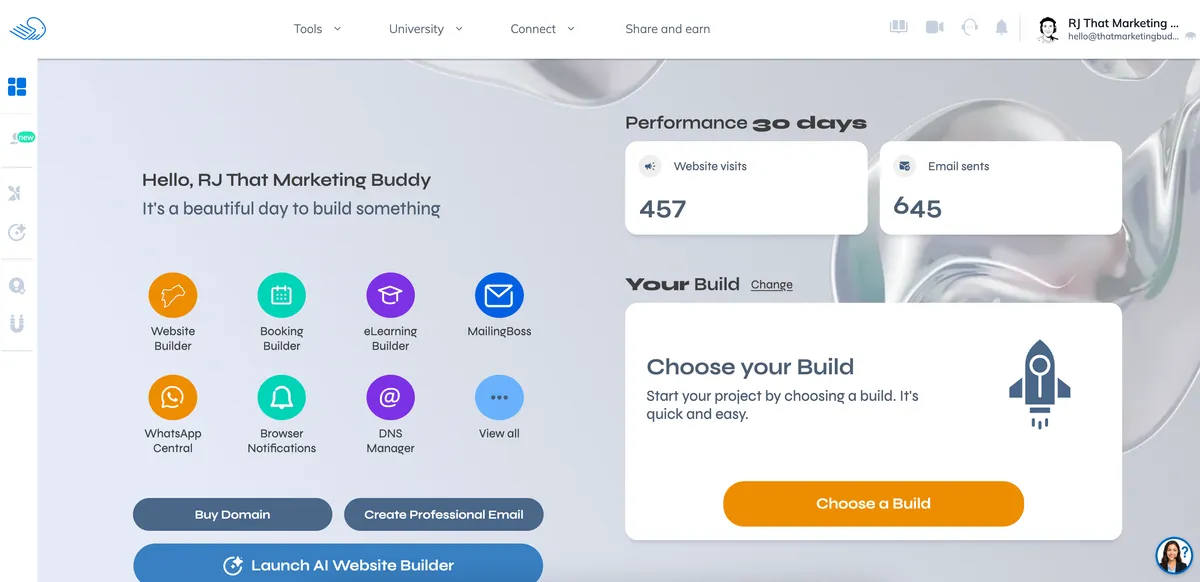
25+ tools for under $50/month is a proposition worth investigating, especially since Builderall offers a permanent free plan that lets you actually test things before paying.
Who It's For
Who Builderall is for (and who it isn't)
✓Best for
- +Budget-Conscious Entrepreneurs Need multiple marketing tools but want to avoid paying for separate subscriptions to Mailchimp, ClickFunnels, and Teachable
- +Course Creators Want to build websites, collect emails, and host courses all in one platform without juggling multiple logins
- +Digital Marketing Agencies Serve multiple clients and need white-label capabilities with a full toolkit of marketing features
- +Small Business Owners Want professional websites, booking systems, and email marketing without hiring multiple vendors
✗Skip this if
- −WordPress Lovers If you prefer WordPress flexibility and ecosystem, Builderall's proprietary system will feel limiting
- −Advanced Email Marketers Dedicated platforms like ConvertKit or ActiveCampaign offer more advanced automation and segmentation
- −E-commerce Focused Businesses Shopify or WooCommerce provide better product management, payment options, and third-party integrations
- −Beginners Who Want Simplicity The sheer number of features and options can overwhelm users who just want to build a simple website
Consider instead
 Kartra
 Systeme.io
 Kajabi
Features
What can Builderall do?
Website Builder & Templates
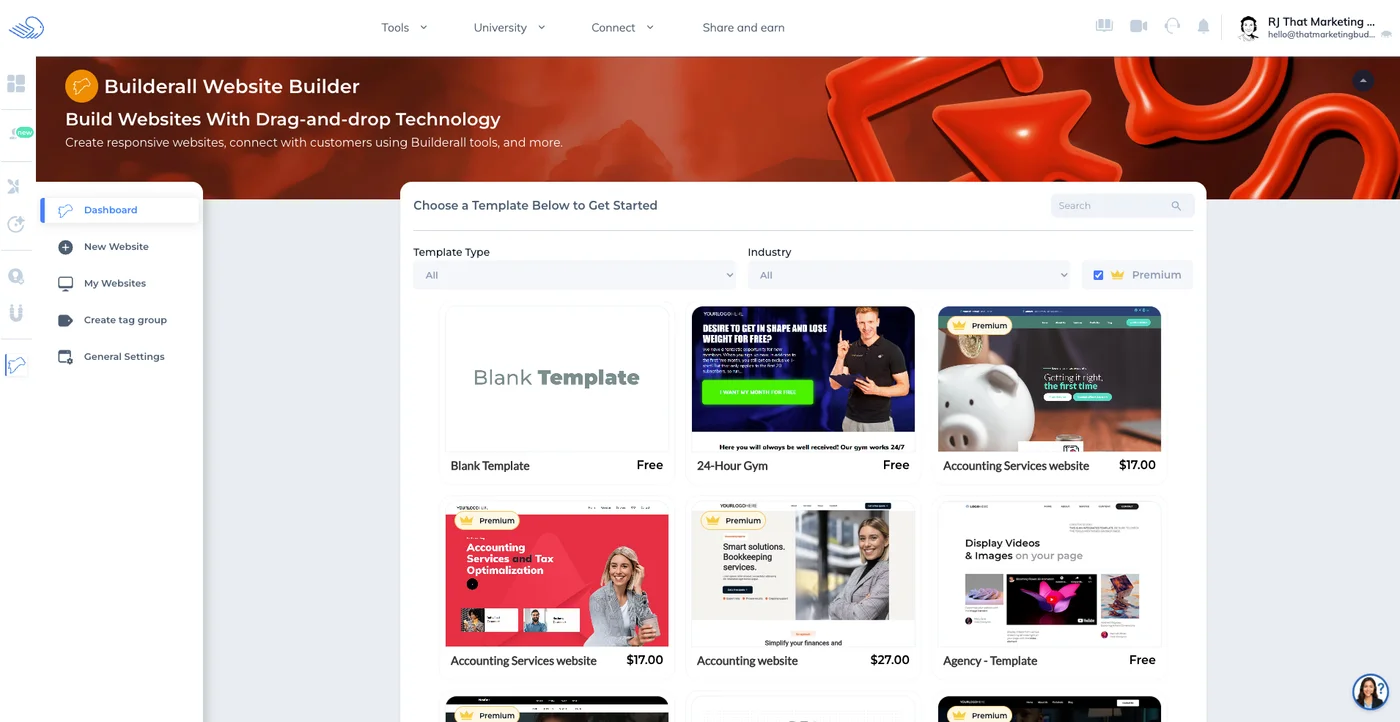
The website builder uses drag-and-drop editing with an AI text generator (Magic Text AI) built in. Templates range from basic to reasonably polished, with a mix of free and paid options ($17-27 each). The free templates cover the essentials, but the paid ones are noticeably better designed. If you're coming from Squarespace or Webflow, expect a step down in design quality. If you're coming from a basic WordPress theme, this will feel like an upgrade.
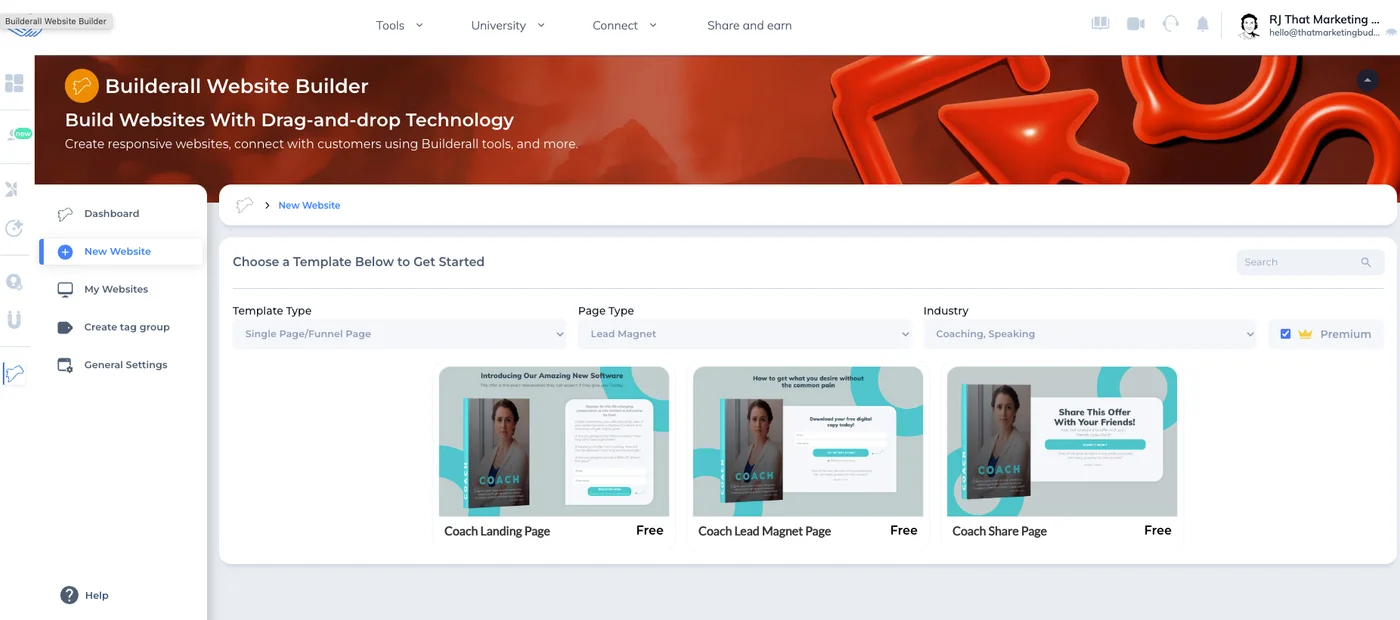
Landing page templates are category-specific, with options for coaches, lead magnets, and share pages. The coaching-focused templates are surprisingly well-designed for a platform at this price point. You can customize everything, though the editor takes some getting used to. For a full breakdown of what each plan includes, check the Builderall pricing page.
Email Marketing (MailingBoss)
MailingBoss handles campaign creation, automation sequences, and list segmentation. The interface is functional rather than pretty. If you've used ActiveCampaign's visual automation builder, MailingBoss will feel basic by comparison. But for straightforward email sequences (welcome series, abandoned cart, drip campaigns), it gets the job done. The value is the tight integration with Builderall's landing pages and funnels, connecting opt-in forms directly to email workflows without third-party tools or Zapier.
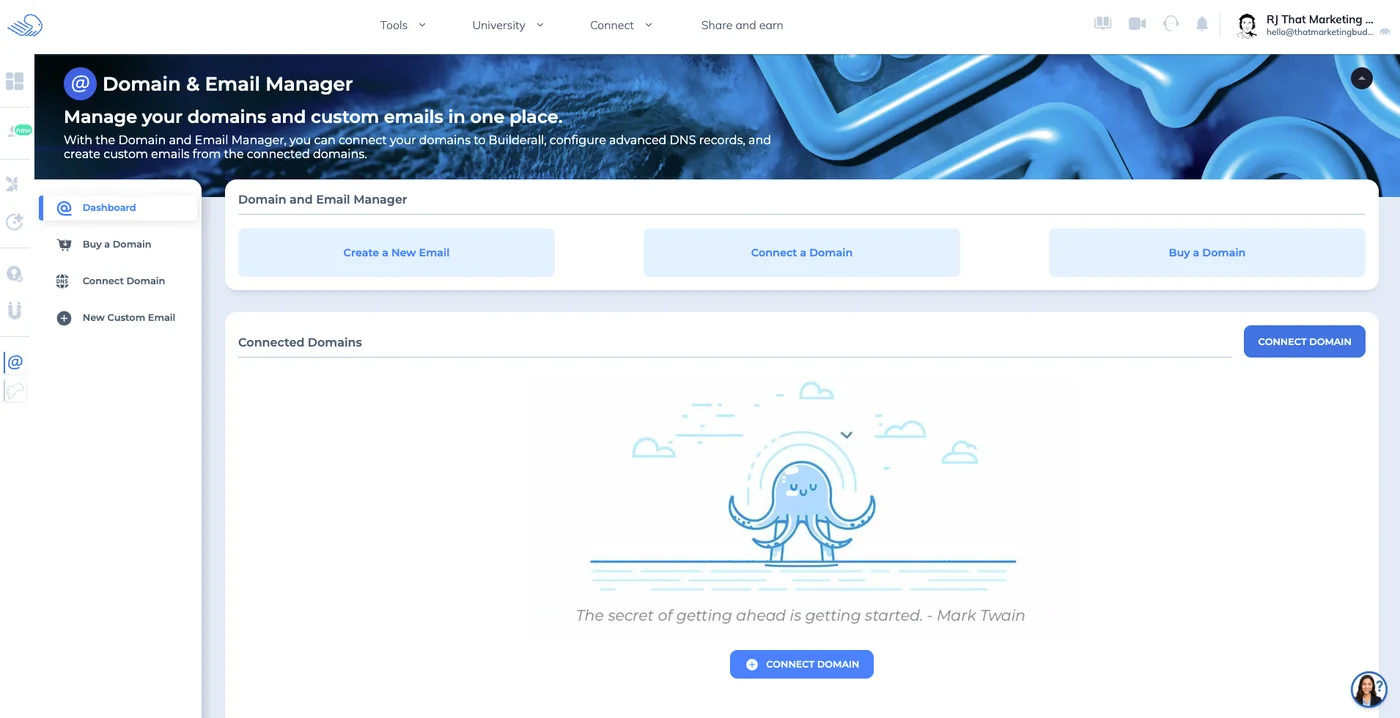
Domain and email management is centralized, letting you connect domains, set up custom email addresses, and manage DNS settings from one place. Having everything in a single dashboard instead of bouncing between your registrar, email provider, and hosting panel saves more time than you'd think.
Course Creator & Webinars
The course platform is one of Builderall's stronger pieces. It uses a Netflix-style interface that looks professional, with progress tracking, quizzes, and drip content scheduling. It won't match Thinkific or Teachable on advanced features like certificates or student analytics, but it covers about 80% of what most course creators need without an additional subscription.
The webinar tool handles registration pages, live streaming, and replay hosting. It works for small to mid-size audiences. For events over 500 attendees or advanced engagement features (polls, breakout rooms), you'd want a dedicated tool like WebinarJam or Zoom.
Social Proof & Extras
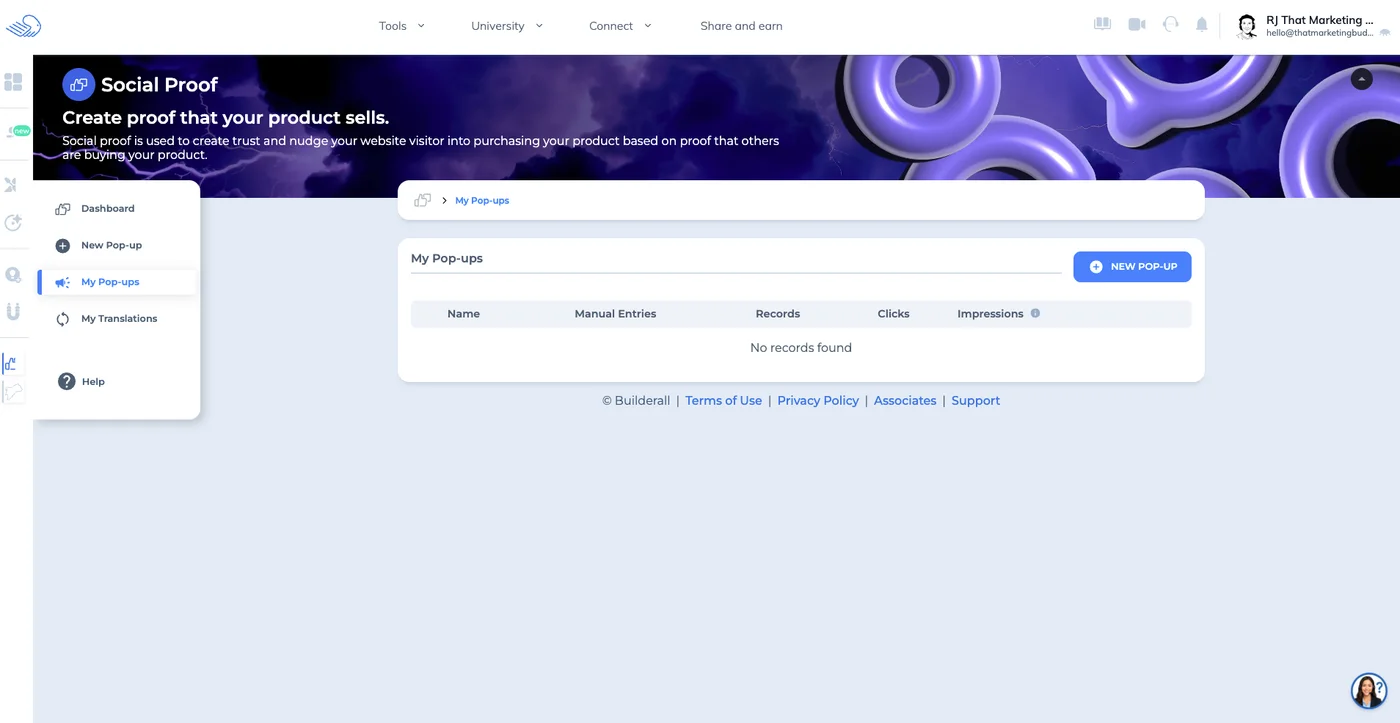
Builderall includes a social proof tool for creating trust-building pop-ups on your site: recent purchases, sign-ups, visitor counts. The WhatsApp automation, browser push notifications, and booking calendar round out a toolset that's impressively broad. Not every tool is polished, but having them available at no extra cost means you can test marketing tactics that would otherwise require separate subscriptions.
Website & Page Building
Email & SMS Marketing
Course & Content Creation
Communication Tools
E-commerce & Sales
UX & Support
Is Builderall easy to use?
The biggest challenge with Builderall is feature overwhelm. The dashboard presents dozens of tools immediately, which can paralyze anyone trying to figure out where to start. The "Builds" system helps (it pre-selects relevant tools based on your business type), but the overall navigation still feels cluttered compared to more focused platforms like Systeme.io or Kartra.
Once you push past the initial learning curve, the drag-and-drop builders work smoothly. Loading times in the editor are acceptable, though not as snappy as modern website builders. Mobile responsiveness is automatic, but fine-tuning mobile layouts requires more manual adjustment than you'd expect from a 2026 platform. Based on Capterra reviews, most users report needing 1-2 weeks to feel comfortable with the interface.
Builderall offers 24/7 support through chat and email, plus an extensive knowledge base and video tutorials. Their "University" section provides structured courses on using each tool, which is a nice touch. Response times vary: straightforward questions get answered within hours, but complex technical issues can take 24-48 hours.
According to G2 reviews, support quality is generally rated as helpful, though some users mention occasional language barriers since the team operates from Brazil. The community forums and Facebook groups are active and often provide faster answers than official support for common questions.
One usability win worth noting: everything stays integrated. Create a landing page, connect it to an email sequence, add a booking calendar, and set up social proof pop-ups, all without leaving the platform or configuring API connections. For non-technical users who dread connecting tools through Zapier, that integration value is significant.
Pricing
How much does Builderall cost?
Builderall starts at From $27/mo. That's 50% below median for All-in-One Marketing. A free plan is available.

Builderall Pricing Analysis
vs. 10 all-in-one marketing toolsBelow median for all-in-one marketing tools

Cheaper than 70% of all-in-one marketing tools on That Marketing Buddy's database. Builderall also offers a free plan.
Builderall offers three main paid plans. The Free plan gives you access to core tools with limitations on contacts and features. The Essential plan at $17/month includes the website builder, email marketing for up to 5,000 contacts, and most core tools. The Premium plan at $47/month removes contact limits and adds advanced features like unlimited funnels, webinars, and e-commerce.
There's also a Funnel Club option at $199/month that adds premium templates, priority support, and additional training. Unless you're running a high-volume funnel operation, the Premium plan covers most needs.
The value math is where Builderall makes its strongest case. A comparable stack using Moosend ($9/month), ClickFunnels ($97/month), Teachable ($39/month), and Calendly ($8/month) costs roughly $153/month. Builderall's Essential plan at $17/month delivers similar (not identical) functionality at roughly 11% of that cost. The catch: "similar" doesn't mean "equal." Individual tools won't match their dedicated alternatives in depth or polish.
If you only need a website and basic email marketing, you'd actually save money with Squarespace ($16/month) plus Moosend ($9/month) at $25/month total, and you'd get better design tools. Builderall's value kicks in when you need four or more tool categories: website + email + funnels + courses + booking. That's where the consolidation discount becomes meaningful.
The free plan is worth highlighting because it lets you test the platform before paying. Unlike most "free trials" that expire after 14 days, Builderall's free tier is permanent, letting you build and publish basic sites and send emails. For the full breakdown including feature-by-feature plan comparison, check the Builderall pricing page.
| Plan | Monthly |
|---|---|
| Supercharge Bundle | — |
| Core | $27/mo |
| Essentials | $47/mo |
| AdvancedPopular | $97/mo |
| Premium | $247/mo |
External Ratings
What 61 reviewers say
Aggregated from 2 platforms
Builderall holds a 3.8/5 average rating across 61 reviews on Capterra, G2.
"The value for money is incredible. I was paying over $300/month for separate tools and now pay $47 for everything I need."
G2"Learning curve is steep if you want to use multiple features, but once you get it, it saves so much time having everything in one place."
Trustpilot"Email deliverability isn't as good as Mailchimp, and the interface feels cluttered compared to modern tools."
Capterra"Perfect for my agency - I can build client websites, run their email campaigns, and host their courses all from one login."
G2"Support can be slow and sometimes I get answers that don't fully address technical issues."
TrustpilotAI & Tech Stack
Does Builderall fit your AI stack?
What AI Can't Replace
Builderall's real moat is its all-in-one infrastructure for building sales funnels, landing pages, and email sequences without leaving the platform. AI can write copy or suggest layouts, but it cannot replace Builderall's integrated funnel builder, native CRM, email delivery infrastructure, and built-in payment processing that work as a cohesive system.
You get proprietary funnel templates, conversion tracking, and split-testing tools that are tied directly to your marketing workflows.
Where AI Is Catching Up
AI content generators can now write funnel copy as well as Builderall's built-in editors, and Claude or ChatGPT can analyze your funnel performance if you export the data. The parts that are most vulnerable are copywriting assistance and basic funnel optimization suggestions.
However, AI cannot replace the actual funnel infrastructure, email deliverability backbone, or payment processing that Builderall provides, so the risk is limited to individual features rather than the core product.
API & Integrations
Builderall documents an API for MailingBoss 5.0, its email tool, authenticated with an integration token from your account. That is worth knowing, because it means the email side is scriptable. What does not exist is a Builderall-wide API: the website builder, funnels and the rest of the suite have no documented programmatic surface, so anything outside email runs through Zapier or by hand.
For a platform selling itself as an all-in-one, that is a real gap.
MCP & CLI
No MCP server available for Claude Desktop or Cursor. No CLI tool exists. Your closest workaround is using Zapier to trigger actions in Builderall or vice versa, though this is limited to what Zapier supports and does not give you programmatic control.
Stack Verdict
Builderall works best as a self-contained funnel and email platform rather than a composable piece of an AI-driven stack, since the lack of API and MCP integration means you cannot easily connect it to AI agents or custom automation workflows.
Data Capabilities at a Glance
I get programmatic access to Builderall through an official MCP server at builderall.com/mcp, a REST API documented at builderall.com/api, and a published OpenAPI spec for schema generation. The API covers the platform's 25+ tools, so I can reach website builder assets, email marketing lists and campaigns, course content, and funnel data from one surface. A Node SDK is available, which shortens integration time for JavaScript stacks.
Zapier is supported for no-code workflows across CRMs, ad platforms, and spreadsheets; Make is not. Authentication details are not published in the materials I have, so I confirm credentials during setup. Webhook availability and native LLM integrations (ChatGPT, Claude) are not documented, so I rely on the MCP server for agent workflows.
Connects with
Security
Downsides
What's wrong with Builderall
Overwhelming Interface
New users face decision paralysis with 25+ tools and hundreds of features presented at once
Learning Curve Complexity
Each tool works differently, requiring significant time investment to master the full platform
Individual Tool Limitations
Most features offer 70-80% of what dedicated platforms provide, lacking advanced capabilities
Template Quality
Website and funnel templates look functional but lack the design polish of Squarespace or ClickFunnels
Email Deliverability
Newer platform with less sender reputation than established providers like Mailchimp or ConvertKit
Integration Ecosystem
Limited third-party integrations compared to platforms with extensive app marketplaces
Are these dealbreakers?
None of these are surprising for a budget all-in-one platform. You're trading best-in-class individual features for the convenience of having everything under one roof at a low price. Whether that trade-off works depends on how much you value each tool individually.
Ready to try Builderall?
Get 14 days free to test all features and see if the all-in-one approach works for your business
Start Free Trial →FAQ
Frequently asked questions about Builderall
Yes, Builderall offers a 14-day free trial with access to most features. You'll need to enter payment details, but you can cancel before the trial ends without charges.
Not directly. You'll need to rebuild your website using Builderall's tools, though you can import content manually. The platform doesn't offer automated migration from WordPress or other systems.
Builderall includes email marketing as part of its package, while Mailchimp specializes in it. Mailchimp has better deliverability, more templates, and advanced segmentation, but costs extra on top of other tools you might need.
Yes, you can connect custom domains to your Builderall websites. The process is straightforward, and they provide step-by-step instructions for major domain registrars.
Builderall doesn't impose strict visitor limits, but they may throttle or suspend accounts with excessive usage that affects server performance. Most small to medium businesses won't hit these limits.
Yes, the Premium plan includes e-commerce functionality with payment processing, digital product delivery, and basic inventory management. It's suitable for simple stores but lacks advanced e-commerce features.
Your websites and content become inaccessible, though you get a grace period to download important data. Unlike WordPress, you don't own the underlying infrastructure.
Yes, many agencies use Builderall to build and manage client websites, email campaigns, and funnels. The white-label options in higher plans help maintain professional branding.
Builderall's pricing is refreshingly simple with four clear tiers and no usage-based surprises.
Builderall is best for: Budget-Conscious Entrepreneurs; Course Creators; Digital Marketing Agencies; Small Business Owners.
Limited AI integration options. No MCP server or API means you'll need to use the web interface manually alongside AI tools.
Getting started is easy with templates and import tools, but leaving means rebuilding everything from scratch.
Builderall starts from From $27/mo. A free plan is available. There is a 14-day free trial.
Sources & References (5)
More on Builderall
Read Next


This page may contain affiliate links. I earn a commission at no extra cost to you. This never influences ratings.