

SEO & GEO professional · Hands-on review · Updated 2026-11-17
How this review was prepared
Plan: Free, with the 14-day Pro trial running. What I did on November 13, 2026: I set up a free beehiiv publication and went through its settings, the plan comparison at three subscriber counts, paid subscriptions, custom domains, automations, the post editor and its templates, the Ad Network, the referral program, subscriber import and the API page, and I connected beehiiv's MCP server to Claude. On November 16, 2026, day 4 of the trial, I imported four more of my own email addresses, which made five subscribers, sent one post to them as email only, read its analytics, tried the AI writer with one prompt and Ask beehiiv with one question, opened the automation builder and the subscribers report, and created a segment and a draft post through the MCP server. On November 17, 2026, day 5 of the trial, I published one automation with a single email and enrolled one of my own addresses in it, went through the website builder's templates and editor without publishing a new design, and requested a quick subscriber export. Not tested: sending to a real list, deliverability at scale, a paid plan after the trial, a multi-step automation, a redesigned site, paid subscriptions, a custom domain, ads, referrals, Boosts and the API itself, because creating an API key asks for identity verification first. Lite and Pro features I did not use are described from what the app and beehiiv's pricing page show.
Affiliate links on this page may earn me a commission, at no extra cost to you. They don't change what I recommend.
The Verdict
Is beehiiv right for you?
Yes. beehiiv is a solid default choice for a newsletter and one of the biggest names in this market. Nearly everything a publisher needs is there, and the Free plan is a real starting point. On first impression its AI features feel somewhat limited next to newer newsletter tools. I recommend it to publishers who want a reliable, safe way to run their newsletter.
Key findings from my test
- The Free plan covers up to 2,500 subscribers with unlimited sends and has no time limit.
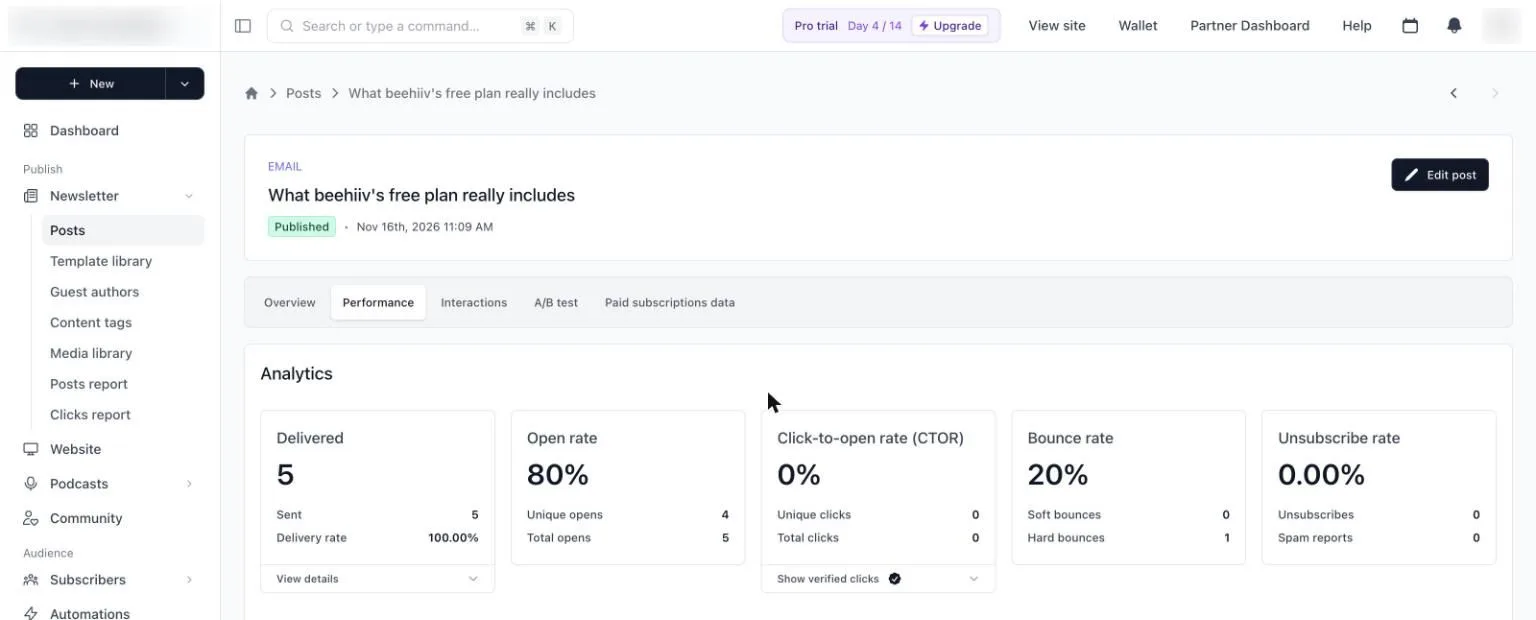
- My test post reached my inboxes in about a minute and Gmail put it in Promotions, not spam. 4 of my 5 addresses opened it and 1 hard bounced.
- Paid subscriptions, a custom domain, live automations and Ad Network offers start on Lite: $59 a month for up to 1,000 subscribers on monthly billing, or $49 a month billed annually.
- The AI writer drafted a paragraph from one prompt within ten seconds, but the text was generic. Ask beehiiv read my post's real numbers and gave four concrete suggestions.
- beehiiv's MCP server gave Claude more than 200 tools. On November 13 its write calls were refused; on day 4 of the 14-day Pro trial Claude created a draft post and a segment.
- Removing the "Powered by beehiiv" badge needs Pro, from $109 a month on monthly billing. See how that compares in my guide to the best newsletter platforms.
Quick answer: which tool fits you
- If you run the newsletter as the product and want ads, paid subscriptions and referrals in one place
 beehiivThis reviewFree to 2,500 subscribers, Lite from $59/mo
- If you want to write and publish with no monthly bill at any list size
 SubstackNo monthly fee, 10% of paid subscription revenue
- If you sell courses or digital products and need email sequences around them
 Kit
For this beehiiv review I set up a free publication, sent a post to five of my own addresses and went through every screen that decides which plan you need. Free covers the editor, sending, a hosted site and import. Lite adds the features that earn money or automate work.
Two things to plan for. The price follows your subscriber count, so Lite is $79 a month at 2,500 subscribers and $109 a month at 5,000 on monthly billing. And five of my own addresses say nothing about deliverability on a real list.
My rating
4.0 / 5
- Sending (my test)4.0
One post to five of my own addresses arrived in about a minute and landed in Gmail's Promotions tab, not in spam. That is a small test, not a deliverability check on a real list.
- Features and depth4.5
Editor, hosted website, signup page, segments, automations with 11 triggers, paid subscriptions, Ad Network, referrals and an MCP server are all in one tool, and nearly everything a publisher needs is there.
- Value for a small business4.0
Free covers 2,500 subscribers with unlimited sends, but paid subscriptions, a custom domain, live automations and ads start on Lite at $59 a month on monthly billing for up to 1,000 subscribers.
- Ease of use4.0
Setting up a publication and sending a post through the five editor steps was quick, though template styling is done element by element with hex codes.
- AI features3.0
On first impression the AI features feel somewhat limited. The AI writer's paragraph was correct but generic, while Ask beehiiv read my post's numbers well. The plan card lists the MCP server from Lite.
- Trial and billing4.5
A Free plan with no time limit, a 14-day Pro trial with no card, and monthly or annual billing with the price shown per subscriber count before you upgrade.
I rate only tools I have used myself, on criteria from 1 to 5, and leave out any I couldn't measure. The overall score is my own judgement, not an average. Rated 2026-11-16.
Compare it: beehiiv vs Substack · beehiiv vs Kit · beehiiv vs Ghost · beehiiv vs MailerLite · beehiiv vs Mailchimp
Who It's For
Who beehiiv is for (and who it isn't)
✓ Best for
- +Writers starting a newsletter from zero. Free covers 2,500 subscribers with unlimited sends, a hosted website and the full post editor, so the first months cost nothing.
- +Publishers who plan to charge for subscriptions. Paid subscriptions on Lite carry a 0% platform fee. You pay the plan price and Stripe's processing fee, not a share of revenue.
- +Newsletters that want ad income without a sales team. The Ad Network lists advertiser offers with per-click rates inside the app. Claiming them starts on Lite.
× Consider something else if
- −You want no monthly bill at any size. beehiiv's paid plans rise with your subscriber count. Substack charges no monthly fee and takes 10% of paid subscription revenue instead.Try Substack →
- −Email automation is the main job. beehiiv is built around publishing a newsletter. Kit is built around sequences, tags and selling digital products.Try Kit →
- −You want to own and host the publication yourself. beehiiv is a hosted service. Ghost is open source and can run on your own server.Try Ghost →
What You Can Do
What can beehiiv do?
Every beehiiv feature, and my verdict on each
This table lists every feature I found in the app's menu and what I can say about each after my own test. Where I only opened a screen, it says so.
The sections below follow the same order.
Post editor
- What it does
- One post for email and web, in five steps
- My verdict
- Fast to learn. Styling is set element by element
- Best for
- Writers who want to draft and send in one place
Sending
- What it does
- Email to your list from a beehiiv address
- My verdict
- Arrived in about a minute, Gmail Promotions, 4 of 5 opened
- Best for
- Any list up to 2,500 on Free
AI writer
- What it does
- Drafts text from a prompt inside a post
- My verdict
- Worked on the first try. The paragraph was generic
- Best for
- A first draft you rewrite
Ask beehiiv
- What it does
- Chat assistant that reads your account data
- My verdict
- Read my post's numbers correctly, four useful suggestions
- Best for
- Quick questions about performance
Subscriber import
- What it does
- CSV upload or pasted addresses
- My verdict
- 4 addresses added within a minute
- Best for
- Moving a list from another tool
Segments
- What it does
- Static or dynamic groups of subscribers
- My verdict
- A dynamic segment filled with 4 openers within minutes
- Best for
- Sending to engaged readers only
Analytics and reports
- What it does
- Dashboard, post analytics, subscribers report
- My verdict
- Clear numbers, verified clicks, source split
- Best for
- Checking what a send did
Automations
- What it does
- Flows started by 11 triggers or by adding a subscriber by hand
- My verdict
- My one-email flow went live on the trial, sent its email and completed in 20 seconds
- Best for
- Welcome series, from Lite
Website and signup page
- What it does
- Hosted site on a beehiiv.com address
- My verdict
- Signup page live from the first day. Seven templates in the simple builder. I did not publish a new design
- Best for
- Starting without your own site
Data export
- What it does
- Subscribers and posts as CSV files
- My verdict
- A quick subscriber export was ready within a minute
- Best for
- Backups and moving to another tool
Custom domain
- What it does
- Your own domain for site and sending
- My verdict
- Not tested: needs Lite
- Best for
- Brands that own their domain
Paid subscriptions
- What it does
- Charge readers, 0% platform fee
- My verdict
- Not tested: needs Lite and Stripe
- Best for
- Publishers selling subscriptions
Ad Network
- What it does
- Advertiser offers paid per click
- My verdict
- Offers visible. Not tested: claiming needs Lite
- Best for
- Lists that want ad income
Referral program
- What it does
- Rewards for readers who refer others
- My verdict
- Not tested: opens on the trial, stays on Lite
- Best for
- Growth from existing readers
Boosts and recommendations
- What it does
- Paid and free cross-promotion
- My verdict
- Not tested
- Best for
- Growing through other newsletters
MCP server
- What it does
- Lets an AI assistant read and write your publication
- My verdict
- More than 200 tools. Writes worked on day 4 of the trial
- Best for
- Running the newsletter from Claude
API
- What it does
- Programmatic access
- My verdict
- Not tested: a key needs identity verification
- Best for
- Developers and integrations
Podcasts, Community, Products, Tip jar, polls and surveys
- What it does
- Extra products in the menu
- My verdict
- Not tested
- Best for
- Publishers adding more formats
| Feature | What it does | My verdict | Best for |
|---|---|---|---|
| Post editor | One post for email and web, in five steps | Fast to learn. Styling is set element by element | Writers who want to draft and send in one place |
| Sending | Email to your list from a beehiiv address | Arrived in about a minute, Gmail Promotions, 4 of 5 opened | Any list up to 2,500 on Free |
| AI writer | Drafts text from a prompt inside a post | Worked on the first try. The paragraph was generic | A first draft you rewrite |
| Ask beehiiv | Chat assistant that reads your account data | Read my post's numbers correctly, four useful suggestions | Quick questions about performance |
| Subscriber import | CSV upload or pasted addresses | 4 addresses added within a minute | Moving a list from another tool |
| Segments | Static or dynamic groups of subscribers | A dynamic segment filled with 4 openers within minutes | Sending to engaged readers only |
| Analytics and reports | Dashboard, post analytics, subscribers report | Clear numbers, verified clicks, source split | Checking what a send did |
| Automations | Flows started by 11 triggers or by adding a subscriber by hand | My one-email flow went live on the trial, sent its email and completed in 20 seconds | Welcome series, from Lite |
| Website and signup page | Hosted site on a beehiiv.com address | Signup page live from the first day. Seven templates in the simple builder. I did not publish a new design | Starting without your own site |
| Data export | Subscribers and posts as CSV files | A quick subscriber export was ready within a minute | Backups and moving to another tool |
| Custom domain | Your own domain for site and sending | Not tested: needs Lite | Brands that own their domain |
| Paid subscriptions | Charge readers, 0% platform fee | Not tested: needs Lite and Stripe | Publishers selling subscriptions |
| Ad Network | Advertiser offers paid per click | Offers visible. Not tested: claiming needs Lite | Lists that want ad income |
| Referral program | Rewards for readers who refer others | Not tested: opens on the trial, stays on Lite | Growth from existing readers |
| Boosts and recommendations | Paid and free cross-promotion | Not tested | Growing through other newsletters |
| MCP server | Lets an AI assistant read and write your publication | More than 200 tools. Writes worked on day 4 of the trial | Running the newsletter from Claude |
| API | Programmatic access | Not tested: a key needs identity verification | Developers and integrations |
| Podcasts, Community, Products, Tip jar, polls and surveys | Extra products in the menu | Not tested | Publishers adding more formats |
My test publication on beehiiv's Free plan, November 13 and 16, 2026. The 14-day Pro trial was running on both days.
What it's like to use
beehiiv feels like a finished product. The menu is grouped into Publish, Audience, Monetize and Grow, and I found every feature where I expected it.
Nearly everything a publisher needs is in one tool: the editor, a site, a signup page, segments, automations, ads and subscriptions. That is why I call it a safe default.
The app is open about what costs money. Most Lite features can be opened and configured before you pay, with a notice that names the plan.
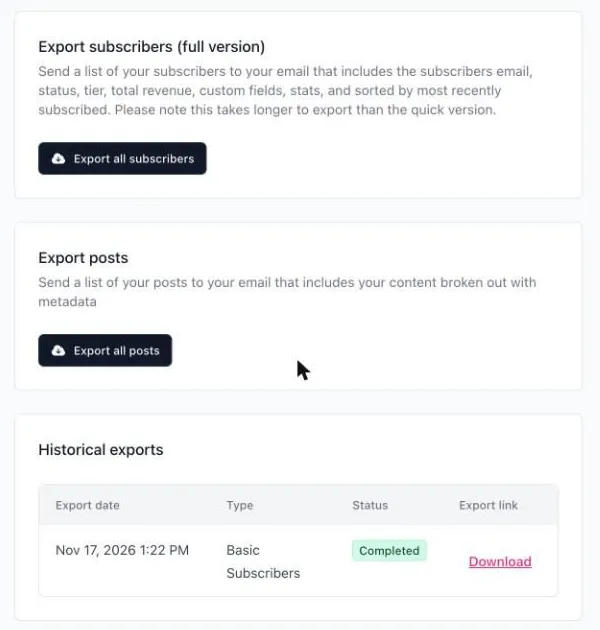
Getting your data out is simple too. Export data in the settings has a quick subscriber export with email, status and tier, a full one that adds revenue, custom fields and stats, and a post export. I requested the quick export for my five subscribers and it was marked completed, with a download link, within a minute. I did not open the file.
My first impression of the AI features is that they are limited next to newer newsletter tools. If AI drafting matters most to you, compare it with Kit and MailerLite before you decide.
Setup and the defaults you get
Setting up a publication took a name, a handle and a few onboarding questions. No credit card was asked for, and the Pro trial started on its own.
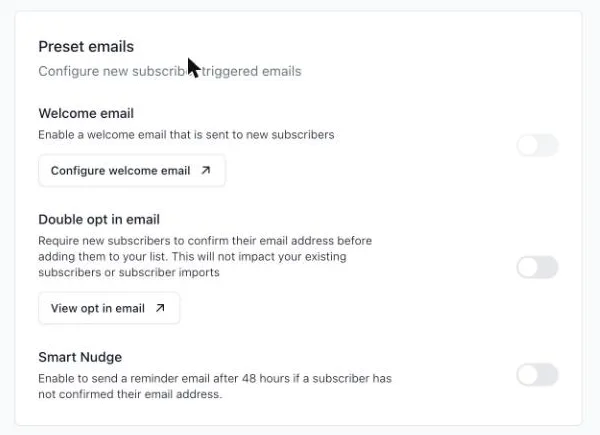
I recorded the defaults before changing anything. Double opt-in is off, so a new subscriber is added without a confirmation email. Turn it on if you want confirmed addresses only.
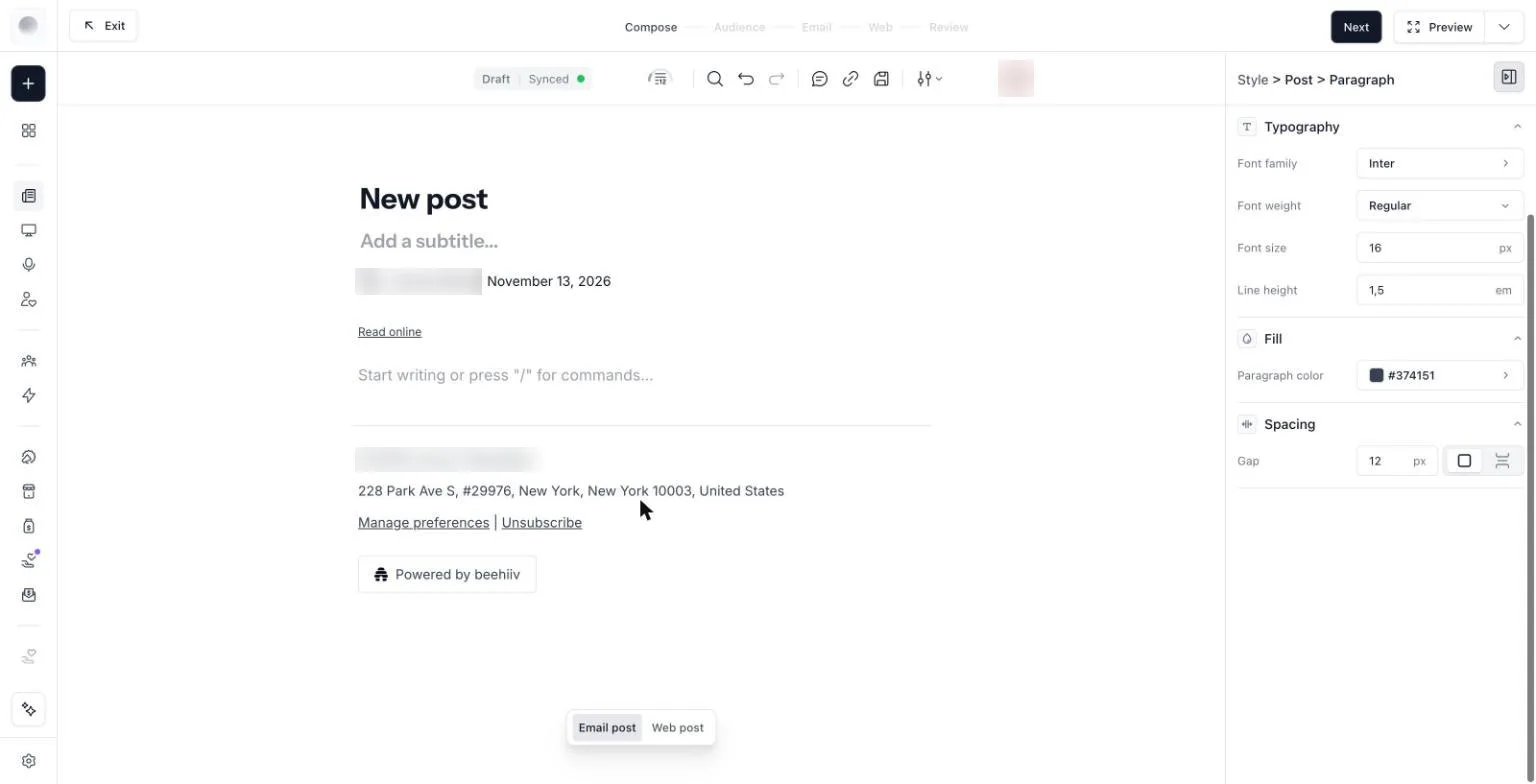
The email footer showed a New York postal address that I had not entered. Check the footer before your first real send and add your own address.
Language
- Default in my new publication
- English
Time zone
- Default in my new publication
- Eastern Time (US and Canada)
Double opt-in
- Default in my new publication
- Off
Smart nudge
- Default in my new publication
- Off
Automatic UTM tagging
- Default in my new publication
- On
Subscriber approval
- Default in my new publication
- Off
Subscribe button text
- Default in my new publication
- Subscribe
Sender name
- Default in my new publication
- Empty
Automations, segments, subscribe forms
- Default in my new publication
- None
| Setting | Default in my new publication |
|---|---|
| Language | English |
| Time zone | Eastern Time (US and Canada) |
| Double opt-in | Off |
| Smart nudge | Off |
| Automatic UTM tagging | On |
| Subscriber approval | Off |
| Subscribe button text | Subscribe |
| Sender name | Empty |
| Automations, segments, subscribe forms | None |
Defaults read from my publication's settings on November 16, 2026, before I changed any of them.
Write a post in the editor
A post moves through five steps: Compose, Audience, Email, Web and Review. The same post goes to the inbox and to the website, and you can set each one separately.
Typing "## " at the start of a line turns it into a heading, so drafting is fast if you write in Markdown. A slash opens a menu of blocks.
Templates are styled per element, such as headings, paragraphs and buttons, and colours are entered as hex codes. I did not find a way to import a brand's styles from an existing site.
Every post on Free and Lite carries a "Powered by beehiiv" badge. Removing it is listed under Pro.
Send test: delivery and inbox placement
On November 16, 2026 I sent one post to five of my own addresses as email only. It reached the inboxes I could check in about a minute.
Gmail put it in the Promotions tab, not in spam. The email came from a beehiiv sending address, because a custom sending domain needs Lite.
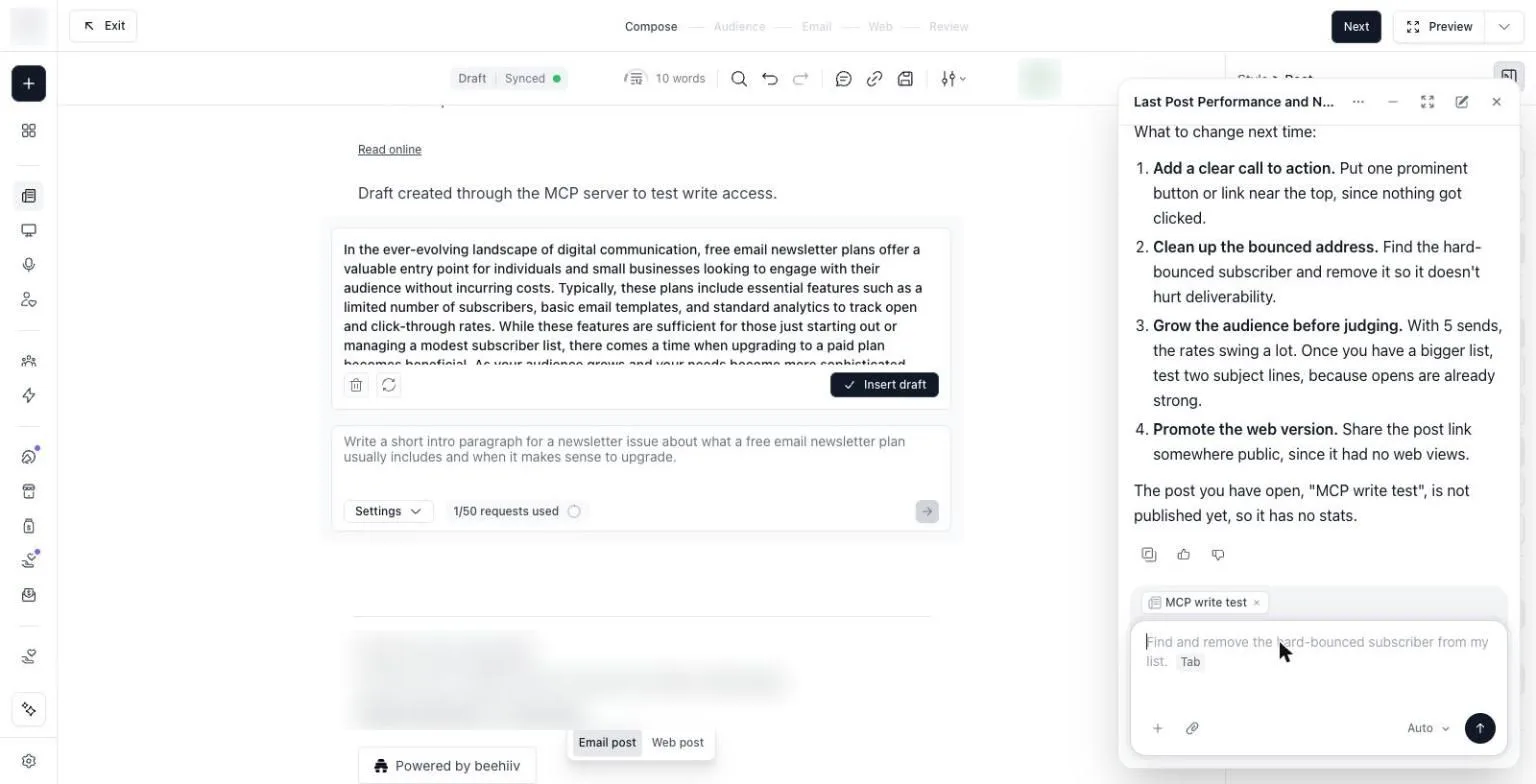
One of my addresses hard bounced. beehiiv showed that in the post analytics, and Ask beehiiv later suggested removing the address.
This shows that sending works on Free. It is not a deliverability test: five of my own addresses say nothing about a real list.
Sent
- Result
- 5
Delivered, as beehiiv reports it
- Result
- 5 (100%)
Unique opens
- Result
- 4 (80%)
Clicks
- Result
- 0
Hard bounces
- Result
- 1
Unsubscribes and spam reports
- Result
- 0
Time to inbox
- Result
- About 1 minute
Gmail placement
- Result
- Promotions tab
| Measure | Result |
|---|---|
| Sent | 5 |
| Delivered, as beehiiv reports it | 5 (100%) |
| Unique opens | 4 (80%) |
| Clicks | 0 |
| Hard bounces | 1 |
| Unsubscribes and spam reports | 0 |
| Time to inbox | About 1 minute |
| Gmail placement | Promotions tab |
One post sent as email only to five of my own addresses on November 16, 2026. Numbers from beehiiv's post analytics.
AI writer and Ask beehiiv
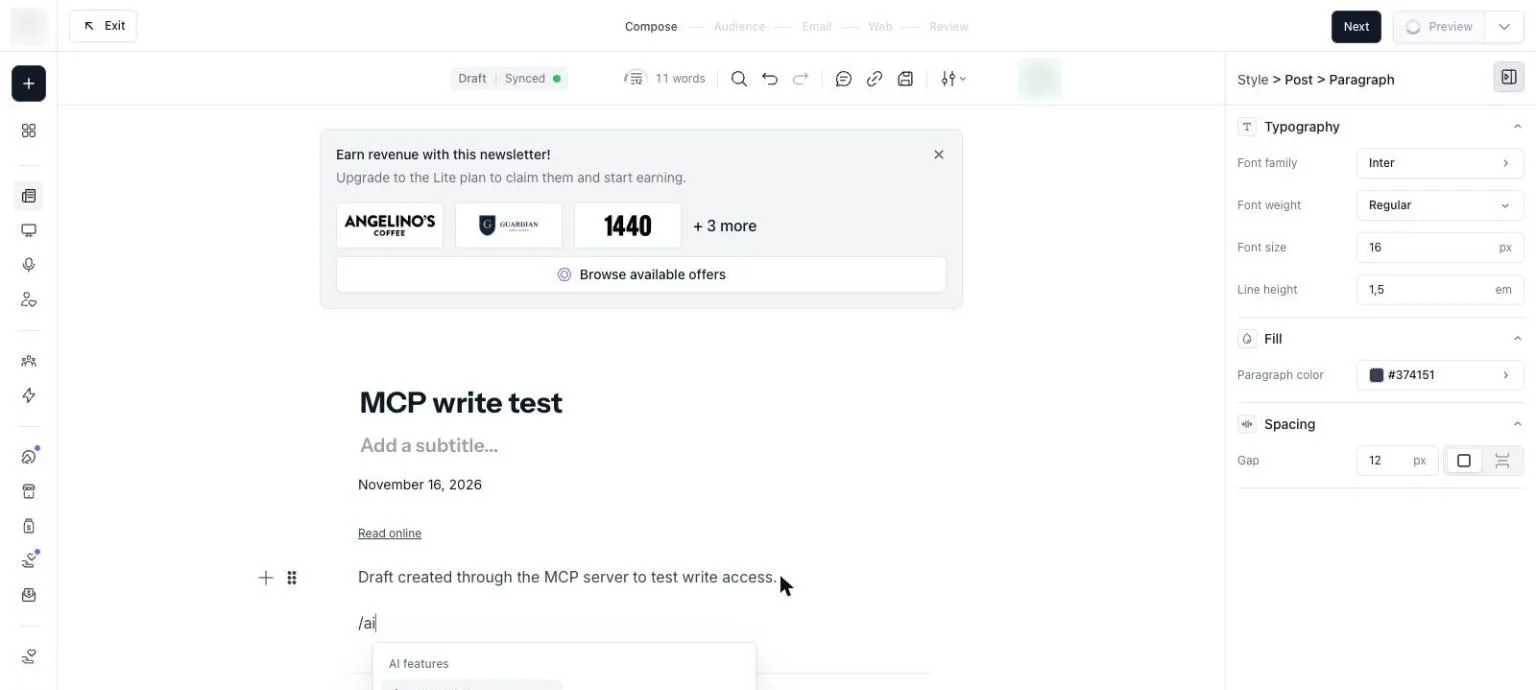
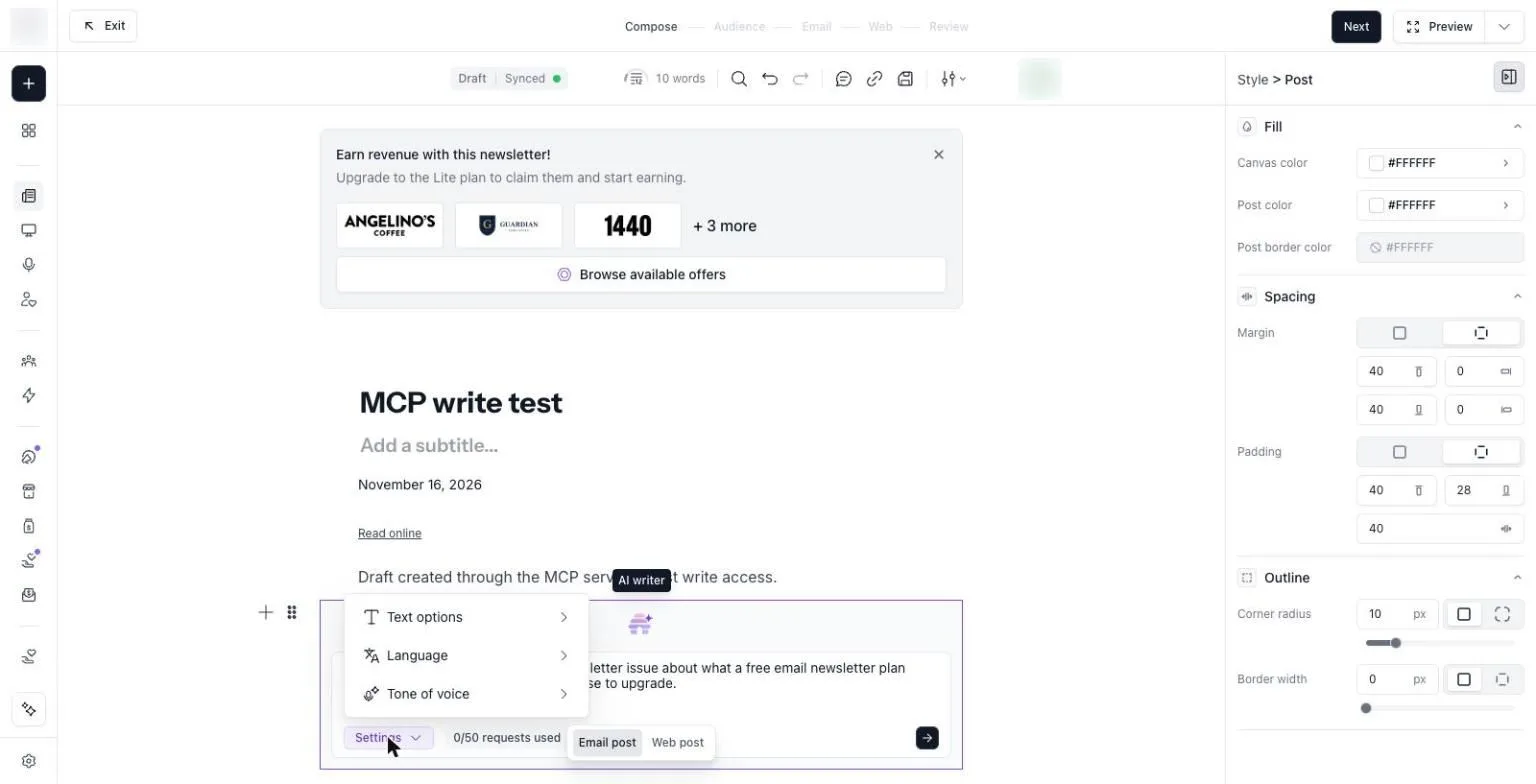
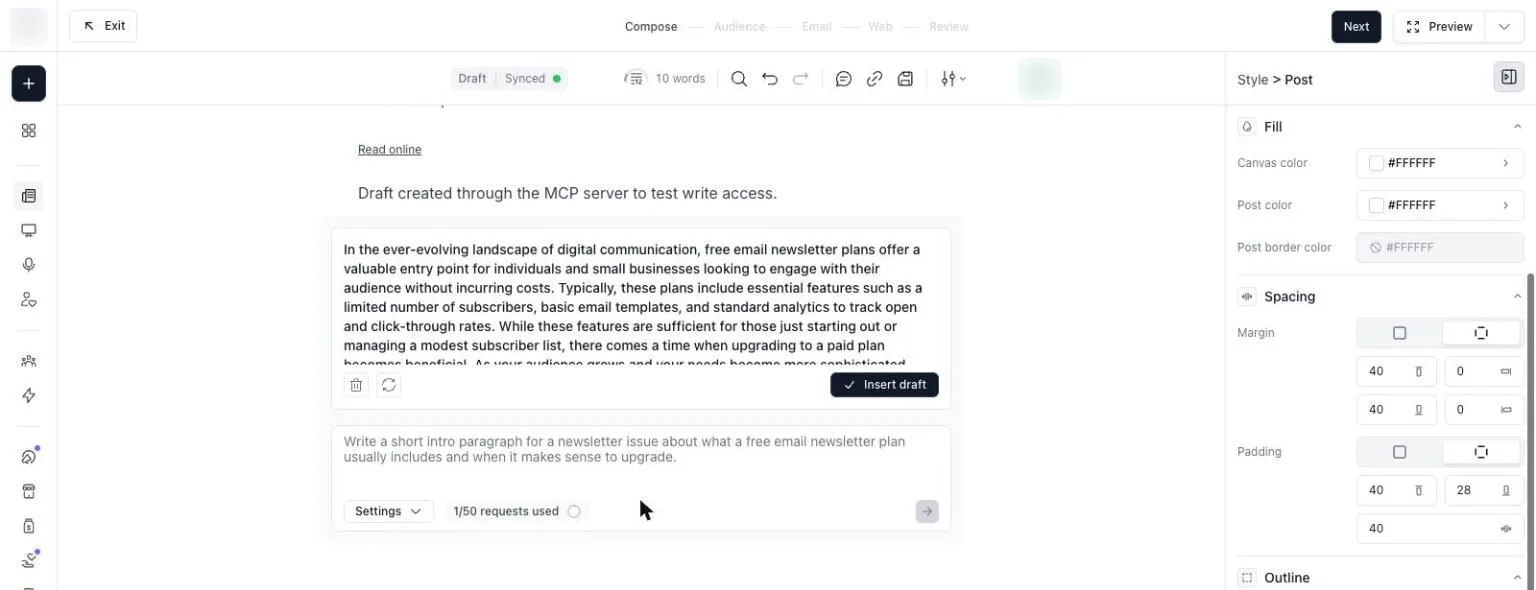
I tested two AI features. The AI writer sits in the editor: type /ai, describe what you want, and choose text options, a language and a tone of voice. A counter showed 50 requests, and my prompt used one.
I asked for a short intro about what a free newsletter plan includes. The paragraph came back within ten seconds. It was correct and readable, but it opened with a stock phrase and could have been about any tool. I would rewrite it before sending.
Ask beehiiv is a chat panel that reads your account. I asked how my last post performed and what to change. It answered from the real numbers and gave four suggestions: add a clear call to action, remove the bounced address, grow the list before judging the rates, and share the web version.
That answer was more useful than I expected from a five-subscriber account. I tested both on day 4 of the Pro trial, so I can't confirm which of them stay on the Free plan after it ends.
Import a list and build segments
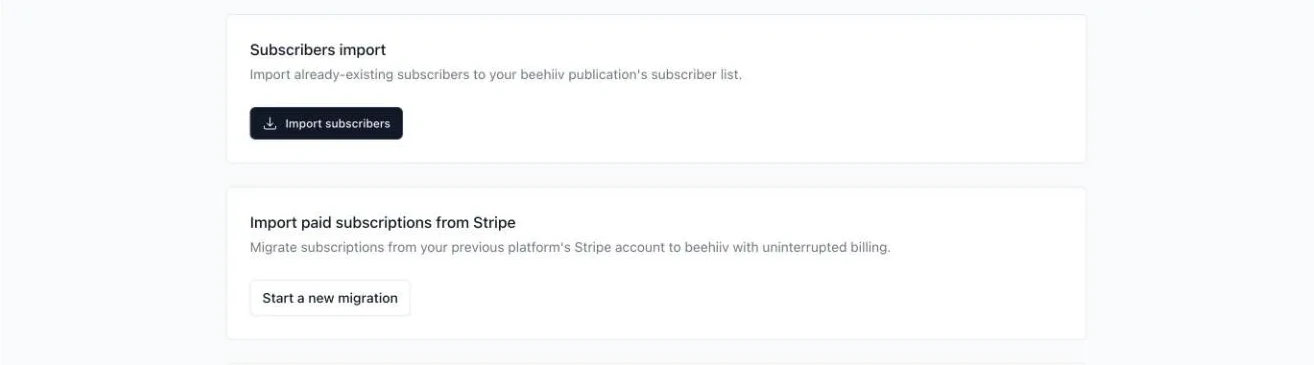
Subscribers come in as a CSV file or as pasted email addresses. There is also a migration for paid subscriptions that already run on Stripe.
I pasted in four of my own addresses and they were added within a minute, after a step that asks you to confirm the people agreed to receive your emails. I did not see importers named for specific platforms, so plan for a CSV export from your current tool.
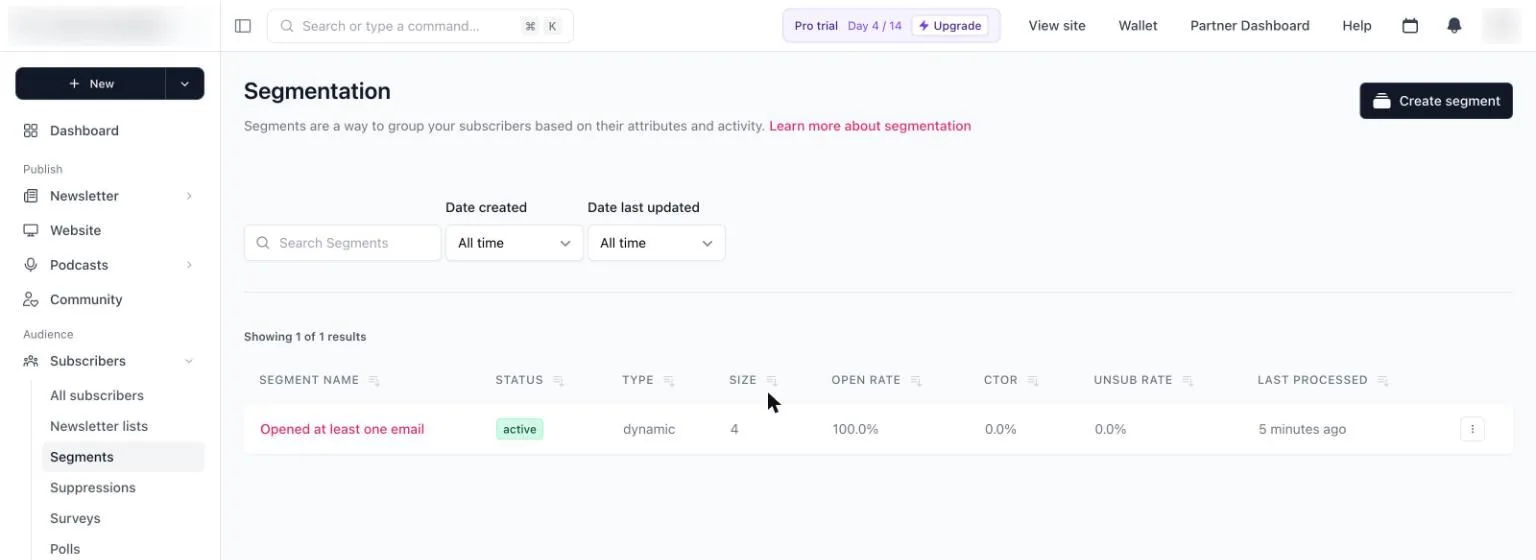
Segments can be static or dynamic. I created a dynamic segment for subscribers who opened at least one email. It was processed within minutes and held the 4 addresses that opened my post.
If segments and tags are the centre of your work, read my Kit review too.
Analytics and reports
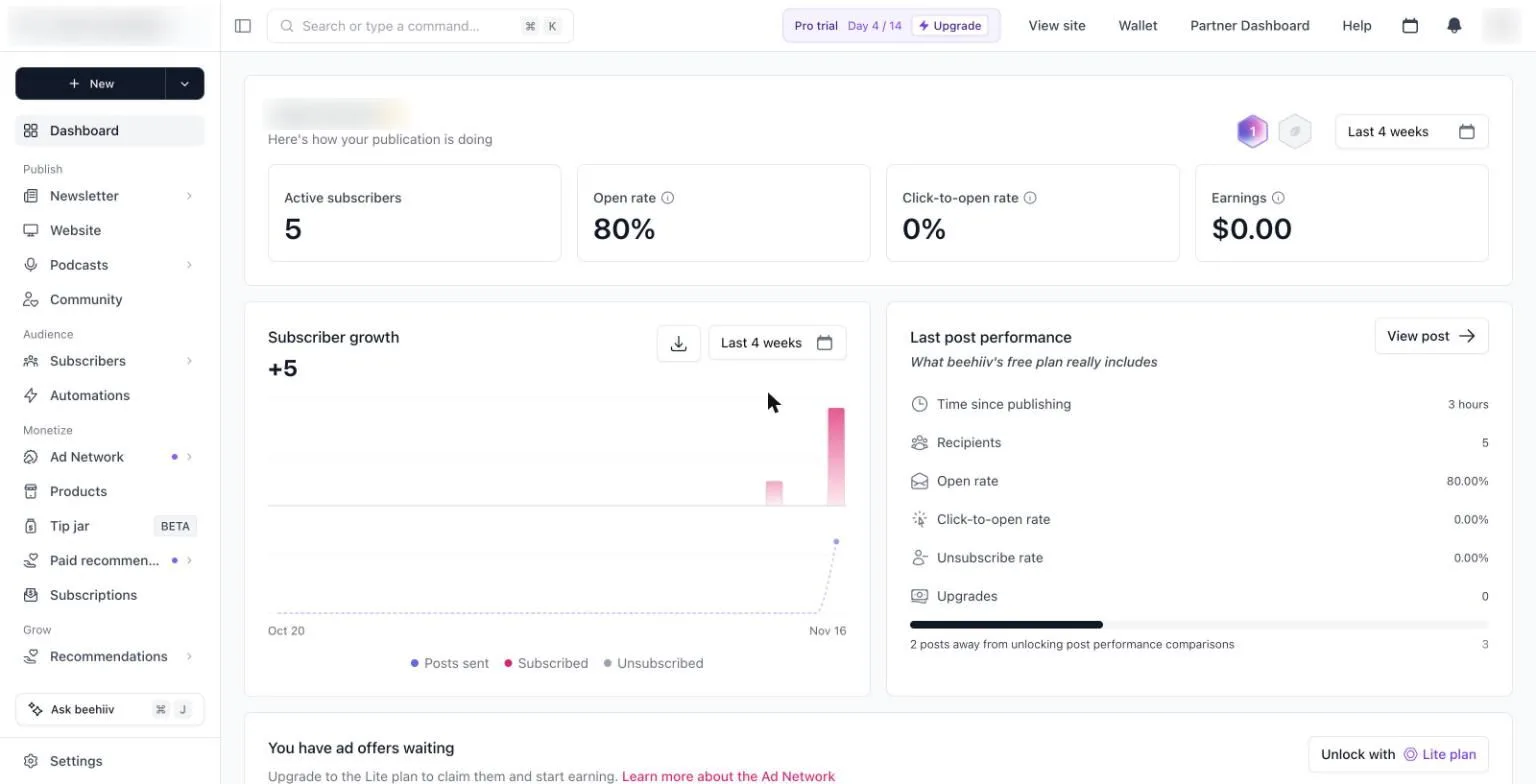
The dashboard shows active subscribers, open rate, click-to-open rate and earnings, with the last post's numbers next to a growth chart.
Post analytics split opens, clicks, bounces and unsubscribes, and a "verified clicks" switch filters out clicks made by email scanners.
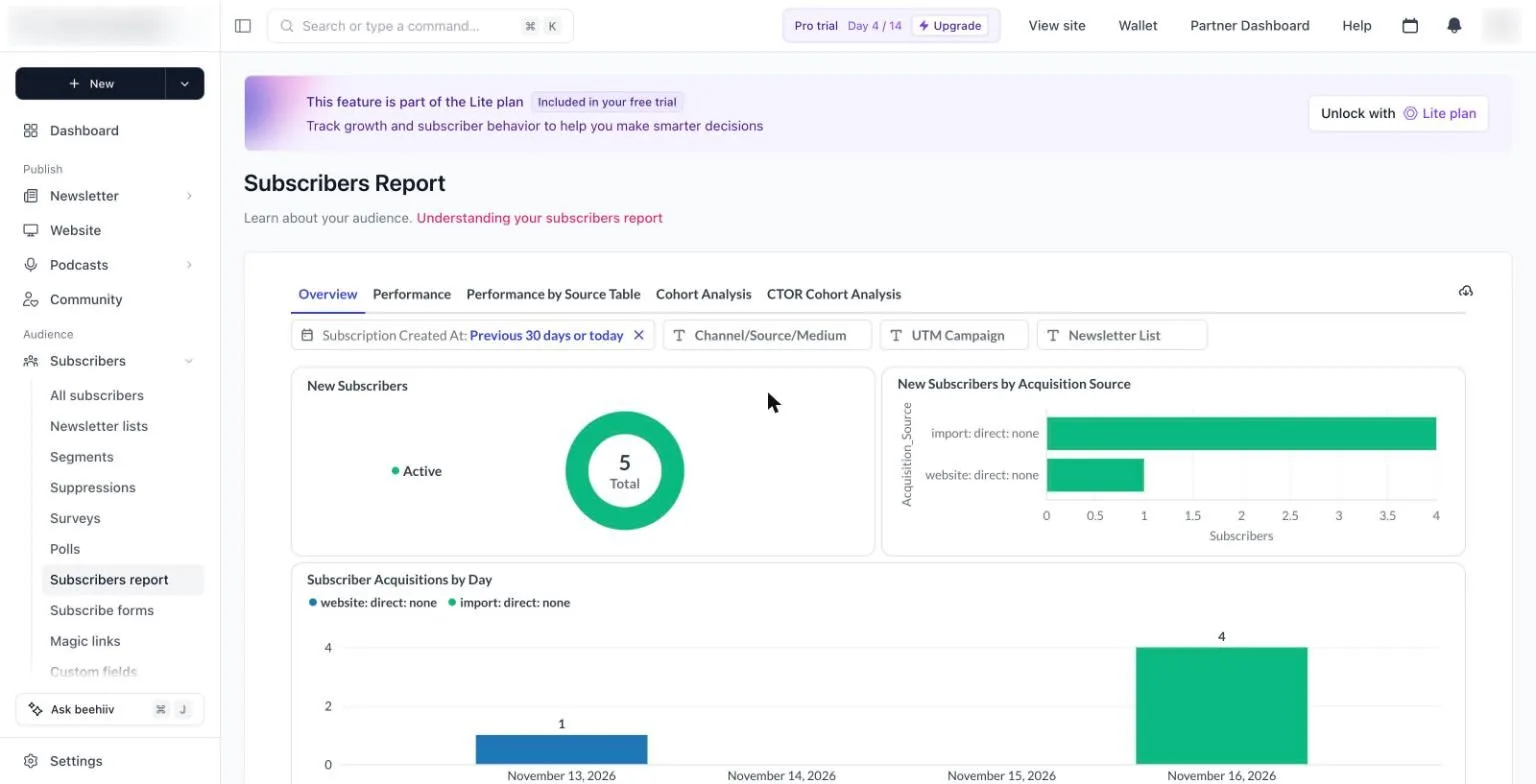
The subscribers report breaks new subscribers down by acquisition source. In my account it showed 4 from import and 1 from the website. The app marks this report as a Lite feature that the trial includes.
Automations
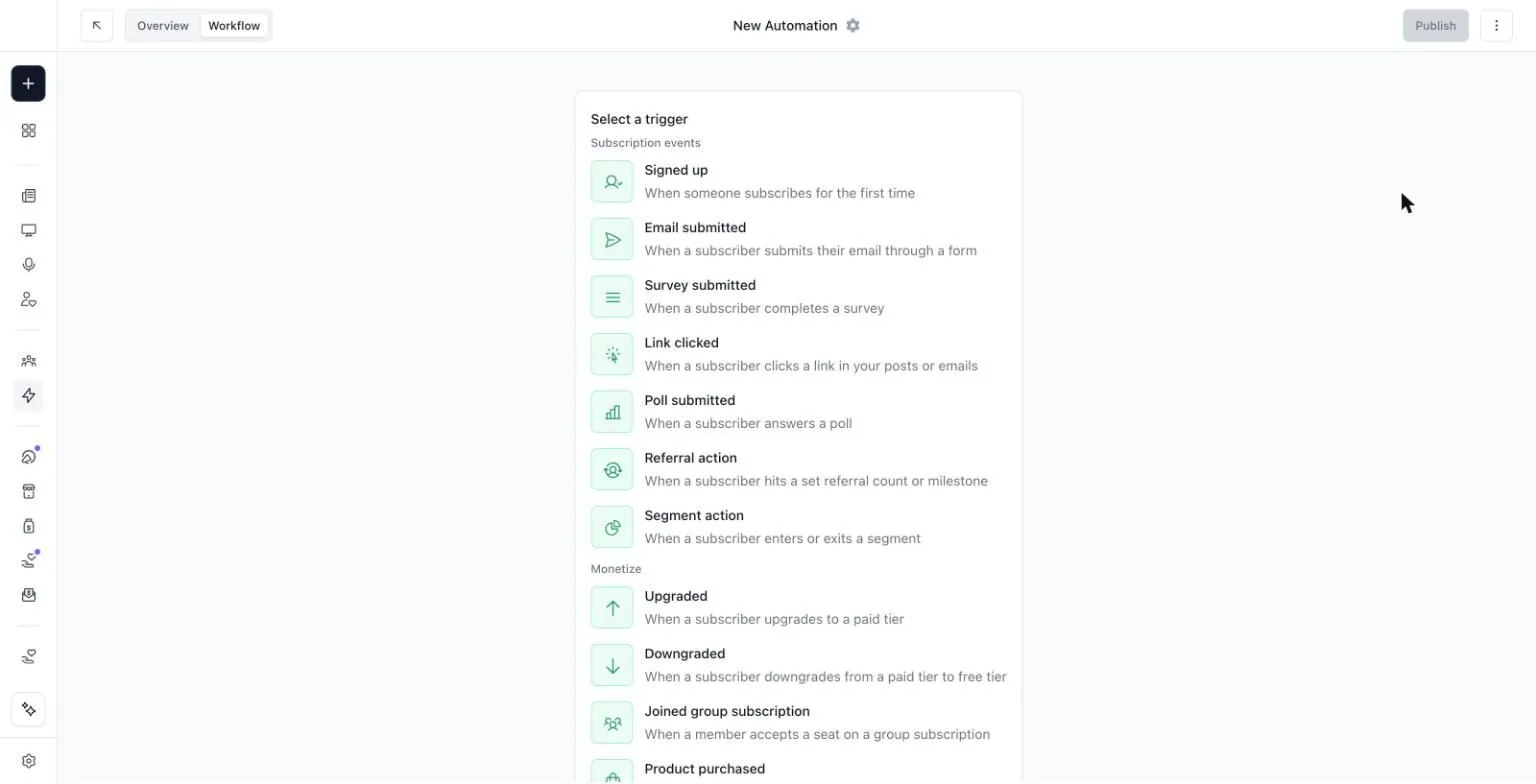
The automation builder starts with a trigger. I counted 11: signed up, email submitted, survey submitted, link clicked, poll submitted, referral action, segment action, upgraded, downgraded, joined group subscription and product purchased.
I did not see an email-opened trigger in the list. A segment action can stand in for it, because a dynamic segment can follow opens.
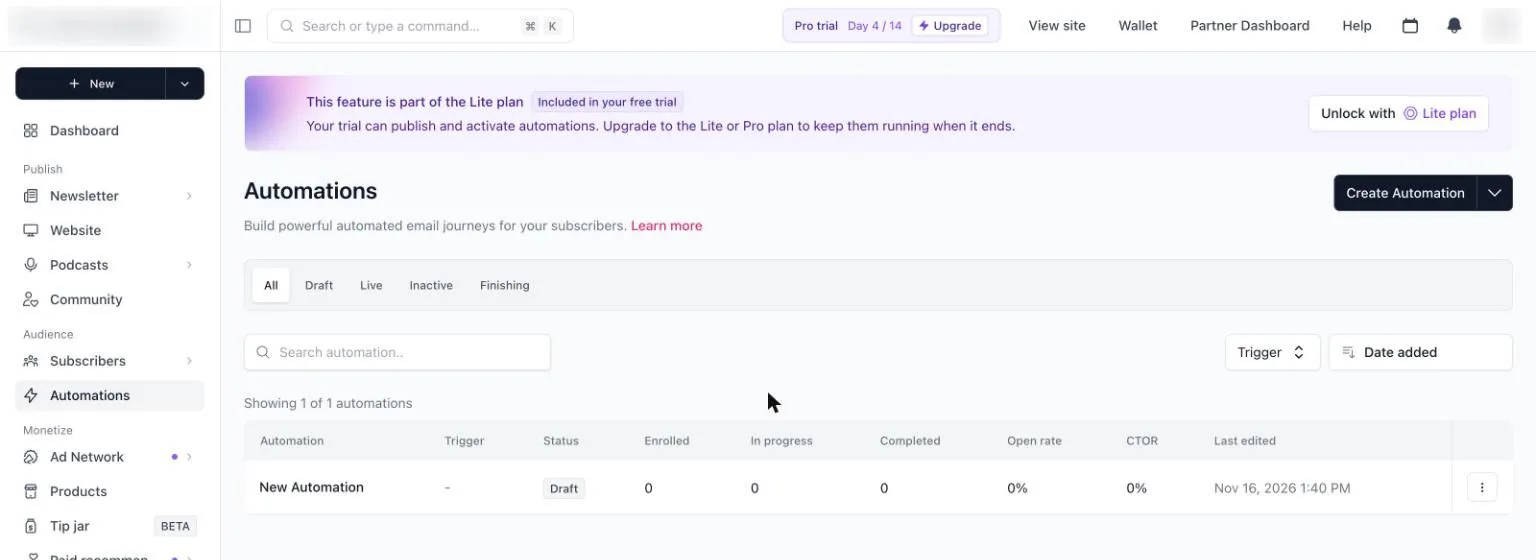
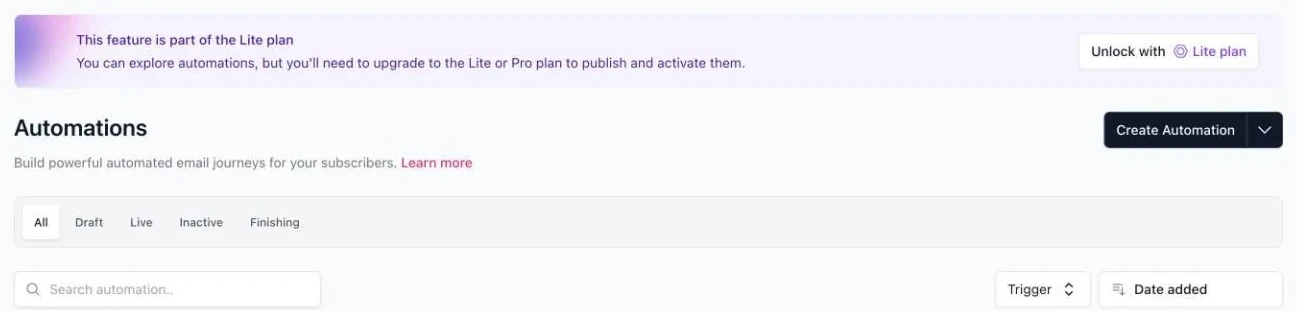
On day 4 of the trial the page said my trial can publish and activate automations, and that they stop when it ends unless I upgrade to Lite or Pro. I ran one on day 5.
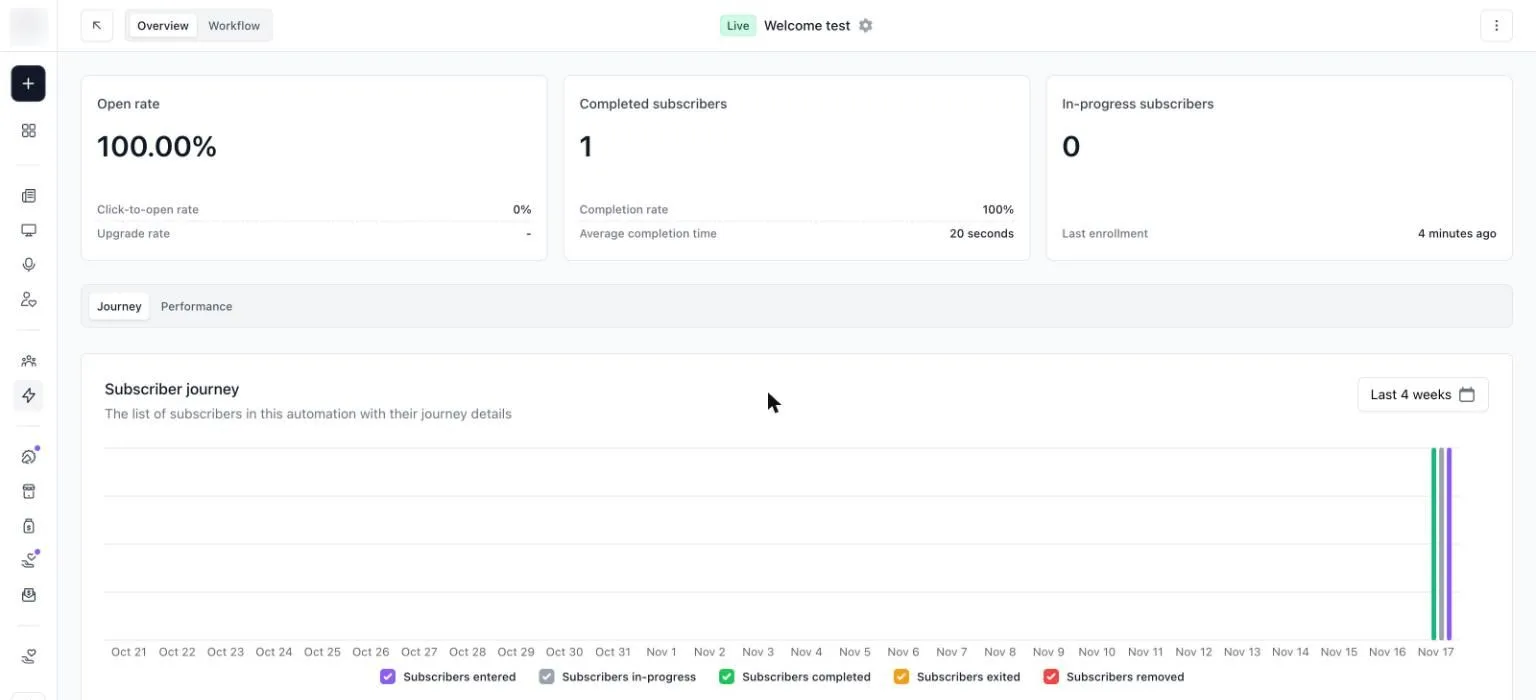
My flow had a manual trigger and one email. Publishing asked for one confirmation and the status changed from Draft to Live. I then enrolled one of my own addresses, which is done from the subscriber's profile menu and not from the automation itself. beehiiv notes that this skips the flow's triggers and conditions.
The email was sent and delivered, and the overview showed the run as completed in 20 seconds. When I deactivated the flow, beehiiv asked whether subscribers still in progress should be removed or allowed to finish.
That makes the trial a fair way to judge the builder: build your welcome series and see whether it does what you need before you pay.
What the Free plan gives you
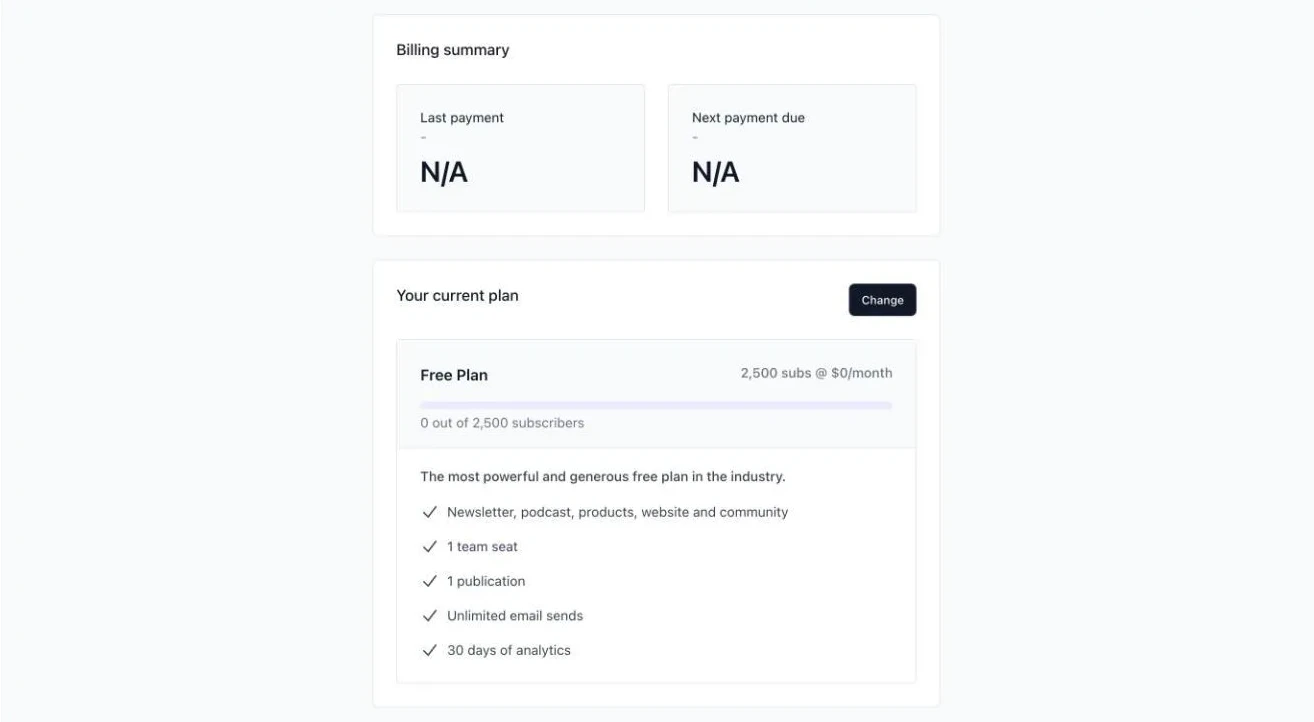
The billing page states the limits plainly: 2,500 subscribers, one seat, one publication, $0. Sends are unlimited.
The plan card lists email templates, landing pages, the recommendation network and API and integrations. Analytics on Free go back 30 days.
What Free leaves out is everything that earns money or automates work: paid subscriptions, ads, a custom domain and live automations.
If you want no monthly bill at any list size, my Substack review covers the other pricing model.
Paid subscriptions and the plan gates
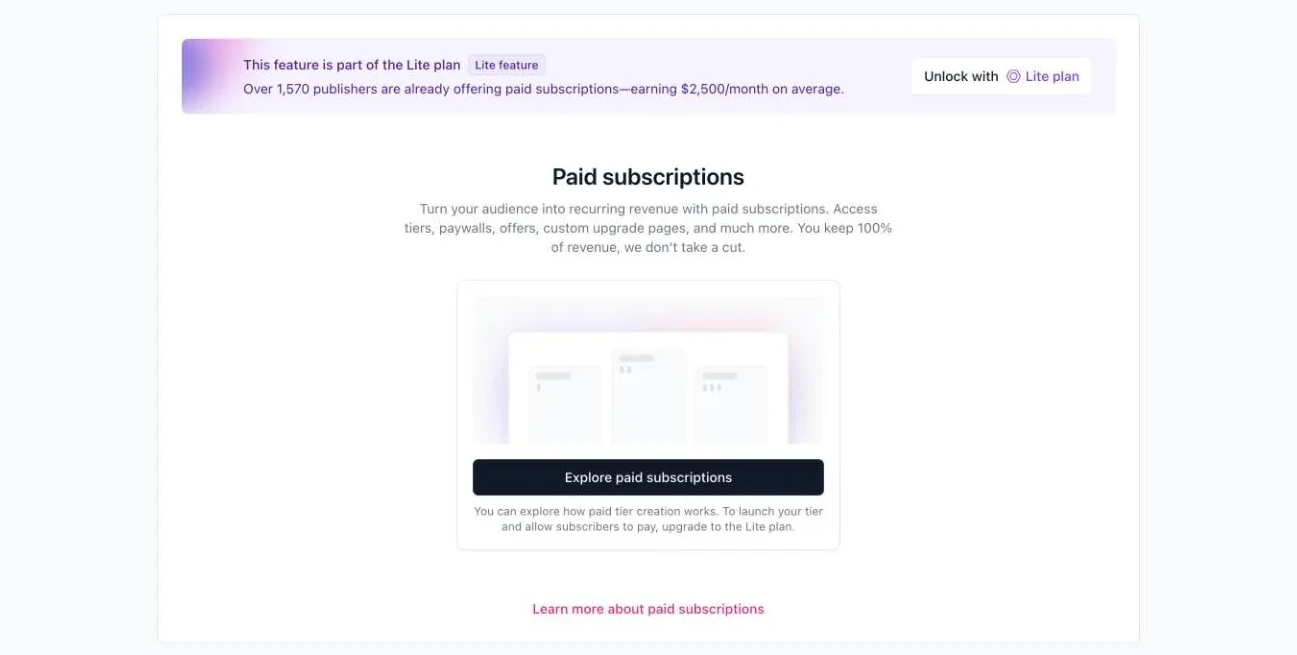
The paid subscriptions screen opens on Free and lets you look at tiers and settings, with a notice that the feature is part of the Lite plan.
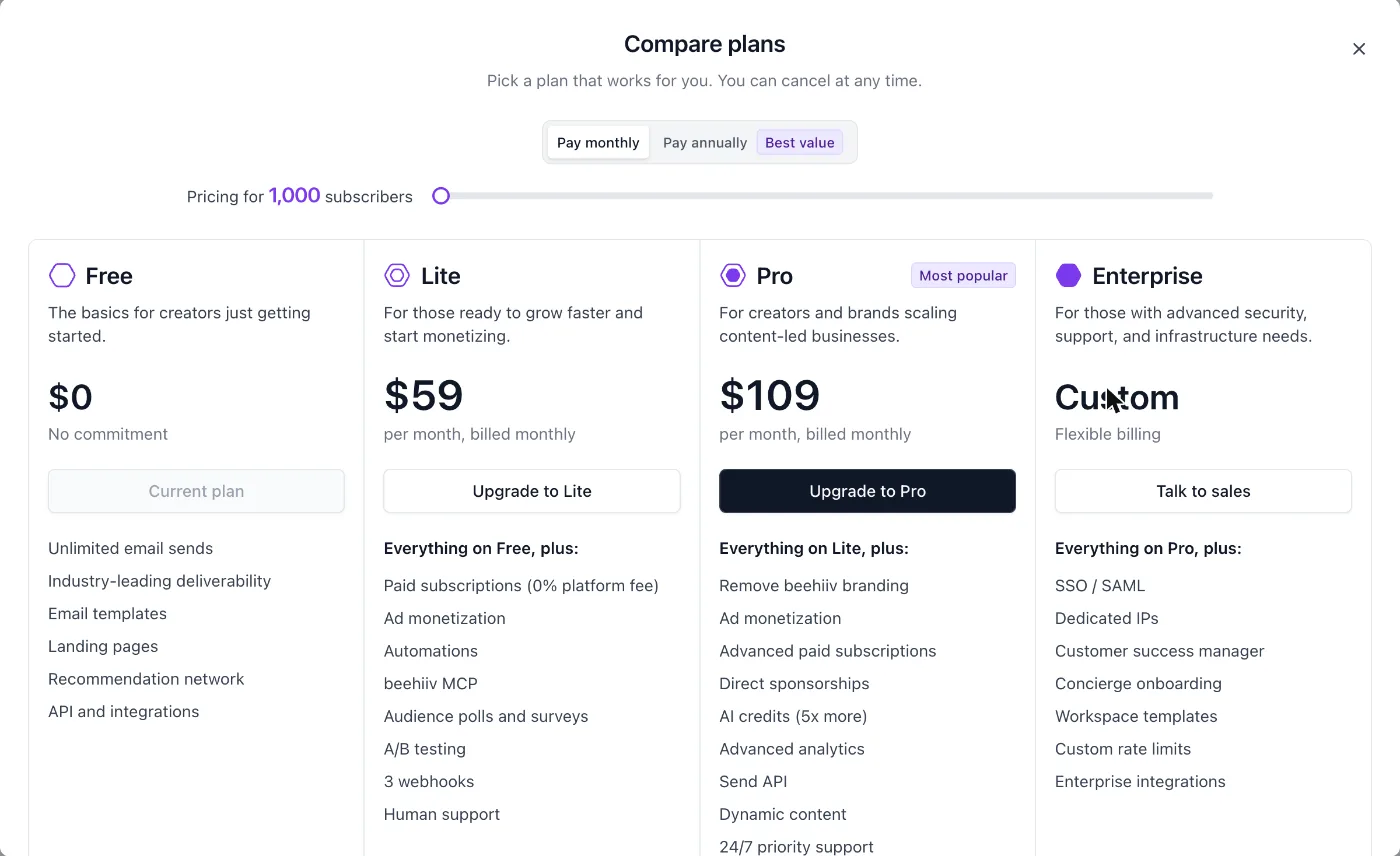
beehiiv's plan card says "Paid subscriptions (0% platform fee)". The cost of charging readers is the plan price plus Stripe's processing fee of 2.9% + $0.30 per payment.
According to beehiiv's pricing page, Lite includes one paid tier and Pro unlimited tiers. I did not connect Stripe or take a payment. I put the fee models side by side in newsletter platform fees compared.
Subscribers
- Free
- Up to 2,500
- Lite
- Up to 100,000
- Pro
- Up to 250,000
Paid subscriptions
- Free
- Explore only
- Lite
- Yes, 0% platform fee
- Pro
- Yes, unlimited tiers
Custom domain
- Free
- No, beehiiv.com address
- Lite
- Yes
- Pro
- Yes
Automations
- Free
- Build only
- Lite
- Yes
- Pro
- Yes
Ad Network offers
- Free
- View only
- Lite
- Yes
- Pro
- Yes
Direct sponsorships
- Free
- No
- Lite
- No
- Pro
- Yes
Remove beehiiv badge
- Free
- No
- Lite
- No
- Pro
- Yes
MCP server
- Free
- Listed from Lite
- Lite
- Yes
- Pro
- Yes
| Feature | Free | Lite | Pro |
|---|---|---|---|
| Subscribers | Up to 2,500 | Up to 100,000 | Up to 250,000 |
| Paid subscriptions | Explore only | Yes, 0% platform fee | Yes, unlimited tiers |
| Custom domain | No, beehiiv.com address | Yes | Yes |
| Automations | Build only | Yes | Yes |
| Ad Network offers | View only | Yes | Yes |
| Direct sponsorships | No | No | Yes |
| Remove beehiiv badge | No | No | Yes |
| MCP server | Listed from Lite | Yes | Yes |
The plan cards in the Compare plans dialog and the notices in the app, read on November 13 and 16, 2026.
Website, signup page and custom domain
Every publication gets a hosted site and a signup page on a beehiiv.com address. Mine was live from the first day, and one subscriber in my report came through it.
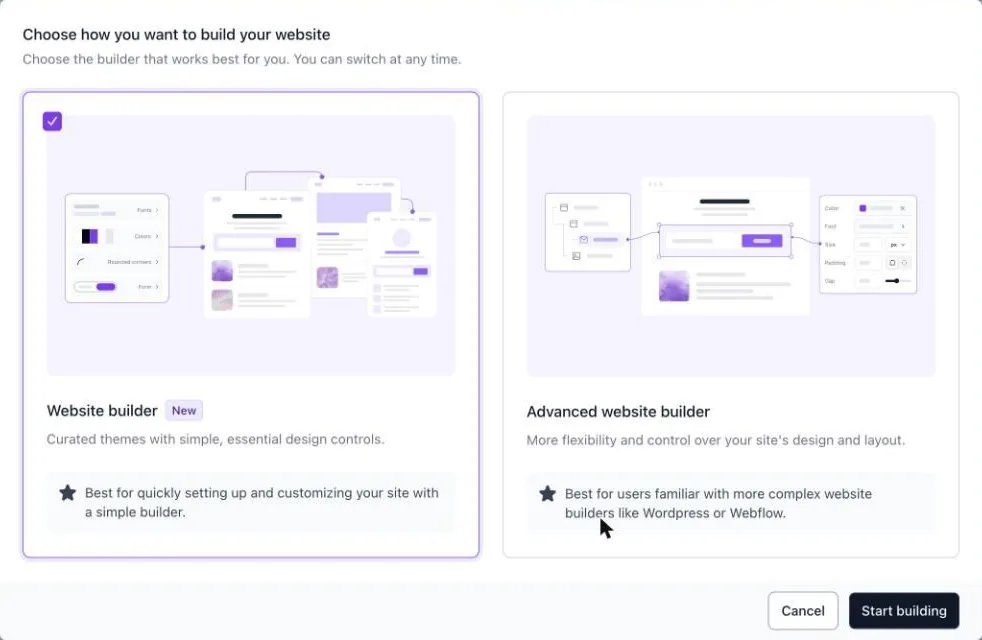
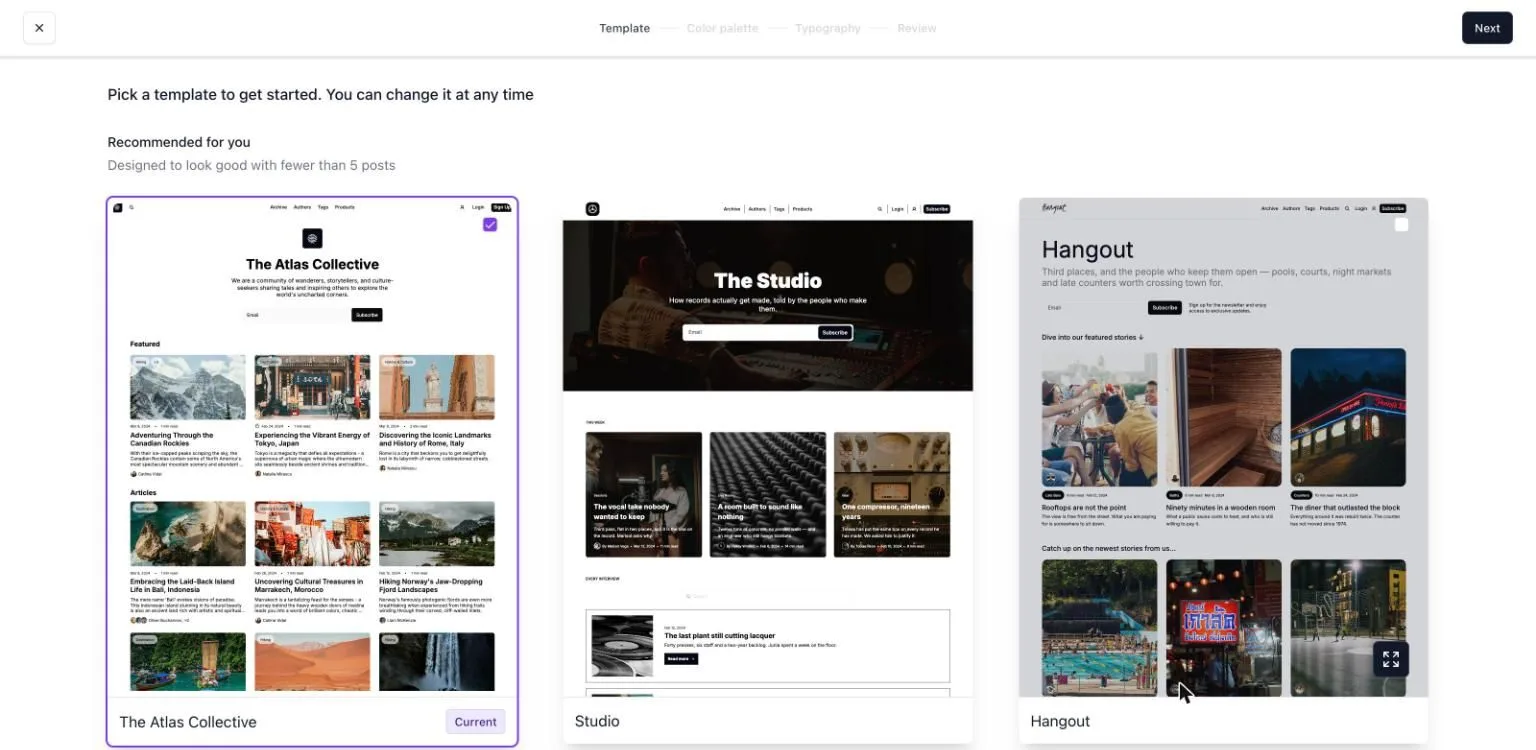
There are two website builders: a simple one with curated themes and an advanced one that beehiiv describes as closer to WordPress or Webflow. In the simple builder I counted seven templates, five meant for publications with fewer than five posts and two for larger archives.
Setup runs in four steps: template, color palette, typography and review. Colors and fonts come from presets or from a Generate with AI button. The editor then has three panels: Theme, Globals for the navbar, footer and subscribe form, and Pages.
You can add feature pages for products, podcasts, authors, tags, surveys and newsletters. The Upgrade page and custom HTML pages carry a paid-plan mark. Until a first post is published on the web, the home page redirects to the signup page.
I went through the steps and opened the editor, but I did not publish a new design, so I can't judge a finished site.
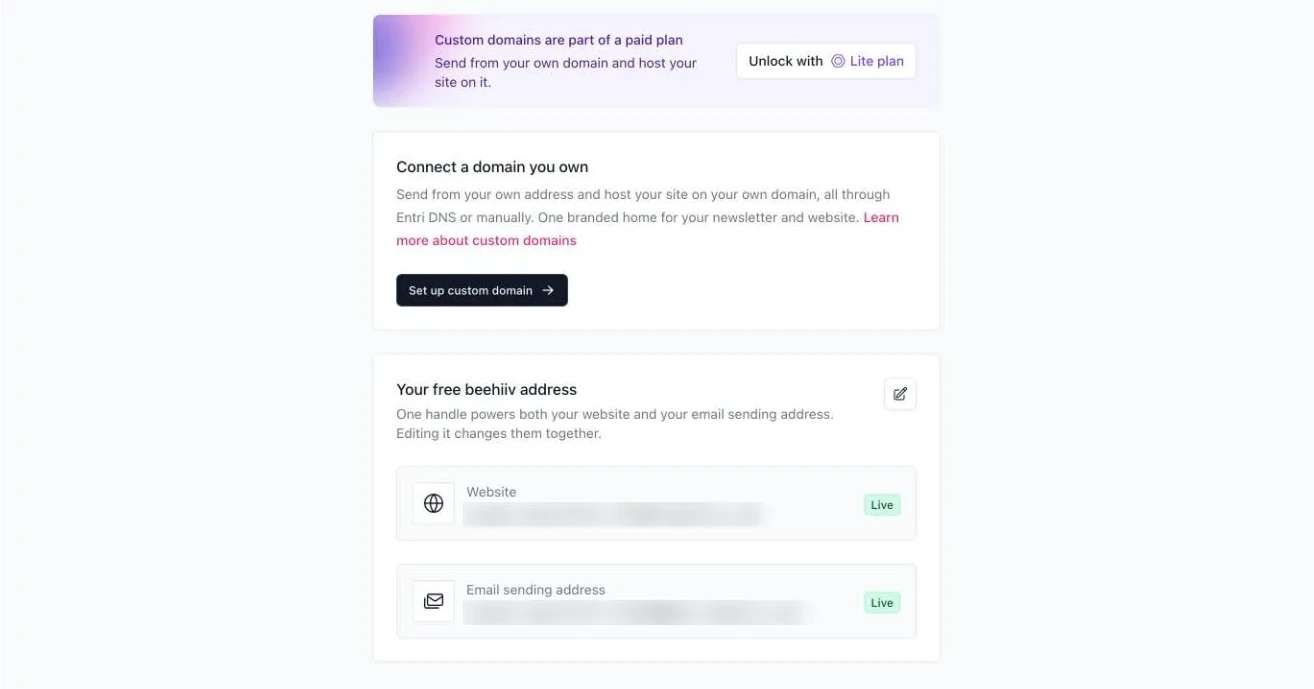
Adding your own domain for the site or for sending asks for Lite. If you plan to build a brand on your own domain, treat Lite as the real starting plan: moving a publication's address later means updating links and sender settings.
If you would rather own and host the whole publication, see my Ghost review.
Ad Network, sponsorships and referrals
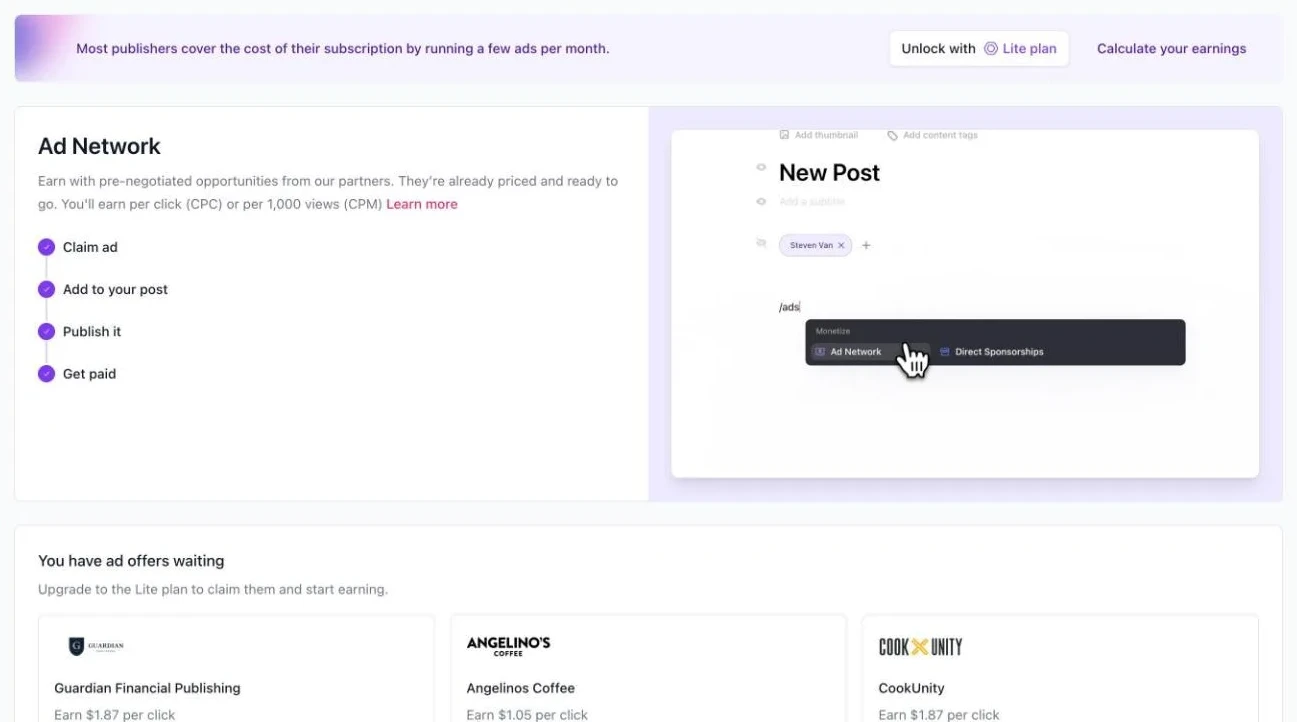
The Ad Network screen showed real advertiser offers with per-click rates even on Free. Claiming an offer needs Lite.
Direct sponsorships, where you sell your own ad slots through beehiiv, are listed under Pro.
The referral program opened on the trial with a notice that it pauses when the trial ends unless you upgrade. I did not run an ad or a referral campaign, so I can't say what a small list earns from them.
Run beehiiv from Claude with the MCP server
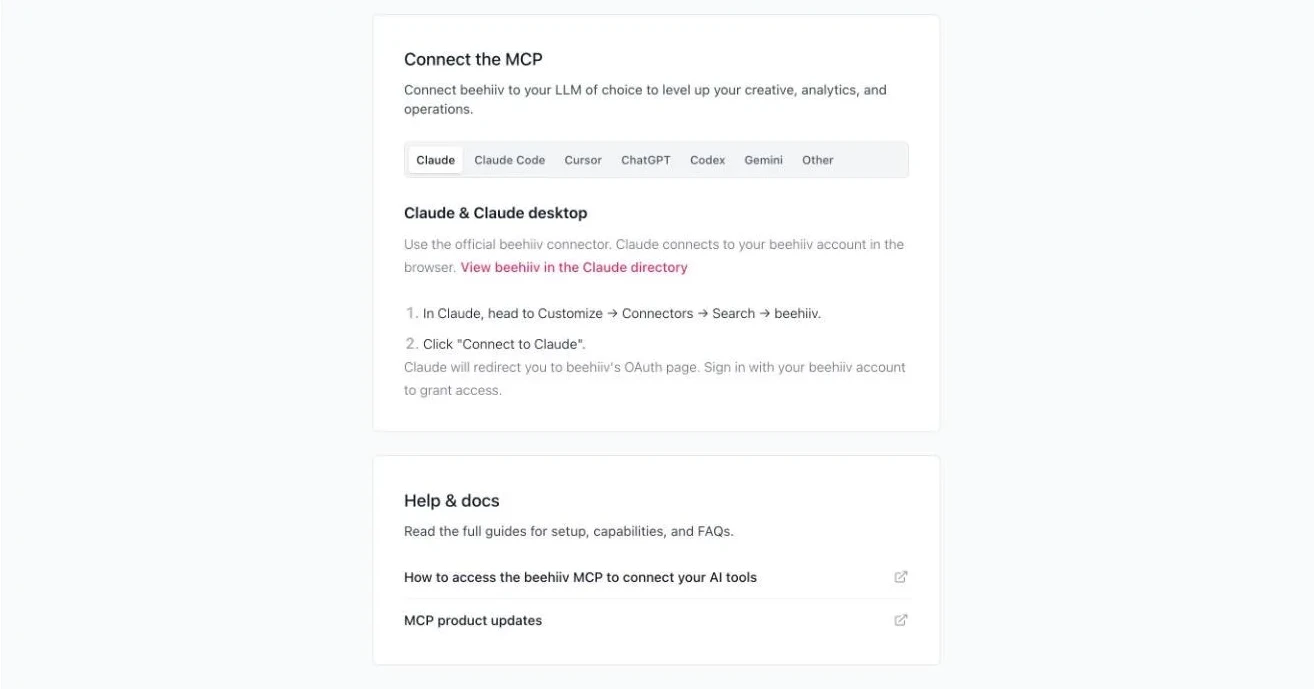
beehiiv has its own MCP server, and connecting it to Claude took a sign-in and an approval. Claude then had more than 200 tools for posts, subscribers, segments, automations, the site and reports.
Read calls worked from the first day. Claude listed my posts and templates, read a post's content, and pulled the post statistics and publication settings used in this review.
Write calls changed during my test. On November 13 saving a post was refused with a message that it is included from the Lite plan. On November 16, day 4 of the Pro trial, Claude created a draft post and a dynamic segment.
The plan card lists "beehiiv MCP" under Lite, so plan for Lite if you want an assistant to keep writing after the trial.
What I did not test
My test list was five of my own addresses, so I have not tested deliverability on a real list, sending at volume or inbox placement outside Gmail.
My automation had one email, so I have not tested a multi-step series with delays or branches. I did not connect Stripe for paid subscriptions, add a custom domain, claim an ad offer, start a referral program or buy Boosts.
I did not publish a redesigned site or use Podcasts, Community, Products, the Tip jar, polls or surveys. I did not call the API, because creating a key asks for identity verification through Stripe.
I did not contact support or cancel a paid plan, and I have not seen the account after the trial ends on November 26, 2026. For a tool I tested on a smaller scale of features, see my Buttondown review.
Works With
Which website platforms does beehiiv work with?
Subscribe forms embed on any site with one script tag, or readers sign up on the hosted beehiiv newsletter site.
beehiiv also has official integrations with:
 WordPress
How each connection works (1)›
- WordPress
Official plugin · Official plugin sends WordPress posts as newsletters, adds a signup form. Max plan and up. Source
Checked against beehiiv's own docs and official app stores on 22 October 2026.
AI, API & MCP
AI, API and assistant workflows
AI agent workflow
Run beehiiv from Claude with the MCP server
Prompts to try: "How did my last post perform?" "Create a segment of subscribers who opened at least one email." "Draft a post from these notes and give me the editor link." "List my automations and their status."
Approval boundary: With write access the server can create and edit posts, segments, automations and site pages. Keep sending and scheduling as steps you approve yourself.
MCP
officialOfficial MCP server, listed from Lite
Remote server with a sign-in and an approval. More than 200 tools in my connection. Reads worked on the Free plan from day one. Authoring calls were refused on November 13 and accepted on November 16, during the Pro trial.
beehiiv pricing →API
officialDocumented API, with the Send API on Pro
The Free plan card lists "API and integrations". Creating an API key asked me to verify my identity through Stripe, which I did not do, so I have not called the API. The Lite plan card lists 3 webhooks and the Send API is listed under Pro.
beehiiv developer documentation →Pricing
How much does beehiiv cost?
Free up to 2,500 subscribers. Lite starts at $59 a month on monthly billing, or $49 a month billed annually, and rises with your subscriber count.
Price by subscriber count
| Plan | 1K | 5K | 10K | 50K | 100K |
|---|---|---|---|---|---|
| Free | $0 | — | — | — | — |
| Lite | $59 | $109 | $139 | $299 | $469 |
| Pro | $109 | $199 | $239 | $469 | $699 |
beehiiv has four plans: Free, Lite, Pro and Enterprise. Free costs $0 for up to 2,500 subscribers. Lite and Pro are priced by subscriber count. At up to 1,000 subscribers Lite is $59 a month on monthly billing or $49 a month billed annually ($588 a year), and Pro is $109 a month on monthly billing or $95 a month billed annually ($1,140 a year). Lite goes up to 100,000 subscribers and Pro to 250,000. Enterprise is custom. A new account also gets a 14-day free trial of Pro features with no credit card, according to beehiiv's support article. My workspace showed day 4 of 14 on November 16, 2026, while the plan on the billing page was still Free. The same article says a custom domain and paid subscriptions wait until you upgrade, and that the account stays on Free if you don't. Prices read in the app on November 13 and again on November 16, 2026.
Lite is the plan most newsletters need
Lite turns on the four things Free holds back: paid subscriptions, a custom domain, live automations and Ad Network offers. Pro adds badge removal, direct sponsorships, the Send API and unlimited paid tiers.
Price your plan at the list size you expect
On monthly billing Lite is $59 a month at 1,000 subscribers, $79 at 2,500 and $109 at 5,000. If your list is growing, budget for the next step, not the current one.
Ignore time-limited discounts when you compare
The app showed me a 24-hour offer of 20% off for three months. It is a real saving if you were upgrading anyway, but the prices on this page are the regular ones you pay after it ends.
Alternatives
When I'd choose something else
Three different buying priorities, and what I'd pick instead for each one.
No monthly fee

Substack
For a writer who wants to publish and charge readers without a monthly bill. Substack takes 10% of paid subscription revenue instead of a plan price.
Trade-off: The 10% share grows with your revenue, and a custom domain costs a one-time $50.
Explore Substack for this use case →Sequences and digital products

Kit
For a creator whose email list supports courses, downloads or a product, with sequences and tags at the centre.
Trade-off: Kit is built around email first, with the website as a smaller part.
Explore Kit for this use case →Own your platform

Ghost
For a publisher who wants an open-source publication with memberships that can run on their own server.
Trade-off: Self-hosting takes technical setup, and there is no built-in ad marketplace.
Explore Ghost for this use case →Keep going
- Compare beehiiv against the field: 11 Best Newsletter Platforms for Creators and Writers, Best Free Email Marketing Software
- Put it to work: Newsletter Platform Fees Compared: Who Takes the Biggest Cut?
- Put it to work: Newsletter Platforms vs Email Marketing Software: What's the Difference?
Downsides
Limitations to consider before subscribing
The features that earn money start on Lite
Paid subscriptions, Ad Network offers and the referral program can be viewed or configured on Free but only switched on from Lite.
The price rises with your list
Lite goes from $59 a month at 1,000 subscribers to $469 a month at 100,000 on monthly billing. Check the step above your current list size.
Badge removal is on Pro
The "Powered by beehiiv" badge stays on Free and Lite. Removing it starts at $109 a month on monthly billing.
An API key needs identity verification
Creating an API key asked me to verify my identity through Stripe. Allow time for that before you plan an integration.
What I have not tested
Sending to a real list, deliverability at scale, a multi-step automation, paid subscriptions, ads, referrals, Boosts and the API. My one send went to five of my own addresses. This review will be updated when I have tested more.
My Recommendation
Start on Free, and plan for Lite
Shortlist beehiiv when the newsletter itself is the business and you want subscriptions, ads and referrals in the same tool as the editor and the website.
Choose something else when email supports a product or a store and you mainly need automation, or when you want no monthly fee at any list size.
What to check during the trial
- –Set up a free publication and write one post through all five editor steps
- –Open paid subscriptions, automations and the Ad Network on Free to see what Lite would turn on
- –Open Compare plans and read the monthly and annual price at your subscriber count and at the next step up
- –Decide whether you need your own domain from day one. If yes, budget for Lite from the start
- –Export your current list as a CSV and check the columns before importing
Try it with an AI assistant
Connect beehiiv's MCP server to Claude during the 14-day Pro trial and ask it how your last post performed, then have it create a segment. Reading worked for me on Free from day one. The plan card lists the MCP server from Lite.
FAQ
Frequently asked questions about beehiiv
Yes. According to beehiiv's support article, a new account gets a 14-day free trial of Pro features and no credit card is required. If you don't upgrade, the account stays on the Free plan, which costs $0 for up to 2,500 subscribers.
Yes. The Free plan costs $0 for up to 2,500 subscribers with unlimited sends, one seat and one publication. Paid subscriptions, a custom domain, live automations and Ad Network offers need the Lite plan.
Lite costs $59 a month for up to 1,000 subscribers on monthly billing, or $49 a month billed annually ($588 a year). Pro costs $109 a month on monthly billing, or $95 a month billed annually ($1,140 a year). Both rise with subscriber count: at 2,500 subscribers Lite is $79 a month and Pro $149 a month on monthly billing.
No. beehiiv lists paid subscriptions with a 0% platform fee. You pay the plan price and Stripe's processing fee of 2.9% + $0.30 per payment. Paid subscriptions start on the Lite plan.
No. On Free the site and the sending address use beehiiv.com. A custom domain needs Lite.
Only on Pro and Enterprise. The badge stays on Free and Lite.
Yes. I connected it to Claude and it exposed more than 200 tools. Reading posts, templates and statistics worked from the first day. Creating a post was refused on November 13, 2026 with a note that it is included from the Lite plan, and worked on November 16 during the 14-day Pro trial.
Yes. I tested two. The AI writer drafts text from a prompt inside a post, with settings for language and tone of voice, and showed a counter of 50 requests. Ask beehiiv is a chat assistant that reads your account data. It answered a question about my last post from the real numbers.
In my test, yes. I set up a publication, imported five of my own addresses and sent one post. It arrived in about a minute, Gmail put it in the Promotions tab, and beehiiv's analytics showed 4 opens and 1 hard bounce. I have not tested it on a real list.
Yes. beehiiv is one of the biggest names among newsletter platforms. In my test the Free plan worked as the billing page describes it: no credit card was asked for, the 14-day Pro trial started on its own, my post was delivered, and the plan on the billing page stayed Free.
beehiiv charges a monthly plan price once you need paid features and takes 0% of paid subscription revenue. Substack has no monthly fee and takes 10% of paid subscription revenue. beehiiv also has an ad marketplace and automations.
Updates
What changed in this review
- 2026-11-17 Added a live automation test, a walk through the website builder, a subscriber export test and five new screenshots.
- 2026-11-16 Added key findings, a feature table with a verdict for every feature, my tests of the AI writer, Ask beehiiv, segments, automations and reports, a send results table and ten new screenshots. Also my 4/5 rating and the 14-day Pro trial terms.
- 2026-11-13 Rewritten after I set up a free publication: current Free, Lite and Pro plans and prices, what each gate looks like in the app, and the MCP server tested from Claude.
Joonas Rotko
SEO & GEO professional, founder of That Marketing Buddy
I'm a Finnish SEO and GEO professional with 11+ years in digital marketing, including years as a co-owner of a digital marketing agency. On That Marketing Buddy I test and compare SEO and AI-visibility software for entrepreneurs, marketing professionals and agencies.
Sources & References (4)
Spot something out of date?Vendors and readers, send me the correct fact.
Software sites change almost every week, and I want every claim on this page to be factually correct. If you are a vendor or a reader, send me the correct fact and a link to the official page. I will check it and update the page. The opinions and rankings stay mine.