
This page may contain affiliate links.
Some links on this page are affiliate links, meaning I may earn a commission if you sign up (at no extra cost to you). This never influences my ratings or recommendations.
The Verdict
Is EmailOctopus right for you?
EmailOctopus is the email marketing tool you pick when budget is the primary concern. With a free plan covering 2,500 subscribers and paid plans starting at just $9/month, it undercuts nearly every competitor. The tradeoff is a stripped-down feature set: basic automation, simple segmentation, and no A/B testing.
But for small businesses, bloggers, and nonprofits who just need to send decent-looking emails to their list without overpaying, EmailOctopus delivers exactly that.
EmailOctopus is the budget pick in email marketing. The free plan is useful (2,500 subscribers, 10,000 emails/month), and paid plans scale affordably. The 100+ templates look professional, and the drag-and-drop editor is easy to learn. But the limitations are real: no A/B testing, basic automation that only supports drip sequences, and integrations that mostly depend on Zapier.
If you need advanced marketing features, look at Moosend or MailerLite. If you need the cheapest reliable option for sending newsletters, EmailOctopus is hard to beat.
Best for budget-conscious small businesses and nonprofits who need simple, affordable email marketing. Skip it if you need advanced automation or ecommerce features.
Who It's For
Who EmailOctopus is for (and who it isn't)
✓Best for
- +Budget-Conscious Small Businesses If keeping costs low is your top priority, EmailOctopus delivers the essentials at a fraction of what competitors charge. A coffee shop sending weekly specials or a music school promoting recitals gets everything needed without the premium price tag.
- +Nonprofits & Charities EmailOctopus offers a 20% lifetime discount for nonprofits on top of already-low pricing. For organizations that need to stretch every dollar, this is one of the most cost-effective options available.
- +Bloggers & Content Creators Simple newsletter sending is EmailOctopus's core strength. If your email strategy is sending regular content updates to subscribers, the platform handles it well without unnecessary complexity.
- +Startups Testing Email Marketing The free plan (2,500 subscribers, 10,000 emails/month) is generous enough to validate an email strategy before committing money. For early-stage businesses, this lets you build a list and test messaging at zero cost.
- +Teams Needing Multiple Users Unlike most competitors that charge per seat, EmailOctopus includes unlimited users on paid plans with role-based access (Admin, Manager, Analyst, Accountant). A staffing agency with several team members sending campaigns saves on per-user fees.
- +Newsletter publishers sending weekly content to 1,000-10,000 subscribers The drag-and-drop editor, generous free plan, and focus on email delivery make this perfect for content creators who want reliable newsletter sending without complexity
- +Small e-commerce store owners running simple welcome sequences and product announcements Basic automation handles welcome emails and product updates well, while the affordable pricing and Shopify integration support growing online stores
- +Solopreneurs and consultants building their email list with lead magnets Landing page builder, pop-up forms, and straightforward segmentation provide everything needed for list building without overwhelming features
- +Nonprofits sending donor updates and fundraising campaigns on a budget 20% nonprofit discount, generous free tier, and simple campaign creation tools maximize impact while minimizing costs
✗Skip this if
- −Ecommerce Businesses No native Shopify or WooCommerce automation triggers, no abandoned cart sequences, and no product recommendation emails. Ecommerce stores need tools like Moosend or Drip that are built for transactional workflows.
- −Data-Driven Marketers No A/B testing, no click heatmaps, no real-time reporting, and no revenue tracking. If optimizing email performance through testing and analytics is core to your strategy, EmailOctopus will hold you back.
- −Complex Automation Users Automation is limited to basic drip sequences. No conditional branching, no behavioral triggers based on website activity, and no lead scoring. Tools like ActiveCampaign handle these workflows natively.
- −International Businesses The platform is English-only with no multi-language support. If you operate across multiple languages and markets, you will need a platform that supports localization.
- −E-commerce brands needing advanced behavioral automation and SMS marketing Limited to basic email sequences with no SMS, behavioral triggers, or purchase-based automationTry Klaviyo →
- −B2B companies requiring lead scoring, CRM integration, and complex nurture sequences Lacks advanced automation, lead scoring, and deep CRM features needed for B2B sales processesTry ActiveCampaign →
- −Agencies managing multiple client accounts with white-label branding No multi-account management or white-label options for agency workflowsTry MailerLite →
Consider instead
 ActiveCampaign
 MailerLite
 Klaviyo
Features
What can EmailOctopus do?
Email Builder & Templates
The email builder uses a drag-and-drop interface with 9 content blocks (text, image, button, divider, social links, video, and a few others). It is functional but basic compared to editors from MailerLite or Moosend. There are no undo/redo buttons, which can be frustrating when making quick edits.
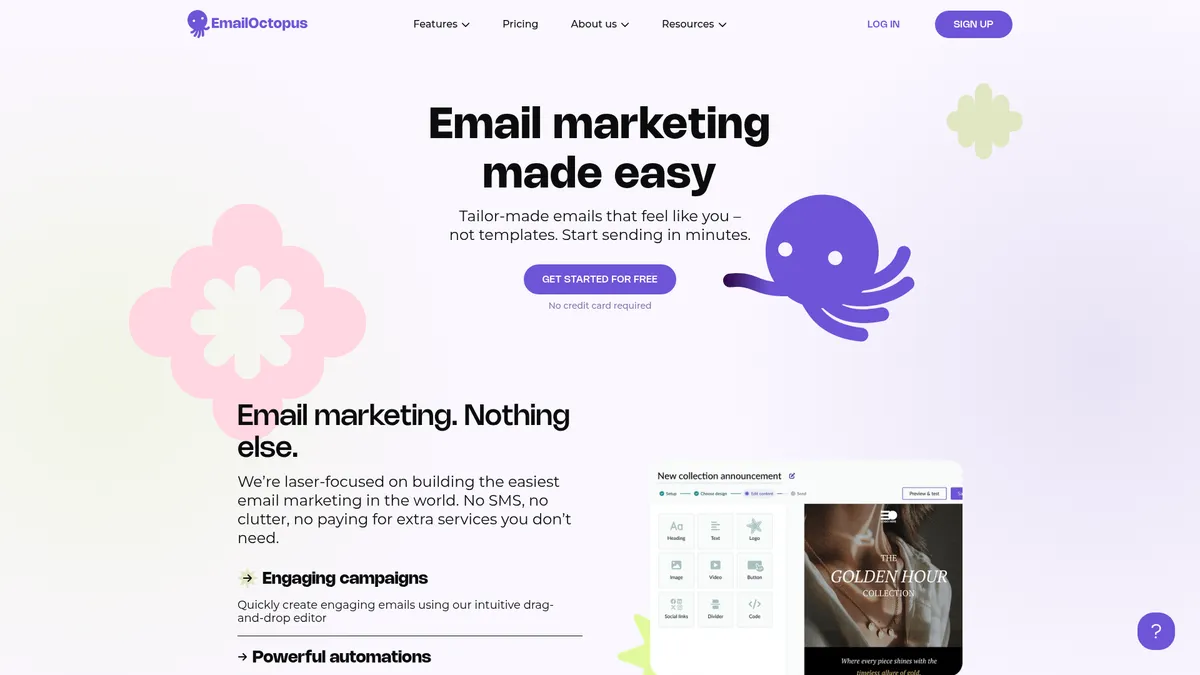
The template library is a strength: 100+ designs covering common categories like newsletters, promotions, and announcements. EmailOctopus also creates four custom-branded templates for your account, automatically applying your logo and brand colors. This auto-branding feature saves time and keeps emails consistent.
You can also upload custom HTML templates, which gives agencies and developers flexibility to use their own designs. This is a feature some competitors lock behind higher-tier plans.
Automation
Automation in EmailOctopus covers the basics: welcome sequences triggered by new subscribers and time-delayed drip campaigns. You can set emails to send immediately or after a specified delay (hours or days). Within workflows, you can add tags and update subscriber data.
That is where it ends. There are no conditional splits, no triggers based on email opens or clicks, no website behavior tracking, and no lead scoring. Compared to Moosend (which offers visual automation builders with conditional logic at $7/month), EmailOctopus feels a generation behind in automation capabilities.
Forms & Landing Pages
EmailOctopus offers four form types: inline, pop-up, slide-in, and "hello bar" (a banner at the top of your page). The visual editor lets you customize colors and fields, though CSS customization options are limited. Forms use JavaScript embedding and include invisible reCAPTCHA for spam protection.
The landing page builder includes 5 templates. Customization is basic but adequate for single-purpose pages like lead magnets or event signups. The free plan limits you to 3 landing pages; paid plans include unlimited.
Segmentation & List Management
You can segment subscribers by campaign activity (opens, clicks), active/inactive status, signup source, and custom tags. This covers basic list hygiene and targeting but falls short of behavioral segmentation offered by more advanced platforms.
One important note: contacts in multiple lists are counted separately toward your subscriber limit. If the same person is on three lists, they count as three subscribers for billing purposes. This can inflate costs if you use multiple lists instead of tags for organization.
Email Builder
Automation
Forms & Pages
Analytics
Integrations
UX & Support
Is EmailOctopus easy to use?
User Experience
EmailOctopus nails the basics of user experience. The dashboard is clean with clear navigation: Campaigns, Automations, Lists, Forms, Landing Pages, and Reports. There are no buried settings or confusing menu structures. A 5-step onboarding checklist guides new users through setup, and most people report launching their first campaign within hours.
The simplicity is genuine, not just marketing. Every feature is exactly where you expect it to be. The learning curve is minimal, which is exactly what budget-conscious users want. They are not paying for advanced features, so they should not have to wade through complex interfaces to access basic ones.
The downside of this simplicity is predictable: when you want to do something beyond the basics (conditional content, advanced segmentation, multi-branch automation), the option simply does not exist.
Customer Support
Pro plan users get priority support via email and live chat. Response times are generally good, with most users reporting helpful replies within a few hours during business hours (UK timezone).
Free plan users get email support with 30-day access to live chat. After 30 days, support is email-only. This is a reasonable tradeoff for a free product, though it can be frustrating if you hit a problem early in your trial period and the chat window has expired.
The knowledge base covers common tasks with step-by-step articles. For a platform this straightforward, the documentation is adequate. Most questions are about form embedding, list management, or deliverability setup.
Pricing
How much does EmailOctopus cost?
EmailOctopus starts at From $10/mo. That's 33% below median for Email Marketing tools. A free plan is available.

EmailOctopus Pricing Analysis
vs. 36 email marketing toolsBelow average for email marketing tools

Cheaper than 76% of email marketing tools on That Marketing Buddy's database. EmailOctopus also offers a free plan.
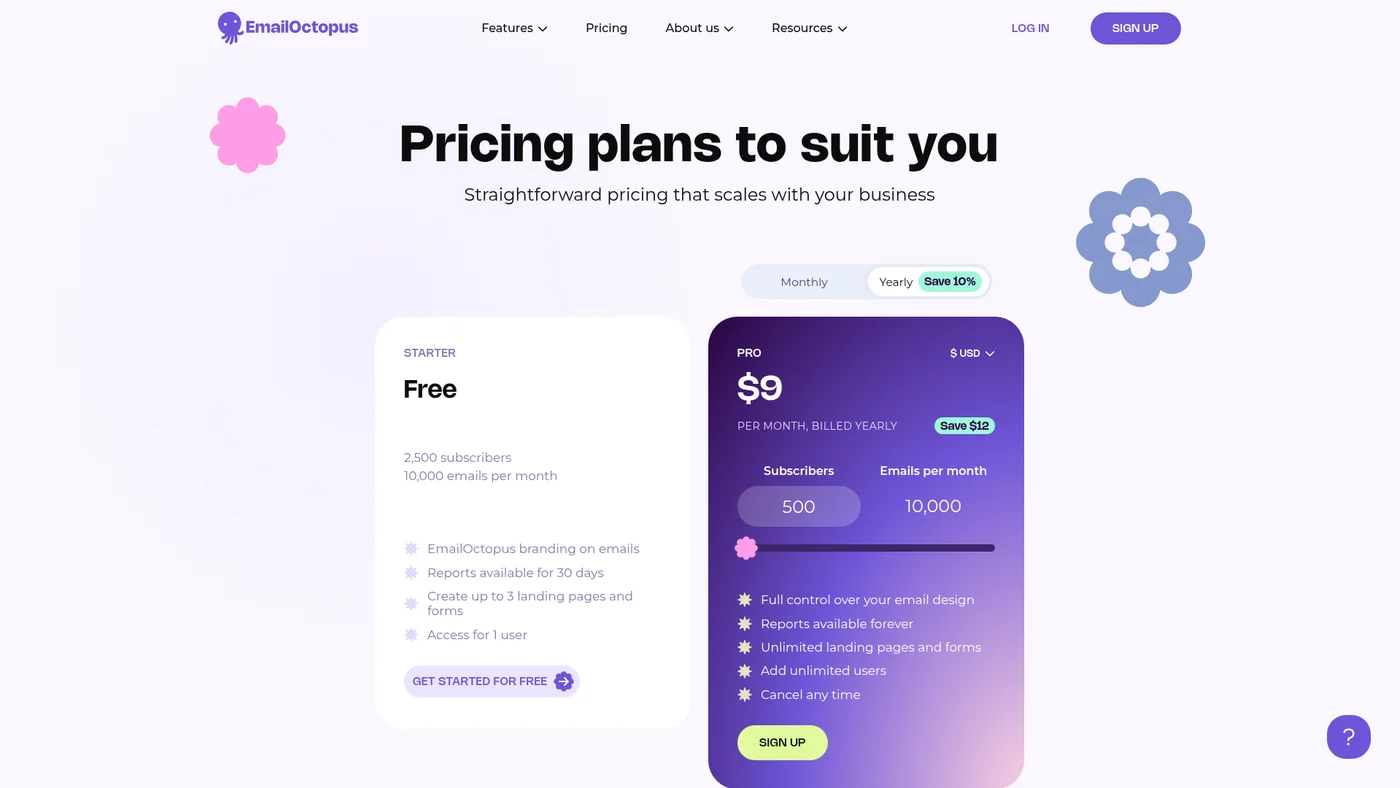
EmailOctopus pricing is its primary competitive advantage. The structure is straightforward: a free Starter plan and a paid Pro plan that scales with your subscriber count.
Free Starter Plan
The free plan includes 2,500 subscribers and 10,000 emails per month. You get basic automation, 3 landing pages, and forms. The trade-off is EmailOctopus branding on your emails and 30-day report/support limits. For a new business testing email marketing, this is one of the most generous free plans available (Moosend caps at 1,000 subscribers on its free plan).
Pro Plan Pricing
The Pro plan starts at $9/month for 500 subscribers and scales incrementally. Key price points: 2,500 subscribers at $20/month, 5,000 at $31.50/month, 10,000 at $44.50/month, and 50,000 at $178/month. Annual billing saves 10%.
Email send limits on Pro are roughly 10x your subscriber count. At 5,000 subscribers, you can send 50,000 emails per month. Pro unlocks unlimited landing pages, full reporting history, priority support, unlimited users, and removes EmailOctopus branding.
Value Comparison
At the 10,000-subscriber mark, EmailOctopus costs $44.50/month. MailerLite charges $47/month. Moosend costs $48/month. The savings are modest at this tier but become more significant at scale: at 50,000 subscribers, EmailOctopus charges $178/month while many competitors exceed $250.
For the full pricing breakdown with all tiers, see the EmailOctopus pricing page analysis.
| Plan | Monthly |
|---|---|
| Starter | — |
| Pro | $10/mo |
External Ratings
What 749 reviewers say
Aggregated from 2 platforms
EmailOctopus holds a 4.5/5 average rating across 749 reviews on G2, Capterra.
"The pricing is unbeatable. I moved from Mailchimp and cut my email marketing costs by 70% without losing any functionality I actually used."
Capterra Review"Perfect for our nonprofit. The 20% discount plus already-low pricing means we can focus our budget on programs instead of software."
G2 Review"The automation is too basic. I needed conditional workflows and had to switch to ActiveCampaign after six months."
G2 Review"Great for simple newsletters. The templates look professional and the editor is easy to use. Just do not expect advanced features."
Capterra ReviewAI & Tech Stack
Does EmailOctopus fit your AI stack?
What AI Can't Replace
EmailOctopus owns your email deliverability infrastructure in ways no AI can replicate. The tool manages bounce handling, list hygiene, SMTP routing, and sender reputation across thousands of accounts. AI cannot replace the actual infrastructure that ensures your emails land in inboxes instead of spam folders, nor can it manage the compliance workflows (CAN-SPAM, GDPR) baked into the platform.
Where AI Is Catching Up
AI is already competitive on email copywriting and subject line testing, which could erode EmailOctopus's built-in editor and A/B testing features. Claude or ChatGPT can generate campaign variations and analyze open rates you export from the tool.
The real risk sits in automation logic: AI agents could eventually orchestrate simple email sequences without needing EmailOctopus's native workflows, though integration complexity will keep many users here.
API & Integrations
EmailOctopus exposes a REST API with solid coverage for campaigns, subscribers, and automation workflows. Documentation is clear but not exhaustive. Rate limits are reasonable for most teams. Zapier integration is native and handles common triggers like new subscriber or campaign sent. No Make support means you'll need to use Zapier or direct API calls for that platform.
MCP & CLI
No MCP server available and no CLI tool. Your best workaround is the REST API plus Zapier for no-code integrations, or custom scripts if you need direct programmatic control over campaigns and lists.
Stack Verdict
EmailOctopus fits best as your deliverability backbone in an AI stack, letting Claude or ChatGPT handle copywriting while the platform handles the unglamorous but critical work of actually reaching inboxes.
Connects with
Security
Downsides
What's wrong with EmailOctopus
No A/B Testing
You cannot test subject lines, content variations, or send times. This is a fundamental optimization tool that most competitors include.
Basic Automation Only
Automation covers welcome sequences and simple drip campaigns. No conditional logic, no behavior-based triggers, no open/click triggers within workflows.
Limited Editor
The drag-and-drop editor has only 9 content blocks. No undo/redo buttons, no email client previews, and no spam testing tools.
Zapier-Dependent Integrations
Most integrations require Zapier as a bridge. Native integrations are minimal. The Shopify integration only syncs data, not automation triggers.
30-Day Report Retention (Free Plan)
On the free plan, reporting data and live chat support are only available for 30 days. After that, historical data is not accessible.
Buddy's Take
These gaps are the direct result of keeping prices low. For users whose needs are simple, most of these limitations will not matter. For anyone building complex email marketing workflows, they will.
FAQ
Frequently asked questions about EmailOctopus
Yes. The Starter plan includes up to 2,500 subscribers and 10,000 emails per month at no cost. It includes basic automation, 3 landing pages, and 30 days of reporting. EmailOctopus branding appears on your emails.
EmailOctopus is consistently one of the cheapest options. At 10,000 subscribers, you pay $44.50/month compared to $47/month for MailerLite and $48/month for Moosend. The gap widens at higher subscriber counts.
EmailOctopus supports DKIM, SPF, and DMARC authentication. The platform manually reviews emails and automations before sending, which helps maintain deliverability. It uses shared IP addresses (no dedicated IP option on the standard version).
Not effectively. While there is a Shopify integration via Zapier, it only syncs contact data. There are no abandoned cart automations, no product recommendation emails, and no purchase-based triggers. Ecommerce stores should consider Moosend instead.
Yes. Nonprofits and charities receive a 20% lifetime discount on all paid plans. This makes it one of the most affordable email marketing options for organizations with limited budgets.
EmailOctopus automatically upgrades you to the next pricing tier and charges the difference immediately. If your subscriber count drops later, you can enable automatic downgrading to reduce costs at the next billing cycle.
EmailOctopus keeps pricing simple with just two tiers and transparent per-contact scaling that won't shock you with sudden jumps.
EmailOctopus is best for: Newsletter publishers sending weekly content to 1,000-10,000 subscribers; Small e-commerce store owners running simple welcome sequences and product announcements; Solopreneurs and consultants building their email list with lead magnets; Nonprofits sending donor updates and fundraising campaigns on a budget.
No MCP server yet, but the REST API means AI tools can interact with EmailOctopus through custom code or platforms like Zapier AI.
EmailOctopus covers the basics for switching in and out, but you'll lose automation workflows and have limited export options compared to more migration-friendly platforms.
EmailOctopus starts from From $10/mo. A free plan is available.
Sources & References (5)
Try EmailOctopus Free
Start with EmailOctopus's free plan: 2,500 subscribers and 10,000 emails per month. No credit card required.
Try EmailOctopus FreeMore on EmailOctopus
Read Next



Joonas Rotko
Author & founder of That Marketing Buddy
I score marketing software for AI-stack fit (MCP, API, agent-readiness), backed by 10+ years in digital marketing.
This page may contain affiliate links. I earn a commission at no extra cost to you. This never influences ratings.