In short
Track AI visibility in three layers. First, the free first-party data: ChatGPT Business Hub Insights, the AI Performance report in Bing Webmaster Tools, Search Console and referrals from chatgpt.com in your analytics. Second, read 5 to 10 key answers yourself each month to check that what assistants say about you is correct. Third, use a tracker when you need competitors, a fixed prompt set and a trend you can report. Answers change between runs, so judge trends over months and always show the sample size.
Contents (12)
- 1What Can I See for Free Before I Pay for a Tool?
- 2Should I Check AI Answers by Hand?
- 3What Should I Measure for AI Visibility?
- 4How Do I Pick the Prompts to Track?
- 5What Does a Systematic Measurement Show That Free Data Does Not?
- 6Why Do AI Answers Change Every Time I Ask?
- 7How Often Should I Measure AI Visibility?
- 8When Does a Paid AI Visibility Tracker Pay Off?
- 9How Do I Report AI Visibility to a Client or to Management?
- 10How Do I Read the Numbers Without Fooling Myself?
- 11What Does a Simple Monthly Routine Look Like?
- 12Frequently Asked Questions
Track your brand in AI answers in three layers: the free data the platforms give you, a short monthly read of the answers that matter most, and a tracker once you need competitors, trends and a report. The free layer shows real usage. The tracker layer shows what the free data cannot: who is named instead of you, and which sources the assistants read.
Tip
Set up the free sources first: ChatGPT Business Hub Insights, AI Performance in Bing Webmaster Tools, Google Search Console, and chatgpt.com referrals in your analytics.
Read 5 to 10 key answers yourself each month. The goal is to check what is said about you, not to produce a number.
A tracker runs a fixed set of prompts on a schedule. It pays off when you need competitors, a trend or a client report.
Count four things: mention rate, citations, position in the answer, and the sources the answer reads.
Split prompts that name your brand from prompts that do not, and show the sample size next to every percentage.
This page covers measuring. For the basics, start with what generative engine optimization is. It does not rank tools (my list of AI visibility tools does that), and it does not cover how to get cited more (my guide how to rank in AI search does).
What Can I See for Free Before I Pay for a Tool?
Four sources cost nothing and show real usage, not a test run: ChatGPT Business Hub, Bing Webmaster Tools, Google Search Console and your own web analytics. Each sees one slice, and none of them shows competitors.
ChatGPT Business Hub Insights
- What it shows
- Mentions of your business in ChatGPT, website clicks, top 5 discovery topics, for 7 or 28 days
- What it does not show
- The prompts, competitors, other assistants
Bing Webmaster Tools, AI Performance
- What it shows
- Citations of your pages in Microsoft Copilot and Bing's AI summaries, cited pages, sampled grounding queries, trends
- What it does not show
- Clicks, competitors by name, Google's AI answers
Google Search Console
- What it shows
- Impressions in AI Overviews and AI Mode by page, country and device (Generative AI performance report)
- What it does not show
- Clicks and queries from AI features on their own
Web analytics
- What it shows
- Visits and leads that arrive from chatgpt.com, perplexity.ai, copilot.microsoft.com and similar referrers
- What it does not show
- Answers that named you without a click
| Source | What it shows | What it does not show |
|---|---|---|
| ChatGPT Business Hub Insights | Mentions of your business in ChatGPT, website clicks, top 5 discovery topics, for 7 or 28 days | The prompts, competitors, other assistants |
| Bing Webmaster Tools, AI Performance | Citations of your pages in Microsoft Copilot and Bing's AI summaries, cited pages, sampled grounding queries, trends | Clicks, competitors by name, Google's AI answers |
| Google Search Console | Impressions in AI Overviews and AI Mode by page, country and device (Generative AI performance report) | Clicks and queries from AI features on their own |
| Web analytics | Visits and leads that arrive from chatgpt.com, perplexity.ai, copilot.microsoft.com and similar referrers | Answers that named you without a click |
Read from each platform's own documentation and my own accounts in November 2026.
What does ChatGPT Business Hub show?
It shows how often ChatGPT mentioned your business, how many people clicked to your website and the top 5 topics people found you through. Claiming a profile costs nothing today and took me about ten minutes per site. Insights show no prompts and no competitors; OpenAI says businesses "don't receive individual prompts or consumer conversations". My ChatGPT Business Hub walkthrough has every step of the claim.
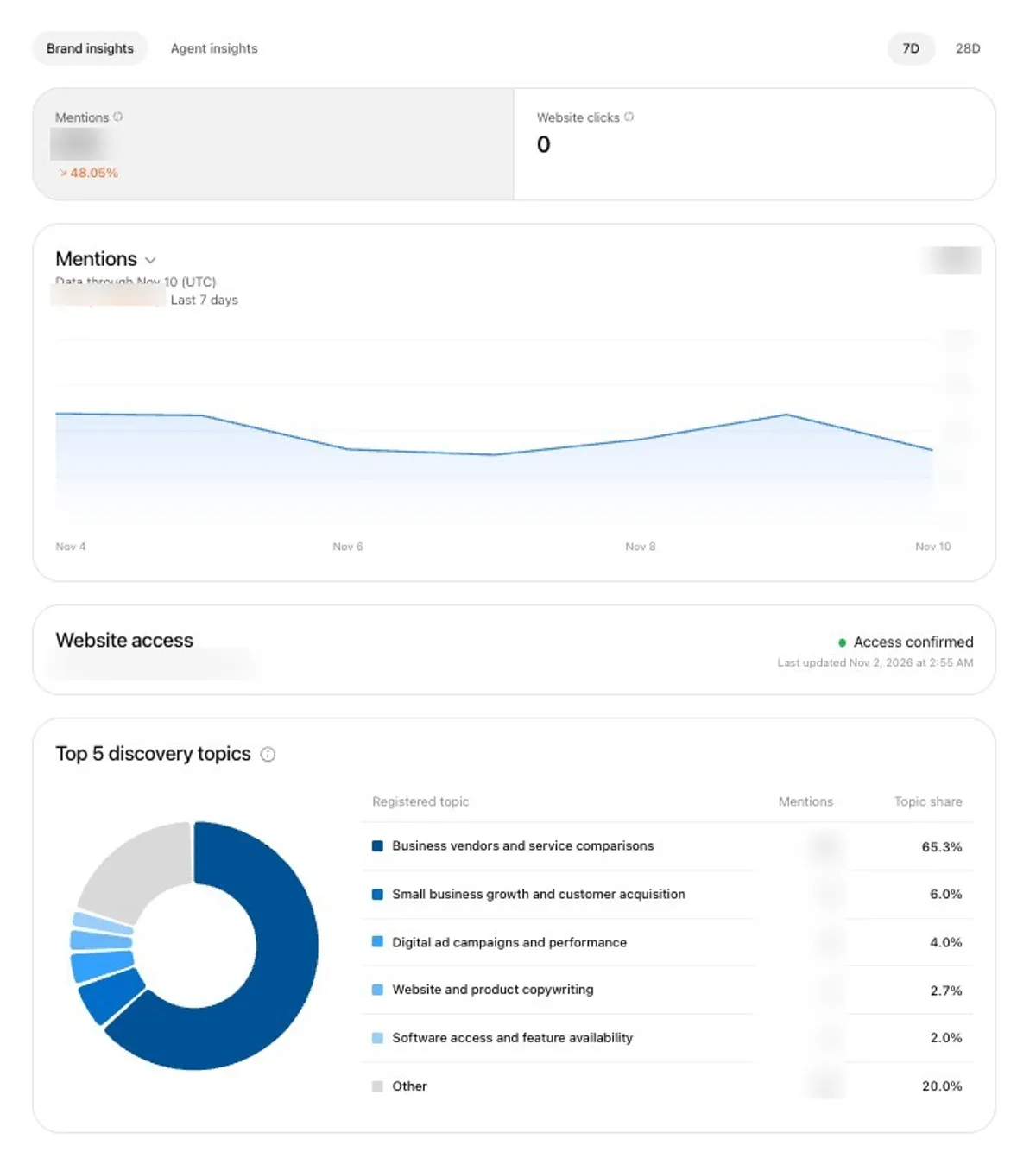
That week showed steady mentions and zero clicks. Being named and being visited are different things, and this is the only place where OpenAI's own count of mentions is visible.
What does Bing Webmaster Tools show about AI answers?
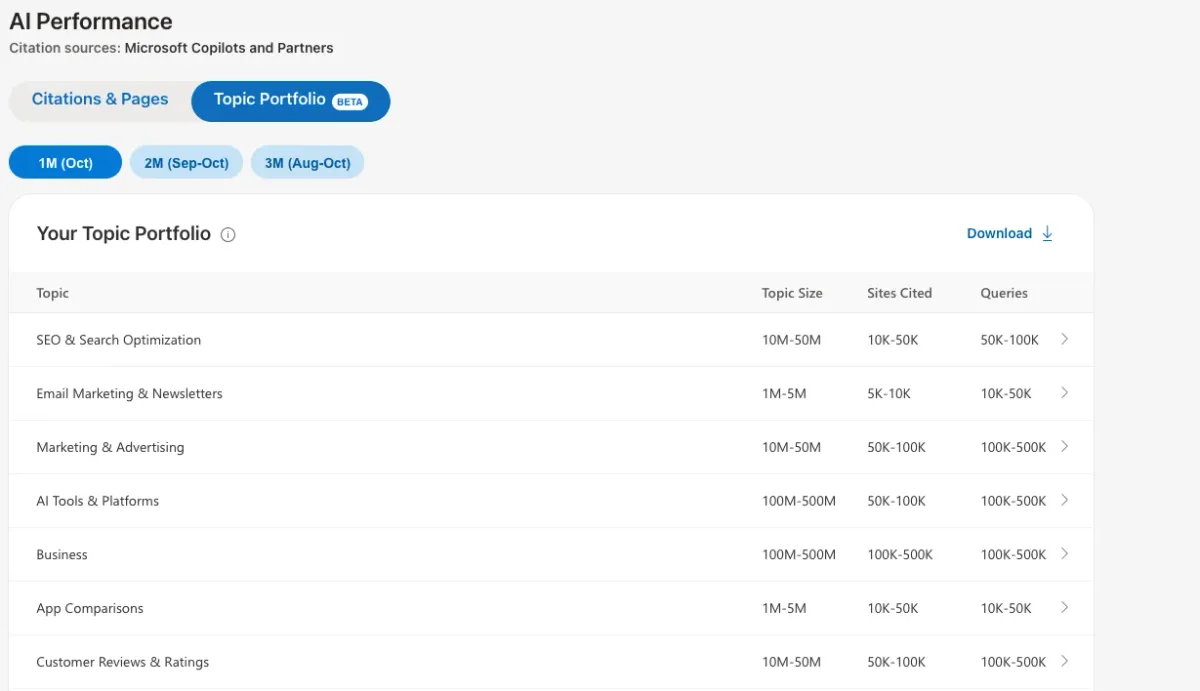
Its AI Performance report shows how often your pages are cited in Microsoft's AI answers, which pages, and a sample of the queries behind them. Microsoft opened it as a public preview on February 10, 2026, and says it covers "Microsoft Copilot, AI-generated summaries in Bing, and select partner integrations" (Bing Webmaster Blog). The report itself names its sources as "Microsoft Copilots and Partners".
It is free, and the screenshots below are from That Marketing Buddy's own account in November 2026.
The top of the report gives two numbers for the period you pick: total citations and average cited pages per day. Under them is a daily chart of both. The chart is the useful part. It shows when AI starts or stops using your pages, and you can set it against your own changes, such as a site migration, pruned pages or a new section. A tracker running 30 prompts cannot show this, because the report counts real answers, not a test run.
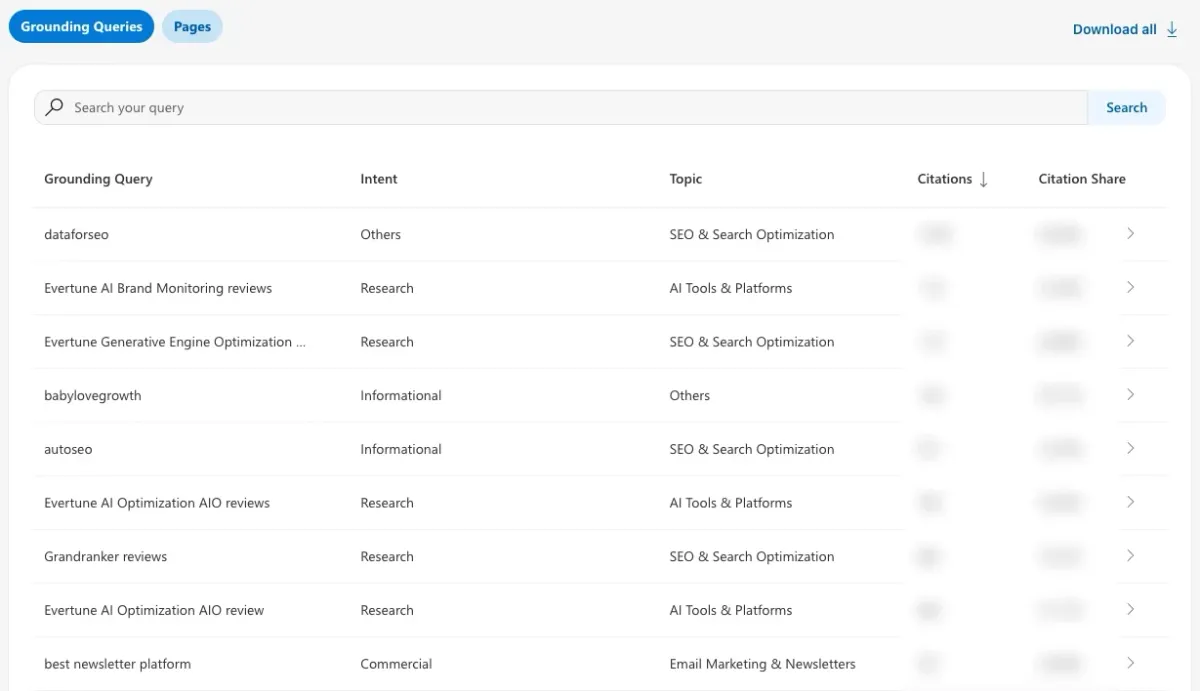
The grounding queries are the closest thing any platform gives you to the real searches behind AI answers. Each row has an intent label (such as Research, Commercial or Informational), a topic, a citation count and a Citation Share. Bing notes that the list is a sample and that the labels are AI generated. On a software site like this one, most rows are tool names and review or pricing searches. These queries are the best source I know for a prompt list.
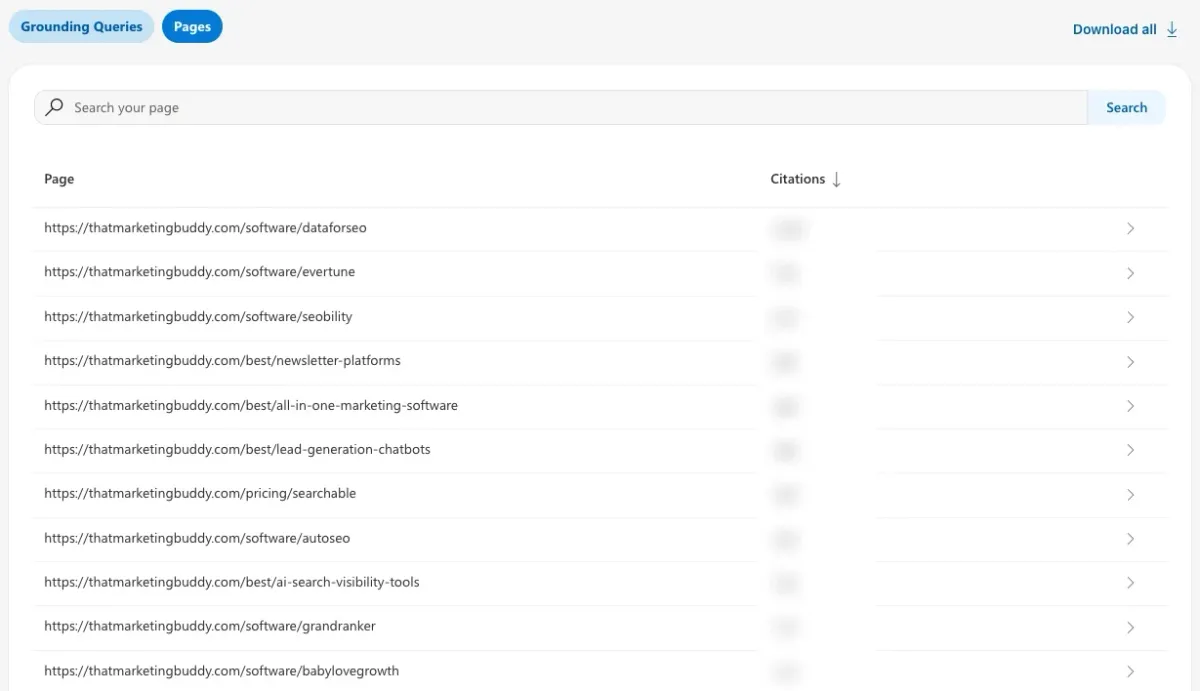
The Pages view answers a question no tracker answers well: which of your own pages AI actually uses. Sort it by citations and you have a list of the pages where facts must stay fresh first. Microsoft added Intents, Topics, Citation Share and Compare in June 2026, so you can compare two periods, and a Topic Portfolio in beta in October 2026.
Note
It counts citations, not clicks or visits. It shows no competitors by name. Microsoft does not say that it covers ChatGPT, so do not read it as ChatGPT data.
What do Search Console and analytics add?
Search Console shows how often your pages appear in AI Overviews and AI Mode, but not the clicks they send. Analytics shows the visits that assistants send. Google launched a Generative AI performance report in Search Console in June 2026 and rolled it out to all sites on August 31, 2026. It counts impressions in AI Overviews and AI Mode by page, country, device and date, and it appears once a site has enough of them (Search Console Help: Generative AI performance report).
It has no clicks and no queries. Clicks from AI features stay inside the normal Performance report under the "Web" search type (Google Search Central: AI features), so you still cannot say how many visitors came from an AI Overview.
In analytics, look for chatgpt.com as a referral source and for the utm_source=chatgpt.com tag on landing page URLs. In my own measurement of 44 ChatGPT answers, 203 of 326 source links carried that tag. Treat the count as a floor, because not every link has it. Build one saved report with the AI referrers and the leads or sales from them. That report is the only place where AI visibility meets revenue.
Should I Check AI Answers by Hand?
Yes, but as a quality check on a few answers, not as your measuring method. Ask the 5 to 10 questions that matter most to your business in ChatGPT and in Google, and read the full answers once a month. You are looking for three things that no free report shows.
- Is what the answer says about you correct? Prices, services, location, who you are.
- Who is named instead of you when the question does not include your brand.
- Which sites the answer reads. Those sites decide your category, so they tell you where to be listed and mentioned.
Reading matters because a score can hide a wrong answer. In my LLM Pulse test, Google's AI Overview described my site as another company, with the wrong founder and wrong prices. The tool counted that answer as a win: mentioned, position 1, cited. Only reading it showed the error.
I would not try to produce a visibility percentage this way. Answers change between runs, so a fair number needs several runs of every question in every assistant. Twenty questions, three runs and two assistants is 120 answers to read and log each month. That is the job a tracker does.
What Should I Measure for AI Visibility?
Measure four things: how often you are mentioned, how often you are linked as a source, where you appear in the answer, and which sources the assistant read to write it. Each answers a different question, and they can disagree: in my LLM Pulse test, my site was cited as a source in 25% of answers but named in only 11.9%.
Mention rate
- What it counts
- Share of answers that name your business or brand
- How to read it
- Your main number. Higher means more people hear your name.
- Watch out for
- Prompts that already contain your brand name inflate it
Citation rate
- What it counts
- Share of answers that link one of your pages as a source
- How to read it
- Shows which pages assistants trust and where clicks can come from
- Watch out for
- A page can be cited without your brand being named
Position
- What it counts
- Where you appear when the answer is a list (1st, 2nd, 3rd)
- How to read it
- Shows whether you are the first name or one of many
- Watch out for
- Many answers are paragraphs with no order
Sources read
- What it counts
- The sites the assistant pulled from for the answer
- How to read it
- Tells you which sites decide your category, so where to be listed
- Watch out for
- Sources change by wording and by run
| Measure | What it counts | How to read it | Watch out for |
|---|---|---|---|
| Mention rate | Share of answers that name your business or brand | Your main number. Higher means more people hear your name. | Prompts that already contain your brand name inflate it |
| Citation rate | Share of answers that link one of your pages as a source | Shows which pages assistants trust and where clicks can come from | A page can be cited without your brand being named |
| Position | Where you appear when the answer is a list (1st, 2nd, 3rd) | Shows whether you are the first name or one of many | Many answers are paragraphs with no order |
| Sources read | The sites the assistant pulled from for the answer | Tells you which sites decide your category, so where to be listed | Sources change by wording and by run |
Mention and citation are different events. Track both.
How Do I Pick the Prompts to Track?
Build a fixed set in four groups: prompts that name your brand, prompts that name a competitor, category prompts that name neither, and price or problem prompts. The category group shows whether new customers hear of you. Twenty prompts is a workable start for one business; an agency or a team with several product lines needs a set per client or line.
Names your brand
- Share of the set
- 20%
- Example for an accounting firm
- "Is Northside Accounting good for small companies?"
- What it tells you
- What the assistant says about you and whether it is correct
Names a competitor
- Share of the set
- 20%
- Example for an accounting firm
- "Alternatives to Ledgerwise for a small company"
- What it tells you
- Whether you appear when people compare
Category, names neither
- Share of the set
- 40%
- Example for an accounting firm
- "Best accountant for a small company in Denver"
- What it tells you
- Whether new customers hear of you
Price or problem
- Share of the set
- 20%
- Example for an accounting firm
- "How much does bookkeeping cost for a ten-person company?"
- What it tells you
- Whether you are named when buyers are close to a decision
| Group | Share of the set | Example for an accounting firm | What it tells you |
|---|---|---|---|
| Names your brand | 20% | "Is Northside Accounting good for small companies?" | What the assistant says about you and whether it is correct |
| Names a competitor | 20% | "Alternatives to Ledgerwise for a small company" | Whether you appear when people compare |
| Category, names neither | 40% | "Best accountant for a small company in Denver" | Whether new customers hear of you |
| Price or problem | 20% | "How much does bookkeeping cost for a ten-person company?" | Whether you are named when buyers are close to a decision |
Northside Accounting and Ledgerwise are made-up names for the example.
Report the groups separately. In my LLM Pulse test the overview opened filtered to prompts that name my brand, where my mention rate read 95%. Across all 32 prompts it was 11.9%. Both numbers were true. Only one of them says anything about reaching new people.
Where do I find the questions customers really ask?
No platform shows the exact prompts people type, so collect them from the places that come closest. Use the grounding queries in Bing's AI Performance report, the discovery topics in Business Hub Insights, your Search Console queries, People Also Ask boxes in Google, and the questions customers and sales calls bring up. Turn each into the full sentence a person would type to an assistant. The trackers do not read real prompts either.
They run your set, so the quality of the set decides the quality of the result.
Wording matters more than you expect. In my own 44 ChatGPT answers, "ai visibility tools" and "best ai visibility tools" shared 7 source websites of 9 and 10. "peec ai review" and "peec ai alternatives" shared none of their 5 and 9. Two ways of asking a similar thing can read different pages, so keep two or three wordings for your most important prompts.
What Does a Systematic Measurement Show That Free Data Does Not?
It shows who is named, who is read and where you are missing, for every prompt in the set. On November 16, 2026 I ran 44 searches about AI visibility and SEO software, in the US on a mobile profile, through the DataForSEO ChatGPT scraper with web search forced on, and recorded Google's top 10 and AI Overview for each.
- Sources: 43 of 44 answers listed sources. The median was 7 distinct sites per answer, the most 14.
- Who gets read: the sites cited most across the 44 answers were tryprofound.com (18 answers), otterly.ai (17), semrush.com (16), peec.ai (16) and ahrefs.com (13). In this topic the tools' own sites are the sources the assistant reads.
- My own site: it was not linked in any of the 44 ChatGPT answers and not cited in any of the 43 AI Overviews. ChatGPT read one of my pages while searching (for "llm pulse review") and did not link it. A mention table would show 0 of 44, and the sources list explains why.
Note
One day, one country (US), mobile, 44 searches about AI visibility software, one run per search. It shows how the method works, not how often an assistant mentions a typical business. The answers were collected through a data provider's ChatGPT scraper, not by typing into the ChatGPT app. Source overlaps are counted per search by website, not by page.
Why Do AI Answers Change Every Time I Ask?
Assistants write each answer fresh, searching the web as they go, so the named businesses and the sources can differ between two runs of the same prompt. A single check is a sample, not a measurement. A tracker that checks weekly gives you one sample per prompt per engine per week.
I measured this noise in my LLM Pulse test. On November 9, 2026 I fetched the same 32 prompts directly from ChatGPT, Google AI Mode and Google AI Overviews twice, minutes apart. Whether my site was cited agreed between my two runs on 94% of prompts in ChatGPT, 97% in AI Mode and 94% in AI Overviews. The top 3 brands named overlapped only 54% to 66% between my own two runs.
ChatGPT: site mentioned
- My two direct runs vs each other
- 100%
- LLM Pulse vs my runs
- 100%
ChatGPT: site cited
- My two direct runs vs each other
- 94%
- LLM Pulse vs my runs
- 81% to 88%
AI Overviews: site cited
- My two direct runs vs each other
- 94%
- LLM Pulse vs my runs
- 81% to 88%
Top 3 brands named, average overlap
- My two direct runs vs each other
- 54% to 66%
- LLM Pulse vs my runs
- 46% to 64%
| Question about the answer | My two direct runs vs each other | LLM Pulse vs my runs |
|---|---|---|
| ChatGPT: site mentioned | 100% | 100% |
| ChatGPT: site cited | 94% | 81% to 88% |
| AI Overviews: site cited | 94% | 81% to 88% |
| Top 3 brands named, average overlap | 54% to 66% | 46% to 64% |
From my LLM Pulse hands-on test. The review has the full table with AI Mode.
The same effect showed up in my Nightwatch test. On day two, Nightwatch had stored 14 answers to my seven newest prompts, and my site was in none. The next morning I asked AI Mode one of those questions myself, and the answer cited my site. What I do about it:
- Count shares over many answers, not yes or no on one.
- As my own rule of thumb, treat a change of 10 points or less as noise. Look for a move that holds for 2 or 3 months.
- Keep the setup fixed: same prompts, same country, same engines.
- Note model and product changes. If an assistant changes how it searches, your trend line breaks for reasons unrelated to you.
How Often Should I Measure AI Visibility?
Look at the free reports monthly, let a tracker run weekly, and judge results over a quarter. More frequent checks add samples, and samples smooth out the run-to-run noise. They do not make you more visible.
Tools differ here. LLM Pulse's Starter plan checks each prompt once a week, with no button to rerun sooner, as I describe in my LLM Pulse review. Otterly's Lite plan can check daily, but its 2,000 credits cover about 20 prompts on three engines (plan card read on November 17, 2026). Daily checks help most when your numbers are small.
When Does a Paid AI Visibility Tracker Pay Off?
A tracker pays off when you need what the free data lacks: competitors, the same prompts measured the same way every week, and a report someone else will read.
Owner of one small business
- What I would do
- Free sources plus a monthly read of 5 to 10 answers
- Why
- Shows whether you are mentioned, visited and described correctly
Owner who wants to see competitors
- What I would do
- An entry plan with 20 to 50 prompts
- Why
- Free data never shows who is named instead of you
In-house marketer reporting to management
- What I would do
- A tracker with a fixed prompt set and weekly checks
- Why
- A trend with a sample size holds up in a meeting; screenshots of single answers do not
Agency with several clients
- What I would do
- A tracker with projects per client and exports or an API
- Why
- One method across clients, and reports that do not depend on who ran them
Already pay for an SEO suite
- What I would do
- Check whether AI tracking is included or an add-on first
- Why
- Several SEO tools now include AI prompts
| Your situation | What I would do | Why |
|---|---|---|
| Owner of one small business | Free sources plus a monthly read of 5 to 10 answers | Shows whether you are mentioned, visited and described correctly |
| Owner who wants to see competitors | An entry plan with 20 to 50 prompts | Free data never shows who is named instead of you |
| In-house marketer reporting to management | A tracker with a fixed prompt set and weekly checks | A trend with a sample size holds up in a meeting; screenshots of single answers do not |
| Agency with several clients | A tracker with projects per client and exports or an API | One method across clients, and reports that do not depend on who ran them |
| Already pay for an SEO suite | Check whether AI tracking is included or an add-on first | Several SEO tools now include AI prompts |
Before you pay, know that plan limits count in different units. Nightwatch's Starter says 50 AI prompts, but each prompt counts once per platform, so that is 10 questions across 5 platforms (from €79 a month billed yearly, as of my review). LLM Pulse's Starter covers 50 prompts on 5 engines, checked weekly, at $58 a month. Count answers, not prompts, and see my list of AI visibility tools compared on real cost for the plans side by side.
What did the trackers I tested show me?
They stored every answer with its sources, which is the part you cannot keep up by hand. For LLM Pulse I ran 32 prompts on 5 engines and read what it stored. For Nightwatch I ran 13 prompts on ChatGPT, Perplexity and AI Mode.
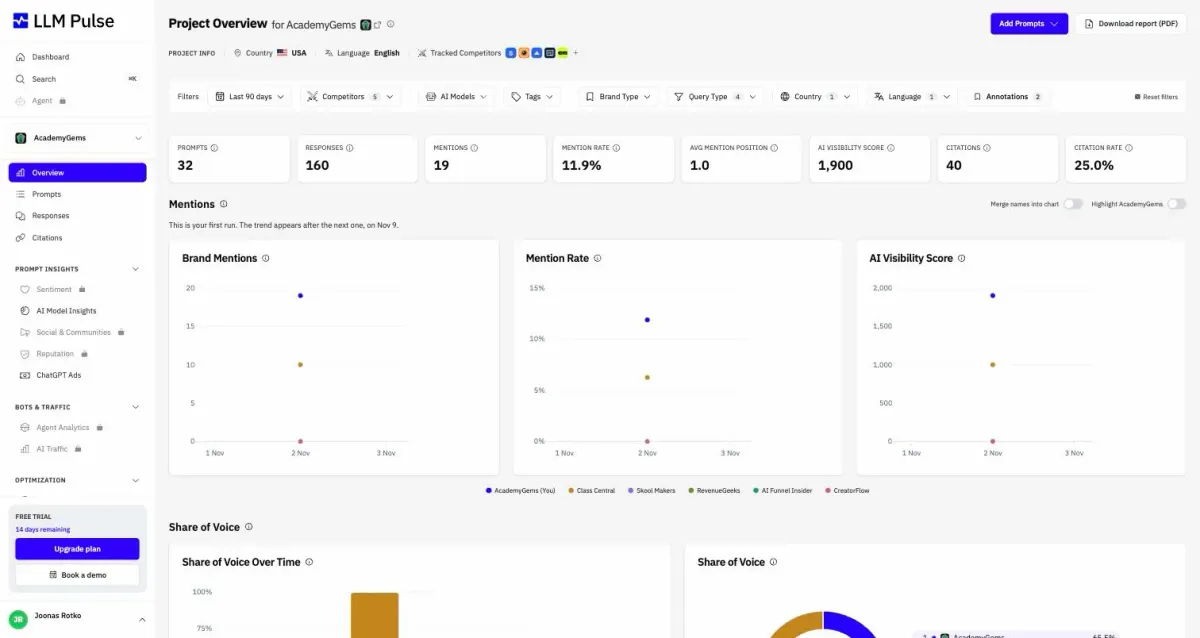
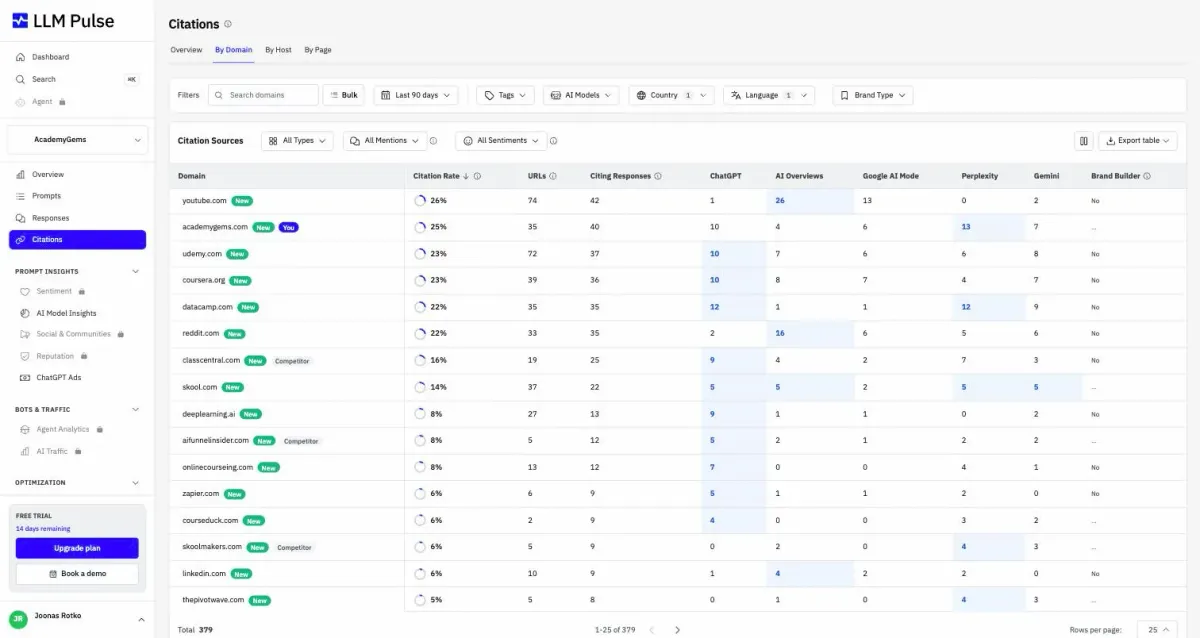
This is the sources view, and in my test it was the most useful screen: it shows which sites decide an answer. The full results are in my LLM Pulse review.
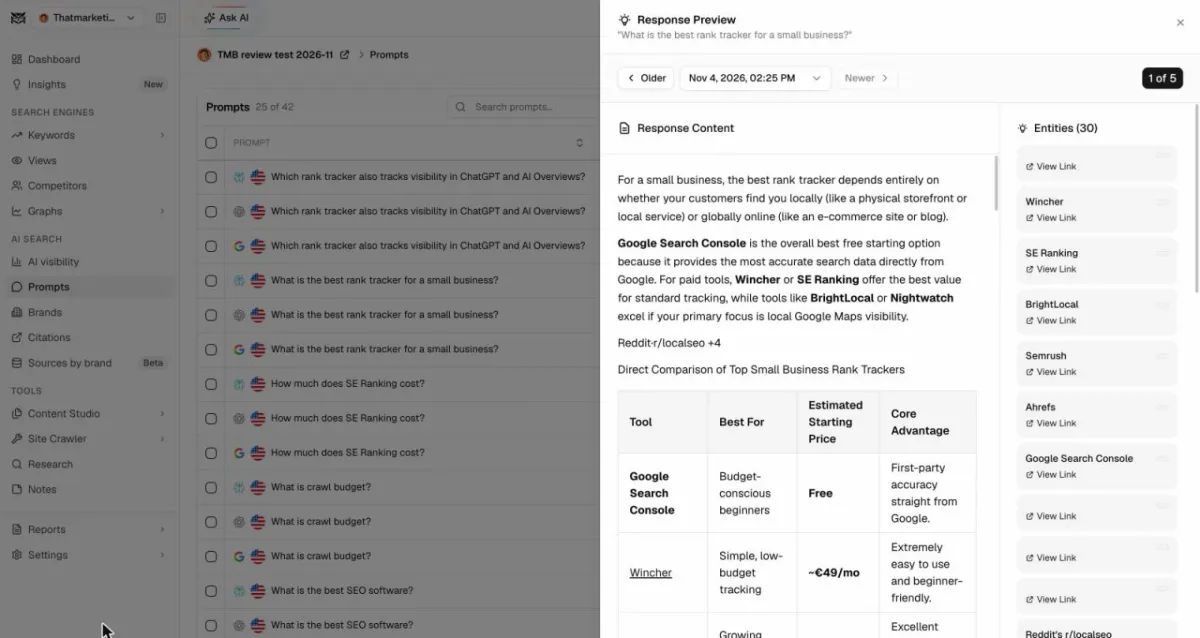
Nightwatch keeps the whole answer text, so you can check any number against it. Its Citations view listed 89 cited domains after one day, and seranking.com had 46 citations across 11 of my prompts while my site had none. One label needs care: its Visibility column reads 100% when any of your tracked brands appears, competitors included. My Nightwatch review has the rest.
The measured tests on this page are from LLM Pulse and Nightwatch only. Plan facts for other trackers are on my Otterly, Peec AI and Promptwatch pages.
How Do I Report AI Visibility to a Client or to Management?
Report a fixed prompt set against named competitors, with the sample size shown, next to the visits and leads AI sends, and end with what you will change. A single percentage with no context invites the wrong questions. This is the structure I would use.
Scope
- What it holds
- The prompt set, engines, country, and dates
- Why it is there
- Numbers from different setups cannot be compared
Baseline
- What it holds
- The first measurement, taken before any work starts
- Why it is there
- Without it, nobody can say what the work changed
Category visibility
- What it holds
- Mention rate and citation rate on prompts that do not name the brand, against 3 to 5 competitors, with answer counts
- Why it is there
- This is the number that reflects new demand
Brand answers
- What it holds
- Whether answers about the brand are correct, with the wrong ones quoted
- Why it is there
- Wrong facts are the fastest thing to fix and the easiest to explain
Sources
- What it holds
- The 10 sites cited most in the category, and whether the brand is on them
- Why it is there
- Turns the report into a work list
Outcome
- What it holds
- Visits, leads or sales from AI referrers in analytics, plus Business Hub and Bing figures
- Why it is there
- Ties visibility to the business
Next actions
- What it holds
- Three to five changes, each tied to a prompt group or a source
- Why it is there
- A report without actions is a status update
| Part | What it holds | Why it is there |
|---|---|---|
| Scope | The prompt set, engines, country, and dates | Numbers from different setups cannot be compared |
| Baseline | The first measurement, taken before any work starts | Without it, nobody can say what the work changed |
| Category visibility | Mention rate and citation rate on prompts that do not name the brand, against 3 to 5 competitors, with answer counts | This is the number that reflects new demand |
| Brand answers | Whether answers about the brand are correct, with the wrong ones quoted | Wrong facts are the fastest thing to fix and the easiest to explain |
| Sources | The 10 sites cited most in the category, and whether the brand is on them | Turns the report into a work list |
| Outcome | Visits, leads or sales from AI referrers in analytics, plus Business Hub and Bing figures | Ties visibility to the business |
| Next actions | Three to five changes, each tied to a prompt group or a source | A report without actions is a status update |
- Keep the prompt set frozen for a quarter. Add prompts as a new group, so the old trend stays comparable.
- Do not promise positions. Answers vary by run, so agree on a direction over a quarter, not on a number for next month.
- Say what the data is. Tracker numbers come from a sample of prompts the team chose. The platform reports are real usage but partial.
- For agencies: use the same structure for every client and fix the method before the first measurement. It makes results comparable across clients and a change of tool less painful.
How Do I Read the Numbers Without Fooling Myself?
Read the answers behind the score, compare groups of prompts, and look at trends over months. These are the traps I hit in my own tests.
- A score can reward a wrong answer. LLM Pulse scored an AI Overview that described my site as another company as mentioned, position 1, cited.
- Brand prompts flatter you. My mention rate was 95% on brand prompts and 11.9% across all prompts.
- Share of voice on a small sample looks sure. Mine was 65.5% against one competitor, built on 29 mentions, with no sample size shown. Ask for the count.
- Mentions are not visits. My Business Hub week had steady mentions and zero website clicks. Report both.
What Does a Simple Monthly Routine Look Like?
Check the free reports, read your key answers, and write down one thing that moved and one thing to fix.
- Business Hub and Bing: note mentions, clicks and citations, and any new topic or grounding query.
- Analytics: visits and leads from AI referrers.
- Key answers: read 5 to 10 of them and fix wrong facts about your business first.
- Tracker, if you have one: category mention rate against competitors, and the sites cited most.
- One action: pick it from the sources list.
What to change is covered in how to rank in AI search, with separate pages on what ChatGPT names and links and what Google AI Overviews cite. My AI visibility index shows a measured example.
Frequently Asked Questions
Can I see what people ask ChatGPT about my business?
Not the real prompts. OpenAI's Business Hub shows mentions, website clicks and top discovery topics, and says businesses do not receive individual prompts. The closest free data is the sampled grounding queries in Bing Webmaster Tools, which come from Microsoft's AI answers.
Is there a free way to track AI visibility?
Yes. ChatGPT Business Hub Insights and Bing Webmaster Tools are free at the time of writing, Google Search Console shows impressions in AI Overviews and AI Mode in its Generative AI performance report, and your analytics shows visits from AI referrers. None of them shows competitors.
Does Bing Webmaster Tools show ChatGPT citations?
Microsoft does not say so. Its announcement names Microsoft Copilot, AI-generated summaries in Bing and select partner integrations. For ChatGPT, use Business Hub Insights and your analytics.
Sources
- Google Search Central: AI features and your website
- Google Search Console Help: Generative AI performance report
- Bing Webmaster Blog: Introducing AI Performance in Bing Webmaster Tools (public preview)
- Bing Search Blog: New AI visibility insights in Bing Webmaster Tools
- Bing Webmaster Blog: Introducing Topics Portfolio (beta) in AI Performance
Ready to move from a hand-kept sheet to a tool? Compare AI visibility trackers by real price.
Compare AI Visibility Trackers →Tools in this guide


Read next

Joonas Rotko
SEO & GEO professional, founder of That Marketing Buddy
I'm a Finnish SEO and GEO professional with 11+ years in digital marketing, including years as a co-owner of a digital marketing agency. On That Marketing Buddy I test and compare SEO and AI-visibility software for entrepreneurs, marketing professionals and agencies.