

SEO & GEO professional · Hands-on review · Updated 2026-11-17
How this review was prepared
Account: a Promptwatch Professional trial on my own account, November 9 to 16, 2026. Test project: my own site, That Marketing Buddy, with 24 prompts on ChatGPT, Google AI Overviews, Google AI Mode, Microsoft Copilot, Gemini and Perplexity, checked daily from the US in English, plus the 10 prompts Promptwatch suggested at signup. What I tested: onboarding and its defaults, every view in the app, answers and citations, query fan-outs, sentiment and brand narrative, Reddit and YouTube sources, the site audit and internal linking map against my own site, one agent task, and the MCP server from Claude Code with a read-only key. Accuracy: on November 9 I fetched the same 24 prompts directly from Google AI Overviews and Google AI Mode about 20 minutes after Promptwatch ran them and compared mentions and citations of my site; I repeated my own fetches on November 11 and 14 to see how much the answers change without any tool involved. Not tested: Business-only features (Shopping, Ads Radar, Fact check, content agent automation), the content writer, the views that need Search Console or server logs, and the agency plans.
Affiliate links on this page may earn me a commission, at no extra cost to you. They don't change what I recommend.
The Verdict
Is Promptwatch right for you?
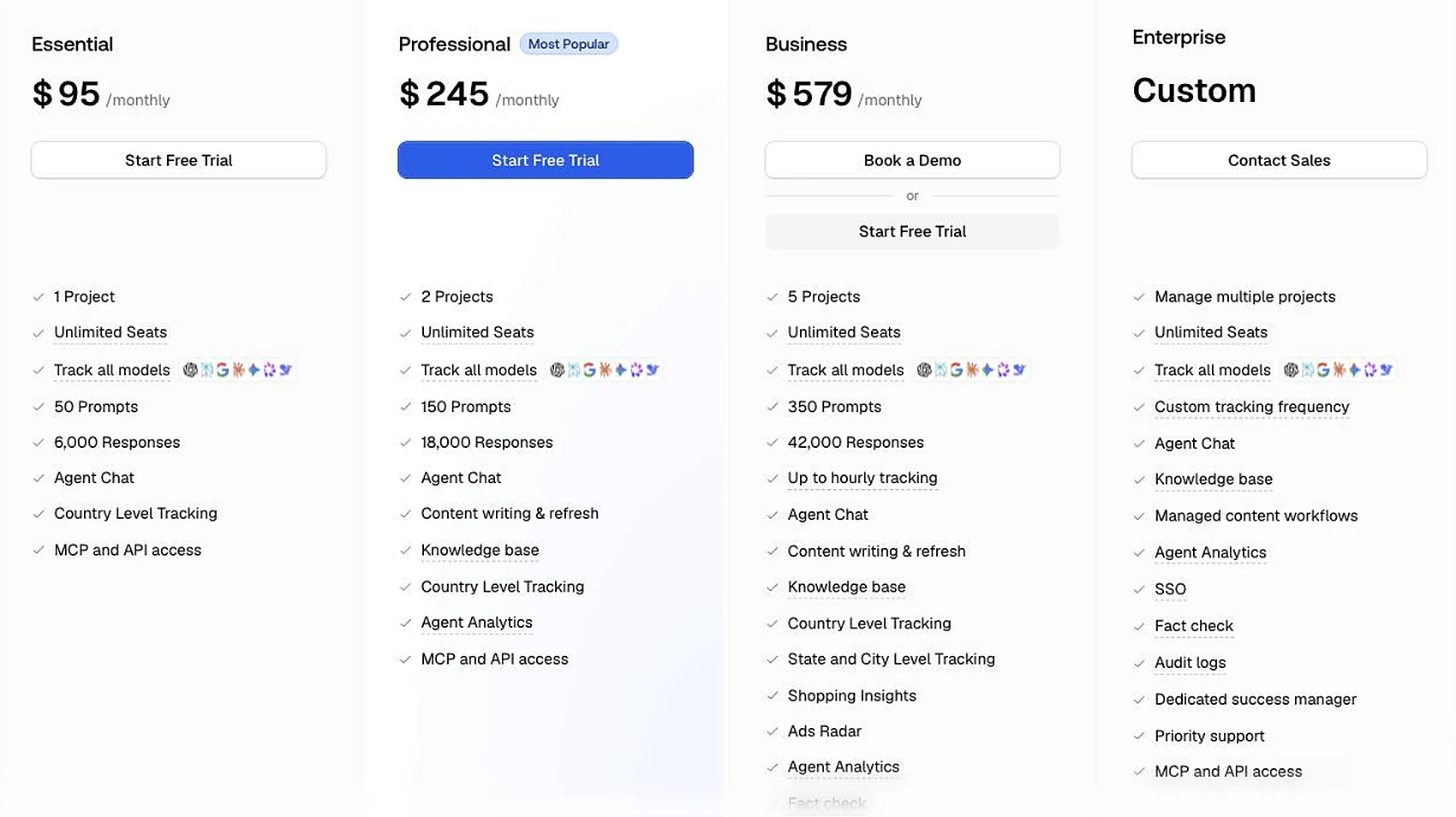
Promptwatch is best for companies and agencies that take AI visibility seriously. Essential costs $95 a month for 50 prompts checked daily, and every plan includes the MCP server and API.
Key findings from my test
- The visibility score counts only answers that name your brand. Pages of mine that AI answers cited as a source scored 0.
- The defaults flatter the first numbers: market set from my IP address, three engines in the first monitor, and two suggested prompts that name my site (20.8% against 7.1% on my own prompts).
- Its stored answers matched my own same-day fetches: mentions on 47 of 47 comparisons and citations on 45 of 47, on Google AI Overviews and AI Mode.
- Copilot was one of the six engines I switched on, and it returned no answers in the first three days.
- The source views go furthest: cited pages, Reddit threads, YouTube videos and the searches behind ChatGPT and Perplexity answers.
- The MCP server is on every plan, and a read-only key is enforced. Shopping, Ads Radar, Fact check and the content agent need Business at $579 a month. For the wider field, see the AI visibility tools I have tested.
Quick answer: which tool fits you
- If you want daily AI visibility data with sources, Reddit, YouTube and site checks
 PromptwatchThis reviewEssential $95 a month; Professional $245 adds content and crawler logs
- If you need weekly reports at the lowest price for 50 prompts
 LLM PulseStarter $58 a month, checked weekly
- If you need daily checks on 50 prompts with a simpler dashboard
 Peec AI$95 a month, 50 prompts checked daily
- If you want the cheapest way to start
 OtterlyLite $29 a month, 15 prompts checked daily
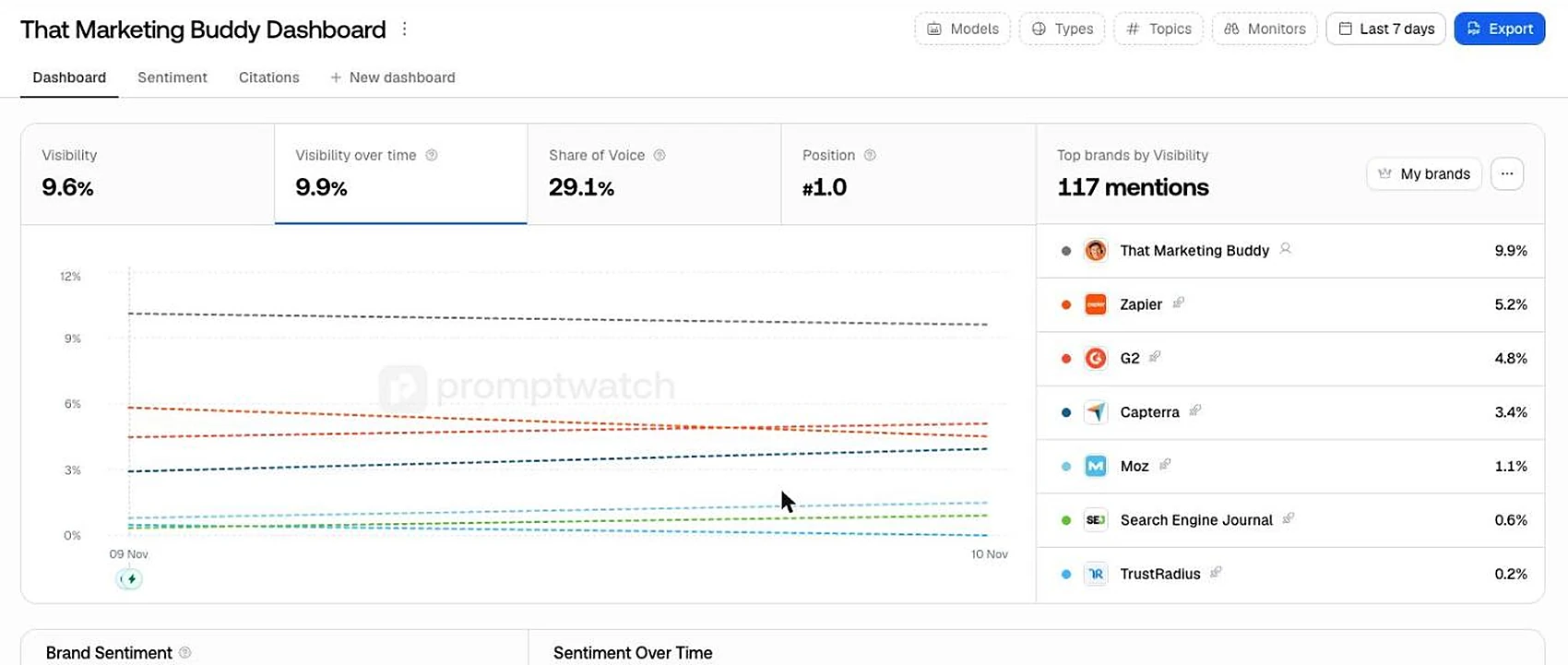
I tracked 24 prompts for my own site on six AI engines for a week. Promptwatch shows more than mention counts: which Reddit threads and YouTube videos the answers cite, how each engine talks about the brand, and a map of my site's internal links that found two real orphan pages. Where I could check it, its data matched the real answers. But the headline visibility score counts only answers that name the brand, so pages of mine that AI Overviews and Perplexity cited as a source scored 0, and Copilot returned no answers in the first three days.
If you only need a weekly report, LLM Pulse costs less. If you run one small site on the side, Essential at $95 a month is more than most people need. Shopping, Ads Radar, Fact check and the automated content agent need Business at $579 a month. It works well through Claude with its MCP server.
My rating
4.5 / 5
- Data accuracy (my tests)4.0
Its stored answers matched my own same-day fetches on mentions in 47 of 47 comparisons and on citations in 45 of 47, on Google AI Overviews and AI Mode; I could check only one day and two engines, and Copilot returned no answers in the first three days.
- Features and depth4.5
Tracking, stored answers, citations, Reddit and YouTube sources, query fan-outs, brand narrative, a site audit with a linking map, and an agent sit in one app; the visibility score leaves out citations, and one audit card flagged 34 URLs of which 5 were real gaps.
- Value for a small business3.5
$95 a month covers 50 prompts checked daily on every engine with unlimited seats and the MCP server, but that is more than one small site needs, and Shopping, Ads Radar and Fact check cost $579.
- Ease of use4.0
The app is clear, intuitive and feels high quality, but three defaults need changing before the first numbers mean anything: the market, the engines and the suggested prompts.
- AI search features4.5
The MCP server and API are on every plan, the server showed 154 tools in Claude Code, and a read-only key is enforced; every call sends a short description of the task to Promptwatch.
- Trial and billing3.5
The 7-day trial needs a card, tracking starts only after you pick a plan, and the plan bills automatically when the trial ends.
I rate only tools I have used myself, on criteria from 1 to 5, and leave out any I couldn't measure. The overall score is my own judgement, not an average. Rated 2026-11-17.
Promptwatch pays me a recurring affiliate commission for customers I refer. It did not affect these scores.
Compare it: Promptwatch alternatives · Promptwatch pricing · Best AI visibility tools
Who It's For
Who Promptwatch is for (and who it isn't)
✓ Best for
- +Companies that take AI visibility seriously. Daily checks on every tracked engine, full answers with sources, sentiment by theme and engine, and site checks in one dashboard.
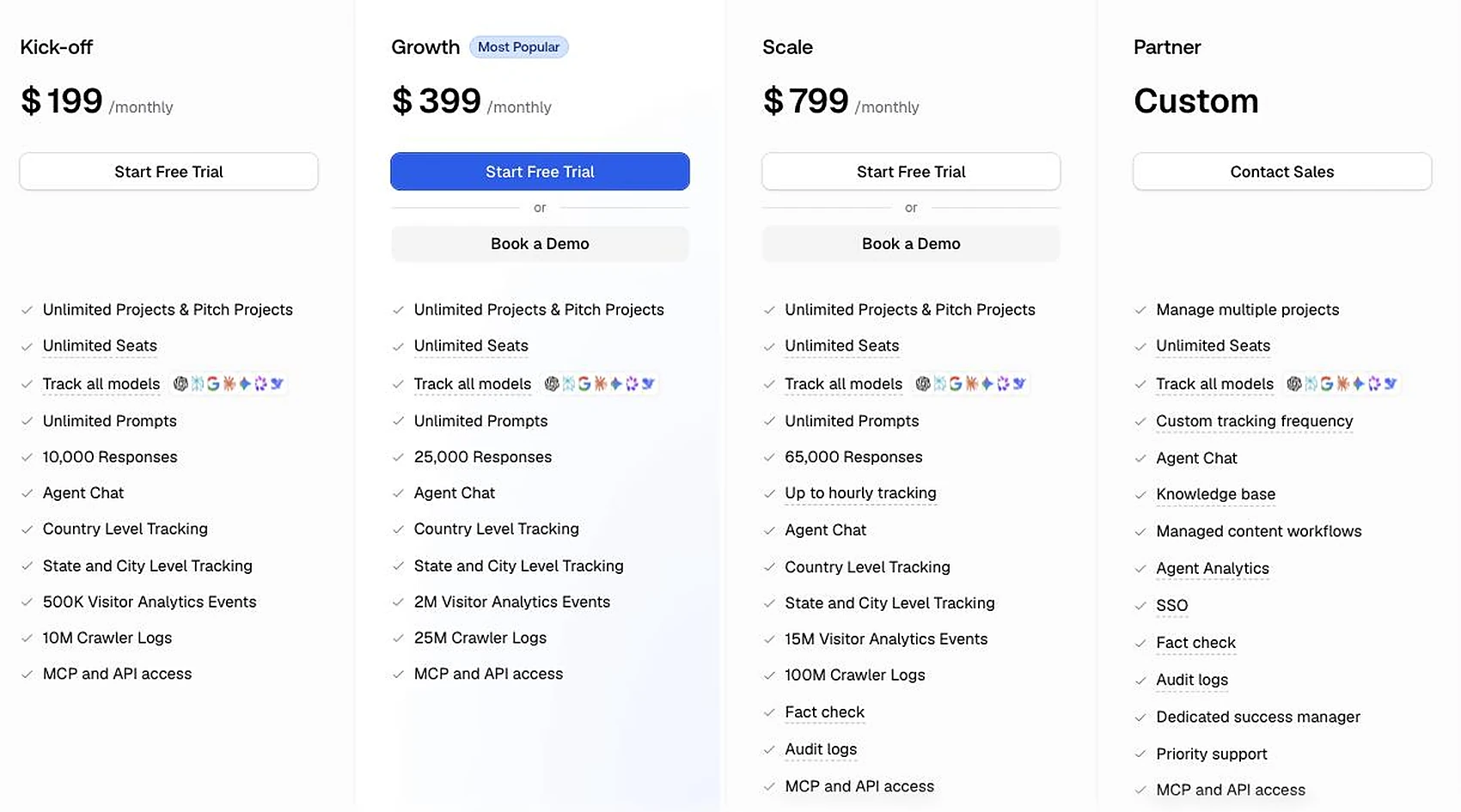
- +Agencies with several clients. Agency plans start at $199 a month with unlimited projects and prompts, and every plan has unlimited seats. I did not test the agency plans myself.
- +Teams that want to know where AI answers get their sources. Citations by domain and page, query fan-outs, and separate views for Reddit threads and YouTube videos the answers cite.
- +Anyone who works through Claude or ChatGPT. The MCP server and API are on every plan, and a read-only key really is read-only.
× Consider something else if
- −You run a one-person side project. Otterly's Lite plan costs $29 a month for 15 prompts checked daily, which covers a small site.Try Otterly →
- −A weekly report is enough. LLM Pulse's Starter checks 50 prompts on five engines weekly for $58 a month.Try LLM Pulse →
- −You want daily data in a simpler dashboard. Peec AI checks 50 prompts daily for $95 a month, with fewer views to learn.Try Peec AI →
What You Can Do
What can Promptwatch do?
3 things to know before you buy Promptwatch
Promptwatch is a polished, deep AI visibility tracker, and I would recommend it to companies and agencies that take the topic seriously. Three things are worth knowing before you pay.
First, its visibility score counts only answers that name your brand, so pages that AI answers use as a source can score 0. Read the citation views next to the score.
Second, the defaults make the first numbers look better than they are: the market is set from your IP address, the first monitor tracks only three engines, and two of the suggested prompts name your brand. Change all three before you judge the results.
Third, Shopping, Ads Radar, Fact check and the automated content agent are on Business at $579 a month, not on the $95 Essential or $245 Professional plans.
The visibility score
- What I found
- My cited pages scored 0 when the answer didn't name my site
- What to do
- Read citations by page next to the score
The defaults
- What I found
- Market from IP, 3 engines, brand prompts in the suggestions
- What to do
- Set market, engines and prompts yourself
The plan
- What I found
- Shopping, Ads Radar, Fact check and the content agent need Business
- What to do
- Check the feature list against $579 a month
| Before you buy | What I found | What to do |
|---|---|---|
| The visibility score | My cited pages scored 0 when the answer didn't name my site | Read citations by page next to the score |
| The defaults | Market from IP, 3 engines, brand prompts in the suggestions | Set market, engines and prompts yourself |
| The plan | Shopping, Ads Radar, Fact check and the content agent need Business | Check the feature list against $579 a month |
From my Professional trial on my own site, November 2026.
Every Promptwatch feature, and who it is for
This table covers every feature I found in the Promptwatch app in November 2026, with my verdict on each. The sections below go through them in the same order.
Dashboard and heatmap
- What it does
- Visibility, share of voice and position, and brands against engines
- My verdict
- Good. Clear at a glance, but the score ignores citations
- Best for
- Everyone
Monitors
- What it does
- Sets of prompts with their own market, engines and schedule
- My verdict
- Good. Check the engines: a new monitor ticks three
- Best for
- Everyone
Prompts and stored answers
- What it does
- Every answer per prompt, engine and day, with sources
- My verdict
- The best part. It makes every number checkable
- Best for
- Everyone
Trends and topics
- What it does
- Daily visibility per prompt, and prompts grouped by theme
- My verdict
- Useful once there is a week of data
- Best for
- Weekly reporting
Citations and URL positions
- What it does
- Cited domains and pages, with position in the answer
- My verdict
- Very good. Read it next to the score
- Best for
- Content work
Offsite mentions
- What it does
- Which cited pages name you or your competitors, by page type
- My verdict
- Good for finding pages to get mentioned on
- Best for
- PR and outreach
Reddit and YouTube
- What it does
- Threads and videos the answers cite
- My verdict
- Good, and rare in this category
- Best for
- Community and video work
Query fan-outs
- What it does
- The searches an engine ran behind its answer
- My verdict
- Useful, but only ChatGPT and Perplexity reported them
- Best for
- Content writers
Sentiment and brand narrative
- What it does
- Tone by prompt, theme and engine, against competitors
- My verdict
- Good for known brands. Thin for a small site
- Best for
- Brand teams
Competitors and brand book
- What it does
- The brand profile and rivals found from your site
- My verdict
- Accurate for my site with one small fix
- Best for
- Everyone, once
Site audit and linking map
- What it does
- Crawls your site, draws its internal links, lists issues
- My verdict
- The map is very good. Check the issue cards before acting
- Best for
- Site owners
Content gap
- What it does
- How well your pages answer the tracked prompts
- My verdict
- A useful shortlist of pages to write
- Best for
- Content planning
Actions board
- What it does
- Suggested tasks from the audit and the data
- My verdict
- Mixed. 5 of 34 flagged URLs were real gaps
- Best for
- Teams that verify first
Agent chat
- What it does
- Ready-made research tasks that run on credits
- My verdict
- Good. One task gave me an outreach list
- Best for
- Outreach and briefings
MCP server and API
- What it does
- Promptwatch's data in Claude or your own scripts
- My verdict
- Very good. On every plan, read-only keys enforced
- Best for
- AI-assisted work
Shopping, Ads Radar, Fact check
- What it does
- Product results, ads in AI answers, and claim checks
- My verdict
- Not tested. Locked to Business
- Best for
- Online shops and larger brands
Content agent and content writer
- What it does
- Writes and refreshes pages for AI search
- My verdict
- Not tested
- Best for
- Teams that publish often
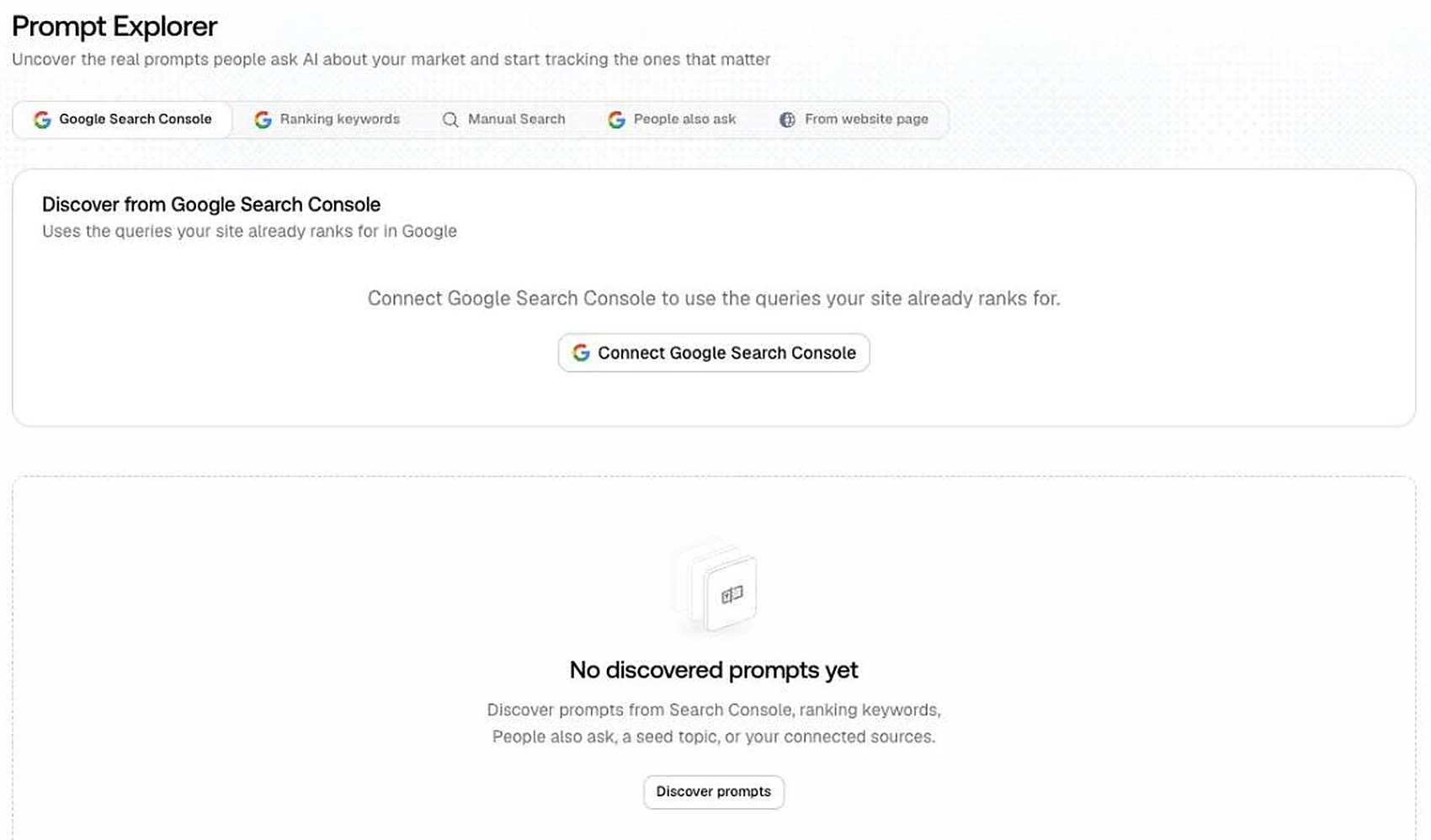
Prompt explorer, crawler logs, page tracker, persona insights
- What it does
- Views that need Search Console, server logs or extra setup
- My verdict
- Not tested. Empty in my trial
- Best for
- Sites with those connections
Agency plans
- What it does
- Unlimited projects and prompts for client work
- My verdict
- Not tested. Facts from the pricing page
- Best for
- Agencies
| Feature | What it does | My verdict | Best for |
|---|---|---|---|
| Dashboard and heatmap | Visibility, share of voice and position, and brands against engines | Good. Clear at a glance, but the score ignores citations | Everyone |
| Monitors | Sets of prompts with their own market, engines and schedule | Good. Check the engines: a new monitor ticks three | Everyone |
| Prompts and stored answers | Every answer per prompt, engine and day, with sources | The best part. It makes every number checkable | Everyone |
| Trends and topics | Daily visibility per prompt, and prompts grouped by theme | Useful once there is a week of data | Weekly reporting |
| Citations and URL positions | Cited domains and pages, with position in the answer | Very good. Read it next to the score | Content work |
| Offsite mentions | Which cited pages name you or your competitors, by page type | Good for finding pages to get mentioned on | PR and outreach |
| Reddit and YouTube | Threads and videos the answers cite | Good, and rare in this category | Community and video work |
| Query fan-outs | The searches an engine ran behind its answer | Useful, but only ChatGPT and Perplexity reported them | Content writers |
| Sentiment and brand narrative | Tone by prompt, theme and engine, against competitors | Good for known brands. Thin for a small site | Brand teams |
| Competitors and brand book | The brand profile and rivals found from your site | Accurate for my site with one small fix | Everyone, once |
| Site audit and linking map | Crawls your site, draws its internal links, lists issues | The map is very good. Check the issue cards before acting | Site owners |
| Content gap | How well your pages answer the tracked prompts | A useful shortlist of pages to write | Content planning |
| Actions board | Suggested tasks from the audit and the data | Mixed. 5 of 34 flagged URLs were real gaps | Teams that verify first |
| Agent chat | Ready-made research tasks that run on credits | Good. One task gave me an outreach list | Outreach and briefings |
| MCP server and API | Promptwatch's data in Claude or your own scripts | Very good. On every plan, read-only keys enforced | AI-assisted work |
| Shopping, Ads Radar, Fact check | Product results, ads in AI answers, and claim checks | Not tested. Locked to Business | Online shops and larger brands |
| Content agent and content writer | Writes and refreshes pages for AI search | Not tested | Teams that publish often |
| Prompt explorer, crawler logs, page tracker, persona insights | Views that need Search Console, server logs or extra setup | Not tested. Empty in my trial | Sites with those connections |
| Agency plans | Unlimited projects and prompts for client work | Not tested. Facts from the pricing page | Agencies |
Promptwatch Professional trial, November 9 to 16, 2026. thatmarketingbuddy.com, US, English.
What it's like to use
The interface feels high quality and clear, and it is obvious a lot of work has gone into it. It gives a trustworthy overall impression, close to Searchable in feel. It is intuitive, and it has small features I haven't found in other tools, such as a visual map of a site's internal links.
The app is built around a left-hand menu. Visibility holds prompts, monitors, query fan-outs, trends and topics. Brand perception holds sentiment and brand narrative. Sources holds citations, offsite mentions, Reddit and YouTube. Then come actions, content, analytics, the site audit and the brand book, with the agent chat one click away on every page.
Using it through MCP and AI was clear and smooth. In my view it suits companies that take AI visibility seriously, and agencies, more than small one-person side projects. I would probably pay for it, especially if I did this work for several clients. I compare it with the others in my list of AI visibility tools.
Setup: what the first day shows, and what it hides
Signup took about five minutes. Promptwatch read my site in under 25 seconds and wrote an accurate brand profile, eight competitors and ten suggested prompts. Tracking only starts after you pick a plan at the end of signup.
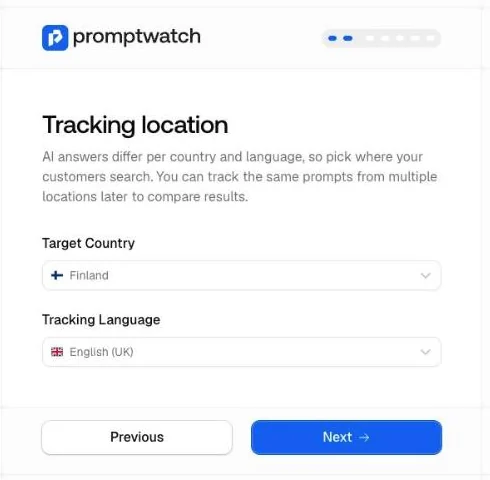
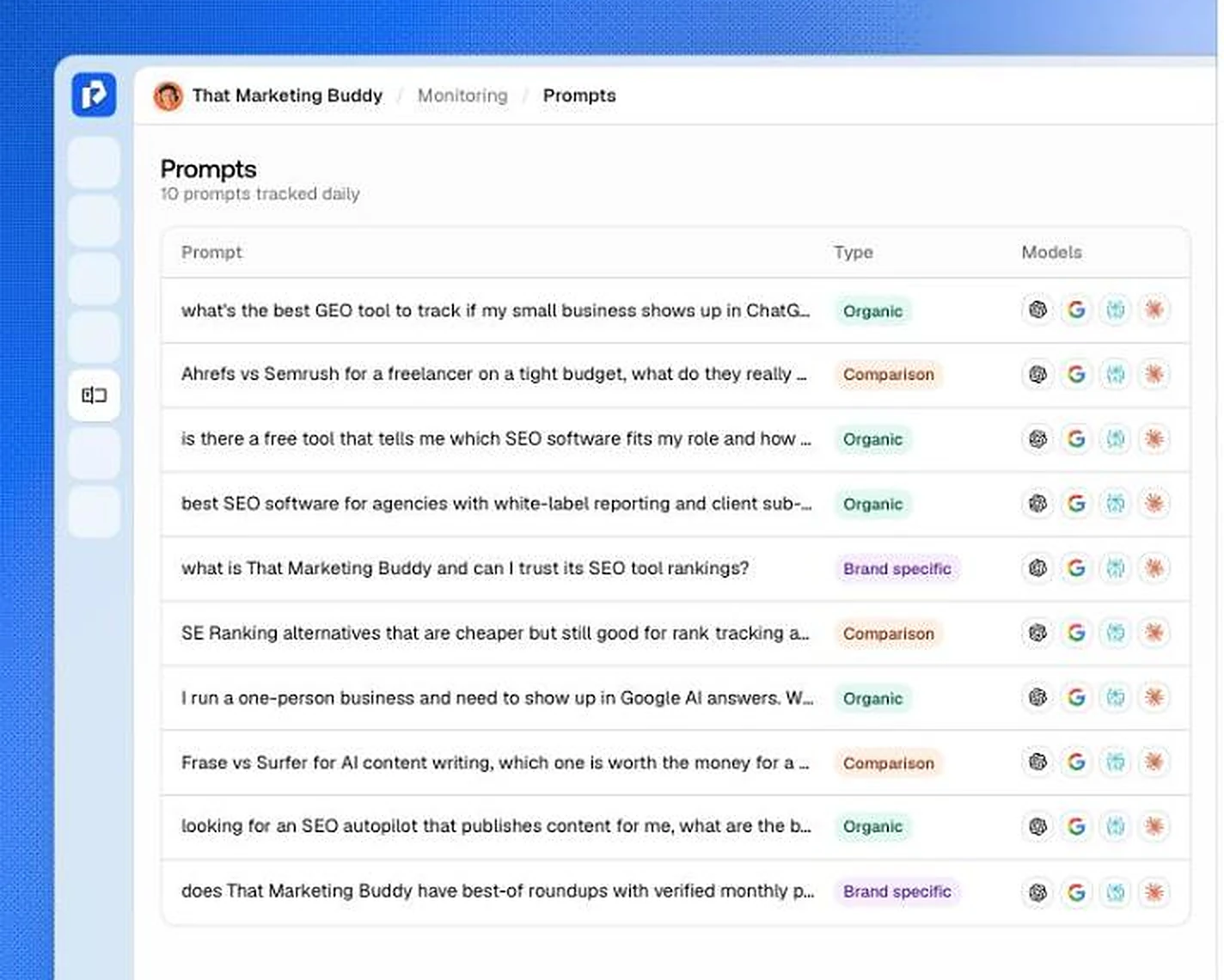
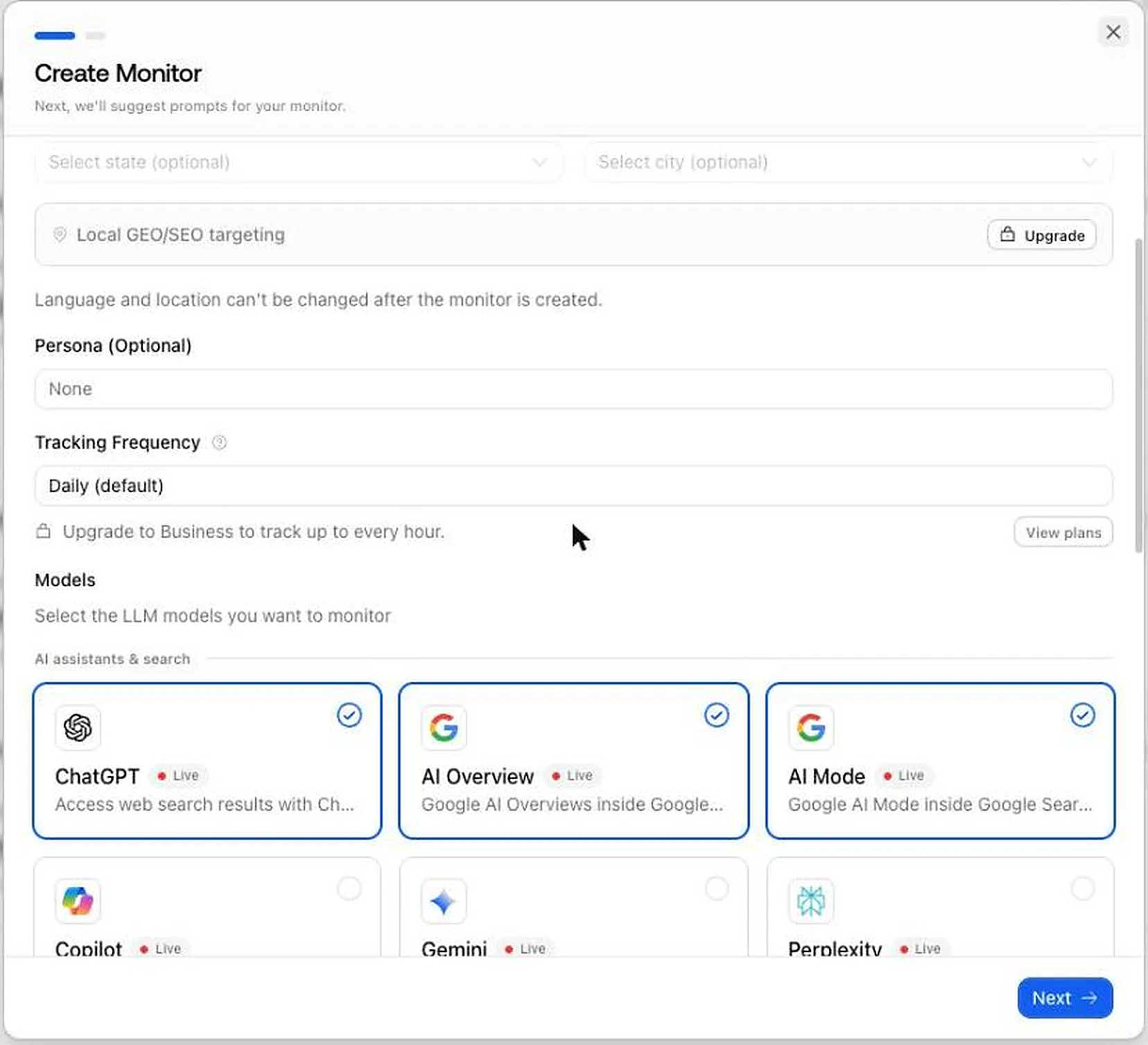
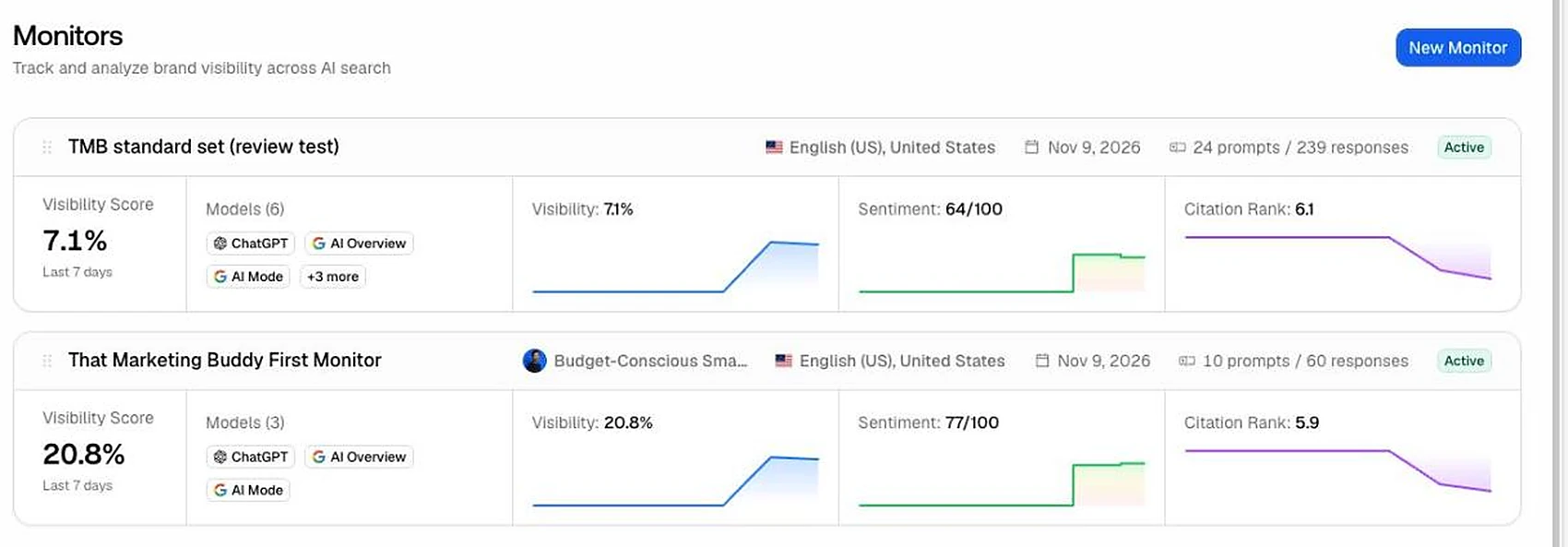
Three defaults are worth changing. It set the tracking market to Finland and English (UK) from my IP address, so I switched it to the US. A monitor's language and location can't be changed after it is created, so check them first. A new monitor ticks only three engines, ChatGPT, AI Overviews and AI Mode, although every plan says "track all models". And two of the ten suggested prompts name my site, built from my own homepage copy, so the starting score flatters you: that monitor scored 20.8%, while my own 24-prompt set scored 7.1% over the same days.
On day 0, 95 of the 144 answers I expected arrived: ChatGPT and Copilot had none. ChatGPT answered from day 1. Copilot returned nothing on any of the first three days, November 9 to 11, and it never got a column in the heatmap. The other five engines scored close to each other on my prompts.
Who it is for: anyone can get through setup in minutes, but give the first monitor ten more minutes and set the market, engines and prompts yourself.
Signup to brand profile
- Result
- About 5 minutes
Default market
- Result
- Finland, English (UK), from my IP
Engines ticked in a new monitor
- Result
- 3: ChatGPT, AI Overviews, AI Mode
Answers on day 0, my 24-prompt set
- Result
- 95 of 144
Answers on day 1
- Result
- 120 of 144
Copilot answers, days 0 to 2
- Result
- 0
Visibility: suggested prompts vs my own set
- Result
- 20.8% vs 7.1%
Average visibility by engine, my set
- Result
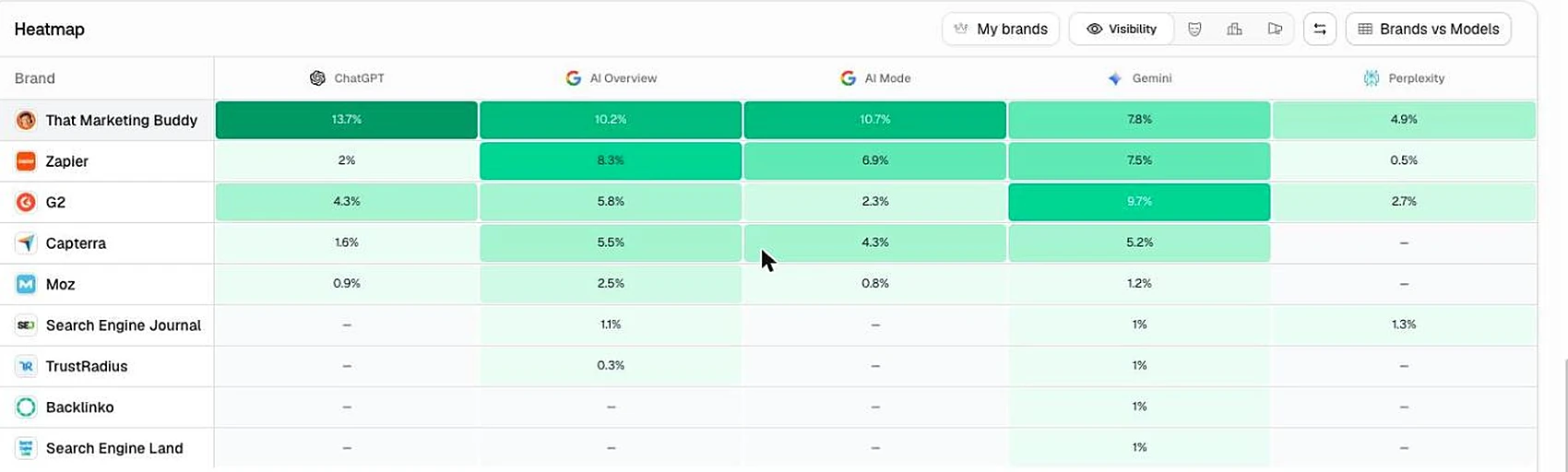
- AI Overviews 8.4%, Gemini 7.9%, AI Mode 7.7%, ChatGPT 7.7%, Perplexity 5.9%
| First three days, November 9 to 11, 2026 | Result |
|---|---|
| Signup to brand profile | About 5 minutes |
| Default market | Finland, English (UK), from my IP |
| Engines ticked in a new monitor | 3: ChatGPT, AI Overviews, AI Mode |
| Answers on day 0, my 24-prompt set | 95 of 144 |
| Answers on day 1 | 120 of 144 |
| Copilot answers, days 0 to 2 | 0 |
| Visibility: suggested prompts vs my own set | 20.8% vs 7.1% |
| Average visibility by engine, my set | AI Overviews 8.4%, Gemini 7.9%, AI Mode 7.7%, ChatGPT 7.7%, Perplexity 5.9% |
That Marketing Buddy, 24 prompts on 6 engines, US, English, checked daily.
Read the citations, not just the visibility score
Promptwatch's visibility score counts an answer only when it names your brand in the text. A citation alone doesn't count.
On day 0 my site was cited in 13 of 95 answers, but 13 of the 20 cited links sat on the two prompts that name my site. On the organic prompts, five answers cited one of my pages and every one of them scored 0. For "How much does the Semrush API cost?", AI Overviews linked my Semrush API pricing article after almost every paragraph, and AI Mode and Perplexity cited it too, all at visibility 0.
If you only read the headline number, a page that AI answers rely on looks invisible. The data is there: the citation views show your own pages, how often each is used and at which position. Read those next to the score.
Who it is for: this matters most to publishers and content sites, where being the cited source is the goal. A product brand that wants to be named in the answer can read the score as it is.
Do its numbers match the real AI answers?
On November 9, 2026, I fetched the same 24 prompts directly from Google AI Overviews and Google AI Mode about 20 minutes after Promptwatch ran them. For every answer I compared two things: does it mention my site by name, and does it cite one of my pages.
Promptwatch's stored answers agreed with mine on mentions in all 47 comparisons and on citations in 45 of 47. The two differences were single prompts where one fetch cited my site and the other did not. That is within how much the answers change by themselves: when I repeated my own fetches on November 11 and 14, the citation result switched on 1 of 24 prompts in AI Overviews, 2 of 24 in AI Mode and 3 of 24 in ChatGPT. The one AI Overviews prompt that differed from Promptwatch was the same prompt that switched in my own fetches.
The limits of this check: it covers one day and two engines. Promptwatch had no ChatGPT answers on day 0, my direct Perplexity fetches failed, and I had no direct check for Gemini or Copilot. What I can say is that the answers Promptwatch stores for the two Google engines are the real ones, and that every number in the app opens to the answer behind it.
Google AI Overviews
- Prompts compared
- 23
- Same on mentions
- 23 of 23
- Same on citations
- 22 of 23
Google AI Mode
- Prompts compared
- 24
- Same on mentions
- 24 of 24
- Same on citations
- 23 of 24
| Engine, November 9, 2026 | Prompts compared | Same on mentions | Same on citations |
|---|---|---|---|
| Google AI Overviews | 23 | 23 of 23 | 22 of 23 |
| Google AI Mode | 24 | 24 of 24 | 23 of 24 |
Promptwatch's stored answers against my own fetches about 20 minutes later. One prompt had no AI Overview in my fetch.
Prompts, stored answers, trends and topics
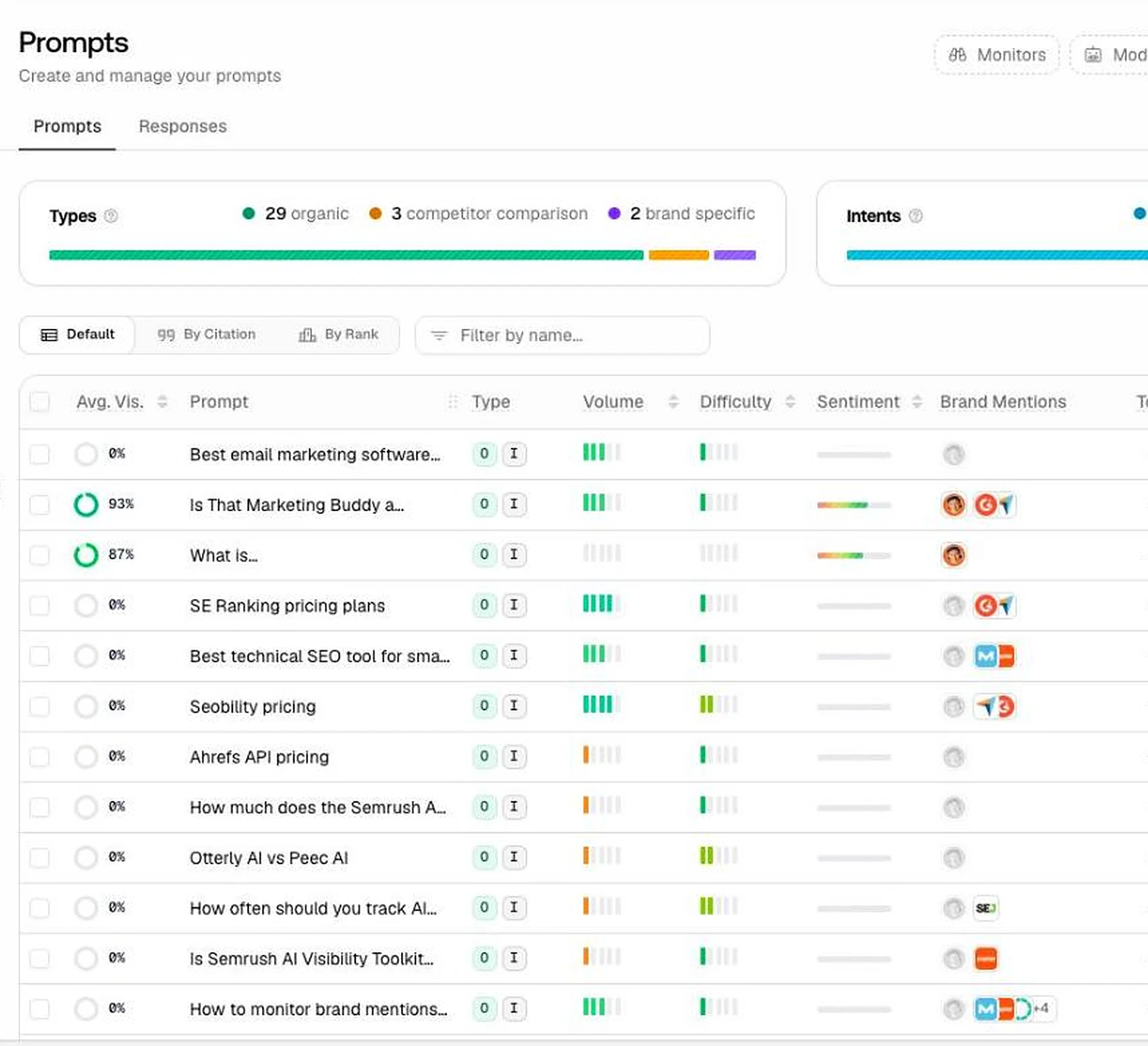
The prompt list labels every prompt by type (organic, competitor comparison, brand specific) and by intent, and shows its average visibility, sentiment and which brands the answers mention. Filter out the brand-specific prompts when you want an honest number. One thing to watch: when I added my prompts in bulk, the two that name my site were labelled organic, so check the labels.
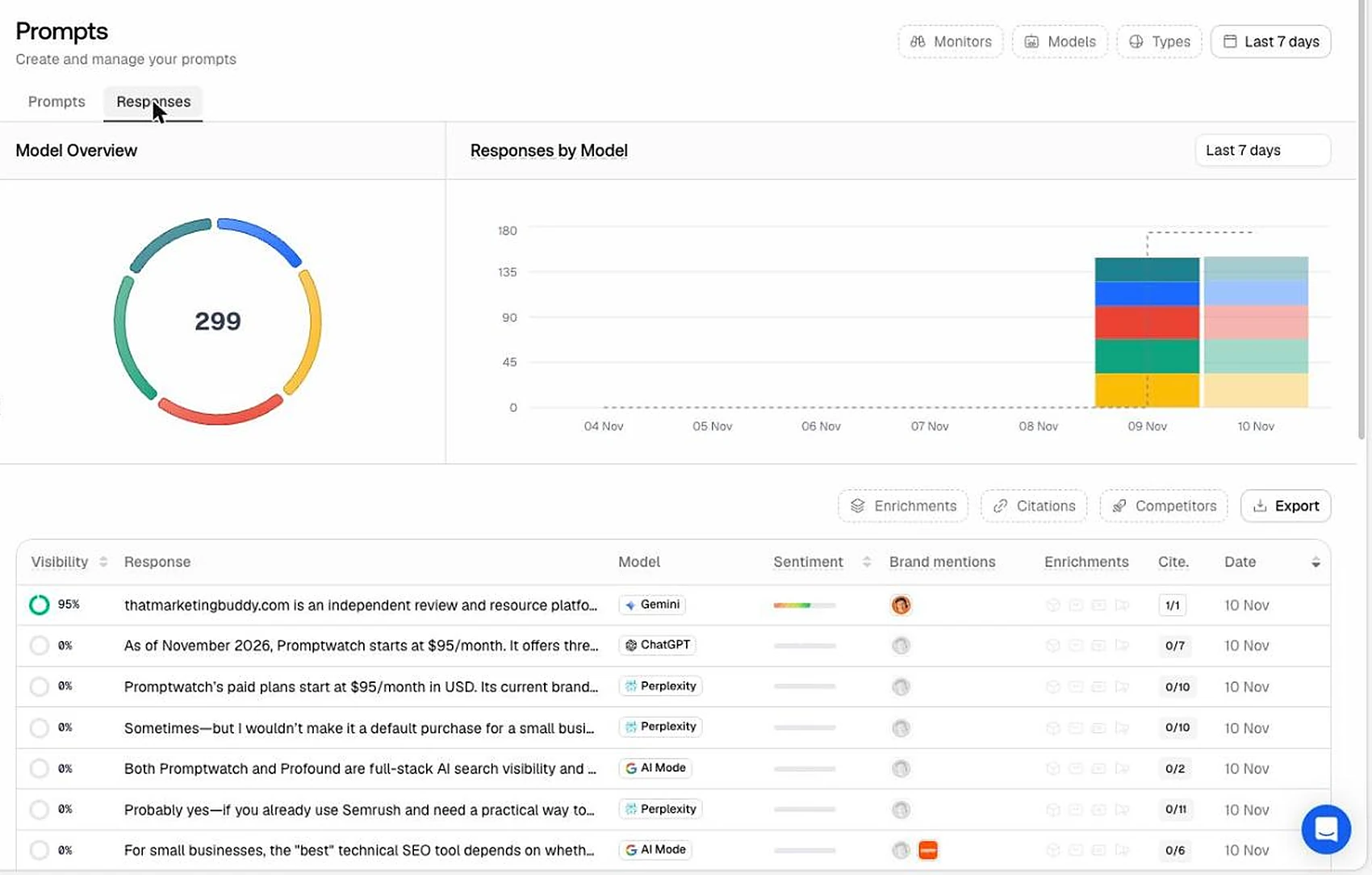
The responses view is the part I used most. It lists every stored answer with its engine, visibility, sentiment and number of citations, and opens the full text with its sources. After two days it held 299 answers. This is what makes the rest of the app checkable.
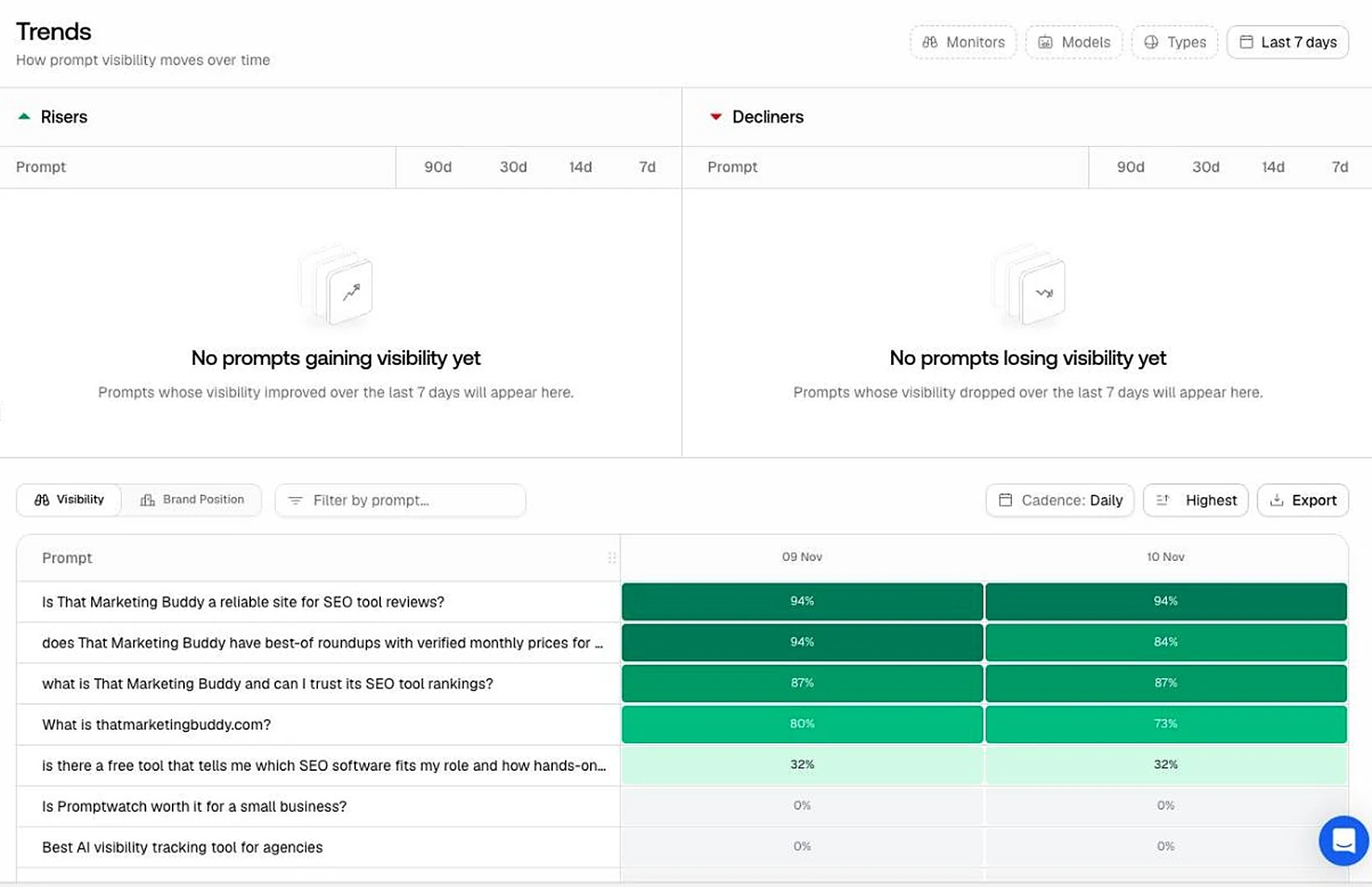
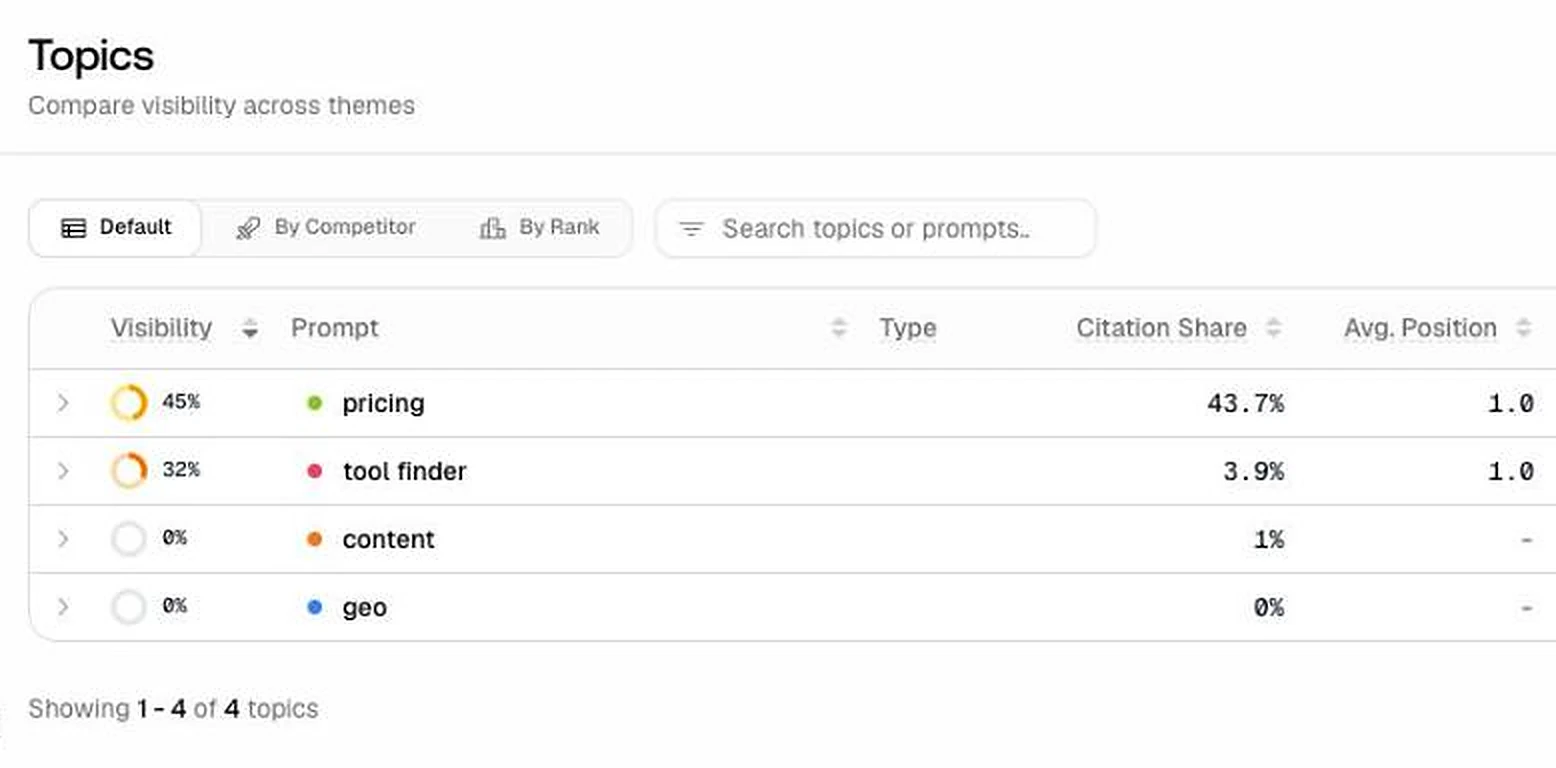
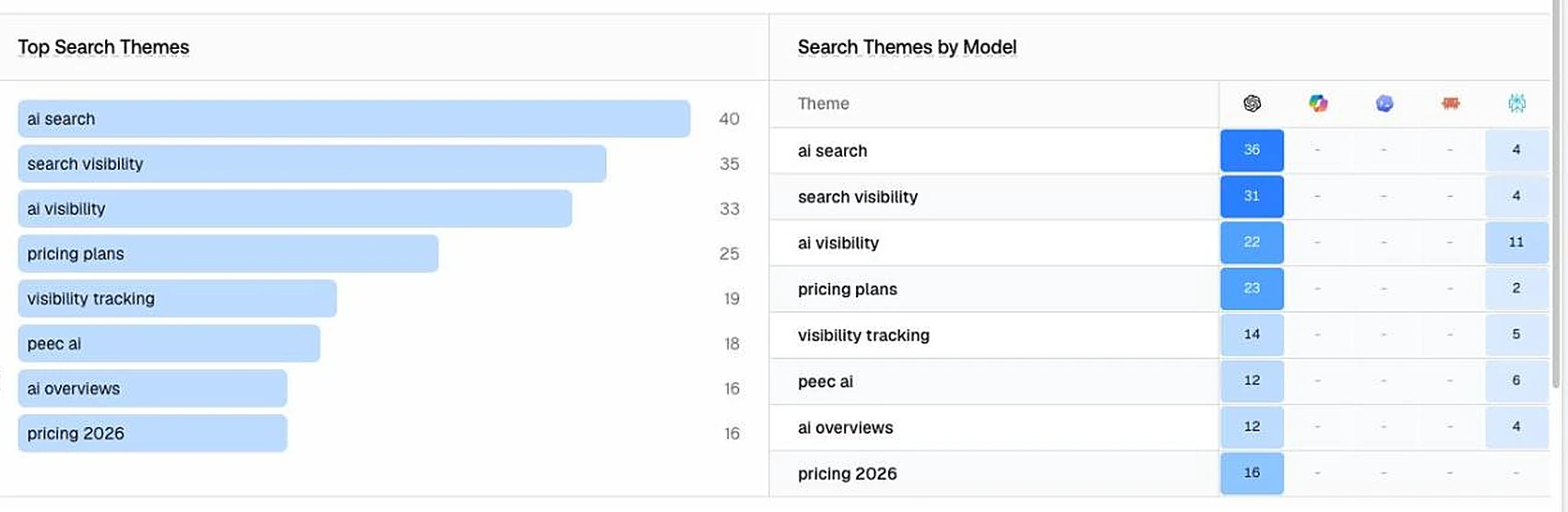
Trends shows visibility per prompt day by day, with risers and decliners once there is enough history. Topics groups the prompts by theme: on my site, pricing prompts had 45% visibility and tool finder prompts 32%, while content and GEO prompts had none.
Who it is for: everyone. Stored answers are the reason to trust any tracker, and Promptwatch shows them well.
Sources: citations, Reddit, YouTube and query fan-outs
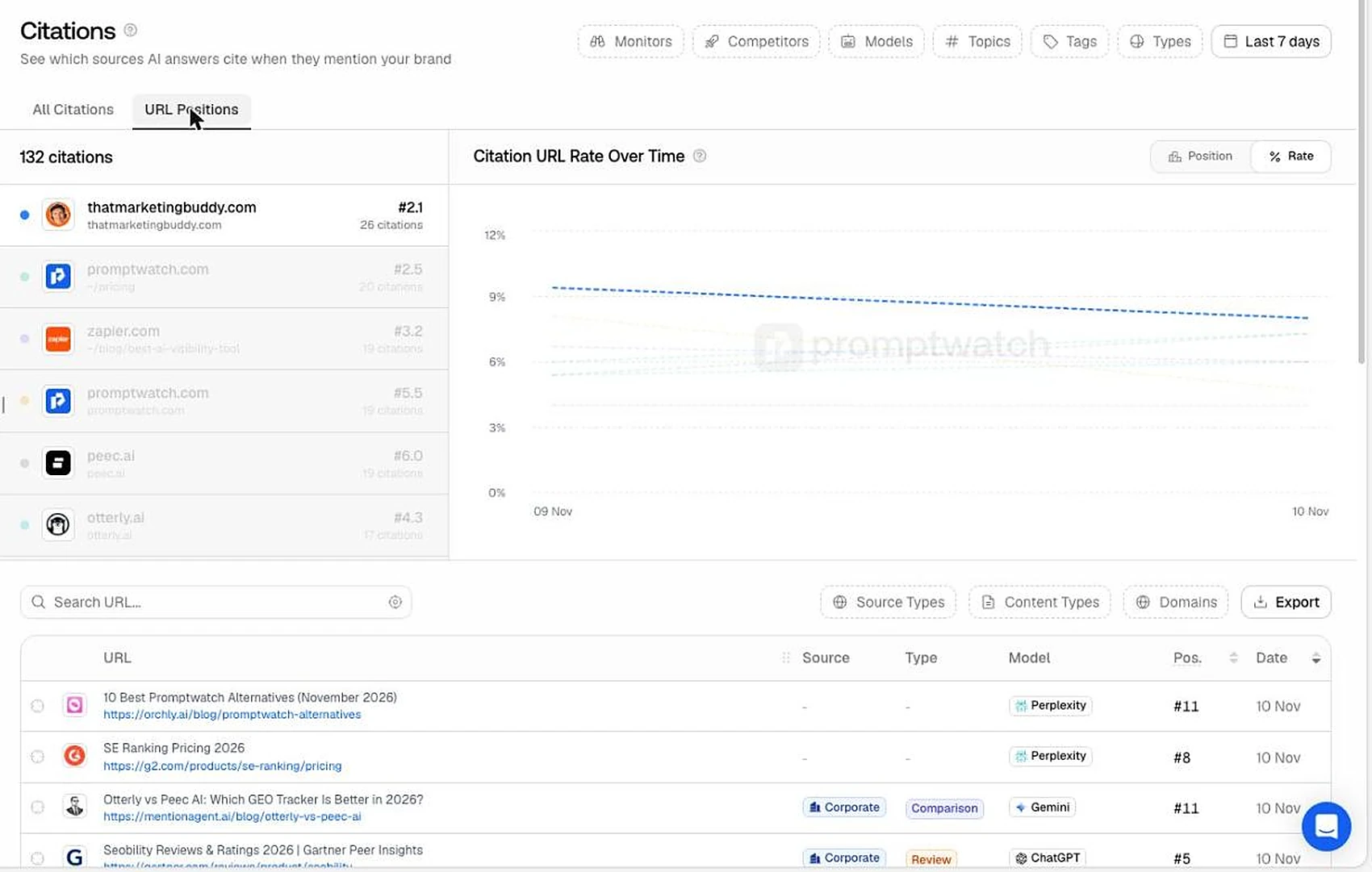
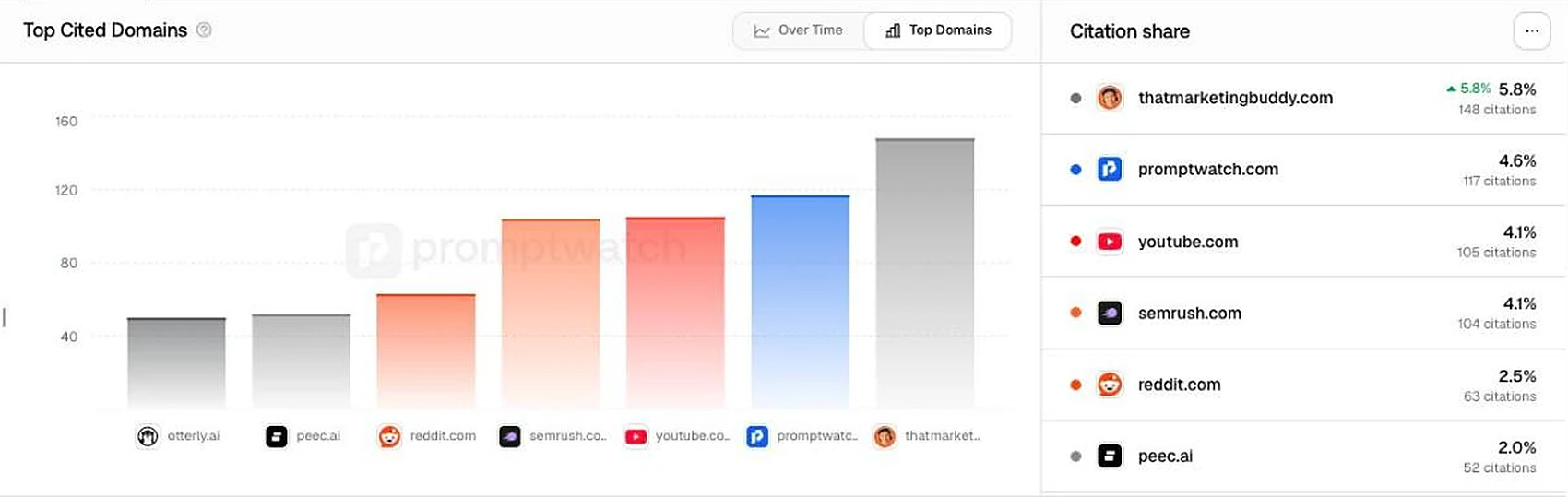
The source views are where Promptwatch goes furthest. Citations show which domains and pages the answers use. On my prompts, my own site was the most cited domain, then promptwatch.com, YouTube, Semrush and Reddit. The URL positions tab lists each cited page with its engine and its position among the sources.
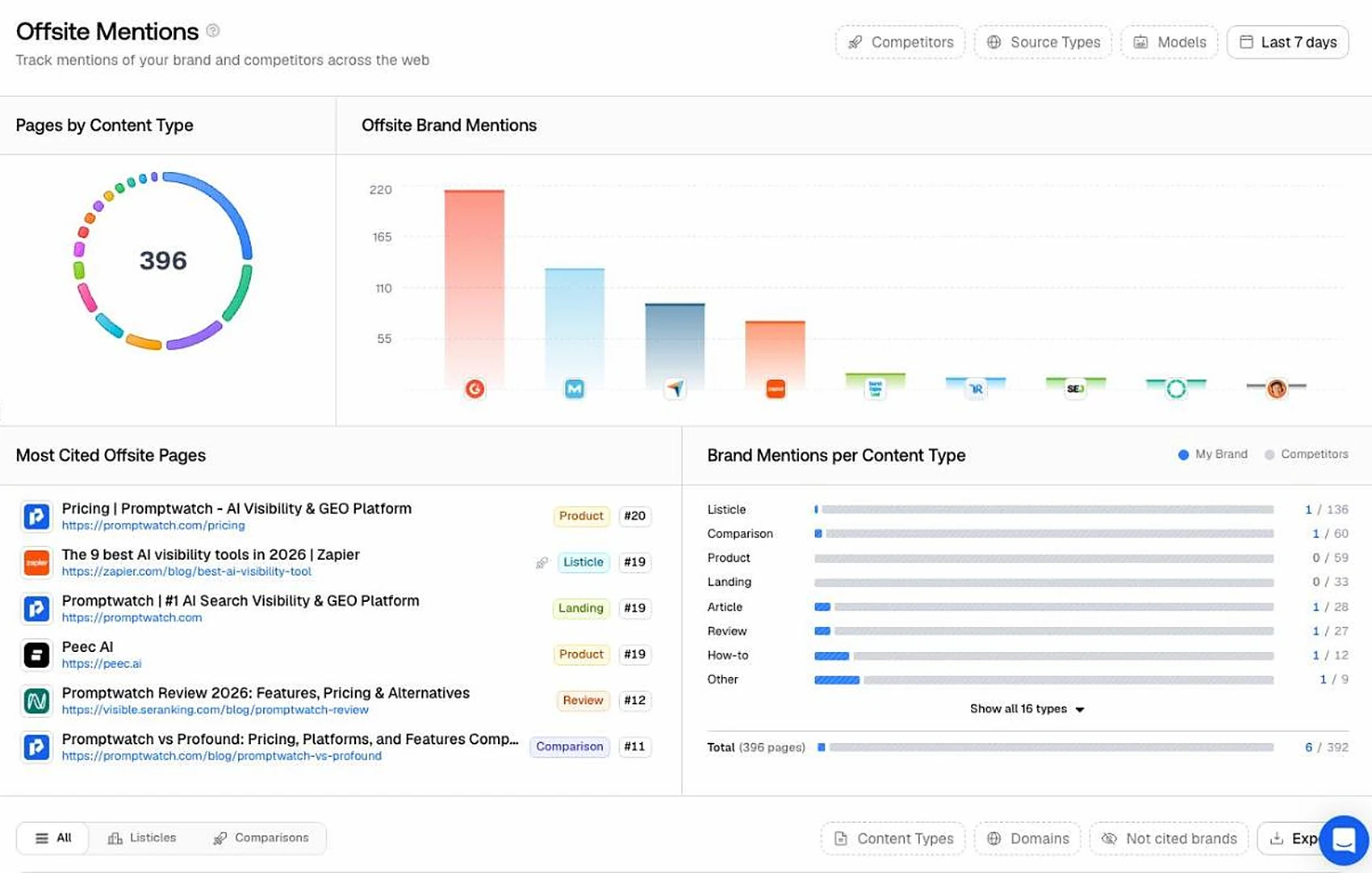
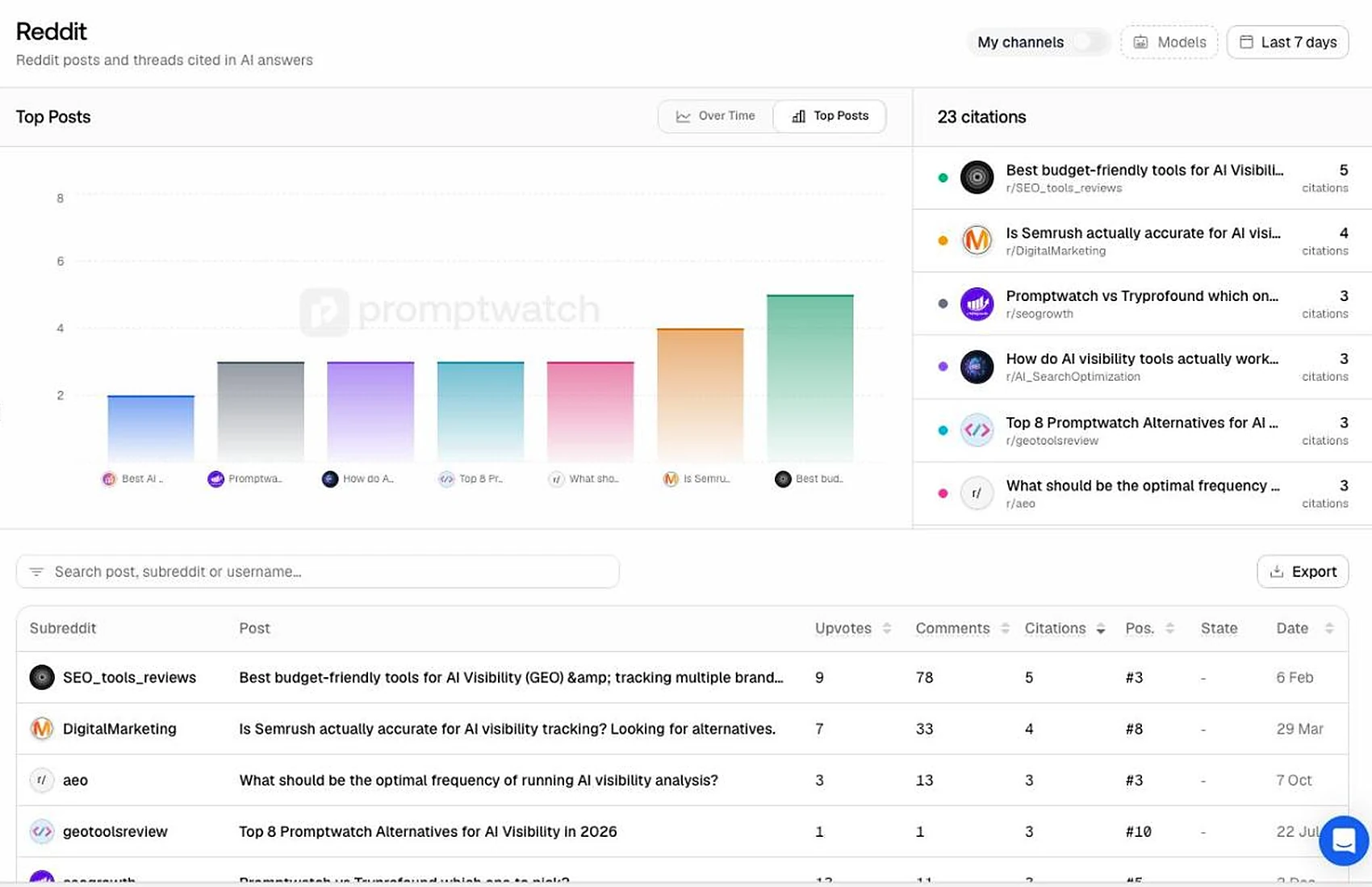
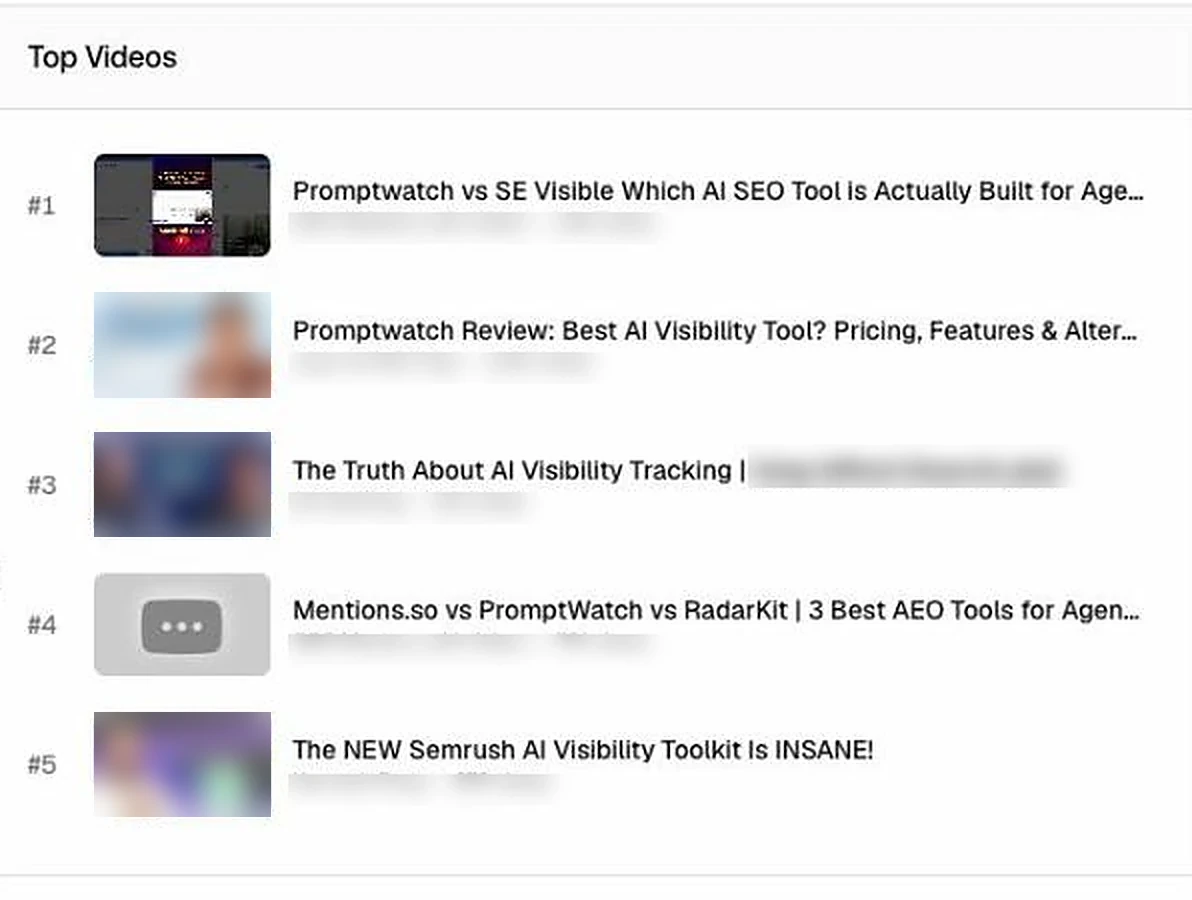
Separate views list the Reddit threads and YouTube videos the answers cited, with upvotes, comments, views and channels, which tells you where to take part if you want to be mentioned. Offsite mentions count how many cited pages name you and your competitors by page type. My site was named on 6 of 392.
Query fan-outs show the searches an engine ran behind its answer, but only ChatGPT and Perplexity reported them in my test. They are a good list of subtopics for a page, which is half of how to rank in AI search.
Who it is for: content, PR and community work. If all you want is a visibility number, you won't need these views. If you want to know what to do next, start here.
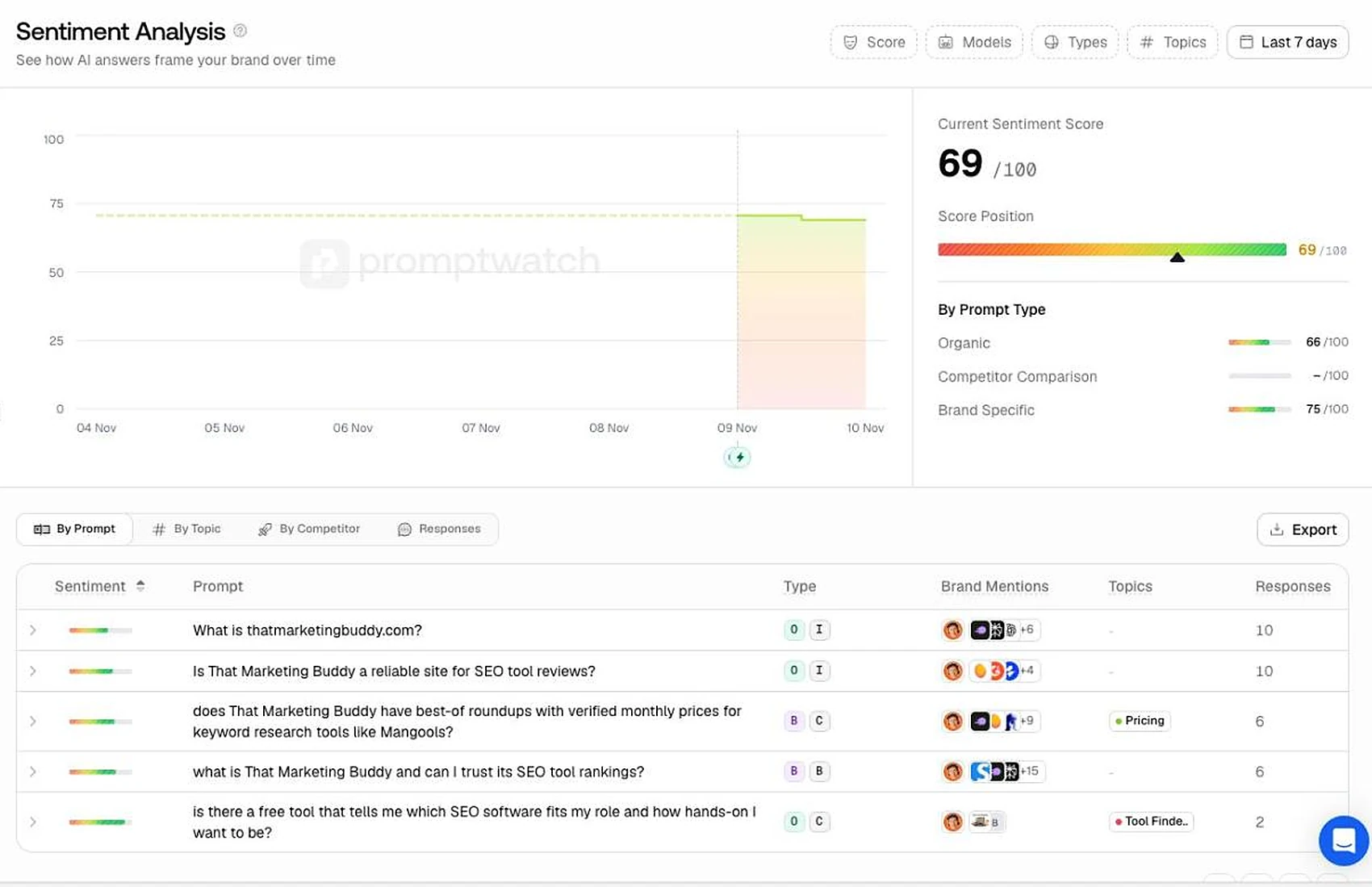
Sentiment, brand narrative and competitors
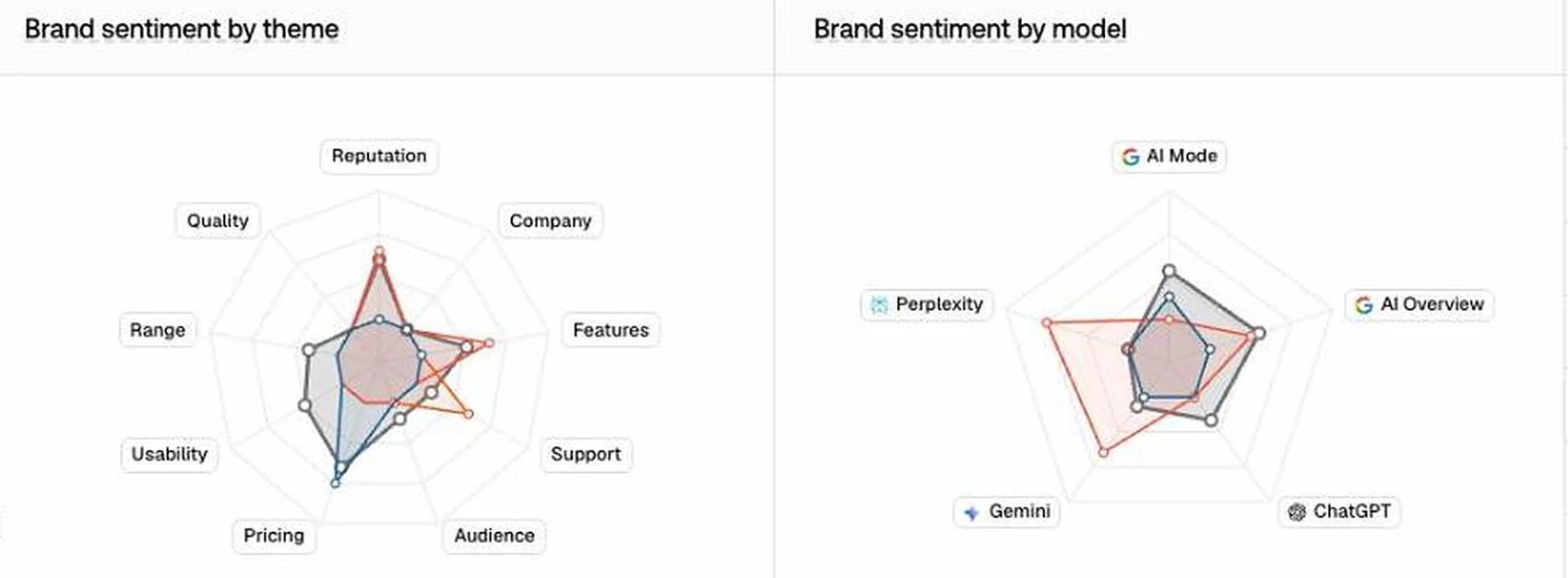
Sentiment scores how positively the answers talk about the brand, from 0 to 100, split by prompt type and by prompt. Mine was 69. Brand narrative goes a step further: a radar of themes such as pricing, reputation, features and support, per engine, with your rank against competitors on each theme.
For a small site these views are thin, because few answers say anything about the brand outside the prompts that name it. For a known brand with hundreds of mentions they would show where the engines disagree about you.
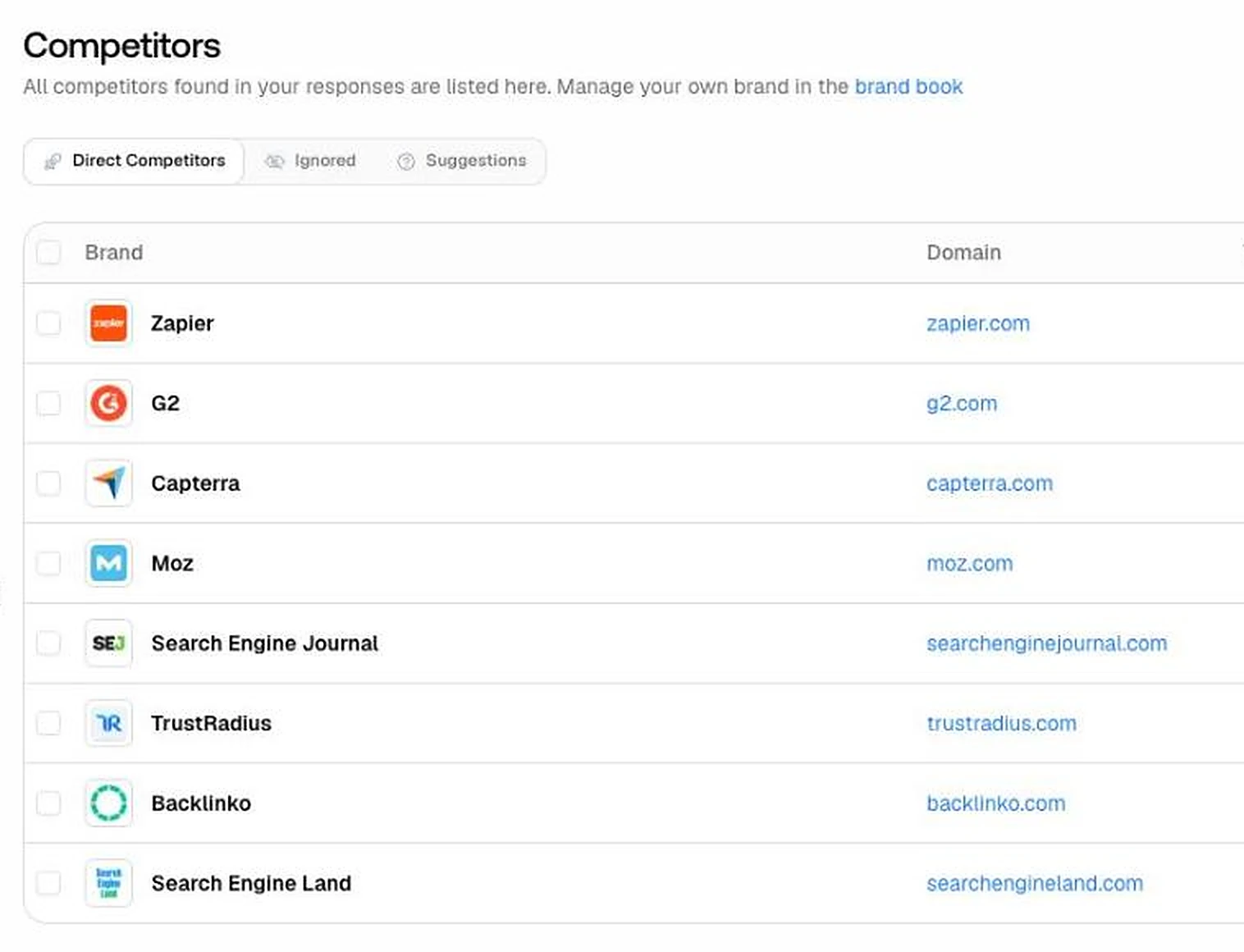
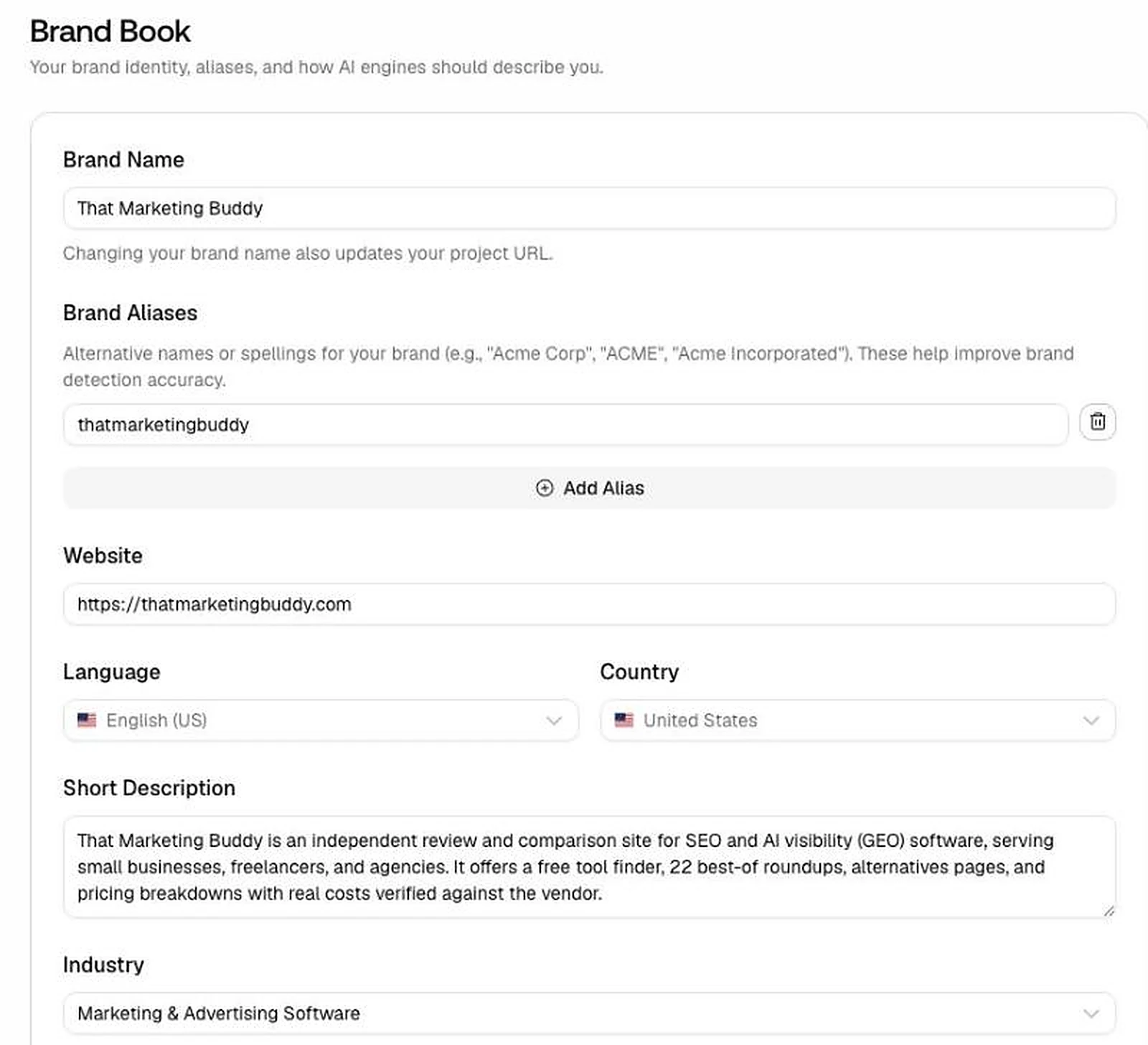
Promptwatch picked eight competitors for me at signup: Zapier, G2, Capterra, Moz, Search Engine Journal, TrustRadius, Backlinko and Search Engine Land. For a review site those are the right rivals, other publishers and not software vendors. The brand book it wrote from my site was accurate. I only added my site's name written as one word, so that mentions in that form are counted.
Who it is for: brand and communications teams at companies that AI answers already talk about.
Site audit, internal linking map and content gap
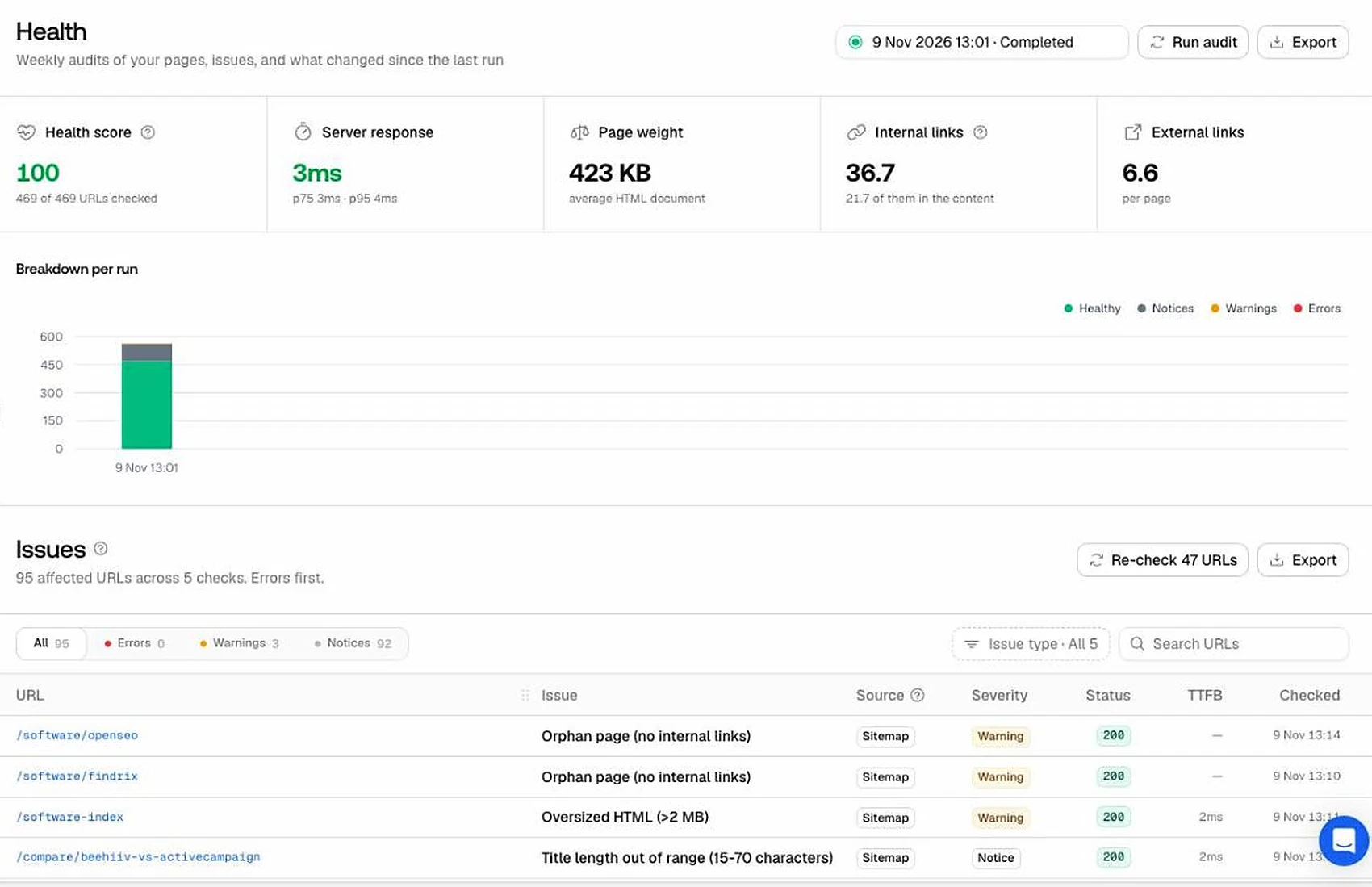
Promptwatch also audits your own site. It crawled all 469 pages in my sitemap and gave a health score of 100.
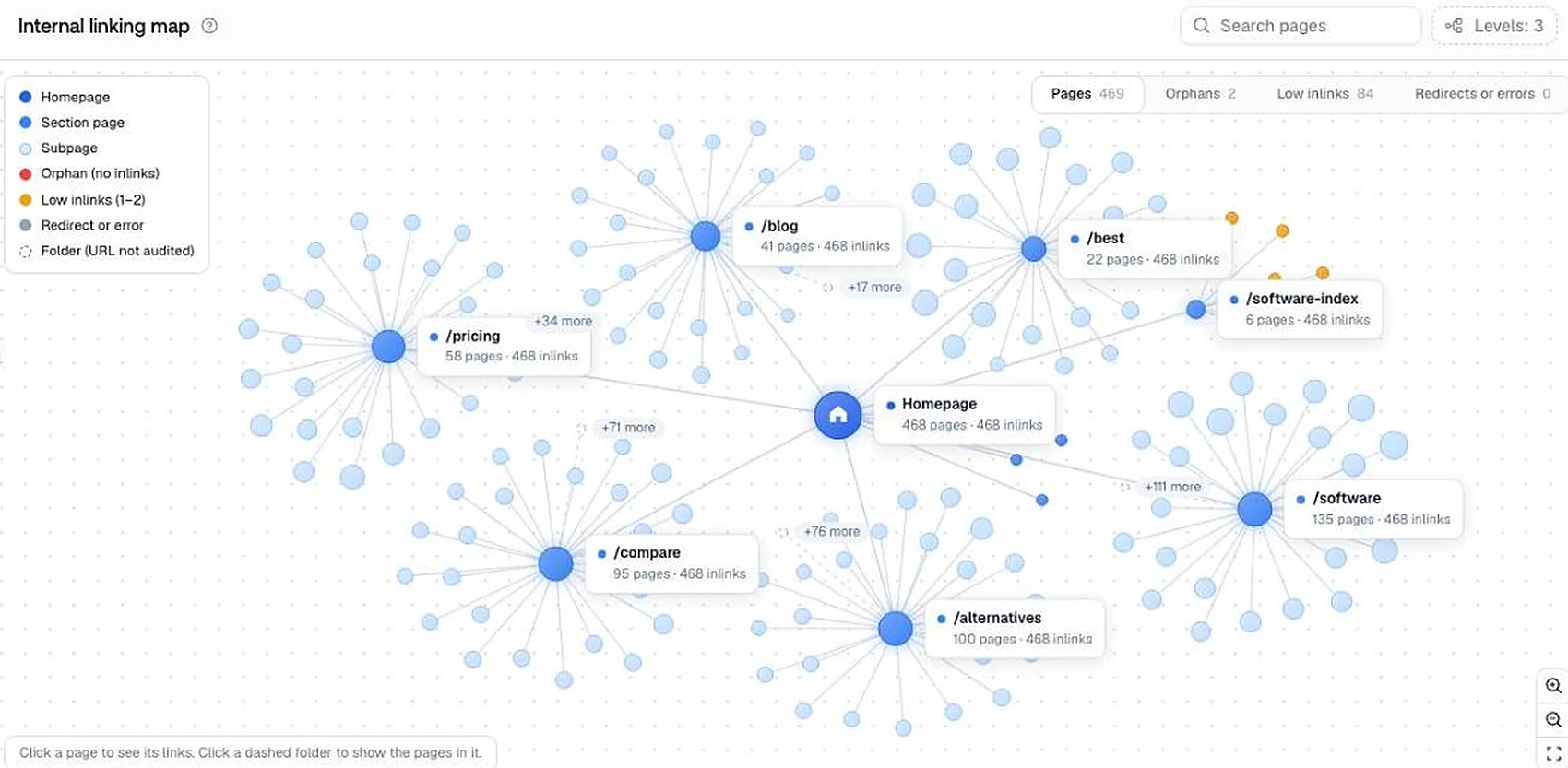
The internal linking map is the most useful view: it draws the site's sections and lets you filter orphan pages and pages with few internal links. It found two orphan pages on my site, my reviews of OpenSEO and Findrix, and both were real. It also listed 84 pages with only one or two internal links.
The audit reported a server response time of 3 milliseconds on every page, which isn't a realistic page load time, so I wouldn't use that number.
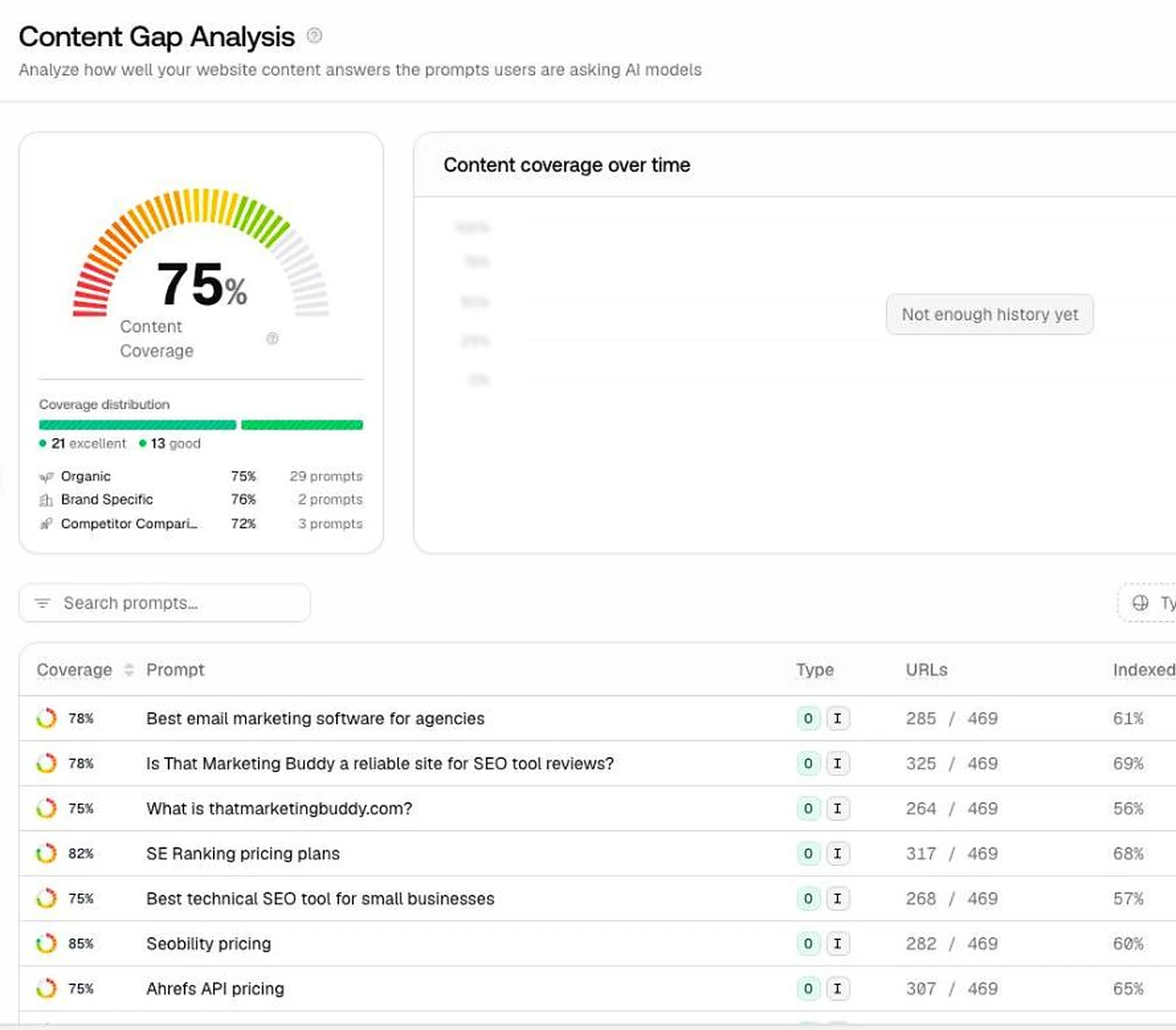
Content gap compares your pages with the tracked prompts and shows which prompts have a matching page. It scored my site at 75% coverage, and the prompts without a matching page are a shortlist to look at.
Who it is for: site owners who don't already run a crawler. If you have one, the linking map is still worth opening once.
2 orphan pages
- What I found on my site
- Both correct
84 pages with one or two internal links
- What I found on my site
- Not checked page by page
34 linked URLs missing from the sitemap
- What I found on my site
- 5 real gaps, 7 links to redirects, 22 query-string URLs
Health score
- What I found on my site
- 100, 469 of 469 pages
Server response time
- What I found on my site
- 3 ms on every page; not a usable number
| Site audit claim, November 9, 2026 | What I found on my site |
|---|---|
| 2 orphan pages | Both correct |
| 84 pages with one or two internal links | Not checked page by page |
| 34 linked URLs missing from the sitemap | 5 real gaps, 7 links to redirects, 22 query-string URLs |
| Health score | 100, 469 of 469 pages |
| Server response time | 3 ms on every page; not a usable number |
Actions board and the agent chat
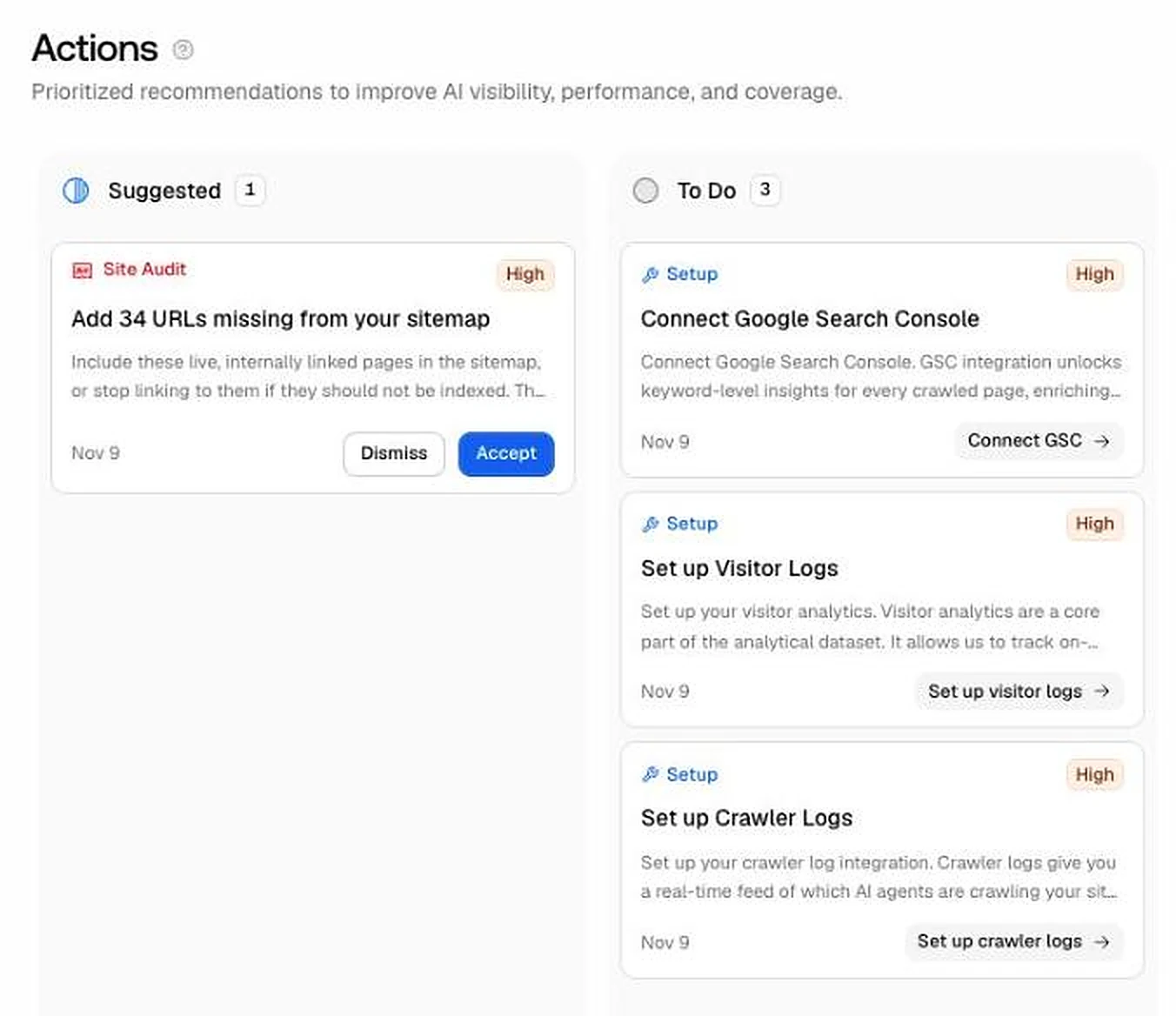
The actions board is a kanban of suggested tasks. Its high-priority card said 34 linked pages were missing from my sitemap. When I checked them, 22 were URLs with query strings that don't belong in a sitemap, 7 were links to pages that redirect, where the fix is to update the link, and 5 were real gaps. So the card pointed at something real, but acting on it as written would have added 29 wrong URLs to the sitemap.
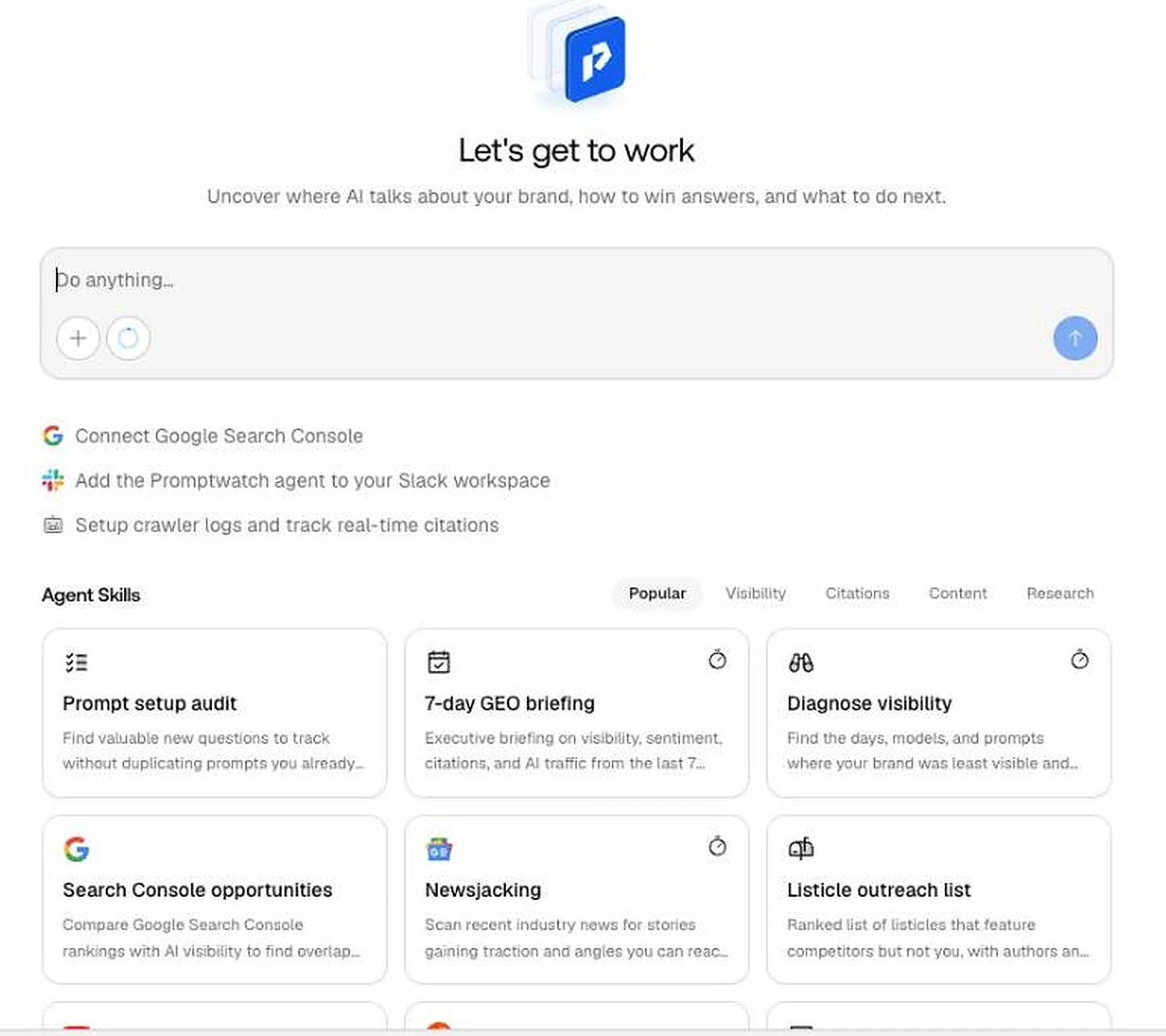
The agent chat runs ready-made skills such as a prompt setup audit, a 7-day briefing and a listicle outreach list. I ran the outreach skill: it returned a ranked list of listicles that mention my competitors but not my site, with authors and outreach angles. That one task used 25 of the plan's 1,500 monthly agent credits. I did not verify the contact details.
Who it is for: teams that have someone to check a suggestion before acting on it. The agent chat suits outreach and weekly briefings.
What Professional covers, and what needs Business
Essential costs $95 a month for 1 project, 50 prompts and 6,000 answers a month. Professional costs $245 a month for 2 projects, 150 prompts and 18,000 answers, with unlimited seats. My Professional trial included 1,500 agent credits, 5 AI-optimised articles, 100 knowledge base items and 25 million crawler log events. The full breakdown is on my Promptwatch pricing page.
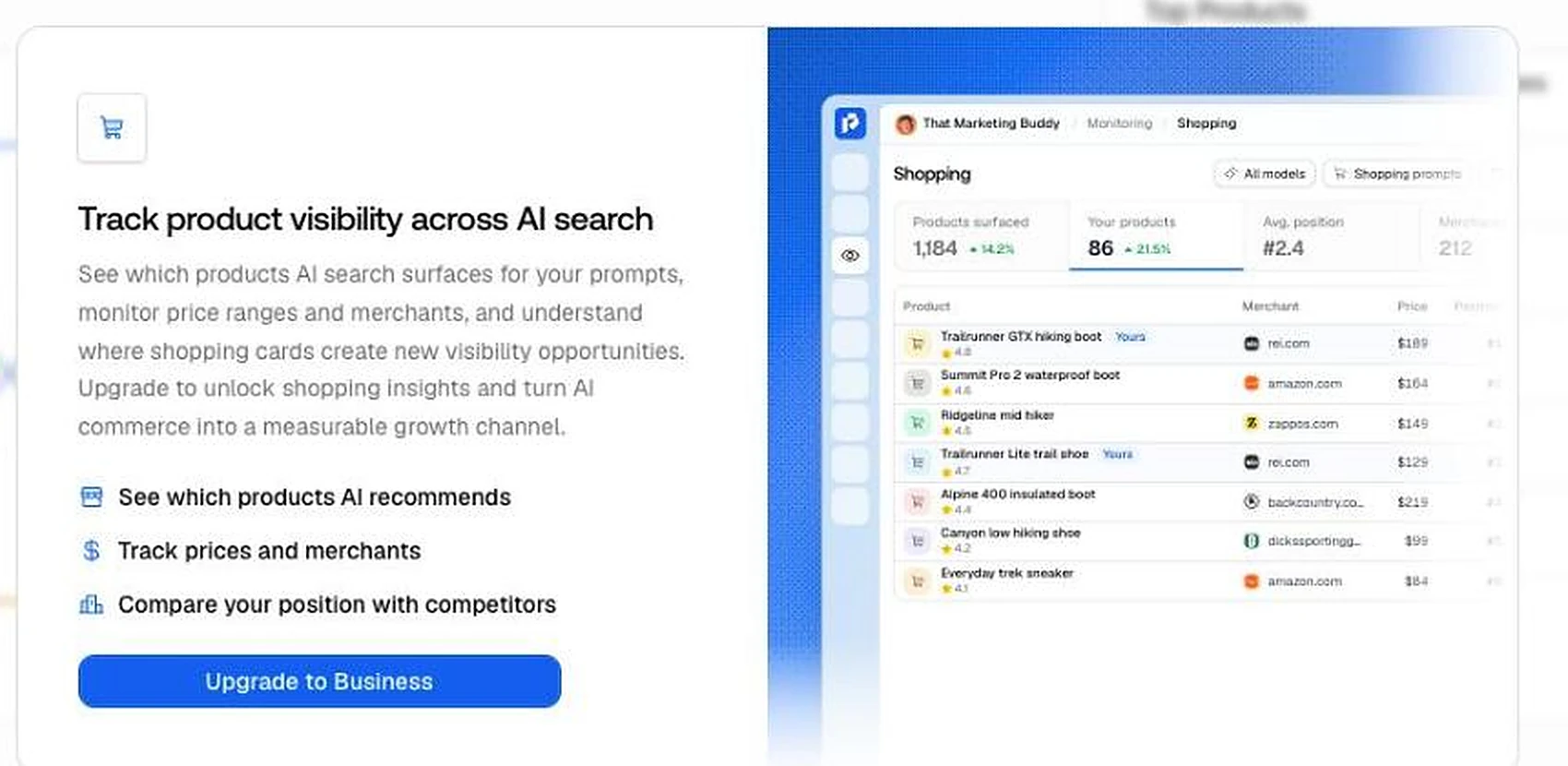
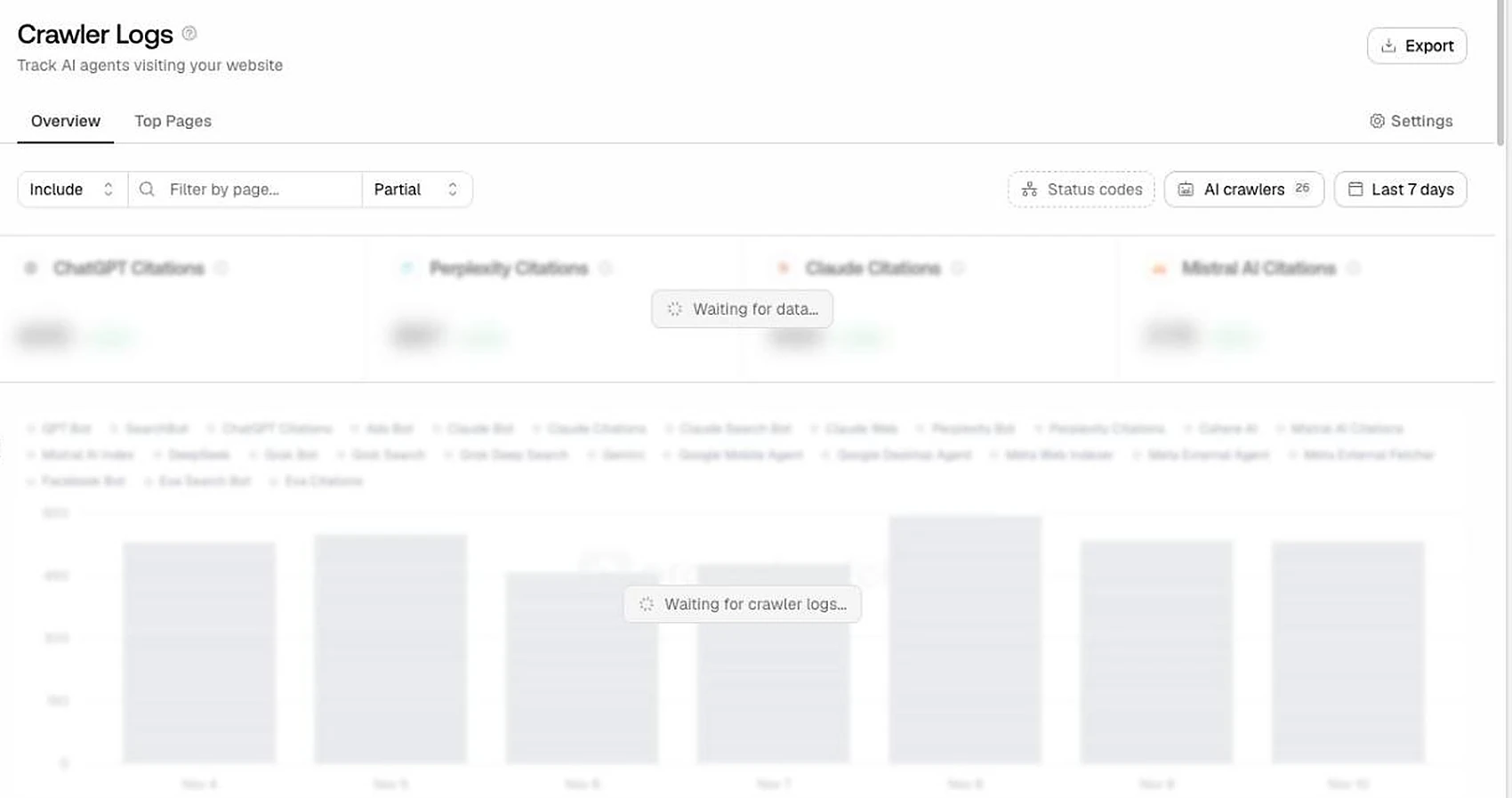
Shopping, Ads Radar, Fact check and the automated content agent show an "Upgrade to Business" panel on Professional. Business costs $579 a month. Crawler logs and visitor analytics need a connection to your host or CDN, and prompt discovery from Search Console needs Search Console connected, so those views were empty in my trial.
For agencies, the separate agency plans start at $199 a month with unlimited projects and prompts. The pricing page doesn't mention white label or client portals; it lists custom reports and a Data Studio connection. I compare agency options in GEO tools for agencies.
The trial lasts 7 days, needs a card, and bills the plan automatically when it ends. After my trial ended, the app showed only a plan picker and I could not open my data without choosing a plan, so export what you need before the last day.
Who it is for: Essential for one brand that wants daily data. Professional when you want the content tools, crawler logs or a second project. Business only if Shopping, Ads Radar or Fact check are the reason you came.
Essential
- Price a month
- $95
- Projects
- 1
- Prompts
- 50
- Answers a month
- 6,000
- Adds
- All engines, agent chat, MCP and API
Professional
- Price a month
- $245
- Projects
- 2
- Prompts
- 150
- Answers a month
- 18,000
- Adds
- Content writing, knowledge base, agent analytics
Business
- Price a month
- $579
- Projects
- 5
- Prompts
- 350
- Answers a month
- 42,000
- Adds
- Shopping, Ads Radar, Fact check, hourly and city-level tracking
Agency Kick-off
- Price a month
- $199
- Projects
- Unlimited
- Prompts
- Unlimited
- Answers a month
- 10,000
- Adds
- Pitch projects, custom reports
Agency Growth
- Price a month
- $399
- Projects
- Unlimited
- Prompts
- Unlimited
- Answers a month
- 25,000
- Adds
- Same, more answers
Agency Scale
- Price a month
- $799
- Projects
- Unlimited
- Prompts
- Unlimited
- Answers a month
- 65,000
- Adds
- Same, more answers
| Plan | Price a month | Projects | Prompts | Answers a month | Adds |
|---|---|---|---|---|---|
| Essential | $95 | 1 | 50 | 6,000 | All engines, agent chat, MCP and API |
| Professional | $245 | 2 | 150 | 18,000 | Content writing, knowledge base, agent analytics |
| Business | $579 | 5 | 350 | 42,000 | Shopping, Ads Radar, Fact check, hourly and city-level tracking |
| Agency Kick-off | $199 | Unlimited | Unlimited | 10,000 | Pitch projects, custom reports |
| Agency Growth | $399 | Unlimited | Unlimited | 25,000 | Same, more answers |
| Agency Scale | $799 | Unlimited | Unlimited | 65,000 | Same, more answers |
Monthly billing, from promptwatch.com/pricing on November 10, 2026. Every plan has unlimited seats.
Use it through Claude with the MCP server
The MCP server exposed 154 tools in my test: 99 that read data and 54 that change it, including deleting prompts and publishing content to a connected CMS. I connected it to Claude Code with a read-only project key. Reads worked on everything I tried, and a test write was refused by the server, so the read-only setting is enforced, not just a label. If MCP is new to you, I explain the setup in how to use MCP with marketing tools.
Two limits: a project key can't read your credit balance or plan limits, and every call sends Promptwatch a one-sentence description of what you are trying to do, labelled for analytics. Answers come back large: 50 stored answers were about 446,000 characters, so ask for small pages or filters.
In my test, the MCP reads did not show up as agent credits. One end-to-end task, finding where my site shows up, who beats it and which pages get cited, took about ten minutes from Claude.
Who it is for: anyone who already works in Claude or ChatGPT. It is on every plan, including Essential, which is not a given in this category.
What I did not test
Some parts of Promptwatch were outside my trial or needed connections I did not make. I have not judged these, and the facts below come from the app and the pricing page.
Shopping, Ads Radar and Fact check, and the automated content agent, are locked to Business. The content writer on Professional includes 5 articles a month, and I did not run it. Prompt explorer needs Search Console. Crawler logs and visitor analytics need a host or CDN connection. Page tracker and persona insights were empty without extra setup, and I did not open the LinkedIn and Instagram source views.
I tested a brand plan, not the agency plans, and I tracked one market, the US in English. My accuracy check covers Google AI Overviews and AI Mode on one day; I could not check ChatGPT, Perplexity, Gemini or Copilot the same way.
Works With
Which website platforms does Promptwatch work with?
Promptwatch publishes straight to:
 WordPress
 Webflow
 Framer
Not on this list? Tracks AI answers for any site; crawler logs can come from any stack via an HTTP endpoint.
How each connection works (3)›
Checked against Promptwatch's own docs and official app stores on 22 October 2026.
AI, API & MCP
How Promptwatch fits an AI-agent workflow
AI agent workflow
Run Promptwatch from Claude with the MCP server
Prompts that worked for me: "On my monitor, which prompts mention my brand and which only cite my pages?" "Which competitors appear most, and on which engines?" "List the pages on my site that AI answers cite, with counts." Ask for small page sizes; full answer text is large.
Approval boundary: With a full-access key the MCP server can delete prompts and monitors and publish content to a connected CMS. Start with a read-only key, which the server enforces.
MCP
officialOfficial MCP server on every plan
Remote server with an API key or OAuth. 154 tools in my test, read-only keys enforced server-side. A project key can't read credits or plan limits.
Promptwatch MCP docs →API
officialREST API on every plan
Documented REST API with OpenAPI specs, listed on every plan.
Promptwatch API docs →Pricing
How much does Promptwatch cost?
Essential costs $95 a month for 1 project and 50 prompts checked daily. Professional is $245 and Business $579 a month. Agency plans run $199, $399 and $799 a month with unlimited projects and prompts. Paying yearly saves about 17%.
| Plan | Monthly |
|---|---|
| Essential · 50 prompts, 1 project | $95/mo |
| Professional · 150 prompts, 2 projectsPopular | $245/mo |
| Business · 350 prompts, 5 projects | $579/mo |
| Agency Kick-off · unlimited projects and prompts | $199/mo |
| Enterprise | Custom |
Trial: 7 days on the self-serve plans, card required, and the plan bills automatically when the trial ends. Every plan has unlimited seats, tracks all models, and includes the MCP server and API. The plans differ by projects, prompts and answers a month: 6,000 on Essential, 18,000 on Professional and 42,000 on Business.
Count answers, not prompts
50 prompts checked daily on four engines is about 6,000 answers a month, which is Essential's cap. Each extra engine uses more of it.
Professional for content and crawler logs
Professional adds content writing and refresh, a knowledge base, agent analytics and a second project.
Business for Shopping, Ads Radar and Fact check
These views show an upgrade panel on Professional. Business also adds city-level and up to hourly tracking.
Agencies have their own plans
Kick-off $199, Growth $399 and Scale $799 a month, all with unlimited projects and prompts. The pricing page doesn't mention white label.
The trial needs a card
7 days; the paid plan starts automatically when the trial ends. Export your data before the last day: after my trial the app showed only a plan picker.
Alternatives
When I'd choose something else
Three different buying priorities, and what I'd pick instead for each one.
Pick it for weekly reports at a lower price

LLM Pulse
50 prompts on five engines for $58 a month, checked weekly, with every answer and source stored.
Trade-off: Promptwatch wins when you need daily data, Reddit and YouTube sources, and site checks.
Explore LLM Pulse for this use case →Pick it for daily checks in a simpler dashboard

Peec AI
50 prompts checked daily for $95 a month, the same entry price as Promptwatch.
Trade-off: Promptwatch wins on answers a month at that price and on the site audit and source views.
Explore Peec AI for this use case →Pick it for the cheapest start

Otterly
Lite costs $29 a month for 15 prompts checked daily.
Trade-off: Promptwatch wins once you track more than a handful of prompts or need agency plans.
Explore Otterly for this use case →Keep going
- Compare Promptwatch against the field: 14 Best AI Visibility Tools in 2026: Real Prices Compared, Best AI Visibility Tools for Agencies
- Put it to work: How to Rank in AI Search: A Practical GEO Guide for 2026
Downsides
Limitations to consider before subscribing
The score ignores citations
Pages that AI answers cited as a source scored 0 visibility when the answer didn't name the brand.
Copilot returned no answers
One of the six engines I switched on delivered nothing in the first three days.
Defaults flatter the first score
Market set from IP, three engines in the first monitor, and suggested prompts that name your brand.
Some site advice is noise
Only 5 of 34 'missing from sitemap' URLs were real gaps, and response times read 3 ms on every page.
Key features need Business
Shopping, Ads Radar, Fact check and the content agent start at $579 a month.
My Recommendation
My recommendation: use the trial on your own prompts
Start the 7-day trial, replace the suggested prompts with 20 to 30 questions a customer would ask, switch on every engine in your monitor, and set the market yourself. If the source and site views show you things to fix, Essential at $95 a month is a fair price for daily data, and Professional at $245 when you want content tools and crawler logs.
Choose LLM Pulse if a weekly report is enough, Peec AI for daily data in a simpler dashboard, or Otterly for the cheapest start.
What to check during the trial
- –Check the tracking market and language after signup.
- –Add every engine your plan includes to the monitor.
- –Compare the visibility score with the citation views for your own pages.
- –Check that every engine is returning answers after day 1.
- –Verify the site audit's action cards against your site before acting.
- –Cancel before day 7 if you don't want the paid plan.
FAQ
Frequently asked questions about Promptwatch
Essential costs $95 a month for 1 project and 50 prompts checked daily, or $79 a month billed yearly. Professional is $245 and Business $579 a month. Agency plans cost $199, $399 and $799 a month with unlimited projects and prompts. Enterprise and Partner are custom.
Yes, 7 days on the self-serve plans. A card is required, and the plan bills automatically when the trial ends unless you cancel. I didn't find a free plan on the pricing page in November 2026.
Every plan says it tracks all models. I tracked ChatGPT, Google AI Overviews, Google AI Mode, Microsoft Copilot, Gemini and Perplexity. Copilot returned no answers in my first three days. The default first monitor tracks only ChatGPT, AI Overviews and AI Mode, so add the others yourself.
Where I could check it, yes. On November 9, 2026, its stored Google AI Overviews and AI Mode answers agreed with my own same-day fetches on mentions in 47 of 47 comparisons and on citations in 45 of 47. I could not check ChatGPT, Perplexity, Gemini or Copilot the same way. Its visibility score counts only answers that name your brand, so pages cited as a source without the brand name score 0.
Its features suit agencies: unlimited seats on every plan, and agency plans from $199 a month with unlimited projects and prompts. The pricing page doesn't mention white label. I tested a brand plan, not the agency plans.
Yes, on every plan. In my test it exposed 154 tools, and a read-only key was enforced by the server. It can also delete prompts and publish content with a full-access key, so start read-only.
LLM Pulse's Starter costs $58 a month for 50 prompts checked weekly. Promptwatch's Essential costs $95 a month for 50 prompts checked daily, and adds Reddit and YouTube source views and a site audit. Pick LLM Pulse for weekly reports, Promptwatch for daily data.
Updates
What changed in this review
- 2026-11-17 Reworked after the full 7-day trial: key findings, a feature table, one section per feature with who it is for, 30 screenshots and my star rating added. Accuracy checked against direct Google AI Overviews and AI Mode answers on November 9.
- 2026-11-10 Rewritten as a hands-on review on a Professional trial: 24 prompts on six AI engines for my own site. Prices re-checked on promptwatch.com: no free plan listed, unlimited seats on every plan, agency plans added.
- 2026-09-28 First version, researched from Promptwatch's website without a hands-on test.
Joonas Rotko
SEO & GEO professional, founder of That Marketing Buddy
I'm a Finnish SEO and GEO professional with 11+ years in digital marketing, including years as a co-owner of a digital marketing agency. On That Marketing Buddy I test and compare SEO and AI-visibility software for entrepreneurs, marketing professionals and agencies.
Sources & References (2)
Spot something out of date?Vendors and readers, send me the correct fact.
Software sites change almost every week, and I want every claim on this page to be factually correct. If you are a vendor or a reader, send me the correct fact and a link to the official page. I will check it and update the page. The opinions and rankings stay mine.

