In short
ChatGPT Business Hub (chatgpt.com/business-hub) lets you claim your business's profile in ChatGPT, correct the details ChatGPT uses, and see 7 or 28 days of mentions, website clicks and discovery topics. OpenAI charges nothing today. You verify by phone, business email, a DNS TXT record or Shopify, and a Persona ID check unlocks editing and the blue check. The whole claim took me about ten minutes. Business agents are only for US ecommerce and online service businesses. Insights show no prompts and no competitors, so it doesn't replace an AI visibility tracker. Claim it anyway: ChatGPT can show a listing for your business whether you claim it or not.
Contents (7)
ChatGPT Business Hub is where you claim your business in ChatGPT: search for your business, prove you own the website, and pass an ID check. OpenAI launched it in beta on November 10, 2026. I claimed That Marketing Buddy and a second site of mine the next morning, and each claim took about ten minutes. Everything below comes from those two claims, plus OpenAI's own help pages and terms.
Note
My own claims of two websites on November 11, 2026, with screenshots of each step.
OpenAI's help article, launch post, policies and Businesses in ChatGPT Terms, read the same day and quoted where used.
10+ years in SEO and Google Ads, including a lot of Google Business Profile work, which this new profile copies closely.
What Is ChatGPT Business Hub?
Business Hub is OpenAI's version of Google Business Profile for ChatGPT. OpenAI's launch post says businesses can "claim their business, manage their information, and see insights on how people engage with them on ChatGPT." You open it at chatgpt.com/business-hub, or from the ChatGPT sidebar.
Don't mix it up with ChatGPT Business, the paid team plan ($25 per user per month on OpenAI's help page). Google still ranks those plan pages for "chatgpt business hub". Business Hub is a different product, and claiming a profile costs nothing today. OpenAI's Benji Shomair didn't rule out charging for it later, according to VentureBeat.
A claimed profile
Your website, description, category, logo, cover photo, and delivery and return policies. ChatGPT may use these when people ask about you.
Insights
Mentions, website clicks and discovery topics from ChatGPT, for the last 7 or 28 days.
A blue check
Shown after your Persona identity check is approved, not just after you claim.
Business agent (some)
A ChatGPT agent that answers questions about your products. US ecommerce and online service businesses only.
Can My Business Claim a Profile in ChatGPT?
Most businesses with a website can claim one, but agents are US-only. OpenAI's help article says eligible businesses can claim "where ChatGPT is available", and its landing page adds that claiming "is initially available to eligible businesses with a website." I'm in Finland and both my claims went through, so it isn't US-only.
Online business with a website (anywhere ChatGPT works)
- Claim a profile?
- Yes
- Business agent?
- Only if US ecommerce or online service
Local store or restaurant in the US
- Claim a profile?
- Only an existing listing
- Business agent?
- No
Local store outside the US
- Claim a profile?
- Not yet
- Business agent?
- No
Service business with no store
- Claim a profile?
- Yes, as a website business (no service option yet)
- Business agent?
- Only if US online service
| Business type | Claim a profile? | Business agent? |
|---|---|---|
| Online business with a website (anywhere ChatGPT works) | Yes | Only if US ecommerce or online service |
| Local store or restaurant in the US | Only an existing listing | No |
| Local store outside the US | Not yet | No |
| Service business with no store | Yes, as a website business (no service option yet) | Only if US online service |
Sources: OpenAI help article "Setting up your business on ChatGPT" and my own claims, November 2026.
How Do I Claim My Business in ChatGPT Business Hub?
It takes six steps and about ten minutes if you can edit your own DNS. This is the order I went through on November 11.
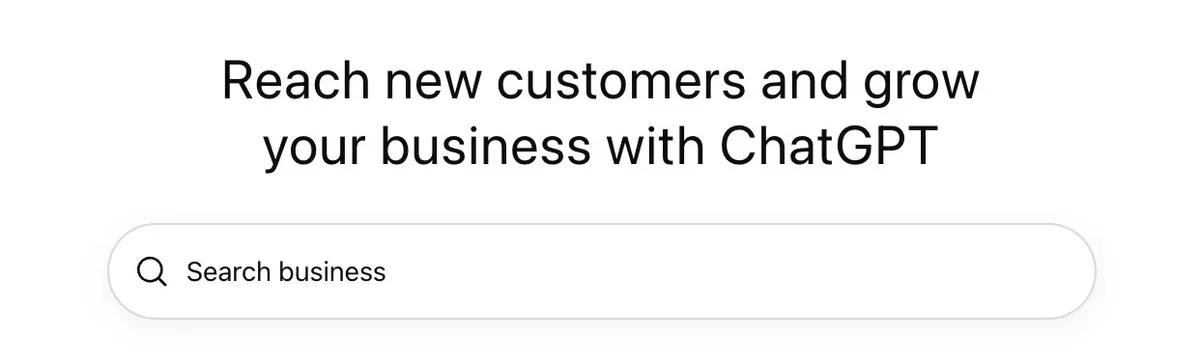
1. Search for your business
Open chatgpt.com/business-hub and sign in with the ChatGPT account that should own the profile. Use an account you'll keep, not one a freelancer controls. Search for your business by name first: ChatGPT already has listings for many businesses, with addresses. My second site wasn't there, so I created it.
2. Choose how customers reach you
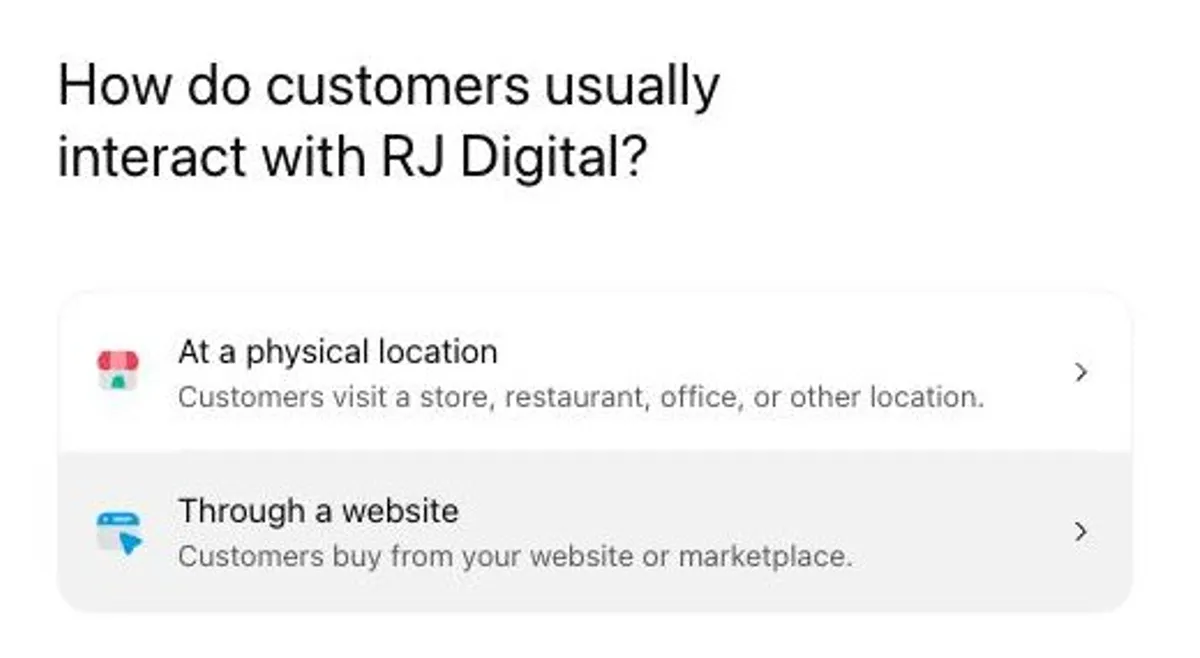
ChatGPT asks whether customers visit a physical location or buy through a website. There's no option for a service business yet, so if you sell services online, pick the website. I did that for both sites.
3. Verify your domain with a DNS TXT record
Add the TXT record ChatGPT shows you to your domain's DNS, then click Verify domain. Phone, business email and Shopify are the other methods, but ChatGPT only offers the ones that fit your listing. I used DNS for both sites.
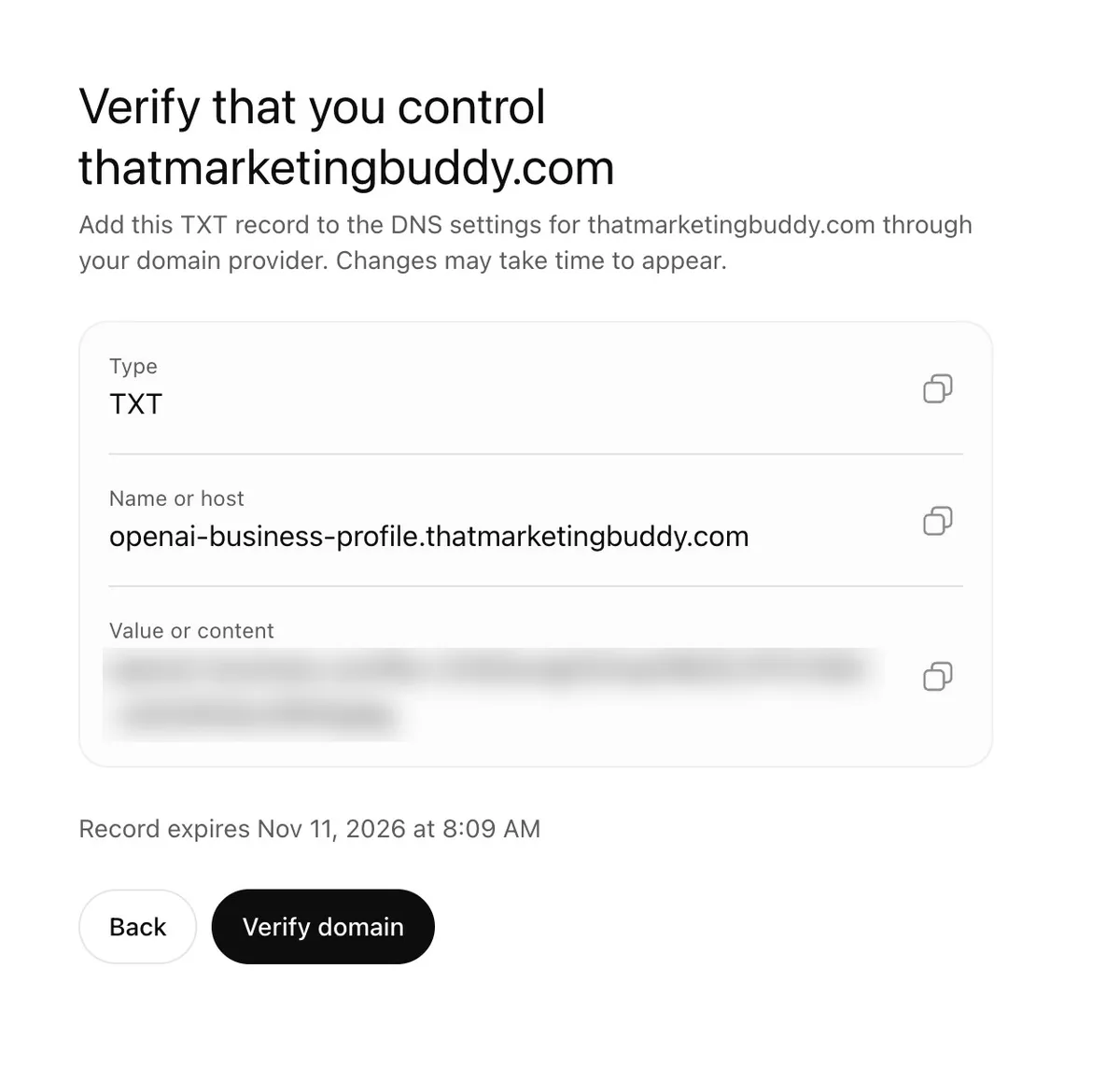
My DNS runs on Vercel, so I added the record there with the name openai-business-profile, not the full name shown. Most DNS hosts (Vercel, Cloudflare, Namecheap) add your domain to the end automatically, and pasting the full name gives you a broken record like openai-business-profile.thatmarketingbuddy.com.thatmarketingbuddy.com. The record showed up in public DNS within a minute, and Verify domain passed on the first click.
Tip
The record expires: mine was valid for about a day. If someone else runs your DNS, ask them to add it while you're in the flow.
The code mixes capital I and lowercase l, which look the same in ChatGPT's font. Use the copy button next to each field instead of retyping it.
4. Pick a category and write a description
Pick the category that describes what you sell, not the one ChatGPT suggests. For That Marketing Buddy, ChatGPT preselected "Online media company", which is right, and suggested Marketing agency, Advertising agency and Copywriting service, which are wrong: they'd tell ChatGPT I sell services. For my second site, a marketing service, it suggested Electronics store and Computer store.
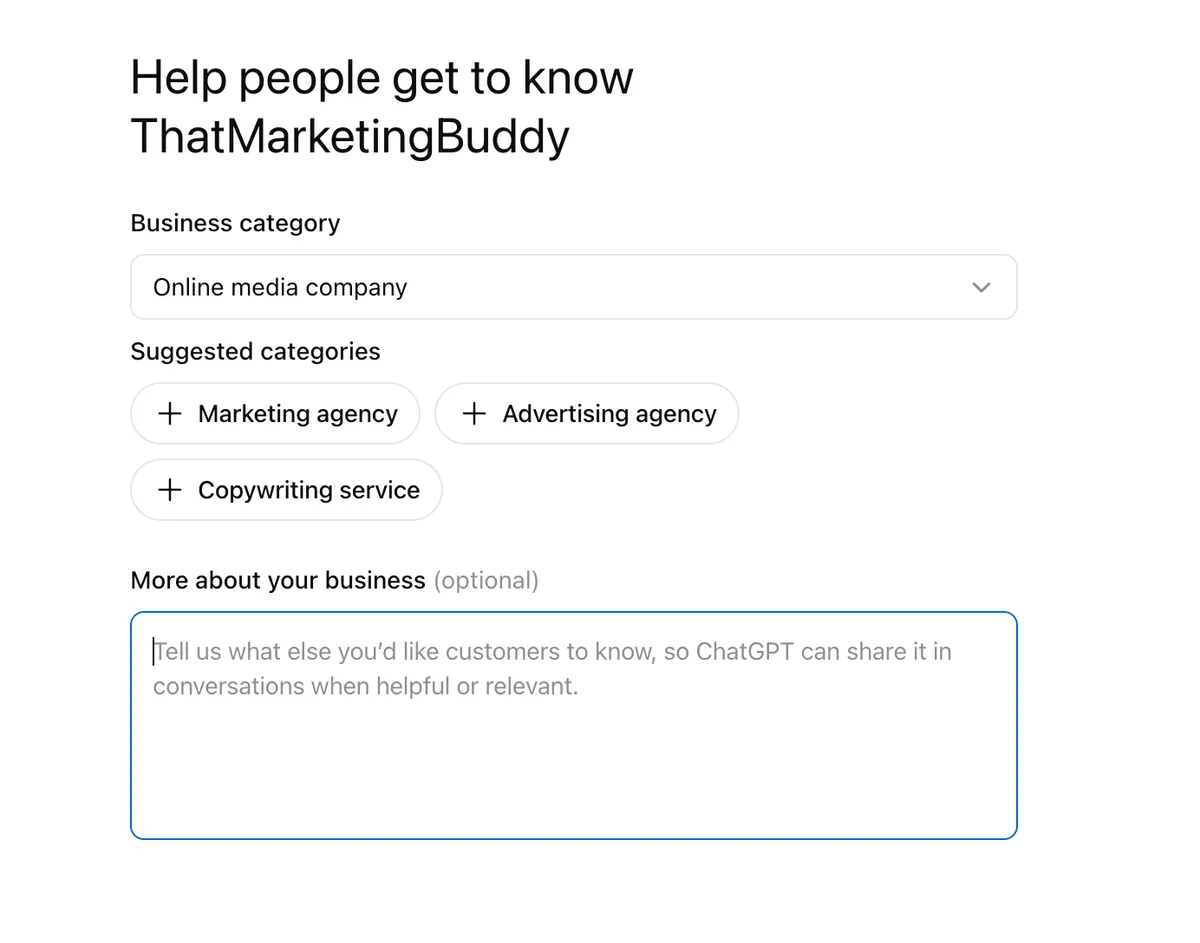
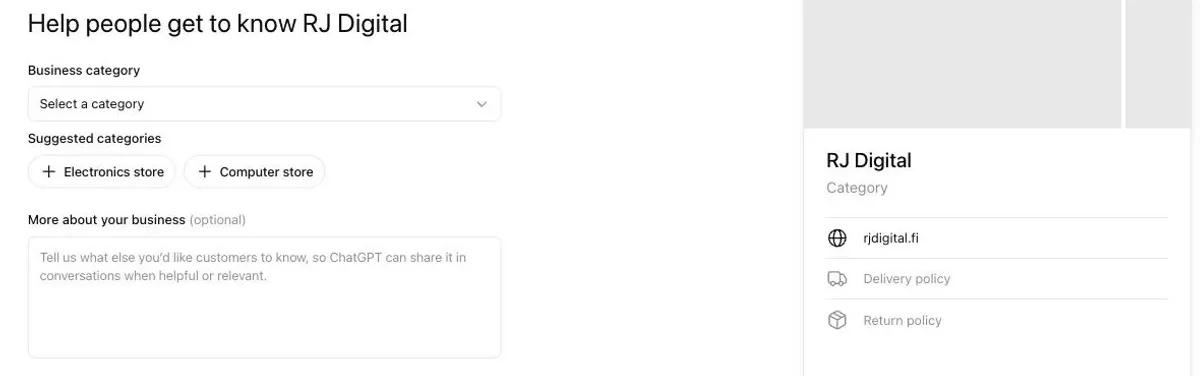
That second suggestion shows why claiming matters: ChatGPT guesses your basic details, and the guesses can be wrong. The category list is long, so search it for the closest match.
The "More about your business" field holds 300 characters. It cut my first draft off mid-word at exactly 300. ChatGPT says it can share this text "in conversations when helpful or relevant", so write the answer you'd want ChatGPT to give: who you serve, what you offer, and why you're different. Write it in your customers' language.
Good to know
"Independent review site run by Joonas Rotko for small business owners, marketers and agencies. Main focus: hands-on tests of SEO, AI search visibility (GEO) and email marketing tools in real accounts, backed by regular pricing checks and research. New tests every week. No paid rankings."
- Who it's for first. ChatGPT matches your profile to the person asking.
- What you offer, in the words customers use, not internal product names.
- One proof point a competitor can't copy. Mine is hands-on tests in real accounts.
- Skip slogans. "Best in class" gives ChatGPT nothing to repeat.
5. Answer the delivery and returns questions
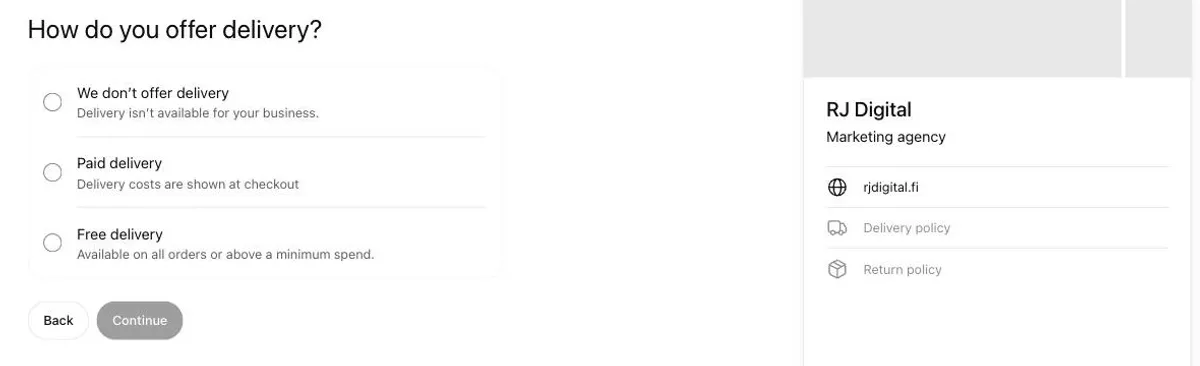
Next, ChatGPT asks how you deliver and whether you accept returns. The questions are written for online stores, which tells you who OpenAI built this for first. A service or content business picks "We don't offer delivery" and no returns.
6. Pass the Persona ID check
The profile is saved as a draft, and the same screen offers $500 in ChatGPT Ads credit and an upgrade to the ChatGPT Business plan. That ad credit is the clearest sign of where OpenAI is taking this.
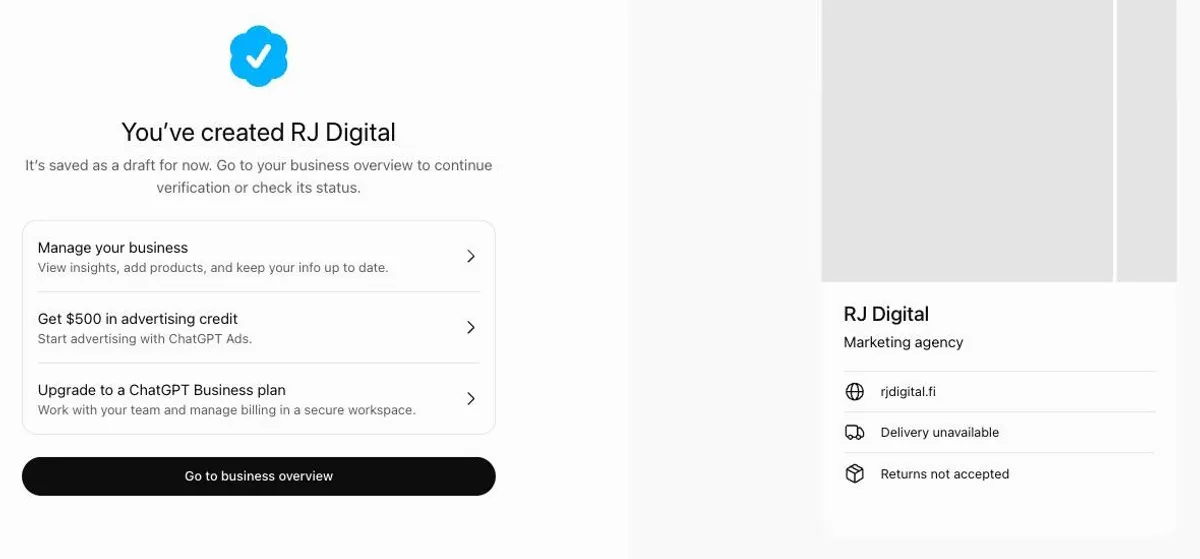
Before you can edit the profile, see Insights or get the blue check, OpenAI asks for an identity check through Persona with a government-issued ID. OpenAI says you may also need business registration details, so keep your company number handy. Until Persona approves you, the profile stays a draft and nothing you write is published.
What Does the Insights Dashboard Show?
Insights show three things: mentions, website clicks and the top 5 discovery topics, for the last 7 or 28 days. It's the first data OpenAI itself gives about how ChatGPT uses your site. Right after I created a profile, the dashboard was empty. About an hour later it showed the whole previous week, including the days before the profile existed.
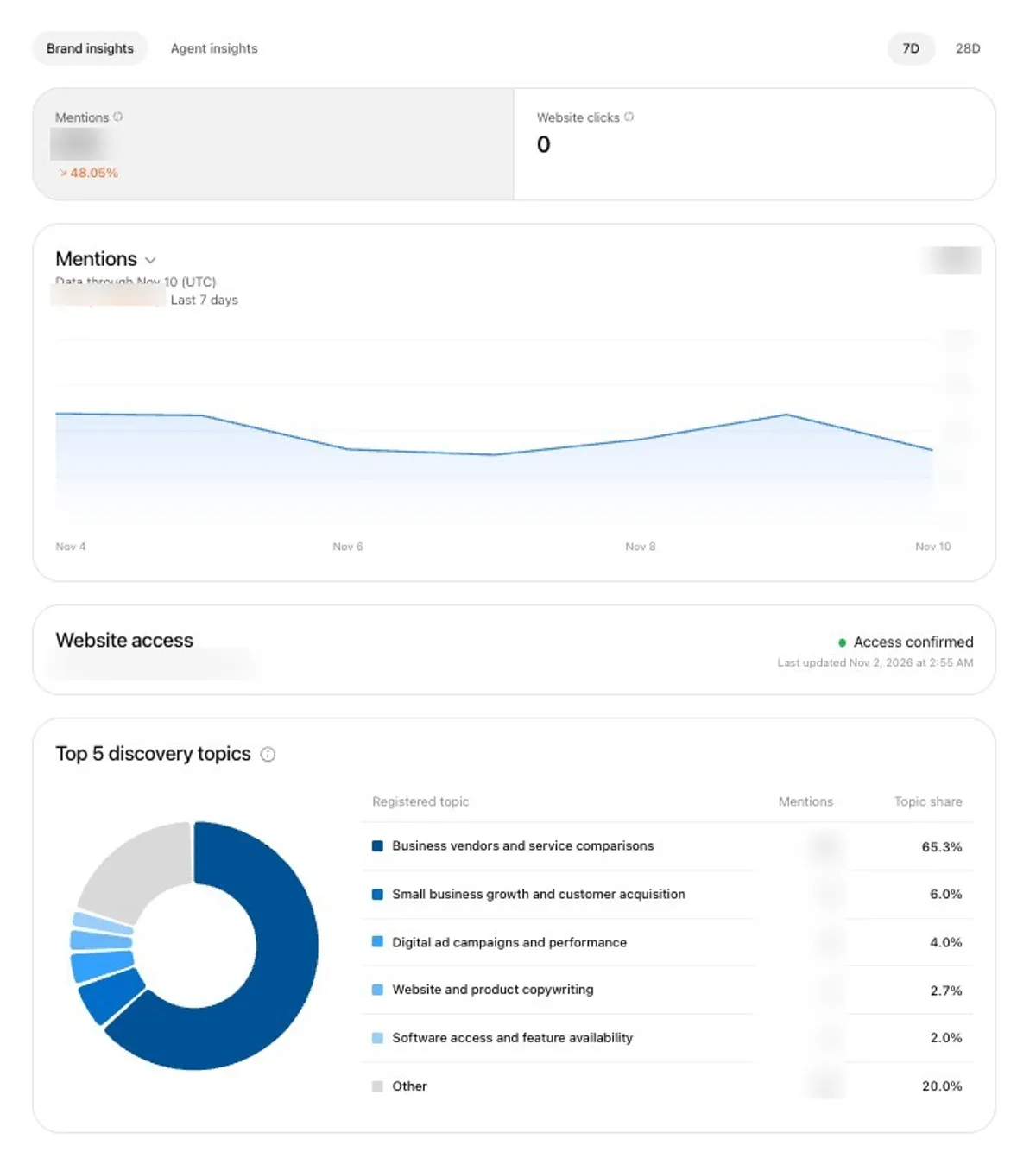
Three things in that screenshot surprised me:
- Zero website clicks in a week of steady mentions. Being cited in an answer doesn't mean anyone visits.
- Only 22% of mentions were sorted into topics. The rest don't appear in the topic list at all, so the topics are a sample, not a full breakdown.
- A week-on-week change with no reason given. Mentions fell 48%, and the dashboard doesn't say why.
Mentions
- What it counts
- For an online business, answers where ChatGPT references your website. "The brand name alone doesn't count."
- What it doesn't tell you
- Which prompts, or how you compare with competitors
Website clicks
- What it counts
- Recorded clicks on links to your site inside ChatGPT
- What it doesn't tell you
- Visits or sales. Clicks "don't confirm website visits or conversions"
Discovery topics
- What it counts
- Top 5 themes in answers that mentioned or cited you
- What it doesn't tell you
- Individual prompts or customer intent
Website access
- What it counts
- Whether ChatGPT can reach your site
- What it doesn't tell you
- Which pages it reads
| Metric | What it counts | What it doesn't tell you |
|---|---|---|
| Mentions | For an online business, answers where ChatGPT references your website. "The brand name alone doesn't count." | Which prompts, or how you compare with competitors |
| Website clicks | Recorded clicks on links to your site inside ChatGPT | Visits or sales. Clicks "don't confirm website visits or conversions" |
| Discovery topics | Top 5 themes in answers that mentioned or cited you | Individual prompts or customer intent |
| Website access | Whether ChatGPT can reach your site | Which pages it reads |
Definitions quoted from OpenAI's help article and the dashboard's own tooltips, November 2026.
A blank metric doesn't mean zero. OpenAI says it can mean "activity hasn't reached the reporting threshold, data is still being collected, or reporting is unavailable." On my smaller site, the topic list stayed empty because there weren't enough mentions yet.
Does Business Hub Replace an AI Visibility Tracker?
No. Business Hub tells you how much ChatGPT uses your site; a tracker tells you why and against whom. OpenAI says businesses "don't receive individual prompts or consumer conversations", and nothing in Insights covers competitors or other AI engines.
Price
- Business Hub Insights
- Nothing today
- AI visibility tracker
- $29 to $125 a month for the cheapest plans (Otterly, Peec AI, Searchable, monthly billing)
Data source
- Business Hub Insights
- OpenAI's own data, real users
- AI visibility tracker
- Prompts the tool runs for you
Engines
- Business Hub Insights
- ChatGPT only
- AI visibility tracker
- ChatGPT, Google AI Overviews, AI Mode, Perplexity, Gemini and more
Shows prompts
- Business Hub Insights
- No
- AI visibility tracker
- Yes, the ones you track
Shows competitors
- Business Hub Insights
- No
- AI visibility tracker
- Yes
Clicks to your site
- Business Hub Insights
- Yes
- AI visibility tracker
- No (needs your analytics)
History
- Business Hub Insights
- 7 or 28 days
- AI visibility tracker
- As long as you pay
| Business Hub Insights | AI visibility tracker | |
|---|---|---|
| Price | Nothing today | $29 to $125 a month for the cheapest plans (Otterly, Peec AI, Searchable, monthly billing) |
| Data source | OpenAI's own data, real users | Prompts the tool runs for you |
| Engines | ChatGPT only | ChatGPT, Google AI Overviews, AI Mode, Perplexity, Gemini and more |
| Shows prompts | No | Yes, the ones you track |
| Shows competitors | No | Yes |
| Clicks to your site | Yes | No (needs your analytics) |
| History | 7 or 28 days | As long as you pay |
Tracker prices from each vendor's pricing page, checked October to November 2026.
The two fit together. Business Hub is the only place with real ChatGPT click counts, and a tracker shows which prompts you lose and to whom. I compare the trackers in the best AI search visibility tools.
What Do You Agree To When You Claim?
Four lines in the Businesses in ChatGPT Terms are worth reading before you click. Hardly any launch guide mentions them:
- ChatGPT may phone you. "By using Business Hub, you agree OpenAI's AI assistant may make calls to you on behalf of our users." You can opt out at realtime.chatgpt.com/stopcalls.
- Your basic details are licensed for good. The licence for your name, address, contact details, category, hours and website is "perpetual and irrevocable".
- A published profile can't be deleted. Only unpublished drafts can.
- You give up some legal claims. Section 10 is a promise not to sue OpenAI over its use of content on your own websites. If that matters to your business, read it with someone who knows contracts.
Your Insights numbers are also OpenAI's "Confidential Information" under the terms, which is why the counts in my screenshot are blurred.
Is ChatGPT Business Hub Worth It?
Yes, claim it now. OpenAI's terms say it may show a listing for your business "regardless of whether you claim" it, so the choice isn't whether you appear but whether the details are right. It took me ten minutes plus the ID check, it costs nothing today, and it fixed a category ChatGPT had guessed wrong.
Keep your expectations low on reach. OpenAI says claiming "doesn't guarantee increased visibility". ChatGPT still cites you for the same reasons as before: pages worth citing, and other sites that mention you. My guide to ranking in AI search covers those, and the SEO guide for small businesses covers the Google side.
Sources
- OpenAI Help: Setting up your business on ChatGPT
- OpenAI: Introducing Businesses in ChatGPT (Nov 10, 2026)
- OpenAI: Your business, in ChatGPT
- OpenAI: Businesses in ChatGPT policy
- OpenAI: Business Agents Policy
- OpenAI: Businesses in ChatGPT Terms
- VentureBeat: OpenAI lets you claim your business in ChatGPT (Nov 10, 2026)
Business Hub shows how often ChatGPT uses your site, not which prompts you lose or to whom. Compare the trackers that do.
Compare AI Visibility Trackers →Read next

Joonas Rotko
SEO & GEO professional, founder of That Marketing Buddy
I'm a Finnish SEO and GEO professional with 11+ years in digital marketing, including years as a co-owner of a digital marketing agency. On That Marketing Buddy I test and compare SEO and AI-visibility software for entrepreneurs, marketing professionals and agencies.