
This page may contain affiliate links.
Some links on this page are affiliate links, meaning I may earn a commission if you sign up (at no extra cost to you). This never influences my ratings or recommendations.
The Verdict
Is Crisp right for you?
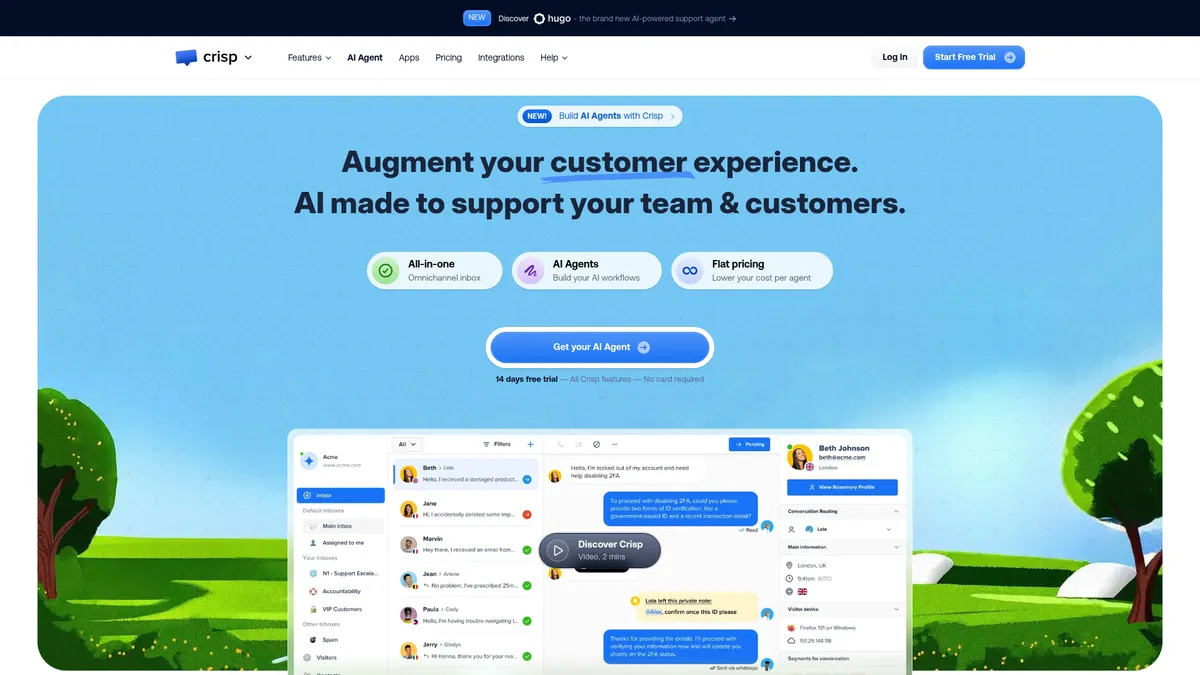
Crisp packs live chat, a shared inbox, AI agents, and a support CRM into one dashboard, priced per workspace instead of per seat. That flat-rate structure is unusual in a category where Intercom and similar tools bill per agent. Whether the tradeoffs underneath that pricing work for you depends on how you actually use support.
Crisp is a customer support platform built around a shared inbox, an AI agent builder, and flat per-workspace pricing starting at $45/month for the Mini plan. It fits small teams that want WhatsApp, Instagram, email, and web chat in one queue without per-seat fees.
Whether it earns its price depends on how much AI Agent automation you actually use, since that part runs on metered credits, not unlimited access.
The flat per-workspace pricing is the real differentiator here, not the AI layer, which still runs on a credit system underneath that flat fee.
Why I'm covering this
Crisp's flat per-workspace pricing bucks the per-seat norm most support tools use, and it ships API access from the Free plan, both worth checking against Intercom-style competitors.
Who It's For
Who Crisp is for (and who it isn't)
✓Best for
- +Early-stage support teams of 4-10 people You want WhatsApp, email, and chat in one inbox without paying per agent on top of a base subscription.
- +Ecommerce brands juggling multiple channels Customers message you on Instagram DMs, WhatsApp, and your website widget. The omnichannel inbox on Essentials and above keeps all three in one queue.
- +Teams testing AI-first support workflows The 4-step AI Agent builder (train, build, deploy, measure) lets you automate FAQ-style tickets without hiring a developer.
- +Technical founders who want API access early Developer APIs and Chat SDKs are available starting on the Free plan, so you can build custom integrations before paying anything.
- +Solo founders running a small SaaS or e-commerce site who need a website chat widget and shared inbox The Free plan covers 2 seats, a chat widget, mobile apps, and e-commerce integrations for Shopify and WooCommerce without any cost.
- +Growing support teams juggling WhatsApp, Instagram DMs, and email in separate tabs The Essentials plan's omnichannel inbox consolidates 10+ channels into one collaborative view with routing rules for assignment.
- +E-commerce operators wanting support tied directly to order and customer data Built-in e-commerce integrations sync conversations with Shopify, Adobe, WooCommerce, and Prestashop from the Free plan onward.
- +Support leads who want to automate FAQ handling without hiring more agents The no-code AI Agent builder trains on your existing content and can deploy across web chat, WhatsApp, and email to handle repetitive questions.
- +Mid-market companies needing ticketing, knowledge base, and CRM in one place The Plus plan bundles a ticketing system, white labelling, and 100+ integrations, replacing several point tools with one workspace.
✗Skip this if
- −Solo freelancers with light support needs The Free plan caps you at 2 seats and 100 customer profiles. Once you outgrow that, the jump to $45/month for Mini may be more than a one-person operation needs.
- −Companies needing ticketing systems on day one A dedicated ticketing portal and white labelling only unlock on the $295/month Plus plan, so budget for the top tier if you need those from the start.
- −Teams uneasy with usage-based AI pricing Each plan includes a set AI credit allowance (roughly 90 to 1,350 automated conversations). Heavy AI Agent use can push real costs past the advertised flat rate.
- −Email marketers running multi-step drip sequences and list segmentation as their primary job Crisp treats marketing emails as a secondary feature bolted onto a support inbox, not a dedicated email marketing engine with deep segmentation.Try ActiveCampaign →
- −Sales teams needing a full CRM with pipeline stages, deal forecasting, and reporting Crisp's Support CRM is built to store customer context for conversations, not to manage a sales pipeline or forecast revenue.Try HubSpot →
- −Newsletter writers who just want to send weekly content to subscribers Crisp has no newsletter-focused sending tools or subscriber list management, it's built around conversations, not broadcast email.Try beehiiv →
Features
What can Crisp do?
The AI Agent builder is the feature Crisp leads with, built around a 4-step process: train the AI on your website, PDFs, or knowledge base articles; build a workflow with a no-code builder or a template; deploy it across web chat, WhatsApp, Messenger, Instagram, or email; then review and refine based on real conversations. It's a straightforward setup for teams without a developer to spare, but the AI runs on a credit system, so heavy use adds cost on top of the flat workspace fee.
The shared inbox is the backbone underneath all of that. Every channel, chat widget, email, WhatsApp, Messenger, plus others, lands in one queue your team works from. That setup isn't unique to Crisp, but user feedback points to it being executed cleanly.
Knowledge base and support CRM round out the core stack. The knowledge base lets customers self-serve answers instead of opening a ticket, and the CRM attaches customer data and conversation history to each contact so replies don't start from zero context every time. Bundling all of this with the chat widget and inbox under one flat price is where the value case gets made.
Developer APIs and Chat SDKs are available starting on the Free plan, which matters if you're evaluating this from an AI-stack angle. That's lower on the pricing ladder than most competitors gate API access, and it's relevant if you want to pull conversation data into other tools or build custom automation around your support data, something covered more broadly in the complete guide to marketing automation.
AI & Automation
Omnichannel Messaging
Customer Data & CRM
Analytics & Reporting
Developer Tools
UX & Support
Is Crisp easy to use?
G2 reviews point to Crisp's chat widget design as a recurring positive. Chris Sees of Hoxton Mix specifically called out the widget's size as what first attracted him to the platform, in a testimonial posted on Crisp's own site.
Edoardo Moreni of Emma highlighted the API's flexibility in the same set of testimonials, noting that Crisp's automation and API access turned it into what he described as a mini back office for the company. That lines up with the developer-friendly angle Crisp pushes: APIs and SDKs available from the Free tier up.
Independent uptime or support-response benchmarks weren't part of the research reviewed here, so treat the vendor-supplied testimonials as a starting point rather than the full picture. If support responsiveness matters to your decision, check current G2 and Capterra review threads directly before committing to a paid tier.
Pricing
How much does Crisp cost?
Crisp starts at $45/mo. That's at category median for Customer Support tools. A free plan is available.
Crisp starts with a Free plan (2 seats, 100 customer profiles, no AI credits, forever free), then moves to Mini at $45/month per workspace, Essentials at $95/month per workspace, and Plus at $295/month per workspace, which Crisp flags as its recommended tier. Enterprise pricing is custom and quote-based.
Each paid tier bundles a set amount of AI credits rather than unlimited AI usage: Mini includes about $5 in credits (roughly 90 automated conversations), Essentials includes about $25 (roughly 450 automated conversations), and Plus includes about $75 (roughly 1,350 automated conversations). That's the part of the pricing model to read twice, since the headline price doesn't include unlimited AI Agent use, just a starting allowance.
Seats scale with plan too: 2 on Free, 4 on Mini, 10 on Essentials, and 20+ on Plus, with additional agents on Plus priced at $10/month each. A 14-day free trial with full feature access and no credit card required is available across all plans, making it low-risk to test the omnichannel inbox and AI Agent builder before paying. If you're weighing this against Intercom's pricing, Crisp's flat per-workspace structure versus Intercom's typical per-seat approach is the main thing to run numbers on.
| Plan | Monthly |
|---|---|
| Free | Free |
| Mini | $45/mo |
| Essentials | $95/mo |
| Plus (Recommended) | $295/mo |
| Enterprise | Custom |
External Ratings
What reviewers say about Crisp
0"Crisp has been amazing and the first thing that really attracted me to, as a techy, was the size of the chat widget."
Chris Sees, Hoxton Mix (G2)"We chose Crisp from the beginning because of its flexibility and level of automations it allowed. We really enjoy being able to play with the possibility of the api, so much that it has become a mini-backoffice for us."
Edoardo Moreni, Emma (G2)"Evaluated over 20 products, and Crisp came out on top"
G2 review (via Crisp customer testimonials)Downsides
What's wrong with Crisp
AI credits meter your usage
The flat monthly fee doesn't include unlimited AI Agent conversations. Once you exceed the bundled allowance (about 90 conversations on Mini, 450 on Essentials, 1,350 on Plus), costs likely climb, which undercuts the flat-pricing pitch somewhat.
Ticketing system is gated to the top tier
A dedicated ticketing portal and white labelling only unlock on the $295/month Plus plan, so teams that need a customer-facing ticket system early will need to budget for the highest tier.
Free plan is thin for teams
Two seats and 100 customer profiles works for a true solo operation, but most small teams will outgrow it within weeks.
Sub-inboxes are limited on lower tiers
Free and Mini plans include zero sub-inboxes for organizing conversations into folders; that only starts at 2 on Essentials and 5 on Plus.
No independent performance data available
Uptime and reliability data wasn't available in the sources reviewed here, so reliability claims rest mostly on vendor testimonials rather than independent benchmarks.
Buddy's Take
None of these are dealbreakers for a team that mainly wants chat, email, and WhatsApp in one inbox with some AI automation layered on top. But if your support volume is heavy enough to blow through the AI credit allowance every month, or you need a ticketing portal from day one, read the plan comparison closely before you commit.
European & GDPR
Crisp is built in Europe — check its data-residency and GDPR details on EuropeanMartech on EuropeanMartech.
FAQ
Frequently asked questions about Crisp
Yes. The Free plan includes 2 seats, 100 customer profiles, the chat widget, shared inbox, mobile apps, and chat SDKs, with no AI credits included. It's forever free, not a trial.
Mini is $45/month per workspace, Essentials is $95/month per workspace, and Plus is $295/month per workspace. Enterprise pricing is custom. All prices are billed per workspace, not per seat.
AI credits are the usage allowance bundled into each paid plan for the AI Agent, ranging from about $5 (roughly 90 automated conversations) on Mini to about $75 (roughly 1,350 conversations) on Plus. Usage beyond that allowance isn't unlimited within the flat fee.
Yes, but only from the Essentials plan and above, which includes the omnichannel inbox connecting WhatsApp Business, Instagram DMs, SMS, and more alongside the chat widget and email.
Yes, 14 days with full access to all Crisp features and no credit card required, regardless of which plan you're evaluating.
Yes. Developer APIs and Chat SDKs are available starting on the Free plan, which is lower on the pricing ladder than many competitors gate API access.
Essentials adds the omnichannel inbox, workflow automation builder, knowledge base, customer data management, and analytics on top of everything in Mini, plus more seats (10 vs 4) and a larger AI credit allowance.
It can be, mainly because of the flat per-workspace pricing versus Intercom's typical per-seat model. Feature depth is comparable at the higher tiers, but Crisp's AI usage is credit-metered, so the total cost comparison depends on your actual conversation volume.
Flat per-workspace pricing is easy to grasp, but the jump from Essentials ($95/month) to Plus ($295/month) is a 3x leap, and AI usage is metered on top of your subscription.
Crisp is best for: Solo founders running a small SaaS or e-commerce site who need a website chat widget and shared inbox; Growing support teams juggling WhatsApp, Instagram DMs, and email in separate tabs; E-commerce operators wanting support tied directly to order and customer data; Support leads who want to automate FAQ handling without hiring more agents; Mid-market companies needing ticketing, knowledge base, and CRM in one place.
Crisp is actively building out AI features (smart replies, auto-summaries, AI Agents, support copilot), and it ships a credits-based AI system baked into every paid plan.
Developer APIs and chat SDKs give you a way out, but there are no dedicated export tools or import wizards documented for competing helpdesk platforms.
Ready to try Crisp?
Test the AI Agent builder and omnichannel inbox free for 14 days, no credit card required.
 Start Free Trial →
More on Crisp

Joonas Rotko
Author & founder of That Marketing Buddy
I score marketing software for AI-stack fit (MCP, API, agent-readiness), backed by 10+ years in digital marketing.
This page may contain affiliate links. I earn a commission at no extra cost to you. This never influences ratings.