

Want a free personalized recommendation for your software stack?Get yours
That Marketing Buddy
8.4My scoreThat Marketing Buddy scores Sender 8.4 out of 10.
Software/Email Marketing/
Sender

Sender Review 2026: The Best Free Email Marketing Plan Available?

Affordable email marketing platform with generous free plan and multichannel automation

From $7/mo startingFree plan4.7 G2
Updated Aug 6, 202636 tools in Email Marketing
Data from Buddy's database
Joonas Rotko

Joonas Rotko · Founder, That Marketing Buddy

I have spent 10+ years doing hands-on digital marketing and buying marketing software for my team and clients, and I now score every tool on this site for how well it works with AI agents. Ex Google Premier Partner agency co-owner.

Research-based reviewUpdated Jun 14, 202636 tools in this category
This page may contain affiliate links.

Some links on this page are affiliate links, meaning I may earn a commission if you sign up (at no extra cost to you). This never influences my ratings or recommendations.
The Verdict

Is Sender right for you?

#3 of 36 in this category by price53% below median28 tools offer free plans

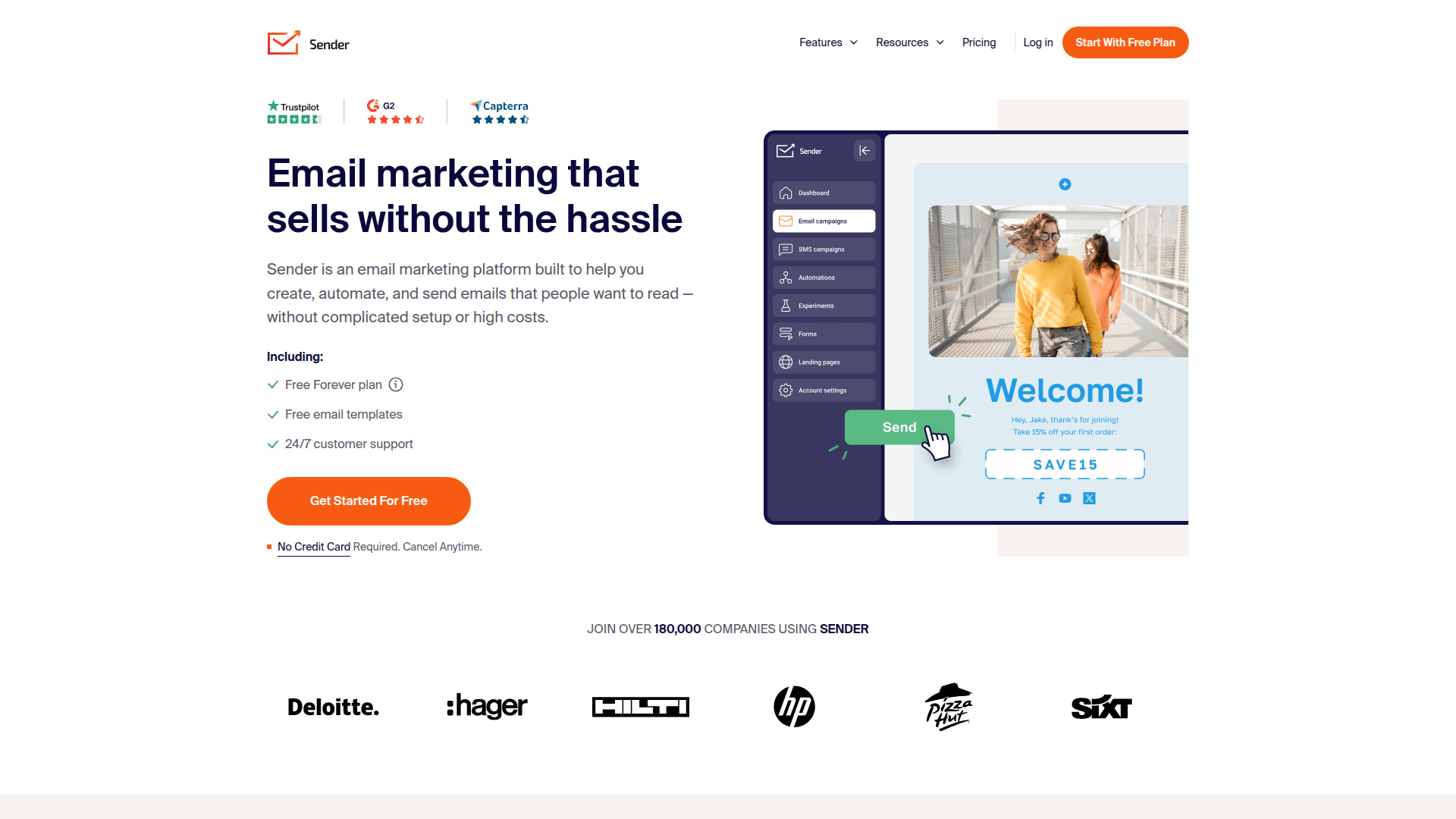
Looking for an email marketing platform that won't drain your budget? Sender promises premium features at a fraction of the cost, with a genuine free forever plan that includes automation. After testing their dashboard and sending capabilities, here's what you need to know.

Sender is an email marketing platform that combines affordability with surprisingly strong features. It's built for small businesses and startups who need professional email marketing without the premium price tag. The free plan alone covers most businesses' basic needs.

This is the email marketing tool I'd recommend to any startup or small business looking to get serious about email without breaking the bank.

Who It's For

Who Sender is for (and who it isn't)

Best for

  • +
    Small Businesses Perfect for businesses under 2,500 contacts who need professional email marketing without monthly fees.
  • +
    E-commerce Stores Built-in Shopify, WooCommerce integrations make it ideal for online retailers needing abandoned cart sequences.
  • +
    Startups on Tight Budgets The generous free plan includes automation features that competitors charge hundreds for.
  • +
    Marketing Agencies White-label capabilities and client-friendly pricing make it attractive for agencies managing multiple accounts.
E-commerceAgenciesCreatorsBudget-friendlyBeginner-friendlysmall teams

Skip this if

  • Enterprise Companies Limited advanced segmentation and enterprise-grade security features compared to platforms like HubSpot.
  • Heavy SMS Users SMS features are basic compared to dedicated SMS platforms like Twilio or SimpleTexting.
  • Complex Automation Needs Advanced behavioral triggers and complex workflows are better handled by platforms like ActiveCampaign.
  • International Businesses Limited language support (only English, Lithuanian, Polish, Spanish) may restrict global operations.

By buyer

Where Sender sits, depending on who you are

I rank every tool in Email Marketing Platforms separately against each kind of buyer. Its strongest placing is 2nd.

Agency4thBrevo leads it
Consultant2ndMailerLite leads it
Solo builder who lives in AI6thBrevo leads it
Solo builder who wants it simple3rdMailerLite leads it

The cheapest way in at $7, and the support scores higher than anything else in this category.

Features

What can Sender do?

Going through Sender's dashboard, the drag-and-drop email builder excels as intuitive. You can start with one of their 1600+ templates or build from scratch, and the editor handles responsive design automatically. The HTML editor gives you full control when needed, while the visual builder keeps things simple for non-technical users.

The automation capabilities impressed me most. Setting up welcome sequences, abandoned cart emails, and behavioral triggers is straightforward, with visual workflow builders that make complex automation accessible. The premade sequences cover common scenarios like lead nurturing and customer onboarding, saving significant setup time.

Lead capture tools integrate smoothly with the main platform. Creating signup forms and popups takes minutes, and the landing page builder, while basic, covers essential needs without requiring external tools. The segmentation features let you target based on behavior, demographics, and engagement levels, though they're not as advanced as specialized platforms.

Deliverability features deserve special mention. Sender claims 99% inbox delivery rates through dedicated infrastructure, monitored IP reputation, and built-in compliance tools. The transactional email capabilities handle order confirmations, password resets, and other automated messages through the same platform, eliminating the need for separate services.

Email Campaign Creation

Drag-and-drop email builder1600+ mobile-responsive templatesHTML email editorAuto-branded emailsA/B testing capabilities

Marketing Automation

Behavioral triggersMultichannel automationPremade automation sequencesDrip campaignsEvent-triggered actions

Lead Capture & Management

Signup forms builderEngaging popupsNo-code landing pagesContact segmentationList management

Analytics & Reporting

Real-time campaign reportsAutomation insightsE-commerce ROI trackingClick and open trackingEngagement analytics

Multichannel Marketing

SMS marketing campaignsSMS automationTransactional emailsEmail personalizationDynamic content

UX & Support

Is Sender easy to use?

Setting up a first campaign in Sender takes under 10 minutes, from account creation to sending. The onboarding process guides you through essential steps without overwhelming new users. The dashboard layout feels familiar to anyone who's used modern web applications, with clear navigation and logical feature grouping.

The template library deserves praise for both quantity and quality. With 1600+ options covering industries from e-commerce to nonprofits, finding a suitable starting point is rarely an issue. Customization options are extensive enough for most needs while remaining accessible to non-designers.

Customer support lives up to their 24/7 availability promise. By user reports, chat responses come within the claimed 10-second average, with knowledgeable representatives who understand both technical and strategic questions. The knowledge base covers common scenarios thoroughly, and video tutorials help visual learners get up to speed quickly.

Pricing

How much does Sender cost?

Sender starts at From $7/mo. That's 53% below median for Email Marketing. A free plan is available.

Sender

Sender Pricing Analysis

vs. 36 email marketing tools
$7/mo starting price

Below average for email marketing tools

median
Sender
$4Median: $15$299+
Starting prices. Scales with usage and team size.
Cheapest in category
Zoho Campaigns
Zoho Campaigns
$4/mo
Category average
$31/mo
Free plan available
28 of 36 tools

Cheaper than 97% of email marketing tools on That Marketing Buddy's database. Sender also offers a free plan.

Sender's pricing structure centers around a generous free plan that includes 15,000 emails monthly for up to 2,500 subscribers with no daily limits. The free plan includes marketing automation, 24/7 support, and access to all templates, making it more comprehensive than most competitors' free offerings.

Paid plans start at $7 monthly based on available information, scaling with subscriber count and email volume. The pricing remains competitive compared to alternatives like Mailchimp or Constant Contact, particularly when factoring in included features like SMS marketing and automation capabilities.

Value assessment strongly favors Sender, especially for smaller businesses. Getting automation features that typically cost $50+ monthly on other platforms included in the free tier represents significant savings. Even paid plans offer better feature-to-price ratios than most mainstream alternatives.

Sender plans and pricing

2 paid plans · Monthly billing · Verified Aug 24, 2026

Free Forever
$0/mo

Up to 2,500 subscribers and 15,000 emails/month. No credit card required, cancel anytime. Premium features (automation, segmentation, 24/7 support) included. CONFIRMED across official page, llms.txt, G2, and multiple reviews.

Standard
$7/mo

Entry price $7/mo CONFIRMED (official /pricing/standard-plan/ 'Starting at only $7', G2, Capterra). This is the FLOOR at the lowest subscriber band only — price scales up with contact count via the JS calculator, which I could NOT render (every static fetch returned 'Standard plans pricing is not av

ProfessionalRecommended
$14/mo

Entry price $14/mo CONFIRMED (official /pricing/professional-plan/ 'Starting at only $14', G2, Capterra). Marked 'Best Value'. Floor at lowest band only; scales by contacts (calculator unrenderable). Adds dedicated IP, free SMS credits, inbox preview, SMS automation. Email allowance = ~24x contact c

Calculate before you commit

Email Marketing pricing at your contact count

Use my pricing calculator to see how Sender compares with other Email Marketing software at the contact count you actually need. Every tool here is priced at the same volume, which is the comparison a vendor’s own pricing page cannot make.

contacts

At 500 contacts, Sender costs Free/mo on Free Forever, which is #6 of 24 in Email Marketing. Mailchimp, the most-reviewed option here, costs $27/mo at the same volume.

Priced in another currency, so listed separately rather than ranked:

The vendor’s own price is on the left. The dollar figure is my conversion at rates taken on 2026-08-06, shown only to give a sense of scale. These vendors do not set their dollar price by converting, so the approximation is not what you would be charged and is not used for ranking.

Some tools do not publish a price at exactly 500 contacts. Those show the next tier up, which is what you would actually pay: EmailOctopus at 2,500, Flodesk at 1,000, beehiiv at 2,500, Loops at 1,000, Sender at 2,500, Buttondown at 1,000.

Compare all Email Marketing pricing by budget →

24 of 25 Email Marketing tools publish a price at this volume. Every figure is the vendor’s own published rate for monthly billing, read from their pricing page and last checked 2026-08-06. Nothing is estimated between published tiers.

What does the Sender free plan include?

Sender offers a Free Forever plan with basic email marketing features and sending limits.

Which Sender plan should you pick?

Complete BeginnersFree Forever
Free

The free-forever plan gives you a genuine starting point with enough contacts and email sends to run your first campaigns at no cost. Sender's free tier includes automation features that many competitors reserve for paid plans, so you can test triggered sequences without spending money. For beginners learning email marketing fundamentals, this provides hands-on experience without any financial risk. Upgrade to Standard when you need higher contact limits, more sends, or want to remove Sender branding from emails.

Small BusinessesStandard
$7/mo

Standard at $7/month is one of the cheapest paid email plans available, providing increased sending limits and additional features beyond the free tier. The low price point makes it accessible for small businesses that want professional email marketing without a significant monthly expense. For businesses that have outgrown the free plan but do not need advanced automation, Standard covers the essentials reliably. Move to Professional when you need advanced automation capabilities or higher sending limits for growing campaigns.

Established CompaniesProfessional
$14/mo

Professional adds advanced automation and higher sending limits for businesses that run complex email campaigns. The expanded automation capabilities support multi-step conditional sequences and behavioral triggers that drive revenue. For companies where email is a primary sales and communication channel, the advanced features help optimize campaign performance over time. If your email strategy is relatively straightforward, Standard provides enough capability at a lower cost.

Does Sender have hidden costs?

6 outside the plan price
  • 1

    SMS credits charged separately on Standard plan

    The Standard plan includes SMS messaging, but if you exceed your included SMS allowance or need additional SMS credits, you must purchase them separately. SMS pricing varies by destination country and is charged per message sent.

  • 2

    Automatic tier upgrade billing if limits exceeded

    If you exceed your monthly sending limit and reach another pricing tier, you'll be automatically charged at the higher tier level on or before your next billing date. This happens even if the billing term ends before the payment is due.

  • 3

    No refunds policy with strict exceptions

    Refunds are only provided if Sender terminates services without cause before the end of a paid year. No refunds are given for account suspensions due to policy violations, unused/partially used plans, wrong plan purchases, immediate cancellations after billing, or forgetting to cancel subscriptions.

  • 4

    Prepaid email credits expire after 12 months of inactivity

    Purchased email credits remain in your account as long as it's active, but if your account shows no activity for 12 months, it may be considered inactive and your email credits may expire.

  • 5

    VAT not included in displayed prices

    VAT is excluded from all displayed prices and varies by country (ranging from 5% to 25%). For example, Germany has 19% VAT while France has 20% VAT, which will be added to your final bill.

  • 6

    Dedicated IP only available for Professional plan with 20,000+ subscribers

    Dedicated IP addresses are available for Professional plan accounts with 20,000 subscribers or above, provided at no additional cost upon request. Lower-tier plans and smaller subscriber counts use shared IP addresses.

Sender discounts and billing

  • ·Annual Discount: Potential savings when paying yearly
Billing Monthly, AnnualPayment Credit card, PayPal

Is Sender Worth the Price?

7/10 value

Sender delivers functional email and SMS marketing at rock-bottom prices. The $7/month entry point is hard to beat, and the free plan reduces risk. The main limitation is that Enterprise has no public number and fewer advanced features than platforms charging 2-3x more. It is a solid budget option for basic needs. Compare it with Moosend and MailerLite.

Sender's $7/month starting price is among the lowest in the email marketing space. The free plan with basic features gives you a genuine way to test the platform, and the Standard plan adds multichannel automation (email + SMS) at a price where most competitors only offer email. For small businesses watching every dollar, that value matters.

The one gap is Enterprise, which shows no number at all and routes you to a demo. Everything below it is published: Free at $0, Standard at $7/month, Professional at $14/month, each scaling with subscriber count. Compare with Moosend at $9/month or MailerLite at $10/month, both of which publish every tier the same way.

Sender fits small businesses and startups that need basic email and SMS marketing on a tight budget. The free plan and low-cost Standard tier cover the fundamentals. If you are building an email list from scratch and cost is the primary concern, Sender is worth testing alongside its budget-friendly competitors.

Want to compare all the free email marketing plans side by side? Check my best free email marketing tools roundup for a complete breakdown.

Prices last checked 2026-08-24 · vendor pricing page

Seen enough?

Visit Sender

MCP Server

Does Sender have an MCP server?

Sender ships a first-party MCP server at mcp.sender.net/mcp, so Claude, ChatGPT or Cursor can read your subscribers, segments and automations and build drafts in your account without any glue code.

StatusOfficialendpoint verified reachable
Server URLhttps://mcp.sender.net/mcp
AuthOAuth
MCP readiness8/10
Facts verified2026-08-24

Sender runs an official MCP server at https://mcp.sender.net/mcp over HTTP. Auth is OAuth: you add the URL as a connector, log in to Sender in a browser window, approve the permissions, and there is no API key to paste anywhere. The token is scoped to the role of the user who authorized it, so a limited role produces a limited view, and disconnecting is a one-click removal on the client side.

The documented surface runs to 40 tools across six groups: account and domain discovery, subscribers and groups, segments, email campaigns, workflows, and the image library. Workflows get the deepest coverage at 14 tools, including a validate_workflow dry run that returns every blocking problem at once instead of one per attempt. Segment reads come back with a plain-English readback of the conditions, which is how an assistant catches a "30-day most engaged" segment still filtering on a fixed date from two years ago.

The guardrails are the interesting part. Campaigns are never sent through this connection, because no tool exists that sends one. Workflows are created inactive and go live only through a separate activation step that runs the same pre-flight checklist as the dashboard. Destructive actions need an explicit acknowledgment flag, drag-and-drop designs stay read-only unless you allow an overwrite, and workflow creation is capped at 50 per account per day.

How to connect Sender to Claude, ChatGPT or Cursor

Connection is a URL and an OAuth login. Add https://mcp.sender.net/mcp as a custom connector, approve access in the browser window Sender opens, and the token is scoped to your account. There is no API key to copy, rotate, or leak into a config file. On Claude Team and Enterprise plans a Claude organization Owner has to add the connector at org level before members can authorize their own Sender accounts.

Sender does not sell the server as an add-on. It follows your existing plan features and your user role: every tool checks a permission, and if your role cannot edit campaigns in the dashboard it gets a permission error here and explains why. Anything that will eventually send needs a verified sending domain, and the server reports SPF, DKIM and DMARC status per domain, so you find out before a draft blocks rather than after.

Running several brands? Add one connector per account with distinct names, authorize each with its own login, and enable only the one you intend to work in for a given conversation.

ClientSupportNotes
Claude (desktop, web, mobile)NativeCustomize then Connectors, add custom connector, OAuth sign-in. Works on web, desktop and mobile. Team and Enterprise plans need an org Owner to add it first.
ChatGPTNativeRequires Developer mode under Settings then Plugins, and you have to select the Sender app in the composer each time.
CursorNativeCursor Settings then MCP then New MCP Server, or a {"mcpServers":{"sender":{"url":"https://mcp.sender.net/mcp"}}} entry, then the OAuth prompt.

What you can do with the Sender MCP server

Sender documents three clients. Claude works on web, desktop and mobile through Customize then Connectors. ChatGPT needs Developer mode switched on under Settings then Plugins before a custom MCP server can be added at all. Cursor takes a two-line mcpServers entry pointing at the same URL. All three finish on the same OAuth flow.

The prompts that earn their keep are audits rather than drafting. Ask which automations overlap and you get the merged picture across every active workflow, which the dashboard makes genuinely hard to see: two flows sharing a trigger event means everyone who enters one enters the other, and stacked delays can land five emails in nine days. Pull the per-workflow report next and the overlap gets priced in unsubscribes.

Content checks are the other one. The assistant reads campaign and workflow email bodies and flags legacy {$firstname} tokens (Sender runs on Liquid, so it is {{ firstname }}, and the old syntax reaches subscribers as literal text), missing preheaders, and social icons carrying the wrong alt text.

MCP verdict

An official OAuth server with 40 documented tools covering reads and writes across subscribers, segments, campaigns and workflows, wrapped in draft-only guardrails that stop an assistant mailing your list. It earns an 8 out of 10: unusually complete for a budget email tool, with no separate fee or plan gate on the connection itself. What holds it back is the layer underneath, where there is still no public OpenAPI spec and no official server-side SDKs.

Comparing tools on agent support? See every marketing tool with an MCP server.

Public API

Does Sender have an API?

Sender runs a versioned REST API at api.sender.net/v2 covering subscribers, campaigns, workflows and webhooks, with tokens you generate yourself in the dashboard.

API documentationapi.sender.net
OpenAPI specNot published
Official SDKsNone
WebhooksAccount webhooks are documented at api.sender.net with create, read, update, delete and list endpoints plus a published example payload. They sit on the REST API, not on the MCP connection.
API readiness6/10

The API lives at https://api.sender.net/v2 and you authenticate with an access token created in the dashboard under Settings then API access tokens. No OAuth app registration, no partner approval, just a token you generate and send with the request.

Resource coverage is wider than a budget email tool usually bothers with: subscribers (including group and phone management), groups, segments, custom fields, statistics broken out by clicks, opens, bounces and complaints, campaigns with create, send, schedule, copy and delete, transactional campaigns with and without templates, workflows with start and performance calls, custom events, and account webhooks.

Webhooks are the piece that matters for anything event-driven. They are documented with full create, read, update, delete and list endpoints plus a published example payload, so you can react to subscriber and campaign events instead of polling for them.

The gaps are on the developer-experience side. There is no OpenAPI spec published on the docs, so you hand-roll clients rather than generating them, and the only SDK is the browser tracking snippet, which is not a server-side client. No rate limit is stated on the documentation either, which is the kind of number you want before you point a batch job at it.

Sender API pricing and rate limits

The API costs nothing on top of your plan. Tokens are generated in Settings then API access tokens, and the calls you can make follow the features your plan already includes, so a Free Forever account can drive the API within its own 2,500 subscriber and 15,000 email a month ceiling.

No rate limit is published on the documentation, which is worth knowing before you plan a bulk import or a nightly sync. Budget for backoff and retry logic rather than assuming a ceiling, and test a batch at small volume first. If you want an agent working the account rather than a scheduled job, the MCP server is the lower-effort path: it carries the same permissions with none of the client code.

API verdict

A properly versioned REST API with real coverage: subscribers, segments, campaigns, workflows, statistics and webhooks, authenticated with a self-serve token. It earns a 6 out of 10. Everything an integration needs is reachable, but no published OpenAPI spec, no server-side SDKs and no documented rate limit mean you write more client code and do more guessing about limits than the best-in-class email APIs ask of you.

External Ratings

What 443 reviewers say

Aggregated from 2 platforms

Sender holds a 4.7/5 average rating across 443 reviews on Capterra, G2.

Capterra

207 reviews

4.7/5

Read reviews on Capterra

G2

236 reviews

4.7/5

Read reviews on G2

"I have tried other email marketing platforms, but I am staying with Sender! I have tried email newsletters and campaign platforms that mostly give you nothing but lies in their free plans, but Sender practically gives you a premium experience even in the free plan."

Capterra

"Sender.net is very affordable and easy to use, the ability to customize email templates and analytics helps improve campaigns constantly and effectively. There are no restrictions on features such as drag-and-drop feature or pre-made templates."

Capterra

"I found Sender a more practical, functional tool with better benefits than Mailchimp."

Capterra

"It's everything Mailchimp was not: generous, easily accessible customer service, generous features, even automation on the free plan, easy to use drag-and-drop builder, much better than Mailchimp's."

Capterra

"Great support made my onboarding a breeze! Sender perfectly fits my needs and allows me to expand as needed."

Capterra

AI-stack fit

Can your AI actually drive Sender?

Short answer: yes. Sender exposes both an MCP server and a REST API.

Sender is a deliverability workhorse , not a creative engine. Pair it with AI for copy and keep it for list health and inbox placement .
Agent surface, every fact sourcedAgent readiness 7/10
  • MCP server

    https://mcp.sender.net/mcp · official

    Vendor docs
  • REST API

    https://api.sender.net

    Vendor docs
  • OpenAPI spec

    None. Hand-roll your client.

    Not verified
  • Official SDKs

    None

    Vendor docs

What that means for your stack

Core

What AI Can't Replace

Sender owns your email deliverability infrastructure and list hygiene in ways no AI can replicate. The tool's real-time bounce handling, SMTP infrastructure, and list validation catch issues before they tank your sender reputation. AI can write the email, but it cannot manage the technical pipes that keep you out of spam folders.

Risk

Where AI Is Catching Up

AI content generation is eating into Sender's template and copy features. Claude or ChatGPT can now write email sequences faster than Sender's editor can format them. The risk is real if you're paying for Sender mainly for creative work rather than deliverability and list management.

Connects with

MCP ServerClaude, Cursor, Windsurf
REST API

Security

SSO2FA
Founded 2012HQ LT

Downsides

What's wrong with Sender

!

Limited Language Support

Interface only available in English, Lithuanian, Polish, and Spanish, restricting global teams.

!

Basic SMS Features

SMS marketing capabilities are functional but lack advanced features found in dedicated SMS platforms.

!

Simple Analytics

Reporting covers essentials but lacks advanced segmentation and custom dashboard options.

!

Template Customization

While extensive, template modifications are less flexible than platforms with advanced design tools.

!

Integration Ecosystem

Fewer third-party integrations compared to established platforms like Mailchimp or HubSpot.

!

Advanced Automation

Complex behavioral triggers and multi-step workflows are more limited than specialized automation platforms.

Are these dealbreakers?

For a free tool (or even at the paid tier prices), these are reasonable trade-offs. You'll notice the gaps mainly if you're comparing Sender to platforms that cost 3-5x more.

Ready to try Sender?

Start with their generous free plan and see why 180,000+ businesses trust Sender for email marketing

Sender logoStart Free Forever →

Alternatives

What else is in this category?

Ranked as they are on my email marketing roundup, where Sender places #2. Prices are what you actually start at.

European & GDPR

Sender is built in Europe — check its data-residency and GDPR details on EuropeanMartech on EuropeanMartech.

FAQ

Frequently asked questions about Sender

Yes, within the stated limits. You get 15,000 emails monthly for up to 2,500 contacts with no daily sending restrictions or time limits.

Branding removal requires upgrading to a paid plan. Free plan emails include small Sender branding in the footer.

Sender claims 99% inbox delivery rates through dedicated infrastructure and IP monitoring, competitive with industry leaders.

Popular integrations include WordPress, WooCommerce, Shopify, PrestaShop, and Zapier, covering most common business tools.

Yes, live chat support is available around the clock with average response times under 10 seconds according to their metrics.

Dedicated IPs are available for Professional plan users upon request at no additional cost for high-volume senders.

Sender offers free migration assistance and supports standard contact import formats from major email platforms.

You can upgrade to a paid plan or wait until the next month for limits to reset. No automatic charges or service suspension.

Sender publishes its prices at sender.net/pricing. The Free Forever plan covers 2,500 subscribers and 15,000 emails a month, Standard starts at $7/month and Professional at $14/month, both scaling with your subscriber count. Only Enterprise has no public number.

Yes, Sender offers a Free Forever plan, though it comes with sending and feature limitations.

Check with Sender directly about their plan change policies and any restrictions.

Contact Sender to understand their complete fee structure and any additional costs.

Most email marketing platforms accept major credit cards and PayPal, but confirm directly with Sender.

Check with Sender directly about any special pricing for nonprofits, educational institutions, or other organizations.

Contact Sender to understand their overage policies and whether you'll be automatically upgraded or charged extra fees.

Sender's pricing is refreshingly transparent with clear per-contact pricing and no hidden fees.

Sender is best for: Small Businesses; E-commerce Stores; Startups on Tight Budgets; Marketing Agencies.

An official MCP server puts Claude, ChatGPT or Cursor directly on the account over OAuth, which is rare at this price. The REST API and webhooks cover the scheduled-job side.

Standard data import/export capabilities with free migration assistance, but limited workflow portability details.

Sources & References (3)

More on Sender

Read Next

This page may contain affiliate links. I earn a commission at no extra cost to you. This never influences ratings.

Sender

Try Now →
WEEKLY NEWSLETTER

The marketing tools worth your money, scored for AI agent readiness

Every week I score the tools for MCP, API, and agent-readiness, then email you the ones that actually deliver, what plugs into Claude and Cursor, the pricing changes, and what to skip. No fluff, no daily spam.

Join for free. One email a week, unsubscribe anytime.