
This page may contain affiliate links.
Some links on this page are affiliate links, meaning I may earn a commission if you sign up (at no extra cost to you). This never influences my ratings or recommendations.
The Verdict
Is PostFast right for you?
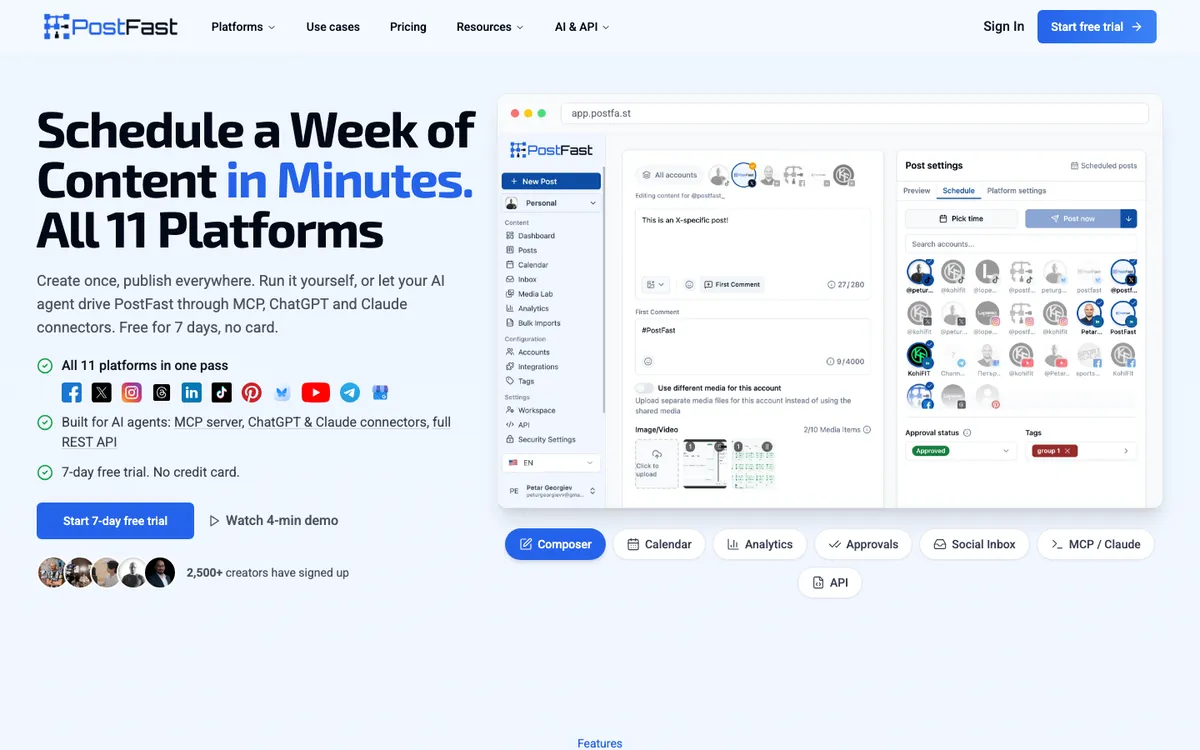
PostFast schedules posts to all 11 major platforms from one composer, and puts a full REST API plus a 24-tool MCP server on every tier, including the cheapest one. There's no free plan, just a 7-day trial, so you'll want to know exactly what you're paying for before you commit.
PostFast is a social media scheduler built for both hands-on posting and AI-agent workflows, covering Facebook, Instagram, Threads, X, LinkedIn, TikTok, YouTube, Pinterest, Telegram, Bluesky, and Google Business Profile. It's a strong pick for agencies managing multiple client workspaces and for developers who want API or MCP access without upgrading to a top tier.
It's a weaker pick if you want a permanent free plan or you post link-heavy content to X at volume.
PostFast's decision to put API and MCP access on its €12 Starter plan instead of gating it behind an enterprise tier is the most interesting thing about this tool, and it's rarer than it should be in this category.
Why I'm covering this
PostFast puts a 24-tool MCP server and full REST API on its cheapest €12/month plan instead of gating automation behind an enterprise tier, which is unusual in social scheduling pricing.
Who It's For
Who PostFast is for (and who it isn't)
✓Best for
- +Agencies running multiple client accounts Granular permissions ship on every tier, Starter included. What scales with price is workspaces: 1 on Starter, 4 on Creator, 10 on Growth, 30 on Pro. White-label branding waits until Pro.
- +Developers building AI-agent posting workflows The MCP server ships 24 tools covering publishing, analytics, and the Social Inbox, and it's available on the €12 Starter plan, not locked behind Pro or Enterprise.
- +Solo creators posting to every major platform All 11 platforms are included on every tier, so a single creator on Starter gets the same platform coverage as an Enterprise customer, just with lower account and post limits.
- +Teams that get flooded with comments on viral posts The Social Inbox covers TikTok, Instagram, Facebook, and Threads comments on every plan with no per-conversation or per-seat charge, so a post blowing up doesn't change your bill.
- +Solo creators posting the same content across TikTok, Instagram, and YouTube The Starter plan at €12/month (or €10/month billed annually) covers 4 accounts across all 11 platforms with no per-platform upcharge, plus the Social Inbox for comment replies at no extra cost.
- +Small agencies managing multiple client social accounts Pro (Agency) at €99/month gives 120 social accounts, 30 workspaces, white-label branding, and granular permissions, letting one team run separate client setups from a single login.
- +Developers and AI-agent builders automating social publishing The open-source MCP server, full REST API, and ChatGPT/Claude connectors let you schedule and analyze posts through natural language or code instead of clicking through a UI.
- +Teams running high posting volumes with community management needs Social Inbox (comments on TikTok, Instagram, Facebook, and Threads) is included on every plan including the trial, so a post that suddenly gets traction doesn't trigger a surprise inbox fee.
- +Growing brands scaling from a handful to dozens of social accounts The Growth plan (€49/month, or €40/month billed annually) supports 30 accounts and 2 years of history, positioned between solo-creator and full-agency tiers.
✗Skip this if
- −Budget-conscious hobbyists who want a permanent free tier There's no free plan, only a 7-day full-feature trial. If you need a forever-free option, look at Buffer's free plan for 3 channels or Publer's free-forever tier instead.
- −Heavy X (Twitter) link posters X applies its own org-wide cap on top of PostFast's plan limits, and it's tight: just 14 link posts per month on Starter, rising to 32 on Creator and 44 on Growth.
- −Small teams needing white-label branding on a budget Workspace branding is a No on Starter, Creator, and Growth, and only unlocks on Pro (€99/mo) and Enterprise (€239/mo).
- −Anyone who wants AI-written captions out of the box The AI Assistant for text generation is listed as an upcoming feature with scope under review, not something you can use today.
- −Newsletter writers and email-first creators PostFast has no email sending or list-building features at all; it's purely social scheduling. Kit is built specifically for creator email lists and automation.Try Kit →
- −Brands that need deep social listening and sentiment analysis beyond comment replies PostFast's Social Inbox covers comments on 4 platforms only (no LinkedIn, X, YouTube, Pinterest); it's not a listening or monitoring tool.Try Hootsuite →
- −Budget-conscious solo users who just want a basic free scheduler PostFast has no free tier, only a 7-day trial, and Starter starts at €12/month. Buffer's free plan covers basic scheduling for a handful of accounts at no cost.Try Buffer →
Consider instead
 BlogToPin
 Supapin
 PosterMyWall
Features
What can PostFast do?
The MCP server is the feature that makes PostFast worth a second look if you're building an AI-driven content workflow. It goes well beyond create_posts and list_posts, covering analytics retrieval, follower history, and full control over the Social Inbox (reply, hide, assign, mark read), all through natural language from Claude, Cursor, or VS Code. If you haven't set up an MCP connection before, this practical MCP guide walks through the general setup pattern.
Run the server against a live workspace and it advertises 24 tools, not the 23 the docs list, with an undocumented list_tiktok_sounds in the set. The count matters less than the shape: all 56 parameters across those tools carry descriptions, and create_posts documents its own failure mode, telling the caller to check connectionStatus first because scheduling to a disconnected account returns a 400.
Malformed calls come back as typed validation errors naming the exact field, so an agent can correct itself instead of guessing. That is the difference between an API an agent can drive and one it can only call.
The Social Inbox deserves a specific mention because of how it's priced: it's included on every plan, including the 7-day trial, with no per-conversation or per-seat fee. That's a real difference from tools that meter engagement features separately. The catch is coverage: it only handles TikTok, Instagram, Facebook, and Threads comments right now. LinkedIn, X, YouTube, Pinterest, Bluesky, Telegram, and Google Business Profile aren't part of this release yet.
Analytics are also platform-dependent in ways worth knowing before you commit. LinkedIn analytics only work for company Pages, not personal profiles. Pinterest analytics require a Business account and report saves over a rolling 90-day window rather than lifetime totals, because that's a limit of Pinterest's own API. None of this is unique to PostFast, but it's the kind of detail that changes which plan actually fits your workflow.
For a broader look at where scheduling automation is heading, this piece on automating social media without automating noise is a decent companion read.
Carousels, bulk CSV imports for up to 200 posts, and native imports from Canva, Dropbox, and Google Drive round out the content side. These aren't flashy, but they're the kind of unglamorous features that save real time if you're managing content for more than one brand.
Cross-Platform Publishing
AI Agent and Automation Access
Team and Agency Tools
Engagement and Analytics
From my test account
Inside PostFast
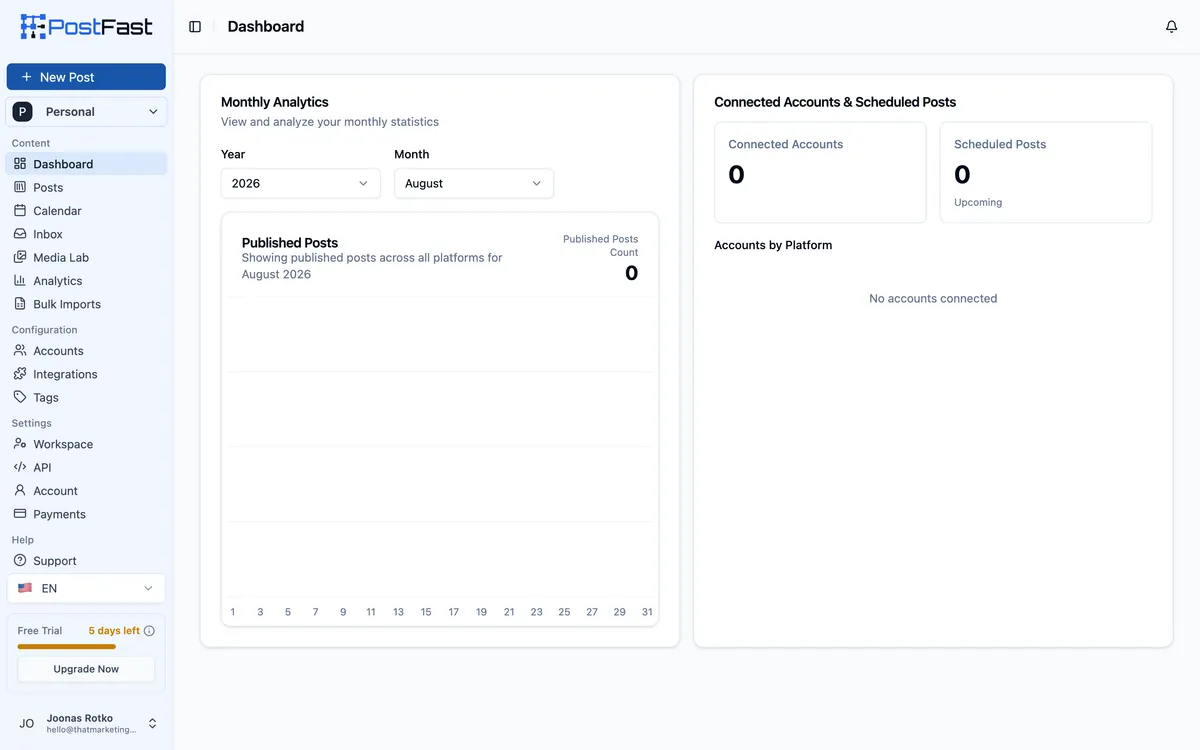
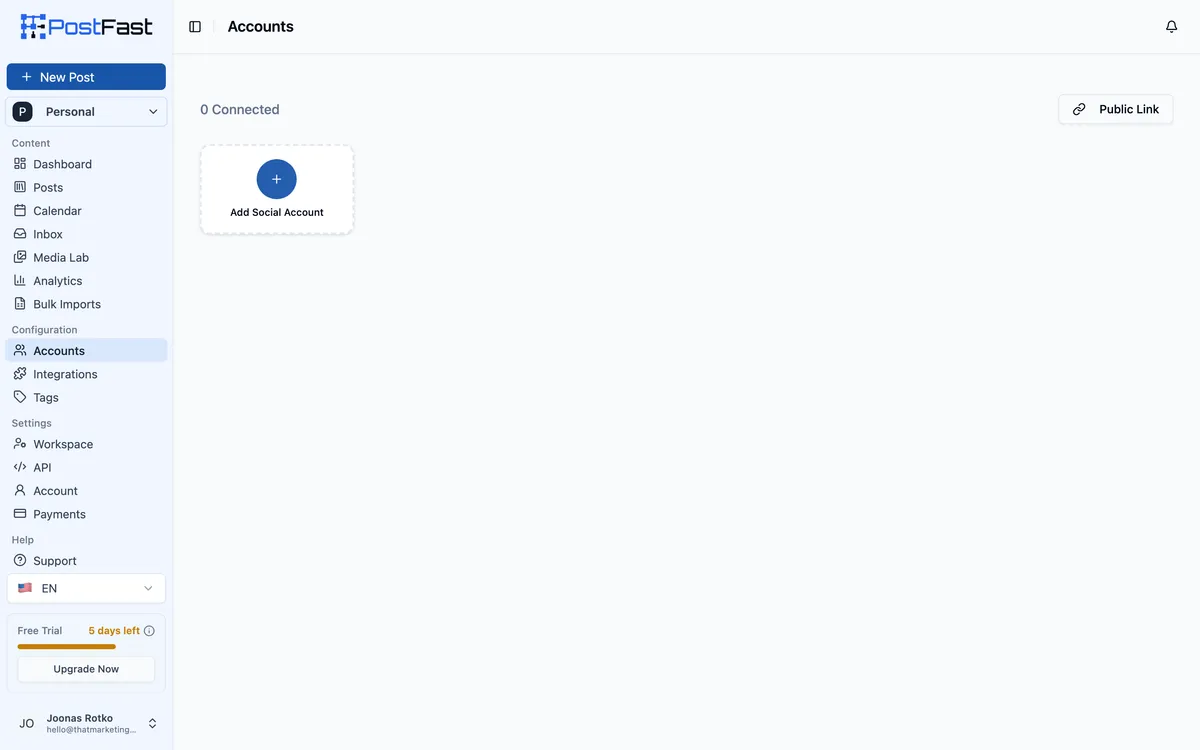
A trial workspace with nothing connected shows you what PostFast is before any data flatters it, and two things are immediately clear.
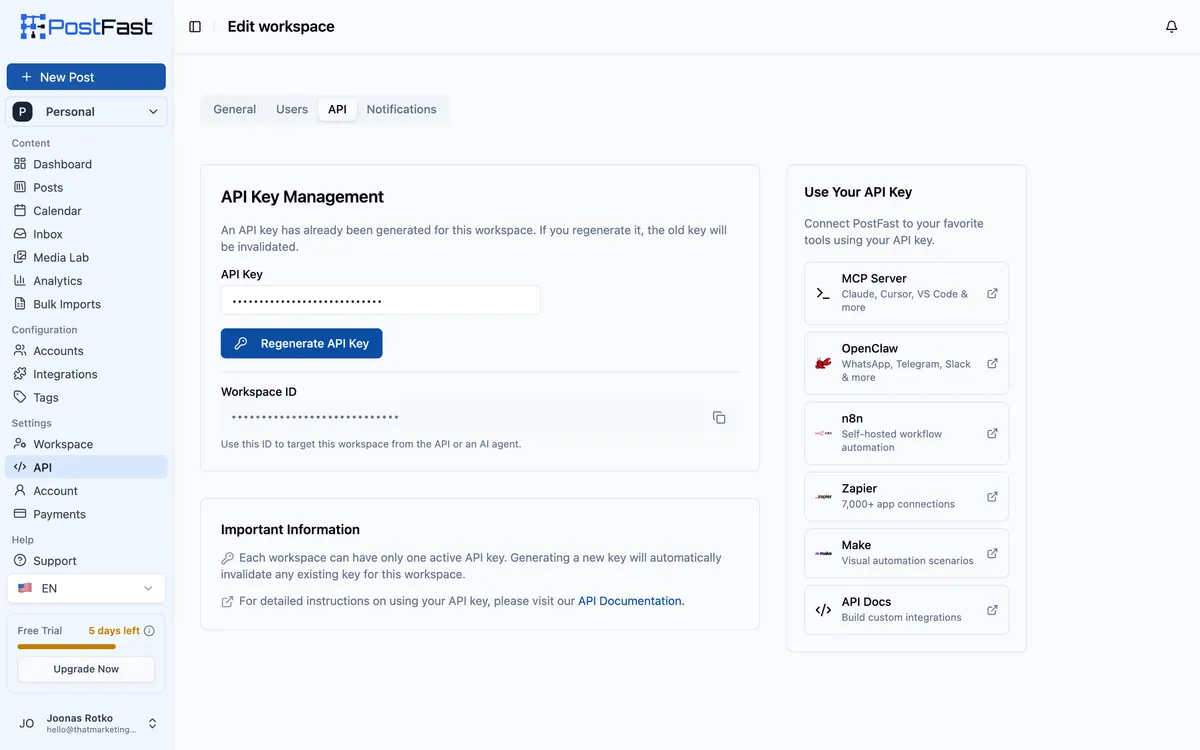
The Workspace API tab is the one screen that changes what this product is. Generate a key, point Claude, Cursor, n8n, Zapier or Make at it, and PostFast runs from an AI client instead of a browser tab. That is the part I like, and it sits on the €12 entry plan rather than behind a sales call.
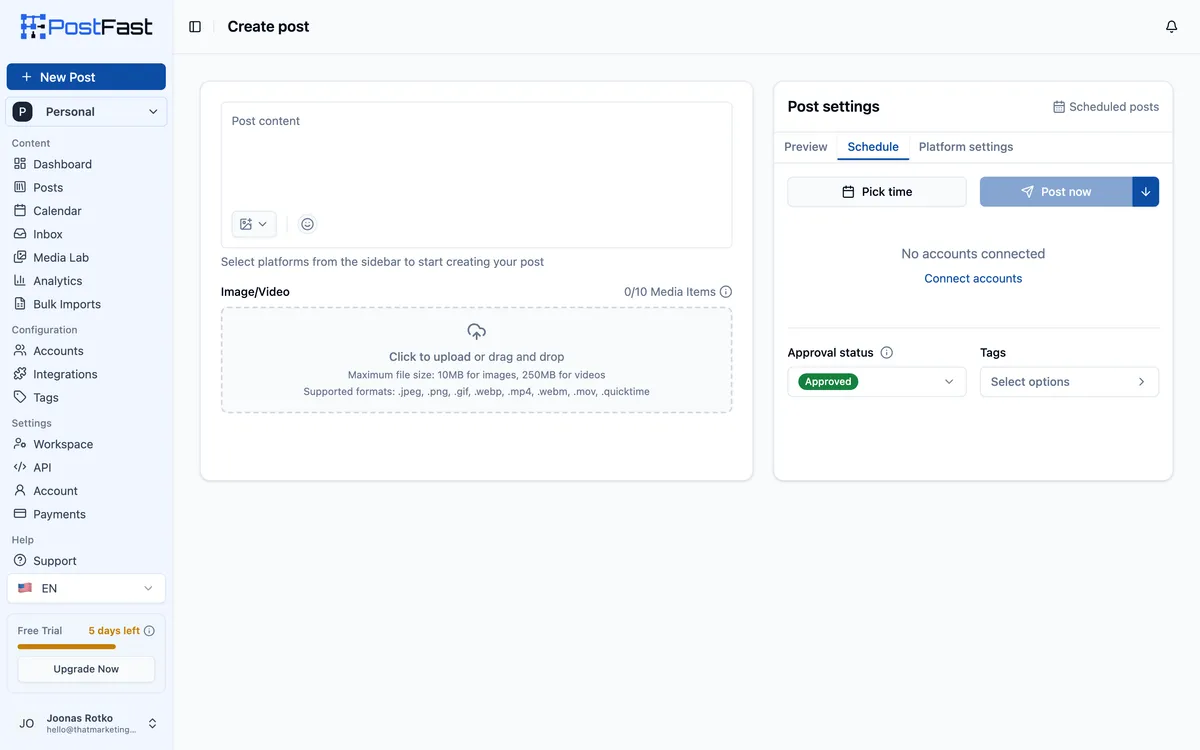
The composer does nothing until a social account is attached. The schedule panel just reads "No accounts connected", so the dashboard and the API share the same hard dependency: no account, no post, whichever way you drive it.
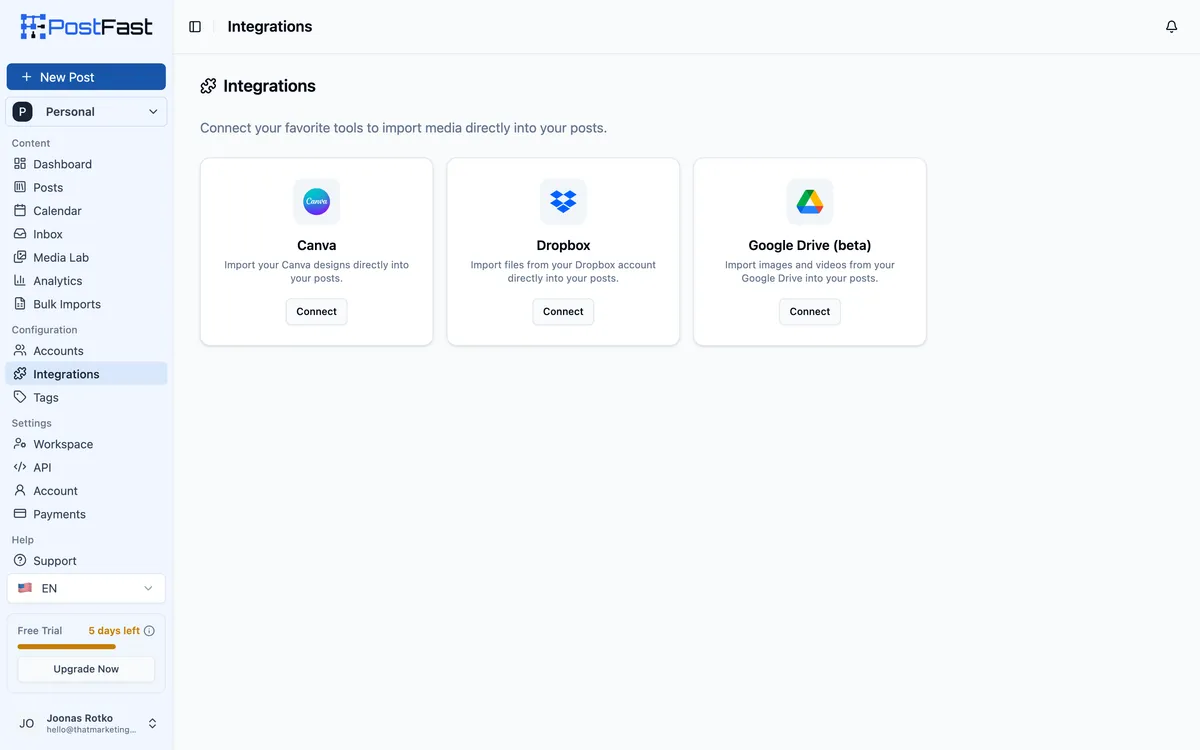
The Integrations screen is also not where the automation lives. It offers Canva, Dropbox and Google Drive, media import only. The MCP server, the ChatGPT and Claude connectors, Zapier, Make and n8n all sit under Workspace, API, behind a single workspace key. If you come into this product looking for the agent surface, that is the wrong menu item to click first.
UX & Support
Is PostFast easy to use?
G2 reviewers consistently describe PostFast as straightforward rather than overbuilt. One reviewer, Olav L., a company owner, specifically credits the tool for not being overcomplicated, which matches the general shape of the feature set: a clean composer and calendar view rather than a dense analytics suite with a learning curve attached.
Inside the product the empty states are unusually explicit. The composer names the missing step, "Select platforms from the sidebar to start creating your post", instead of showing a dead button and leaving you to work it out. Approval status, tags and the choice between picking a time and posting now all sit in one right-hand panel, so writing to queued is a single column rather than a multi-step wizard.
The one piece of navigation that misleads is Integrations, which holds only Canva, Dropbox and Google Drive. Everything agent-related is filed under Workspace, API.
Support quality also comes up favorably in reviews. Teodora B., a GTM strategist, mentioned in a G2 review that the API integration for AI-assisted workflows worked well and that support was strong when needed. PostFast also shipped native iOS (November 2025) and Android (December 2025) apps, so mobile management isn't an afterthought bolted onto a web-only product.
Priority support itself, however, is gated to the Pro and Enterprise plans according to the published feature table. If you're on Starter, Creator, or Growth, you're working with standard support channels, which is worth knowing if fast turnaround matters to your workflow.
Pricing
How much does PostFast cost?
PostFast starts at €12/mo. That's 37% below median for Social Media Automation tools. No free plan, but there’s a 7-day free trial.
PostFast runs five tiers: Starter at €12/month (€10/month billed annually), Creator at €29/month (€24/month billed annually), Growth at €49/month (€40/month billed annually), Pro (Agency) at €99/month (€82.50/month billed annually), and Enterprise at €239/month (€199/month billed annually). Annual billing saves roughly 17-18% on every plan, which the vendor markets as two months free. There's no permanent free plan, just a 7-day full-feature trial with no credit card required.
The interesting part of this ladder is what it does not gate: API access, the MCP server, and the Zapier, Make, and n8n integrations are on every tier, including the €12 Starter plan. What the ladder does gate is volume, social accounts, scheduled posts, drafts, workspaces, users, scheduling window, and history length. That's a cleaner pricing philosophy than tools that charge extra to unlock automation access, and it's closer to how WoopSocial's MCP server and Post for Me's API approach pricing than how a legacy per-seat tool like Hootsuite does it.
One caveat the plan cards don't surface clearly: X (Twitter) applies its own org-wide posting caps regardless of your PostFast tier. Starter is limited to 14 link posts per month across the entire organization, which is tight if X is a primary channel. Anyone weighing this against Buffer's free plan should also factor in that Buffer's free tier covers only 3 channels, so the comparison isn't purely about price.
| Plan | Monthly |
|---|---|
| Starter | €12/mo |
| Creator | €29/mo |
| Growth | €49/mo |
| Pro (Agency) | €99/mo |
| Enterprise | €239/mo |
External Ratings
What reviewers say about PostFast
0"It makes posting at scale really easy. We also love the API integration that allows us to leverage our AI assistant. The support has also been great."
G2 (Teodora B., GTM Strategist)"I use PostFast to post by API to many social media platforms programmatically at high volumes. It just works."
G2 (Bilal R., Founder)"I really like PostFast's ease of use and its powerful API. PostFast isn't overcomplicated, which suits my needs perfectly."
G2 (Olav L., Company Owner)"PostFast is the fastest and easiest to use platform I've tried from all on the market, and I've tried most of them!"
X (Victor)Downsides
What's wrong with PostFast
No permanent free plan
Only a 7-day full-feature trial is available. Anyone who needs to post for free indefinitely will need to look elsewhere.
X (Twitter) applies its own org-wide caps
Link posts to X are capped at just 14 per month on Starter, 32 on Creator, and 44 on Growth, regardless of your PostFast plan limits. This affects link-heavy X strategies most.
White-label branding and priority support are gated high
Workspace branding and priority support only appear on Pro (€99/mo) and Enterprise (€239/mo), leaving smaller teams on lower tiers without either.
Social Inbox coverage is limited to 4 platforms
Comment management only covers TikTok, Instagram, Facebook, and Threads. LinkedIn, X, YouTube, Pinterest, Bluesky, Telegram, and Google Business Profile comments aren't included yet.
AI content generation isn't live yet
An AI Assistant for on-brand caption writing is listed as a roadmap item with scope still under review, not a shipped feature.
LinkedIn and Pinterest analytics have account-type restrictions
LinkedIn analytics only work for company Pages, not personal profiles, and Pinterest analytics require a Business account, which can leave gaps in reporting for some users.
One API key, and it can do everything
The key is scoped to the entire workspace and there is no read-only variant. Anything holding it can also mint a client-connect link, a token valid for 7 days that lets someone attach social accounts to your workspace. Worth knowing before you hand that key to an autonomous agent.
The €12 Starter plan is thinner than the API access suggests
Starter carries the full API and MCP surface, but no calendar view, only limited analytics, 4 social accounts and 150 scheduled posts. It fits an agent-driven workflow better than a human one.
Buddy's Take
None of these are dealbreakers for the core use case of scheduling and publishing across 11 platforms with API access. But if your priority is a free tier, heavy X link posting, or white-label branding on a lower budget, these gaps will matter more than the feature list suggests at first glance.
FAQ
Frequently asked questions about PostFast
No. PostFast offers a 7-day free trial with full feature access and no credit card required, but there's no permanent free tier after that.
All 11: Facebook, Instagram, Threads, X, LinkedIn, TikTok, YouTube, Pinterest, Telegram, Bluesky, and Google Business Profile. All platforms are included on every plan with no per-platform upcharge.
Yes. It ships an official MCP server with 24 tools covering publishing, analytics, and Social Inbox management, installable via npx postfast-mcp and compatible with Claude, Cursor, VS Code, and other MCP-compatible tools.
Yes. Full API access is included on the €12/month Starter plan (€10/month billed annually), not reserved for higher tiers.
Yes. X applies its own org-wide cap on top of PostFast's plan limits. Link posts are capped at 14 per month on Starter, rising to 120 per month on Enterprise.
No. It's included on every plan, including the trial, with no per-conversation or per-seat charge. It currently covers comments on TikTok, Instagram, Facebook, and Threads.
Yes. Switching from monthly to yearly takes effect immediately and charges the new yearly amount that day. Switching yearly to monthly takes effect at the end of your current annual period.
Posts keep publishing until the end of your billing period. After a 2-day grace period, remaining scheduled posts move to Rejected status but aren't deleted, and you can bulk re-approve them if you resubscribe.
The pricing ladder is unusually well documented: every limit (accounts, posts, drafts, workspaces, users, even X's own posting caps) is spelled out per tier, and the annual discount is a consistent 17-18% across all five plans.
PostFast is best for: Solo creators posting the same content across TikTok, Instagram, and YouTube; Small agencies managing multiple client social accounts; Developers and AI-agent builders automating social publishing; Teams running high posting volumes with community management needs; Growing brands scaling from a handful to dozens of social accounts.
PostFast is one of the more AI-forward tools in this category right now: an open-source MCP server with 24 tools, native ChatGPT/Claude connectors over OAuth, and a changelog that ships AI integrations monthly.
Getting data out via the REST API is straightforward, but there's no dedicated 'export everything' button mentioned anywhere in the docs or pricing pages.
PostFast starts from €12/mo. There is a 7-day free trial.
Ready to try PostFast?
Schedule across 11 platforms and connect your AI tools with a 7-day free trial, no credit card required.
 Start 7-Day Free Trial →
More on PostFast

Joonas Rotko
Author & founder of That Marketing Buddy
I score marketing software for AI-stack fit (MCP, API, agent-readiness), backed by 10+ years in digital marketing.
This page may contain affiliate links. I earn a commission at no extra cost to you. This never influences ratings.