

Joonas Rotko · Founder, That Marketing Buddy
I spent 10+ years buying marketing software for my own agency and its clients, so I know which tools earn their monthly fee and which ones quietly drain it. Now I check the prices and the claims on this site myself.
This page may contain affiliate links.
Some links on this page are affiliate links, meaning I may earn a commission if you sign up (at no extra cost to you). This never influences my ratings or recommendations.
The Verdict
Is BlogToPin right for you?
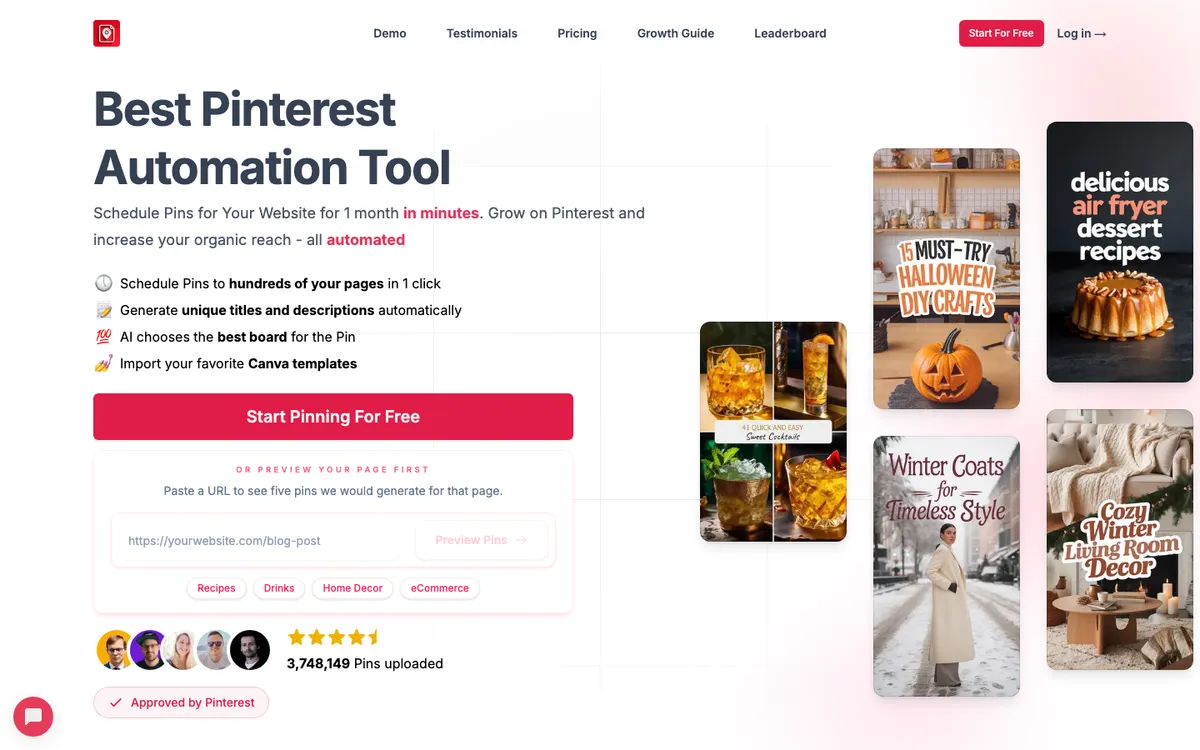
BlogToPin is a Pinterest automation tool with one clear job: turn the blog posts and product pages you already have into scheduled, SEO-optimized pins. You connect a site or feed, and it generates pin images, writes titles and descriptions, matches each pin to a relevant board, and queues everything out over days or weeks.
It is Pinterest-approved and connects to WordPress, Shopify, Etsy, Medium and YouTube, plus Canva for templates. For anyone who publishes regularly and treats Pinterest as a traffic channel, it removes the part that usually kills consistency: making the pins.
BlogToPin is the most direct fix for the real Pinterest bottleneck, which is not scheduling but creating pins. Point it at your content and it builds and schedules them for you, with AI images, copy and board matching. It is a specialist, and a good one: bloggers and store owners with a steady publishing habit get the most out of it.
Pricing is clean and public ($25/mo Starter, $50/mo Agency, $125/mo Enterprise), with daily pin caps that scale by tier. Two honest caveats. There is no permanent free plan, only limited free pinning to try it. And on a site about AI-stack fit, BlogToPin scores low: it uses AI inside the product but exposes no public API or MCP server, so you cannot drive it from your own stack.
If you want hands-off pin creation, that does not matter. If you want a tool your agents can control, it will.
BlogToPin has no permanent free plan (just limited free pinning to try it), then three flat tiers: Starter $25/mo (35 pins/day, 500 AI pins/mo), Agency $50/mo (350 pins/day, 1,000 AI pins/mo, most popular), and Enterprise $125/mo (1,000 pins/day, 2,500 AI pins/mo). Annual billing ($299 / $599 / $1,499) saves roughly a month. Verified on the live pricing page in June 2026.
Who It's For
Who BlogToPin is for (and who it isn't)
✓Best for
- +Bloggers who use Pinterest for traffic If you publish posts and want each one turned into multiple pins automatically, this is built for exactly that, with a WordPress integration that can fire new pins when you publish.
- +Ecommerce and Etsy sellers Shopify, Etsy and feed support means product pages become product pins without you designing each one by hand.
- +Solo marketers short on time The whole pitch is removing the slow part. If pin creation is what stops you posting consistently, BlogToPin keeps the queue full on its own.
- +Agencies running several Pinterest accounts Unlimited Pinterest accounts and websites even on Starter, with higher daily caps and team members on the upper tiers, make it workable for managing multiple clients.
✗Skip this if
- −Teams wanting an agent-drivable tool There is no public API or MCP server. If you are building toward an AI-run social stack, Metricool or ContentStudio fit far better. BlogToPin's automation is closed inside the product.
- −People who only need scheduling If you already make your pins and just need them queued, a general scheduler like Tailwind or Publer is cheaper and broader. BlogToPin's value is the creation, not the calendar.
- −Anyone who needs a free plan There is no permanent free tier, only limited free pinning. Tailwind, Metricool and Publer all have genuine free plans if cost is the deciding factor.
- −Multi-network social teams BlogToPin is Pinterest-only. If you want one tool for Pinterest plus Instagram, TikTok and the rest, this is not it.
 Zernio
 Buffer
 Postiz
Features
What can BlogToPin do?
BlogToPin's core is pin creation, and that is the real difference from a normal scheduler. You connect a blog, store or feed, and it reads each page, pulls or generates an image, writes a title and description tuned for Pinterest search, and matches the pin to a relevant board. You can import Canva templates so the output stays on-brand, and it can spin several pin variations from a single page, which is how serious Pinterest marketers feed the algorithm without designing dozens of graphics by hand.
Scheduling sits on top of the creation. Once pins are generated, BlogToPin queues them out over time, with AI board matching deciding where each one lands and a smart shuffle to keep the feed varied. Daily caps scale by plan: 35 pins a day on Starter, 350 on Agency, 1,000 on Enterprise, with AI-pin allowances of 500, 1,000 and 2,500 a month respectively. The Enterprise tier can auto-create pins daily, so the whole loop runs without you opening the app.
On integrations, BlogToPin is a Pinterest-approved tool, which matters because it means scheduling runs through Pinterest's official API rather than risky workarounds. It connects to WordPress (with a plugin that can pin new posts automatically), Shopify and WooCommerce, Etsy, Medium and YouTube. The one place it is deliberately narrow is its own openness: there is no public API or MCP server for your own code to call, so everything happens inside BlogToPin rather than from your stack.
Pin Creation
Scheduling & Automation
Integrations
Analytics & Accounts
UX & Support
Is BlogToPin easy to use?
BlogToPin is built to be set-and-forget, and that shapes the experience. The work is in the initial setup: connecting your site or feed, importing Canva templates, and configuring how pins are generated and scheduled. After that, the tool is meant to run on its own, which is the point for a busy solo marketer. Because it is a specialist rather than a sprawling suite, there is less to learn than with a full social-media platform.
Support scales with plan: basic on Starter, priority on Agency, and urgent support plus a Pinterest strategy call on Enterprise. As a newer, niche tool, BlogToPin does not have the deep third-party review history of a Tailwind, so there is less independent feedback to lean on. It is Pinterest-approved, which is a meaningful trust signal, but I would treat the upper tiers' value as something to confirm against your own posting volume before committing.
Pricing
How much does BlogToPin cost?
BlogToPin starts at From $25/mo. That's 28% above median for Social Media Automation.
BlogToPin's pricing is refreshingly clear. Three flat tiers, each with public numbers and obvious limits. Starter is $25 a month (or $299 a year) and gives you 35 pins a day, up to 1,000 a month, plus 500 AI pins a month and basic analytics. Agency, the plan they mark most popular, is $50 a month ($599 a year) and lifts you to 350 pins a day (10,000 a month), 1,000 AI pins, advanced analytics and priority support.
Enterprise is $125 a month ($1,499 a year) for 1,000 pins a day (30,000 a month), 2,500 AI pins, the ability to auto-create pins daily, team members and a Pinterest strategy call. Every tier includes unlimited Pinterest accounts and unlimited websites, which is unusual and useful if you run more than one site or manage clients. Annual billing saves you roughly one month across the board.
The honest gap is the lack of a permanent free plan. You can do limited free pinning to try the tool, but there is no ongoing free tier the way Tailwind, Metricool and Publer offer one. For a single active blog, Starter is the sensible entry; if you publish heavily or manage several accounts, Agency is where the daily caps stop getting in your way.
| Plan | Monthly |
|---|---|
| Starter | $25/mo |
| AgencyPopular | $50/mo |
| Enterprise | $125/mo |
AI & Tech Stack
Does BlogToPin fit your AI stack?
What AI Can't Replace
Automated Pinterest pin creation from content you already publish. BlogToPin uses AI where it counts for a marketer: generating images, writing search-tuned titles and descriptions, and matching pins to boards, then scheduling the result. For a blogger or store owner, that is the slow, repetitive job done hands-off.
Where AI Is Catching Up
Moderate. The pin-generation-plus-Pinterest-approved-scheduling combination is real value that a general assistant does not replace, because publishing to Pinterest needs the official API integration BlogToPin holds. The risk is that a capable marketer could stitch together AI image and copy tools with a separate approved scheduler.
BlogToPin's moat is doing the whole loop in one Pinterest-approved product.
API & Integrations
There is no public API to assess. The vendor's /api, /docs and /developers paths all return 404, and the only API claims come from third-party aggregator sites, not BlogToPin. Treat BlogToPin as a closed product with no documented programmatic access.
MCP & CLI
No MCP server and no CLI. BlogToPin cannot be driven by an external agent like Claude or Cursor. The AI in the product is internal to BlogToPin, not exposed to your stack. On agent-readiness this is the tool's clear weak point, and the score reflects it.
Stack Verdict
A strong autonomous tool for hands-off Pinterest pin creation, but closed to your stack: no public API, no MCP server, no CLI. Pick it for what it does for you, not for what your agents can do with it.
Connects with
Security
Want your blog posts turned into Pinterest pins automatically?
BlogToPin generates SEO pins from your content, with AI images, titles, descriptions and board matching, then schedules them for you. Pinterest-approved, from $25/mo.
 Try BlogToPin
FAQ
Frequently asked questions about BlogToPin
BlogToPin is a Pinterest automation tool that turns your blog posts and product pages into scheduled pins. It generates pin images, writes SEO titles and descriptions, matches each pin to a relevant board, and queues everything out automatically, so you get a steady stream of pins from content you already publish.
There are three flat tiers: Starter $25/mo (35 pins/day, 500 AI pins/mo), Agency $50/mo (350 pins/day, 1,000 AI pins/mo), and Enterprise $125/mo (1,000 pins/day, 2,500 AI pins/mo). Annual billing is $299, $599 and $1,499 respectively, saving about a month. There is no permanent free plan, only limited free pinning to try it.
No public API is documented. BlogToPin's /api, /docs and /developers pages return 404, and the only API claims come from third-party aggregator sites, not BlogToPin itself. There is also no MCP server. Treat it as a closed product: the automation runs inside BlogToPin, and you cannot drive it from your own code or an AI agent.
Yes. BlogToPin is a Pinterest-approved tool , which means it publishes through Pinterest's official API and follows its policies, rather than using the kind of unofficial automation that can get accounts flagged.
Pinterest (as an approved tool), plus WordPress, Shopify, WooCommerce, Etsy, Medium and YouTube as content sources, and Canva for importing pin templates. The WordPress integration can automatically create pins when you publish a new post.
If pin creation is what stops you being consistent on Pinterest, yes: it removes that work and runs hands-off, and it is Pinterest-approved. If you only need scheduling for pins you already make, a general scheduler like Tailwind or Publer is cheaper. And if you need a tool your own stack or AI agents can control, BlogToPin is not the fit, because it has no public API.
Pricing is public and easy to read. Three flat tiers (Starter $25/mo, Agency $50/mo, Enterprise $125/mo), each with clear daily and monthly pin caps, plus an AI-pin allowance. Annual billing knocks roughly a month off. The only wrinkle is that there is no permanent free plan, just limited free pinning to try it.
BlogToPin is best for: Bloggers who use Pinterest for traffic; Ecommerce and Etsy sellers; Solo marketers short on time; Agencies running several Pinterest accounts.
This is the honest weak spot on a site about AI-stack fit. BlogToPin uses AI inside the product (image generation, copywriting, board matching), but it is closed to external agents. There is no public API or MCP server documented: the /api, /docs and /developers paths all return 404, and the only API claims come from third-party aggregators, not BlogToPin. You cannot drive it from Claude, Cursor or your own code.
Your pins live on Pinterest, not locked inside BlogToPin, and the tool can export pins to CSV, so you are not trapped. The weak point for portability is the closed nature of the platform: there is no public API to pull your configuration or schedules out programmatically.
More on BlogToPin
Read Next

This page may contain affiliate links. I earn a commission at no extra cost to you. This never influences ratings.