

Joonas Rotko · Founder, That Marketing Buddy
I spent 10+ years buying marketing software for my own agency and its clients, so I know which tools earn their monthly fee and which ones quietly drain it. Now I check the prices and the claims on this site myself.
This page may contain affiliate links.
Some links on this page are affiliate links, meaning I may earn a commission if you sign up (at no extra cost to you). This never influences my ratings or recommendations.
The Verdict
Is URL2Pin right for you?
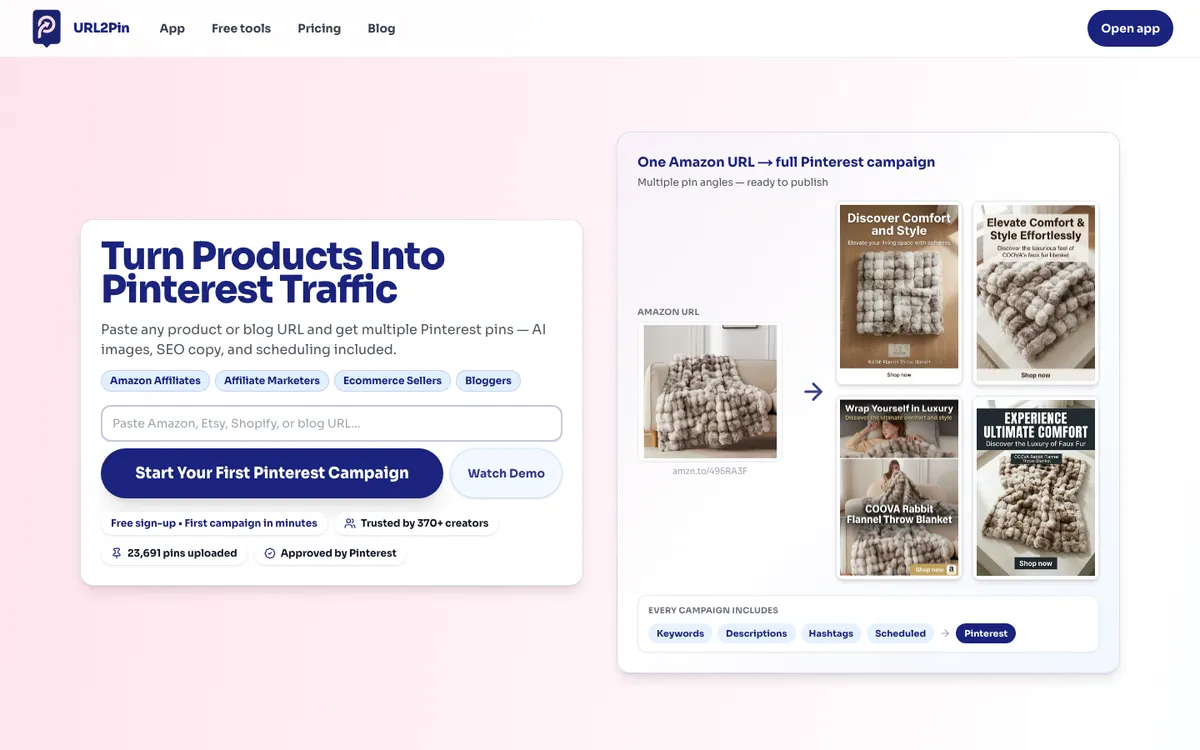
URL2Pin is a Pinterest tool with one specific job: turn a URL into pins. You paste a product, Etsy, Shopify, Amazon or blog link, and it generates a batch of ready-to-publish pins with AI images, titles, descriptions and hashtags, then schedules them through Pinterest's official API or lets you download them.
It is built for affiliate marketers and product sellers rather than designers, and it leans into that with free side tools like a Pinterest keyword tool, a pin worth checker and an affiliate page generator. For anyone who treats Pinterest as an affiliate or ecommerce traffic channel and hates making pins by hand, it removes the slow part cheaply.
URL2Pin is the cheap, focused way to turn links into Pinterest pins. If you are an Amazon affiliate, Etsy seller or blogger who wants pins from a URL without opening Canva, it does exactly that from $9 a month, and there is a real free plan to prove the workflow first. Pricing is priced purely on how many AI pins you generate a month (60 / 150 / 450 / 1,000).
Watch the pricing page: it defaults to the annual toggle, so the headline $7/$15/$32/$65 are yearly rates, and month-to-month you pay $9/$19/$39/$79. Two honest caveats. It is young and small (370+ creators at the time of writing), so it has a short track record.
And on AI-stack fit, the thing this site cares most about, it scores low: it uses AI inside the product but exposes no public API or MCP server, so you cannot drive it from your own stack. If you just want pins made for you, that will not matter.
URL2Pin has a genuine free plan (10 AI image pins lifetime, plus up to 40 own-photo pins, with export but no scheduling), then four flat paid tiers priced by monthly AI-pin volume: Starter $9/mo (60 pins), Creator $19/mo (150), Pro $39/mo (450, most popular), and Agency $79/mo (1,000). Those are the monthly-billed rates; annual billing drops them to $7 / $15 / $32 / $65 a month ($84 / $180 / $384 / $780 a year). Verified on the live pricing page in July 2026. Note the toggle defaults to annual.
Who It's For
Who URL2Pin is for (and who it isn't)
✓Best for
- +Amazon and affiliate marketers The whole tool is built around pasting a product or affiliate URL and getting pins back. Free side tools like the affiliate page generator and pin worth checker lean into this audience specifically.
- +Etsy and Shopify sellers Product listings become product pins without designing each one. Paste the listing, pick from the generated variations, schedule or download.
- +Bloggers on a budget At $9/mo billed monthly (or a free plan to start), it is one of the cheapest ways to turn each post into multiple pins with AI copy and images.
- +Solo creators testing Pinterest The permanent free plan lets you prove the URL-to-pin workflow with no card before paying, which is rare in this category.
✗Skip this if
- −Teams wanting an agent-drivable tool There is no public API or MCP server, so nothing in your stack can control it. If you are building toward an AI-run social workflow, Metricool or ContentStudio fit far better.
- −Anyone who needs a mature, proven platform URL2Pin is young and small (370+ creators when I checked). If you need a long track record and deep third-party reviews, Tailwind is the safer, if pricier, pick.
- −Multi-network social teams URL2Pin is Pinterest-only. If you want one tool for Pinterest plus Instagram, TikTok and the rest, this is not it.
- −Heavy-volume design control The strength is fast AI pins from a URL. If you need pixel-level brand control on every pin, a design-first tool like Canva or a template-driven option like Supapin suits better.
 Zernio
 Buffer
 Postiz
Features
What can URL2Pin do?
URL2Pin's core is the URL-to-pin flow, and that is the whole pitch. You paste a link (an Amazon product, an Etsy or Shopify listing, or a blog post), and it reads the page, generates pin images, and writes titles, descriptions and hashtags tuned for Pinterest search. It spins several variations from a single URL, so you can feed the algorithm with multiple angles from one product without designing anything.
You can also upload your own photos and add text overlays, or upload finished pins and just let the tool handle the metadata.
Scheduling sits on top of the creation, and it runs through Pinterest's official API rather than unofficial automation. Paid plans unlock scheduling to boards on a calendar, and bulk generation arrives from the Creator tier up, which is where the tool starts to save real time for anyone posting at volume. The plans are separated almost entirely by how many AI pins you can generate a month: 60 on Starter, 150 on Creator, 450 on Pro and 1,000 on Agency.
Around the core sit a set of free tools that tell you who this is really for: a Pinterest keyword tool, a pin worth checker, an Amazon affiliate link builder and an AI affiliate product page generator. That is an affiliate-marketer toolkit, not a designer's. The one place URL2Pin is deliberately closed is its own openness: there is no public API or MCP server for your own code to call, so everything happens inside the product rather than from your stack.
Pin Creation
Scheduling & Automation
Sources & Export
Free Tools
UX & Support
Is URL2Pin easy to use?
URL2Pin is built to be fast to try and simple to use, and the free plan reflects that: you can paste a URL and see generated pins within a couple of minutes, no card required. Because the whole product is organized around one workflow (URL in, pins out, schedule or download), there is very little to learn compared with a full social suite. The free side tools double as low-friction entry points for its affiliate-marketer audience.
Support and track record are where a young tool shows its age. At the time of writing URL2Pin lists 370+ creators and around 24,000 pins generated, so this is an early-stage product without the deep independent review history of a Tailwind or the volume of case studies you would get from an established platform. It publishes through Pinterest's official API, which is a meaningful trust signal, but I would treat the upper tiers as something to grow into rather than commit to up front, and lean on the free plan to judge output quality first.
Pricing
How much does URL2Pin cost?
URL2Pin starts at Free plan, paid from $9/mo. That's 54% below median for Social Media Automation. A free plan is available.
URL2Pin's pricing is cheap and simple, priced almost entirely on how many AI pins you generate a month. There is a genuine free plan first: no card, 10 AI image pins total (lifetime) plus up to 40 own-photo pins, with PNG and ZIP export and a preview of the scheduler, but no actual scheduling to Pinterest and no bulk generation. It is a real way to test the workflow before paying, which most tools in this space do not offer.
The paid tiers are Starter at $9 a month (60 AI pins), Creator at $19 (150 pins, adds bulk generation), Pro at $39 (450 pins, marked most popular) and Agency at $79 (1,000 pins). Those are the monthly-billed prices. There is one thing to watch: the pricing page defaults to the annual toggle, so the first numbers you see ($7, $15, $32, $65) are the annual-equivalent per-month rate, not what you pay month to month.
Annual billing costs $84, $180, $384 and $780 a year respectively and saves roughly 20%.
For a single affiliate site or blog, Starter or the free plan is the sensible way in, and you only move up when you hit the monthly pin cap. Because every paid tier includes the same scheduling and (from Creator) bulk generation, you are really just buying pin volume as you grow. If you need more than 1,000 AI pins a month, the vendor points you to contact sales.
| Plan | Monthly |
|---|---|
| Free | $0/mo |
| Starter | $9/mo |
| Creator | $19/mo |
| ProPopular | $39/mo |
| Agency | $79/mo |
AI & Tech Stack
Does URL2Pin fit your AI stack?
What AI Can't Replace
Fast, cheap AI pin creation from a URL. URL2Pin uses AI where an affiliate or seller feels it: generating pin images and writing search-tuned titles, descriptions and hashtags from a product or blog link, then scheduling through Pinterest's official API. For someone pushing products to Pinterest, that is the slow part done for a few dollars a month.
Where AI Is Catching Up
Moderate to high. The URL-to-pin batch plus Pinterest-approved scheduling is real convenience, but a capable marketer could stitch AI image and copy tools to a separate approved scheduler. URL2Pin's edge is doing the whole loop cheaply in one place, aimed specifically at affiliates. That is a convenience moat, not a technical one.
API & Integrations
There is no public API to assess. The vendor's /api path returns 404 and the site documents no developer access. Treat URL2Pin as a closed product with no programmatic access.
MCP & CLI
No MCP server and no CLI. URL2Pin cannot be driven by an external agent like Claude or Cursor, and there is no documented Zapier or Make integration either. The AI in the product is internal to URL2Pin. On agent-readiness this is the tool's clear weak point, and the score reflects it.
Stack Verdict
A cheap, focused autonomous tool for hands-off Pinterest pin creation from URLs, but closed to your stack: no public API, no MCP server, no CLI. Pick it for what it does for you, not for what your agents can do with it.
Connects with
Security
Want Pinterest pins made from your product and blog URLs?
URL2Pin turns any product, Etsy or blog link into ready-to-publish pins with AI images, titles and descriptions, then schedules them. Free plan, paid from $9/mo.
 Try URL2Pin
FAQ
Frequently asked questions about URL2Pin
URL2Pin turns a URL into Pinterest pins. You paste a product, Etsy, Amazon, Shopify or blog link and it generates a batch of ready-to-publish pins with AI images, titles, descriptions and hashtags , then schedules them through Pinterest's official API or lets you download them as PNG or ZIP. It is built for affiliate marketers and product sellers.
There is a permanent free plan (10 AI image pins lifetime, plus up to 40 own-photo pins, with export but no scheduling). Paid plans are Starter $9/mo (60 AI pins), Creator $19/mo (150), Pro $39/mo (450) and Agency $79/mo (1,000), billed monthly. Annual billing drops those to $7 / $15 / $32 / $65 a month ($84 / $180 / $384 / $780 a year). Note the pricing page defaults to the annual toggle.
Yes. The free plan needs no card and gives you 10 AI image pins total (lifetime) plus up to 40 own-photo pins, an on-image text editor, PNG/ZIP export and a scheduler preview. It does not include scheduling to Pinterest or bulk generation, both of which require a paid plan. It is designed to let you test the URL-to-pin workflow before paying.
No public API is documented. The /api path returns 404 and the site lists no developer access, MCP server, Zapier or Make integration. Treat it as a closed product: the automation runs inside URL2Pin, and you cannot drive it from your own code or an AI agent.
URL2Pin schedules through Pinterest's official API rather than the kind of unofficial automation that can get accounts flagged, which is the safer approach. As with any newer tool, connect a Pinterest account you are comfortable testing with first, using the free plan.
If you are an affiliate marketer, Etsy seller or blogger who wants cheap AI pins from a URL, yes: it is one of the lowest-cost ways to do that and there is a free plan to test it. If you want a proven platform with a long track record, Tailwind is safer. And if you need a tool your own stack or AI agents can control, URL2Pin is not the fit, because it has no public API.
Pricing is public, cheap to start, and easy to read once you catch the toggle. Four flat paid tiers priced by monthly AI-pin allowance: Starter $9/mo (60 pins), Creator $19/mo (150), Pro $39/mo (450), Agency $79/mo (1,000), all billed monthly. Annual billing knocks it to $7 / $15 / $32 / $65 a month. The one gotcha: the pricing page defaults to the annual toggle, so the headline numbers are the yearly rate, not what you pay month to month.
URL2Pin is best for: Amazon and affiliate marketers; Etsy and Shopify sellers; Bloggers on a budget; Solo creators testing Pinterest.
This is the honest weak spot on a site about AI-stack fit. URL2Pin uses AI inside the product (pin images, titles, descriptions), but it is closed to external agents. There is no public API and no MCP server: the /api path returns 404 and the site documents no developer access, Zapier or Make integration. You cannot drive it from Claude, Cursor, or your own code.
Your pins publish to Pinterest, which you own, and the free plan alone lets you export pins as PNG or ZIP, so nothing is locked in. The weak point for portability is the closed platform: there is no public API to pull your pins, schedules or settings out programmatically.
More on URL2Pin
This page may contain affiliate links. I earn a commission at no extra cost to you. This never influences ratings.