
This page may contain affiliate links.
Some links on this page are affiliate links, meaning I may earn a commission if you sign up (at no extra cost to you). This never influences my ratings or recommendations.
The Verdict
Is Rybbit right for you?
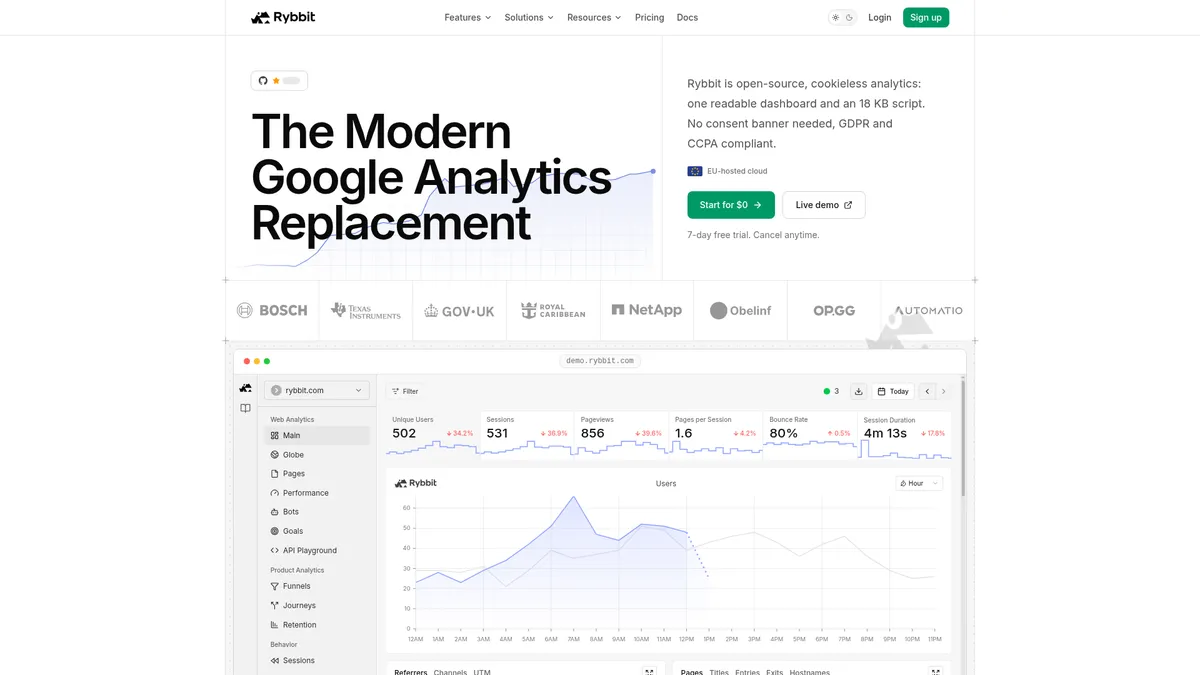
Rybbit bills itself as the modern Google Analytics replacement: an open-source, cookieless dashboard with an 18 KB script and no consent banner required. It also ships a hosted MCP server on top of a full REST API, so an AI agent can query your traffic instead of you staring at charts.
Rybbit is an open-source analytics platform built to replace Google Analytics without the consent-banner headache, offering autocapture, session replay, funnels, and Core Web Vitals in one dashboard. It's aimed at small teams and technical founders who want GDPR-friendly tracking plus a way for AI tools like Claude Code to query traffic directly.
Whether it's worth it depends entirely on which plan you land on, since session replay and unlimited websites only arrive at the Pro tier, $39/month or $26 billed annually.
For $19 a month, or $13 billed annually, you get a surprisingly complete analytics stack, but the feature that makes Rybbit interesting (session replay) sits behind the Pro plan, not the entry tier.
Why I'm covering this
Rybbit pairs a lightweight, cookieless analytics script with a hosted MCP server, letting Claude Code or Cursor query live traffic and diagnose errors instead of just displaying charts.
Who It's For
Who Rybbit is for (and who it isn't)
✓Best for
- +Indie hackers replacing Google Analytics You want a lightweight script, no cookie banner, and a dashboard that doesn't require a data analytics degree to read.
- +EU-based or privacy-focused teams Rybbit is cookieless, GDPR and CCPA compliant, and runs on an EU-hosted cloud, which matters if compliance reviews are part of your job.
- +Developers wiring analytics into an AI workflow The hosted MCP server works with Claude Code, Claude Desktop, Cursor, VS Code, Codex, and opencode, so an agent can pull live traffic and investigate errors on request.
- +Self-hosters who want data ownership Rybbit is open-source, and community members on X have documented self-hosting it for full control over their analytics data.
- +Indie developers and small SaaS teams needing GDPR/CCPA-compliant analytics without a cookie consent banner Rybbit is cookieless by design and EU-hosted, so you skip the consent banner debate entirely while staying compliant.
- +Teams already using AI coding agents like Cursor or Claude Code for development work The hosted MCP server lets your agent pull live traffic, debug errors, and manage goals with the same permissions as a teammate, directly inside your existing coding workflow.
- +Agencies or freelancers managing multiple client sites who want unlimited websites on one plan The Pro tier at $26/month billed annually includes unlimited websites and team members, which is more predictable than paying per site.
- +Developers migrating off PostHog who want a lighter script and simpler dashboard Multiple community testimonials on Rybbit's own site describe switching from PostHog for speed and page-load reasons, with an 18 KB script versus PostHog's heavier footprint.
- +Open-source-minded teams that want the option to self-host analytics infrastructure Rybbit's codebase is open-source, so you're never fully locked into the hosted cloud pricing if you want to run it yourself.
✗Skip this if
- −Agencies needing whitelabeling on a budget Whitelabeling and dedicated isolated instances live on the custom-priced Enterprise tier, not Standard or Pro.
- −Teams that want session replay cheap Session replay is a Pro-only feature at $26/month billed annually; it's not included in the $13 Standard plan.
- −Multi-brand teams tracking more than 5 sites Standard caps you at 5 websites and 3 team members, so anyone managing a portfolio of sites needs to jump to Pro or Enterprise.
- −Teams that need years of historical data on a budget Data retention is 3 years on Standard and 5 years on Pro; infinite retention only comes with the custom Enterprise plan.
- −Marketing teams that need website behavior to automatically trigger emails or SMS campaigns Rybbit tracks and measures behavior but has no built-in email/SMS automation to act on it, you'd need a separate tool wired in via API.Try Customer.io →
- −Agencies that need polished, white-labeled client reporting across SEO, social, and ads, not just on-site analytics Rybbit's dashboard is focused on web behavior data; it doesn't pull in SEO rankings or ad spend for cross-channel client reports.Try AgencyAnalytics →
- −Teams primarily focused on keyword rankings and competitor SEO research rather than on-site visitor behavior Rybbit measures what happens once visitors land on your site, it has no keyword tracking or competitive SEO data.Try Semrush →
Features
What can Rybbit do?
The autocapture system is the feature that does the most quiet work here. Instead of instrumenting every button and form by hand, Rybbit's 18 KB script picks up clicks, form submits, copied text, outbound links, and JavaScript errors on its own, which matters most for teams without a dedicated analytics engineer.
Session replay, user journeys, and conversion funnels round out the behavioral side, letting you watch an actual recorded session next to the funnel step where someone dropped off. According to Rybbit's own documentation, the funnel and journey endpoints can be chained together programmatically, for example pairing a funnel's drop-off rate with a journeys query filtered to the leaky page, which is a more useful diagnostic than a drop-off percentage alone.
The part that separates Rybbit from most tools in the web analytics category is the hosted MCP server. It sits on top of a full REST API and connects to Claude Code, Claude Desktop, Cursor, VS Code, Codex, and opencode, so an AI agent can query live traffic, pull error logs, and analyze a funnel without you opening the dashboard at all. Rybbit's own example shows an agent diagnosing a 14% signup drop by cross-referencing a timeseries, an error log, and a funnel analysis in one conversation.
If you're mapping out how MCP, API, and CLI options differ across your stack, this comparison of API vs MCP vs CLI is worth a read before you commit to a workflow.
One caveat worth flagging: Rybbit's own docs state the REST API is currently in beta, with the possibility of breaking changes as it develops. That's a normal state for a growing product, but anyone building automation on top of it should build with that instability in mind rather than assuming API stability on day one.
Core Analytics
Behavior Data
Conversion & Performance
AI & Automation
Privacy & Compliance
UX & Support
Is Rybbit easy to use?
Based on Rybbit's own site and documentation, onboarding is designed to be a single script tag, with framework-specific guides for over 30 platforms including Next.js, Shopify, WordPress, Webflow, and WooCommerce. That breadth of install guides suggests the team has put real effort into making setup painless regardless of tech stack, which lines up with community comments on X describing the switch from PostHog as mostly just 'adding the no-brainer single-line script tag,' in the words of one user who migrated 15+ Next.js projects.
Support tiers scale with plan: Standard gets email support, Pro gets priority support, and Enterprise gets dedicated support plus Slack access according to the pricing comparison table.
Community sentiment on X skews positive, with several users describing Rybbit as lighter and faster than PostHog and citing the open-source model as a draw. That's useful signal, but it's still self-selected praise from people who chose to post about switching, not a representative sample of every Rybbit customer.
Pricing
How much does Rybbit cost?
Rybbit starts at $19/month. That's at category median for Web Analytics tools. No free plan, but there’s a 7-day free trial.
Rybbit's paid plans start at $13/month billed annually for Standard and $26/month billed annually for Pro (marked as the recommended tier), with Enterprise priced on a custom, contact-sales basis. Pricing also scales with monthly pageviews, from 100K up through 50M+, so the $19 and $39 anchor prices, $13 and $26 billed annually, apply at the lower end of that range and rise as your traffic grows.
Rybbit's pricing page also notes that annual billing gets you roughly 4 months free compared to paying monthly, though the exact monthly (non-annual) rate isn't published in what I reviewed.
Standard covers up to 5 websites, up to 3 team members, custom events, funnels, goals, journeys, and web vitals, with 3-year data retention and email support. Pro adds unlimited websites and team members, session replays, 5-year data retention, a 10x higher API rate limit, and priority support. That gap matters: session replay is arguably the single most useful feature in the whole product, and it's locked out of the cheaper plan entirely.
A 7-day free trial with no credit card charged until it ends makes it low-risk to test the actual dashboard against your real traffic before deciding which tier you need. If you're comparing this against other analytics spend in your stack, the 17 Best Web Analytics Tools roundup covers where Rybbit sits price-wise against the rest of the category.
| Plan | Monthly |
|---|---|
| Standard | $19/mo |
| Pro | $39/mo |
| Enterprise | Custom |
External Ratings
What reviewers say about Rybbit
0"Love how lightweight Rybbit Analytics is compared to Posthog. Its open source, provides session replays, real-time data and is perfect for our 0->1 startup."
Agnay Srivastava, X (Twitter)"Rybbit is undeniably the best open-source analytics available"
Vlad Cx, X (Twitter)"Fully switched from PostHog to Rybbit in the past month. I had been using PostHog on 15+ Next.js projects and was encountering issues with speed and page loads. With Rybbit, most of the transition involved cleaning up code and adding the no-brainer single-line script tag."
Marcelo Granzotto, X (Twitter)"My favourite open source and privacy friendly alternative to Google Analytics: Rybbit"
Teygeta, X (Twitter)Downsides
What's wrong with Rybbit
Session replay is Pro-only
One of the most useful features in the product isn't in the $19/month Standard plan at all; you need the $39/month Pro tier to get it.
REST API is still in beta
Rybbit's own docs warn of possible breaking changes to the API, which matters if you're building automation or MCP workflows you plan to depend on long-term.
Data retention scales with price
Standard keeps 3 years of data, Pro keeps 5, and infinite retention is Enterprise-only, so long-term trend analysis on a budget has a hard ceiling.
Enterprise features require a sales call
SSO, whitelabeling, dedicated isolated instances, and on-premise installs all sit behind custom Enterprise pricing with no published number.
Website and team caps on the entry plan
Standard is limited to 5 websites and 3 team members, which multi-brand teams or small agencies will outgrow fast.
Newer ecosystem than the incumbents
As a newer, lighter tool than Google Analytics or Matomo, Rybbit has fewer years of accumulated third-party integrations, agency familiarity, and edge-case documentation.
Buddy's Take
None of this makes Rybbit a bad product, but the plan structure does mean the headline price doesn't get you the full picture. If session replay, unlimited sites, or long data retention matter to you, budget for Pro or Enterprise from the start rather than assuming Standard covers it.
FAQ
Frequently asked questions about Rybbit
Not permanently. Rybbit offers a 7-day free trial with no credit card required until the trial ends, but ongoing use requires a paid plan starting at $13/month billed annually, unless you self-host the open-source version yourself.
No. Rybbit is cookieless and designed to be GDPR and CCPA compliant without needing a consent banner, according to Rybbit's own site.
Yes. Rybbit is open-source, and multiple users on X have documented self-hosting it for their own sites rather than paying for the hosted cloud plans.
Yes. Rybbit runs a hosted MCP server on top of its REST API, and it's built to work with Claude Code, Claude Desktop, Cursor, VS Code, Codex, and opencode.
Pro adds session replays, unlimited websites and team members, 5-year data retention instead of 3, a 10x higher API rate limit, and priority support, on top of everything in Standard.
It's usable, but Rybbit's own documentation states the API is currently in beta with the possibility of breaking changes, so build automation with that in mind.
Yes. Rybbit publishes setup guides for over 30 platforms, including Shopify, WooCommerce, WordPress, Webflow, Next.js, and Wix.
Plans are priced against monthly pageviews, from 100K up to 50M+, so the $19 and $39 starting prices, or $13 and $26 billed annually, apply at the lower end of that range and increase as your site's traffic grows.
Rybbit's pricing slider ties cost directly to monthly pageviews, which is easier to forecast than most seat-based or contact-based models. The catch is session replay, arguably the most compelling feature, sits behind the Pro tier.
Rybbit is best for: Indie developers and small SaaS teams needing GDPR/CCPA-compliant analytics without a cookie consent banner; Teams already using AI coding agents like Cursor or Claude Code for development work; Agencies or freelancers managing multiple client sites who want unlimited websites on one plan; Developers migrating off PostHog who want a lighter script and simpler dashboard; Open-source-minded teams that want the option to self-host analytics infrastructure.
This is where Rybbit pulls ahead of most analytics tools in this space. A hosted MCP server plus a documented REST API means your AI agent can genuinely operate the tool, not just read a static export.
Being open-source is the biggest lock-in insurance policy here. You can self-host if you ever want out of the cloud pricing entirely.
Rybbit starts from $19/month. There is a 7-day free trial.
Ready to try Rybbit?
Test the full dashboard, session replay, and MCP server on your own traffic during the 7-day free trial before committing to a plan.
 Start Free Trial →
Joonas Rotko
Author & founder of That Marketing Buddy
I score marketing software for AI-stack fit (MCP, API, agent-readiness), backed by 10+ years in digital marketing.
This page may contain affiliate links. I earn a commission at no extra cost to you. This never influences ratings.