
This page may contain affiliate links.
Some links on this page are affiliate links, meaning I may earn a commission if you sign up (at no extra cost to you). This never influences my ratings or recommendations.
The Verdict
Is Sender right for you?
Looking for an email marketing platform that won't drain your budget? Sender promises premium features at a fraction of the cost, with a genuine free forever plan that includes automation. After testing their dashboard and sending capabilities, here's what you need to know.
Sender is an email marketing platform that combines affordability with surprisingly strong features. It's built for small businesses and startups who need professional email marketing without the premium price tag. The free plan alone covers most businesses' basic needs.
This is the email marketing tool I'd recommend to any startup or small business looking to get serious about email without breaking the bank.
Who It's For
Who Sender is for (and who it isn't)
✓Best for
- +Small Businesses Perfect for businesses under 2,500 contacts who need professional email marketing without monthly fees.
- +E-commerce Stores Built-in Shopify, WooCommerce integrations make it ideal for online retailers needing abandoned cart sequences.
- +Startups on Tight Budgets The generous free plan includes automation features that competitors charge hundreds for.
- +Marketing Agencies White-label capabilities and client-friendly pricing make it attractive for agencies managing multiple accounts.
- +Content Creators Newsletter-focused features and beautiful templates help creators build engaged audiences without technical hassle.
- +Small business owners sending newsletters to local customers Perfect free plan allowances, easy templates, and straightforward interface without complexity they don't need
- +Ecommerce stores with 1,000-10,000 subscribers needing automated welcome sequences Strong deliverability focus, ecommerce integrations, and automation features at affordable pricing
- +Service businesses wanting to combine email and SMS marketing Multichannel automation in one platform eliminates need for separate SMS tools
- +Startups testing email marketing without upfront investment Generous free plan with 15,000 emails monthly lets them validate email marketing before paying
✗Skip this if
- −Enterprise Companies Limited advanced segmentation and enterprise-grade security features compared to platforms like HubSpot.
- −Heavy SMS Users SMS features are basic compared to dedicated SMS platforms like Twilio or SimpleTexting.
- −Complex Automation Needs Advanced behavioral triggers and complex workflows are better handled by platforms like ActiveCampaign.
- −International Businesses Limited language support (only English, Lithuanian, Polish, Spanish) may restrict global operations.
- −Advanced Analytics Users Reporting lacks the depth and customization options found in platforms like Mailchimp or Constant Contact.
- −Enterprise companies with complex customer journeys and advanced segmentation needs Lacks automation logic and advanced analytics required at scaleTry ActiveCampaign →
- −Agencies managing email marketing for multiple clients No multi-account management or white-label features mentionedTry HubSpot →
- −High-volume senders needing advanced deliverability controls and IP warming While deliverability is good, lacks enterprise-grade sending infrastructure featuresTry Brevo →
Consider instead
 Semrush
 SurferSEO
 ActiveCampaign
Features
What can Sender do?
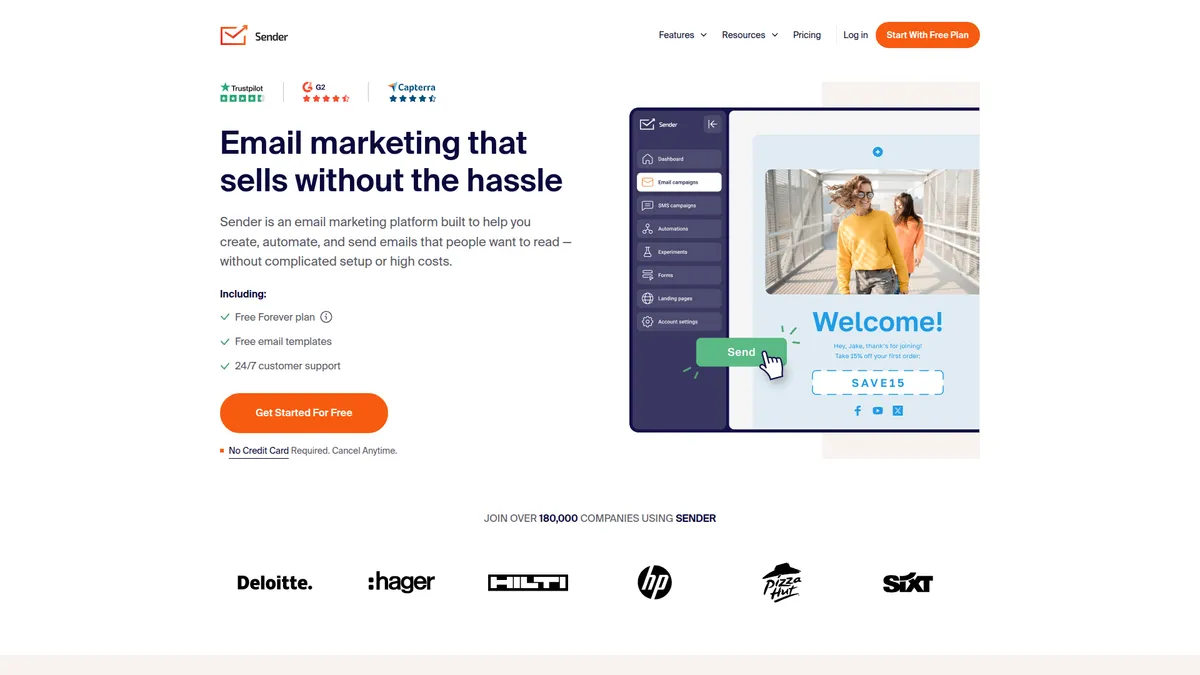
Going through Sender's dashboard, the drag-and-drop email builder excels as intuitive. You can start with one of their 1600+ templates or build from scratch, and the editor handles responsive design automatically. The HTML editor gives you full control when needed, while the visual builder keeps things simple for non-technical users.
The automation capabilities impressed me most. Setting up welcome sequences, abandoned cart emails, and behavioral triggers is straightforward, with visual workflow builders that make complex automation accessible. The premade sequences cover common scenarios like lead nurturing and customer onboarding, saving significant setup time.
Lead capture tools integrate smoothly with the main platform. Creating signup forms and popups takes minutes, and the landing page builder, while basic, covers essential needs without requiring external tools. The segmentation features let you target based on behavior, demographics, and engagement levels, though they're not as advanced as specialized platforms.
Deliverability features deserve special mention. Sender claims 99% inbox delivery rates through dedicated infrastructure, monitored IP reputation, and built-in compliance tools. The transactional email capabilities handle order confirmations, password resets, and other automated messages through the same platform, eliminating the need for separate services.
Email Campaign Creation
Marketing Automation
Lead Capture & Management
Analytics & Reporting
Multichannel Marketing
UX & Support
Is Sender easy to use?
Setting up a first campaign in Sender takes under 10 minutes, from account creation to sending. The onboarding process guides you through essential steps without overwhelming new users. The dashboard layout feels familiar to anyone who's used modern web applications, with clear navigation and logical feature grouping.
The template library deserves praise for both quantity and quality. With 1600+ options covering industries from e-commerce to nonprofits, finding a suitable starting point is rarely an issue. Customization options are extensive enough for most needs while remaining accessible to non-designers.
Customer support lives up to their 24/7 availability promise. By user reports, chat responses come within the claimed 10-second average, with knowledgeable representatives who understand both technical and strategic questions. The knowledge base covers common scenarios thoroughly, and video tutorials help visual learners get up to speed quickly.
Pricing
How much does Sender cost?
Sender starts at From $7/mo. That's 53% below median for Email Marketing tools. A free plan is available.

Sender Pricing Analysis
vs. 36 email marketing toolsBelow average for email marketing tools

Cheaper than 97% of email marketing tools on That Marketing Buddy's database. Sender also offers a free plan.
Sender's pricing structure centers around a generous free plan that includes 15,000 emails monthly for up to 2,500 subscribers with no daily limits. The free plan includes marketing automation, 24/7 support, and access to all templates, making it more comprehensive than most competitors' free offerings.
Paid plans start at $7 monthly based on available information, scaling with subscriber count and email volume. The pricing remains competitive compared to alternatives like Mailchimp or Constant Contact, particularly when factoring in included features like SMS marketing and automation capabilities.
Value assessment strongly favors Sender, especially for smaller businesses. Getting automation features that typically cost $50+ monthly on other platforms included in the free tier represents significant savings. Even paid plans offer better feature-to-price ratios than most mainstream alternatives.
Price at scale (contacts)
| Plan | 1K | 15K | 60K | 100K | 200K |
|---|---|---|---|---|---|
| Free | $0 | — | — | — | — |
| Standard | $10 | $87 | $277 | $367 | $697 |
| Professional | $20 | $200 | $540 | $860 | $1660 |
External Ratings
What 443 reviewers say
Aggregated from 2 platforms
Sender holds a 4.7/5 average rating across 443 reviews on Capterra, G2.
"I have tried other email marketing platforms, but I am staying with Sender! I have tried email newsletters and campaign platforms that mostly give you nothing but lies in their free plans, but Sender practically gives you a premium experience even in the free plan."
Capterra"Sender.net is very affordable and easy to use, the ability to customize email templates and analytics helps improve campaigns constantly and effectively. There are no restrictions on features such as drag-and-drop feature or pre-made templates."
Capterra"I found Sender a more practical, functional tool with better benefits than Mailchimp."
Capterra"It's everything Mailchimp was not: generous, easily accessible customer service, generous features, even automation on the free plan, easy to use drag-and-drop builder, much better than Mailchimp's."
Capterra"Great support made my onboarding a breeze! Sender perfectly fits my needs and allows me to expand as needed."
CapterraAI & Tech Stack
Does Sender fit your AI stack?
What AI Can't Replace
Sender owns your email deliverability infrastructure and list hygiene in ways no AI can replicate. The tool's real-time bounce handling, SMTP infrastructure, and list validation catch issues before they tank your sender reputation. AI can write the email, but it cannot manage the technical pipes that keep you out of spam folders.
Where AI Is Catching Up
AI content generation is eating into Sender's template and copy features. Claude or ChatGPT can now write email sequences faster than Sender's editor can format them. The risk is real if you're paying for Sender mainly for creative work rather than deliverability and list management.
API & Integrations
Sender's API is straightforward for contacts, campaigns, and automation triggers. Zapier and Make integrations exist and work without friction. Rate limits are reasonable for most teams. Documentation is functional but not ornate. The API handles the core workflows, but you won't find bleeding-edge features like webhook signing or advanced filtering that some competitors offer.
MCP & CLI
No MCP server available and no CLI tool. Your best workaround is Zapier or Make automations for connecting Sender to your other tools, or building custom API integrations if you need direct programmatic control.
Stack Verdict
Sender is a deliverability workhorse , not a creative engine. Pair it with AI for copy and keep it for list health and inbox placement .
Connects with
Security
Downsides
What's wrong with Sender
Limited Language Support
Interface only available in English, Lithuanian, Polish, and Spanish, restricting global teams.
Basic SMS Features
SMS marketing capabilities are functional but lack advanced features found in dedicated SMS platforms.
Simple Analytics
Reporting covers essentials but lacks advanced segmentation and custom dashboard options.
Template Customization
While extensive, template modifications are less flexible than platforms with advanced design tools.
Integration Ecosystem
Fewer third-party integrations compared to established platforms like Mailchimp or HubSpot.
Advanced Automation
Complex behavioral triggers and multi-step workflows are more limited than specialized automation platforms.
Buddy's Take
For a free tool (or even at the paid tier prices), these are reasonable trade-offs. You'll notice the gaps mainly if you're comparing Sender to platforms that cost 3-5x more.
European & GDPR
Sender is built in Europe — check its data-residency and GDPR details on EuropeanMartech on EuropeanMartech.
FAQ
Frequently asked questions about Sender
Yes, within the stated limits. You get 15,000 emails monthly for up to 2,500 contacts with no daily sending restrictions or time limits.
Branding removal requires upgrading to a paid plan. Free plan emails include small Sender branding in the footer.
Sender claims 99% inbox delivery rates through dedicated infrastructure and IP monitoring, competitive with industry leaders.
Popular integrations include WordPress, WooCommerce, Shopify, PrestaShop, and Zapier, covering most common business tools.
Yes, live chat support is available around the clock with average response times under 10 seconds according to their metrics.
Dedicated IPs are available for Professional plan users upon request at no additional cost for high-volume senders.
Sender offers free migration assistance and supports standard contact import formats from major email platforms.
You can upgrade to a paid plan or wait until the next month for limits to reset. No automatic charges or service suspension.
Sender's pricing is refreshingly transparent with clear per-contact pricing and no hidden fees.
Sender is best for: Small business owners sending newsletters to local customers; Ecommerce stores with 1,000-10,000 subscribers needing automated welcome sequences; Service businesses wanting to combine email and SMS marketing; Startups testing email marketing without upfront investment.
No MCP server yet, but the REST API means AI tools can interact with Sender through custom code or platforms like Zapier AI.
Standard data import/export capabilities with free migration assistance, but limited workflow portability details.
Sender starts from From $7/mo. A free plan is available.
Sources & References (3)
Ready to try Sender?
Start with their generous free plan and see why 180,000+ businesses trust Sender for email marketing
Start Free Forever →More on Sender
Read Next



Joonas Rotko
Author & founder of That Marketing Buddy
I score marketing software for AI-stack fit (MCP, API, agent-readiness), backed by 10+ years in digital marketing.
This page may contain affiliate links. I earn a commission at no extra cost to you. This never influences ratings.